Opus Clip vs Vizard and the Hidden Credit Math
Opus Clip vs Vizard and the Hidden Credit Math
Opus Clip vs Vizard compared on credits, captions, and clip quality. See which AI clipper really fits your short form workflow.
- 1Opus Clip vs Vizard Pricing and the Credit Trap
- 2Which Tool Clips Smarter for Your Content
- 3Captions, Languages, and Export Quality
- 4The Failure Modes Nobody Advertises
- 5Who Should Choose Opus Clip
- 6Who Should Choose Vizard
- 7Final Verdict Table
- 8Frequently Asked Questions
- Is Opus Clip or Vizard cheaper?
- Which is better for podcasts, Opus Clip or Vizard?
- Do Opus Clip and Vizard have free plans?
- Which tool has better captions?
- Why does my Opus Clip project freeze at 99%?
- Are these tools worth it over manual editing?
- 9Quick Takeaways
The Verdict: Opus Clip vs Vizard comes down to the credit math more than the features. At the same $14.50 a month annual price, Vizard hands you roughly 600 minutes of processing while Opus Clip gives 300, and Opus quietly charges extra credits to post. Pick Opus for fast solo talking-head clips, Vizard for podcasts, interviews, and tighter cost control.
If you have ever uploaded one long video and watched an AI tool spit out a dozen vertical clips in a couple of minutes, you already know why Opus Clip and Vizard own this category. Both turn a podcast, webinar, or talking-head recording into TikToks, Reels, and Shorts without you touching a timeline. The pitch is identical. The bill is not.
Here is the part most comparisons skip when they line up Opus Clip vs Vizard: both tools charge by the minute of source video you feed them, not by the number of clips you keep. Upload a 60 minute podcast and you spend 60 credits whether the AI surfaces 2 good clips or 20. That one detail decides which tool is cheaper for you, and it has nothing to do with the feature lists on either homepage.
I have spent enough time inside both editors to know the marketing pages bury the things that matter most to a working creator. So this is the comparison I wish existed: where the credits really go, which tool clips smarter for your kind of content, and the failure modes real users hit once the free trial runs out. Read on and you will know exactly which one to pay for.
Opus Clip vs Vizard Pricing and the Credit Trap
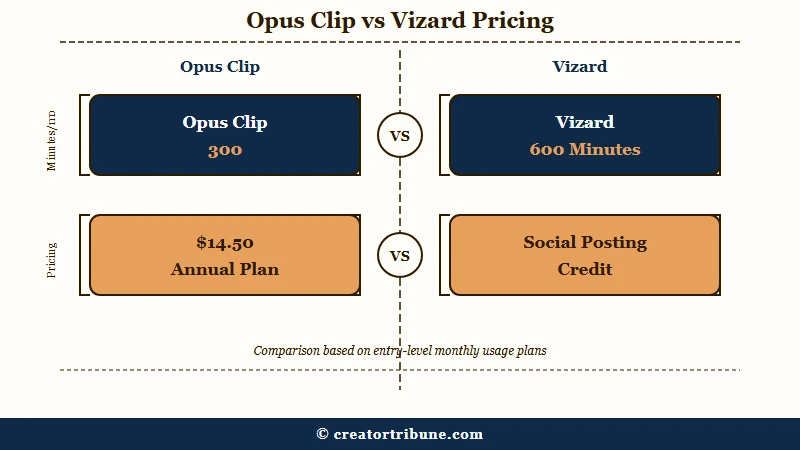
Opus Clip vs Vizard pricing looks identical at $14.50 a month on annual billing, but Vizard gives roughly double the processing minutes.
Opus Clip Pro includes 300 minutes a month; Vizard Creator includes 7,200 credits a year, which works out to about 600 minutes a month.
What is a processing credit: On both tools, 1 credit equals 1 minute of source video the AI analyzes, regardless of how many clips it generates from that video.
The way I read the tiers, the sticker price is the least useful number here. Opus Clip Pro runs $29 a month, or $14.50 a month billed annually ($174 a year), and annual subscribers get all 3,600 credits dropped in upfront so you can burn them in heavy months.
Vizard Creator starts at $14.50 a month annual with 7,200 credits a year and watermark-free exports. Same headline price, double the minutes on Vizard, and our full Vizard review digs into where those credits really go.
The trap that catches people is the per-post credit burn on Opus. Posting a clip directly to certain platforms, such as X, costs 1 additional credit per post on top of the minutes you already spent processing.
From my testing, that adds up fast if you schedule everything through the dashboard instead of downloading and posting natively.
| Plan | Opus Clip | Vizard |
|---|---|---|
| Free | 60 min/mo, watermark, 9:16 only, files expire in 3 days | 60 credits/mo, watermark, 720p cap, 1 social account |
| Entry paid | Starter $15/mo, 150 min, watermark-free, monthly only | Creator $14.50/mo annual, ~600 min/mo, 6 social accounts |
| Main plan | Pro $29/mo or $14.50/mo annual, 300 min/mo, 100GB storage | Business $19.50/mo, 20 social accounts, $5 per extra seat |
| Hidden cost | 1 extra credit per direct social post (e.g. X) | 720p ceiling on free tier limits trial usefulness |
Both free plans delete your exports after 3 days, which makes them a demo rather than a workflow. If you need a manager or client to approve a clip before it goes out, that 3 day window is not enough, and you will be paying within a week either way.
For the long-form math, the Opus Clip pricing breakdown walks through where the per-minute model gets expensive on podcasts.
Which Tool Clips Smarter for Your Content
Opus Clip clips aggressively for solo virality while Vizard clips surgically for narrative and multi-speaker content.
They are not the same AI with different paint, and matching the style to your footage matters more than any single feature.
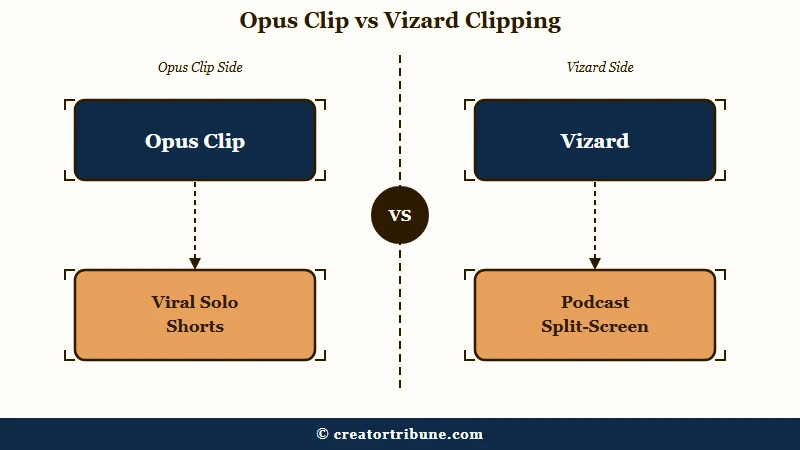
Opus Clip is built to be punchy. Its AI is willing to stitch a hook from the middle of one sentence onto context from a minute earlier to manufacture a fast, scroll-stopping open. That works beautifully for solo talking-head clips where momentum beats nuance. For educational or carefully argued content, I have seen it flatten the speaker’s actual meaning to chase the hook.
Vizard takes the opposite approach. It pulls contiguous blocks of conversation to keep the original intent intact, and it is noticeably better at multi-speaker layouts. If you run a two-host podcast or interview, Vizard can stack both faces in a split-screen 9:16 frame so the visual back-and-forth survives the crop. That alone makes it my pick for remote duos.
Example scenario: Say you upload a 45 minute interview between two hosts. On Vizard, you get a split-screen clip where both faces stay visible and the exchange reads as a real conversation. On Opus Clip, you more often get a single-speaker crop that snaps to whoever is talking, so the back-and-forth rhythm of the interview gets lost.
The B-roll engines split the same way. Opus matches stock footage to literal nouns and verbs in your transcript and can generate up to 50 clips a day on Pro. Vizard’s multimodal AI reads abstract concepts, not just literal words, and can pull from Storyblocks and Pexels or generate custom B-roll from text prompts using models like Sora and Kling.
For talks about strategy, philosophy, or anything non-visual, Vizard’s concept matching pulls more relevant footage. If you want the full short-form workflow around either tool, turning one upload into shorts covers the posting side.
Captions, Languages, and Export Quality
Opus Clip wins on caption polish and English virality styling, while Vizard wins on language reach and export resolution. The right pick depends on whether your audience is domestic and trend-driven or global.
Opus Clip lands around 95% caption accuracy across 25-plus languages, and its animated, high-retention caption templates are the ones you have seen on every viral finance and motivation clip.
Its transcription runs on OpenAI’s Whisper architecture, which is why the raw text comes back clean. From what I have seen, the captions need less manual cleanup than almost anything else in the category.
Vizard trades some of that styling flash for reach. It handles auto-translation and captions in 100-plus languages, gives you granular control over font kerning, drop shadows, and exact brand hex codes, and exports up to 4K on paid tiers.
Opus Clip typically caps exports at 1080p. If you repurpose for an international audience or need 4K masters, Vizard is the only one of the two that covers you.
One quality-of-life gap that surprised me: Opus Clip’s editor still has no playback speed control, so you cannot scrub through clips at 1.5x or 2x to review them quickly. Vizard does. On a heavy batch day, that missing feature can double how long your final review takes. For short-form caption tools specifically, our Opus Clip vs Submagic compares the caption styling side in more depth.
The Failure Modes Nobody Advertises
Opus Clip’s most reported failures are processing jobs stuck at 96-99% and a scheduler bug, while Vizard’s are repetitive clips and weak context selection.
Knowing these ahead of time tells you when to file a support ticket versus when to just wait.
On the Opus side, multiple users report projects freezing permanently at 96% or 99% during the clip-reproduction phase. Once you know that exact percentage is a server-side stall, you stop waiting and open a ticket instead of losing an afternoon.
There is also a documented scheduler bug where uploads stay stuck as “scheduled” in the past and cannot be deleted or rescheduled, which locks your posting queue.
On the Vizard side, the common complaint is that it generates too many near-duplicate clips and picks start and end points that do not make sense contextually, so you end up doing manual cleanup the tool was supposed to save you. It is less hands-off than the marketing suggests, especially on long, rambling source videos.
Here is the triage sequence I would run before blaming either tool for a bad export:
- Check whether the source file is clean. Bad audio and long silences confuse both AIs and produce junk clips.
- If an Opus job sits at 96-99% for more than 15 minutes, treat it as a failed server-side job and contact support rather than re-uploading.
- If Vizard floods you with repetitive clips, raise the minimum clip length and re-run, which cuts the duplicate count noticeably.
- Download and post natively instead of scheduling through the dashboard to dodge both the Opus per-post credit burn and the scheduler bug.
Who Should Choose Opus Clip
Choose Opus Clip if you publish solo talking-head clips, care about caption styling, and want the fastest path from one link to a batch of viral-styled shorts.
It is the better fit for creators chasing reach on a single platform.
Opus Clip’s Virality Score, which rates each clip from 1 to 100 on hook strength and current trends, is genuinely useful for deciding what to post first when you are solo and time-poor.
Pair that with the cleanest captions in the category and the upfront annual credit drop, and it is the tool I would hand to a creator who records themselves talking and wants clips out the door tonight.
The aggressive clipping style is a feature when your content is built on momentum rather than nuance.
Who Should Choose Vizard
Choose Vizard if you produce podcasts or interviews, publish in multiple languages, or want more processing minutes and predictable team pricing for the same money.
It rewards creators who value narrative integrity and cost control over caption flash.
Vizard gives you roughly double the minutes at the same entry price, split-screen layouts that keep multi-speaker content watchable, 4K exports, and 100-plus language support.
Add the transcript-based editor, where you cut clips by highlighting text instead of scrubbing a timeline, and it is the one I would pick for anyone whose core asset is a conversation. For agencies, the flat $19.50 Business tier with 20 social accounts and $5 seats beats Opus Clip’s custom-quote Business plan on predictability.
Both tools beat manual editing, which runs 30 to 45 minutes per clip against 2 to 5 minutes here, and short-form video keeps growing as a discovery channel, with Statista’s TikTok user data putting it past 1 billion monthly active users.
Final Verdict Table
The final verdict is that Vizard wins on value and versatility while Opus Clip wins on caption polish and fast solo clips.
The table below lines up the five criteria that move the decision.
| Criteria | Opus Clip | Vizard |
|---|---|---|
| Minutes per $14.50/mo | 300/mo | ~600/mo |
| Best content fit | Solo talking-head, viral clips | Podcasts, interviews, multi-speaker |
| Captions | 95% accuracy, 25+ languages, best styling | 100+ languages, granular brand control |
| Max export | 1080p | 4K on paid tiers |
| Main weakness | Jobs stuck at 96-99%, no playback speed control | Repetitive clips, weak context selection |
Frequently Asked Questions
Is Opus Clip or Vizard cheaper?
Vizard is cheaper per minute. Both cost about $14.50 a month on annual billing, but Vizard gives roughly 600 processing minutes a month against Opus Clip’s 300. Opus also charges 1 extra credit per direct social post.
Which is better for podcasts, Opus Clip or Vizard?
Vizard is better for podcasts and interviews. It pulls contiguous conversation blocks to keep the narrative intact and offers split-screen layouts that keep multiple speakers visible in a vertical frame. Opus Clip favors fast solo clips over conversational flow.
Do Opus Clip and Vizard have free plans?
Both offer free plans with watermarks. Opus Clip gives 60 minutes a month limited to 9:16, and Vizard gives 60 credits a month capped at 720p. Both delete your exports after 3 days, so treat them as demos.
Which tool has better captions?
Opus Clip has the better caption styling, with about 95% accuracy and the animated templates seen on most viral clips. Vizard supports 100-plus languages and finer brand controls, so it wins for international or heavily branded content.
Why does my Opus Clip project freeze at 99%?
A job stuck at 96-99% during clip reproduction is usually a server-side stall, not your connection. If it sits there longer than about 15 minutes, contact support instead of re-uploading and burning more credits.
Are these tools worth it over manual editing?
Yes for most creators. Manual reframing and clipping runs 30 to 45 minutes per clip, while both tools batch clips in 2 to 5 minutes. Even an entry plan pays for itself if your time is worth more than a few dollars an hour.
Quick Takeaways
- At the same $14.50 a month annual price, Vizard gives about 600 processing minutes against Opus Clip’s 300, and both bill per source minute, not per clip.
- Opus Clip clips aggressively for solo viral shorts; Vizard clips surgically for podcasts, interviews, and multi-speaker layouts.
- Watch the hidden costs: Opus charges 1 extra credit per direct social post and caps exports at 1080p, while Vizard reaches 4K and 100-plus languages.
- Pick Opus Clip for caption styling and fast solo clips; pick Vizard for cost control, narrative integrity, and team pricing.