Manychat Review After the Free Plan Disappeared
Manychat Review After the Free Plan Disappeared
Manychat review for Instagram creators. The free plan now caps at 25 contacts. Here is what you get, what it costs, and who should skip it.
- 1How Much Does Manychat Cost in 2026?
- 2Does the Comment-to-DM Trigger Work?
- 3Will Manychat Get Your Instagram Account Banned?
- 4What Is the 24-Hour Messaging Window?
- 5Who Should Pay for Manychat and Who Should Skip It?
- 6What Are the Biggest Manychat Limitations?
- 7Frequently Asked Questions
- Is Manychat free in 2026?
- Can Manychat get your Instagram account banned?
- What is the best Manychat plan for a small creator?
- Does Manychat work with TikTok?
- What happens when the 24-hour window closes?
- Is there a Manychat alternative for Instagram?
- 8Quick Takeaways
Bottom Line: Manychat is worth paying for if you get 20 or more DMs per day and want to automate comment-to-DM funnels on Instagram. The free plan dropped to 25 contacts in March 2026, making it useless for anything beyond a quick test. The Pro plan at $29 per month is the real starting point for creators.
Manychat review posts from 2024 and 2025 all praised the generous free tier. One thousand contacts, unlimited basic flows, zero cost. That version of Manychat no longer exists.
On March 2, 2026, Manychat overhauled its pricing and cut the free plan from 1,000 active contacts to 25. That is a 97.5 percent reduction. A single viral Reel can push you past that limit in under an hour.
This review covers the 2026 version of Manychat as it stands right now: four pricing tiers, a $29 per month AI add-on that is less capable than it sounds, a confirmed bug with the Follow-to-DM feature since March 17, and a real case where a creator with 572,000 followers got banned for 30 days after a Reel went viral.
If you are a creator deciding whether to pay for DM automation, this is the review that tells you the truth.
How Much Does Manychat Cost in 2026?
Manychat uses a four-tier pricing model based on active contacts, and the real cost is higher than the base price suggests. The tiers changed on March 2, 2026, and the new structure penalizes growth with per-contact overages that add up fast.
Here is how I would think about the tiers:
| Plan | Base Price | Active Contacts | Channels | AI Step |
|---|---|---|---|---|
| Free | $0/mo | 25 | Instagram only | No |
| Essential | $14/mo | 250 | Instagram only | No |
| Pro | $29/mo | 2,500 | IG + WhatsApp + Messenger | $29/mo add-on |
| Business | $69/mo | 7,500 | Unlimited | $29/mo add-on |
The number that matters most is “active contacts.” A contact becomes active the moment they interact with your automation, and they stay active indefinitely unless you manually remove them. There is no auto-expiration. At 25,000 active contacts on the Business plan, the estimated monthly cost including overages reaches roughly $506.
What caught my attention is the AI Step pricing. It costs $29 per month on top of your existing plan, but it only handles single-step responses inside a pre-built flow. It cannot hold a free-form conversation.
You still need to build the branching logic yourself. The AI answers one question, then dumps the user back into a button menu.
Two add-ons that most reviews skip: Inbox Pro costs $99 per month for 3 human agent seats (required if you want live agents managing conversations alongside the bot), and WhatsApp conversations carry separate Meta fees of $0.02 to $0.08 per conversation depending on region.
Does the Comment-to-DM Trigger Work?
The comment-to-DM keyword trigger is Manychat’s strongest feature and the main reason Instagram creators buy it. You set a trigger word on any post or Reel, and when someone comments that word, Manychat posts a public reply and sends a private DM within seconds. It runs 24 hours a day without you touching your phone.
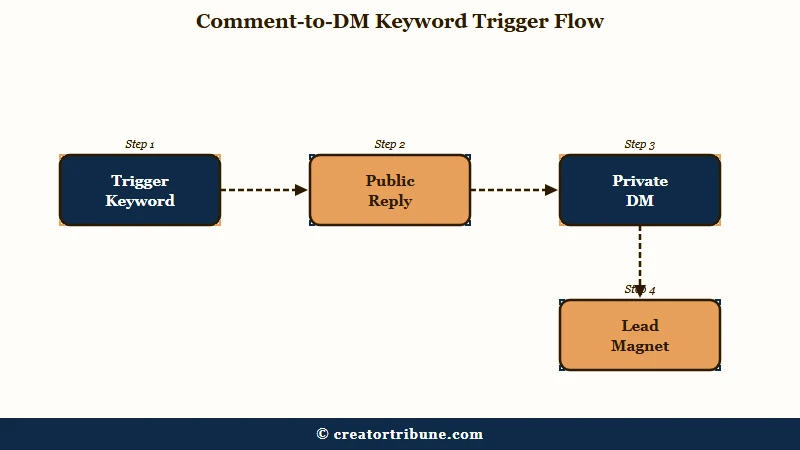
Here is the setup I would recommend for a lead magnet:
- Create a new Automation in Manychat and select “Instagram Comment” as the trigger.
- Set your trigger keyword (something short and specific, like “GUIDE” or “LINK”).
- Build a flow with two branches: a public comment reply (“Check your DMs!”) and a private DM with your download link or opt-in form.
- Attach the automation to a specific post or set it to run on all posts.
- Test it with a second account before publishing anything to your main audience.
Before: You post a Reel, tell viewers to comment “LINK” for your free guide, then spend 45 minutes manually DMing everyone who commented.
After: Manychat sends the DM automatically within seconds, 24/7. You wake up to 200 delivered leads instead of 200 unanswered comment notifications.
One technical detail most guides skip: the first automated DM you send after a comment trigger is limited to a single content block. No typing delays, no dynamic content, no follow-up steps in that first node. You can build more complex flows after the user responds, but the initial message has to be a single text bubble or a single image with buttons.
If you have been running comment-based giveaways and noticed reach problems, the giveaway recovery guide explains the algorithm penalty side of that equation.
Will Manychat Get Your Instagram Account Banned?
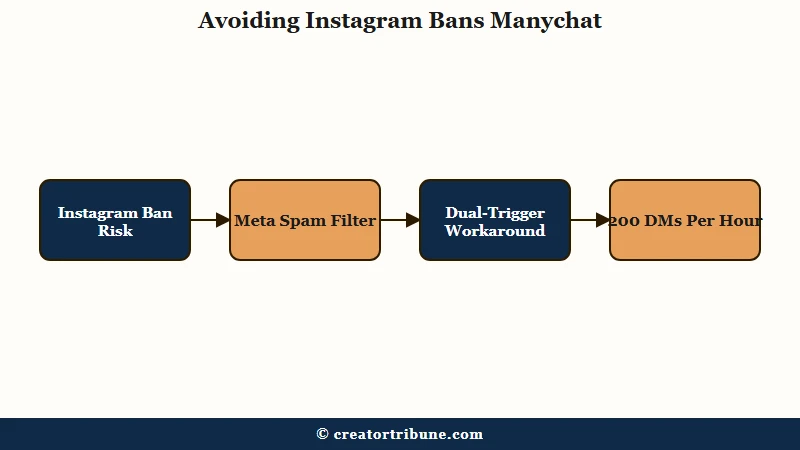
Manychat is an official Meta Business Partner using the sanctioned Instagram Graph API, but that status does not protect you from Meta’s spam filters during viral spikes.
This is the section every Manychat review glosses over, and I think it is the most important one.
What is Meta Business Partner: A company that has passed Meta’s technical review and uses official APIs. It means Manychat is not a scraper or unauthorized bot, but it does not mean Meta will intervene if your account gets flagged.
In May 2026, a creator named Davey Maher reported that his medically-led business account with 572,000 followers was banned from sending DMs for 30 days. The trigger: a Reel hit 1 million views and generated 12,000 comments in 48 hours. Manychat’s automation tried to process all of them, and Meta’s internal spam detector flagged the surge as inauthentic behavior.
The Manychat community moderators confirmed this is a known risk. Their recommended workaround is what I would call the “dual-trigger” strategy:
- Create two versions of every comment trigger: one with a public auto-reply plus DM, and one with a DM only (no public reply).
- Use the full version (public reply + DM) for normal posts.
- The moment a post starts gaining viral traction (you will see the comment velocity spike in real time), switch to the DM-only version.
- The public auto-reply is what draws the most algorithmic attention during a spike. Removing it reduces your surface area for false positives.
Manychat also throttles comment triggers to 12 requests per 60 seconds, and Meta enforces a hard cap of 200 automated DMs per hour (reduced from 5,000 in October 2024). These limits exist for safety, but they also mean that during a viral event, your automation will queue messages and some followers will wait hours for their DM.
According to Statista’s Instagram data, Instagram has over 2 billion monthly active users, and Meta’s spam detection is calibrated for that scale. Individual creator accounts that look like spam bots, even compliant ones, get caught in the filter.
What Is the 24-Hour Messaging Window?
The 24-hour window is a Meta policy that blocks automated messages unless the user interacted with your account in the last 24 hours.
This is not a Manychat limitation. It applies to every tool that uses the Instagram Messaging API, and it is the single biggest constraint on Instagram DM automation.
The clock starts when a user takes a qualifying action: sending you a DM, replying to your Story, or commenting on your post. Following your account does not count. Clicking a “Shop Now” button that leads off-platform does not count either.
Once the window closes, you have three legitimate options:
- One-Time Notification (OTN). You can request permission to send one follow-up message outside the window. Meta limits this to one OTN request per user per week on the same topic.
- Marketing Messages (opt-in). The user must explicitly subscribe to recurring messages from you. This requires a separate consent flow.
- Human Agent tag. A real person (not a bot) can respond within 7 days of the user’s last message. This is meant for support, not marketing.
The way I see it, this window makes Manychat a “catch them in the moment” tool, not a nurture-sequence engine. If your audience engages with a post, you have 24 hours to deliver value and convert. After that, the door shuts until they interact again.
Creators who want long-term drip campaigns need email or WhatsApp, not Instagram DM automation. If you are comparing your scheduling and automation options more broadly, the scheduling tool comparison covers the non-DM side of the stack.
Who Should Pay for Manychat and Who Should Skip It?
Manychat is worth the $29 per month Pro plan if you consistently receive 20 or more DMs per day and use comment-triggered lead magnets on Reels. Below that volume, Instagram’s free Saved Replies feature handles the load.
I would recommend Manychat for:
- Creators running comment-to-DM funnels on Reels. This is the use case where the ROI is clearest. A lead magnet trigger (“comment GUIDE to get the download”) on a Reel that gets 10,000 views can generate 200 to 500 automated DM deliveries overnight while you sleep.
- Service providers who qualify leads via DM. If you sell coaching, courses, or done-for-you services and need to ask 3 to 5 qualifying questions before booking, the flow builder saves hours.
- E-commerce accounts with Shopify. The Shopify integration lets you send abandoned cart reminders and order confirmations via DM. Conversion rates for DM-based cart recovery consistently beat email.
I would tell these creators to skip Manychat:
- Anyone under 5,000 followers. The volume does not justify the cost. Use Instagram’s native Saved Replies and Quick Replies instead.
- Creators who rely on voice notes for sales. Manychat cannot send or receive voice notes. If your sales process depends on voice, this tool breaks it.
- Anyone who needs in-chat booking. Manychat cannot book appointments inside the DM. It sends external links (Calendly, Acuity), and that handoff loses 15 to 30 percent of conversions compared to in-chat booking. Newer tools like SetSmart and FlowGent handle this natively.
If you are a link-in-bio creator deciding between tools, the Beacons AI review covers the other half of that stack.
What Are the Biggest Manychat Limitations?
The three limitations that matter most are the dead free tier, the single-step AI, and the broken Follow-to-DM feature. Everything else is workable.
| Limitation | Impact | Workaround |
|---|---|---|
| Free plan capped at 25 contacts | Useless for real use | Pay $14/mo Essential minimum |
| AI Step is single-step only | Feels robotic after first answer | Build deeper branching flows manually |
| Follow-to-DM broken since March 17 | New followers get no welcome DM | Use Story reply triggers as a workaround |
| No voice note support | Kills high-touch sales | Qualify via text, then move to call |
| No in-chat booking | 15-30% conversion loss | Use external booking with urgency copy |
| Active contacts never auto-expire | Bill creeps up monthly | Manually purge inactive contacts quarterly |
The Follow-to-DM bug deserves special attention. Manychat confirmed to its community that there has been a bug with Meta since March 17 affecting the “Say Hi to New Followers” feature. Messages are delivered inconsistently, sometimes hours late, sometimes not at all. There is no fix date. If your onboarding funnel depends on this trigger, switch to a Story reply trigger until the bug is resolved.
If your comments have been disappearing alongside these DM issues, the comments not loading guide covers the Instagram-side diagnostics.
Frequently Asked Questions
Is Manychat free in 2026?
Technically yes, but the free plan now supports only 25 active contacts. One viral post can exceed that in minutes. The free tier works as a sandbox for testing flows, not as a production tool for a real audience.
Can Manychat get your Instagram account banned?
Manychat uses the official Meta API and is a certified Meta Business Partner. Bans are not caused by Manychat itself but by Meta’s spam filters flagging high-volume automated activity during viral spikes. The risk is real but manageable with throttling strategies.
What is the best Manychat plan for a small creator?
The Pro plan at $29 per month is the starting point for serious use. It supports 2,500 contacts, includes WhatsApp and Messenger, and unlocks the AI Step add-on. Essential ($14/mo) works for very low-volume accounts under 250 contacts.
Does Manychat work with TikTok?
Not directly. Manychat supports Instagram, Facebook Messenger, WhatsApp, Telegram, and SMS. TikTok does not have a public DM API, so no third-party tool can automate TikTok DMs.
What happens when the 24-hour window closes?
You cannot send automated messages after the window expires. Your options are One-Time Notifications (one per user per week per topic), Marketing Message opt-ins, or manual replies via the Human Agent tag (7-day extension for support conversations only).
Is there a Manychat alternative for Instagram?
Chatfuel is the closest competitor with similar pricing and features. Newer AI-first tools like SetSmart and FlowGent offer in-chat booking and free-form AI conversations, but they are smaller and less battle-tested.
Quick Takeaways
- Manychat gutted its free plan to 25 contacts in March 2026, making the Pro plan at $29 per month the real entry point for creators.
- The comment-to-DM trigger is the strongest feature and the primary reason to pay. It automates lead magnet delivery on Reels around the clock.
- Viral spikes can trigger Meta’s spam filters even when you follow every rule. Use the dual-trigger workaround to reduce risk during high-velocity posts.
- The AI Step add-on costs $29 per month extra and handles only single-step responses, not full conversations.
- Skip Manychat if you are under 5,000 followers, rely on voice notes, or need in-chat appointment booking.