Gling AI Review After It Left a Quarter of My Filler Words
Gling AI Review After It Left a Quarter of My Filler Words
Gling AI promises one-click rough cuts, but my test left a quarter of the filler words behind. See who it really helps and who should skip it.
- 1What Is Gling AI and Who Is It For
- 2How Much Does Gling AI Cost
- 3How Well Does Gling Remove Filler Words and Silences
- 4Where Gling AI Falls Short
- 5Who Should Use Gling and Who Should Skip It
- 6How Gling Compares to Descript and Opus Clip
- 7Is the Time You Save Worth Anything Without a Plan for It
- 8Pros and Cons of Gling AI
- 9My Verdict on Gling AI
- 10Frequently Asked Questions
- Is Gling AI free to use?
- Can Gling AI export to Premiere Pro and Final Cut?
- How accurate is Gling at removing filler words?
- Does Gling AI work on mobile?
- Is Gling AI better than Descript?
- 11Quick Takeaways
Bottom Line: Gling AI is a real time-saver for solo talking-head creators, turning an hour of rough-edit grunt work into a few minutes. It is a rough-cut tool, not a finisher, and in my test it still left about a quarter of the filler words for me to clean up by hand. Skip it for cinematic, music-timed, or multi-speaker footage.
Gling AI sells one promise above all others: drop in your raw footage, and it strips out the dead air, the fumbled takes, and every “um” and “uh” before you touch a timeline. I went in expecting a one-click magic button.
What I got was closer to a fast, slightly sloppy intern who does 80 percent of the boring work and hands the rest back to me.
That gap between the pitch and the result is the whole story of this review. On a dense, retake-heavy clip, one independent head-to-head test found Gling left 180 redundant words in the cut while a rival tool left only 43. Its general cleanliness score sits around 77.5 percent, which is a polite way of saying it leaves roughly a quarter of the filler for you.
So is it worth paying for? For the right creator, the answer is a clear yes, and I will show you exactly who that is. For the wrong one, it is wasted money on a tool fighting your footage.
Stick with me and you will know which camp you fall into, what the four pricing tiers really cost, and where Gling quietly breaks down.
What Is Gling AI and Who Is It For
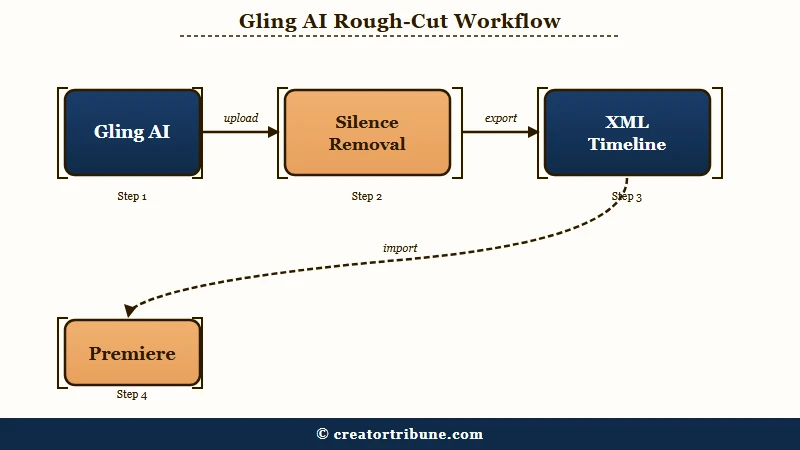
Gling AI is a desktop rough-cut tool that auto-removes silences, filler words, and bad takes from talking-head video, then hands a clean timeline to your real editor.
It is built for solo YouTubers, educators, and commentary creators, not for cinematic or multi-camera work.
What is a rough cut: The first editing pass that removes mistakes and dead air to leave only the keeper takes, before any b-roll, music, or color work.
Gling was built in 2022 by Sefi Keller and Yonatan Bendahan, and the company says more than 50,000 creators now use it, including names like Shelby Church and DamiLee. The pitch is narrow on purpose. It does one job, the tedious first pass, and tries to do it faster than you ever could by hand.
The way I see it, that focus is the most honest thing about the product. It is not trying to be a full editor with motion graphics and color grading.
It is a pre-editor, and it expects you to finish the job somewhere else like Premiere Pro or DaVinci Resolve. If you want an all-in-one studio instead, my Descript review covers a tool that leans that direction.
How Much Does Gling AI Cost
Gling AI costs nothing to try and starts at 10 dollars a month billed annually for the Plus plan, scaling to 100 dollars a month for high-volume podcasters.
Every paid tier unlocks all features; the only thing that changes is how many hours of footage you can process.
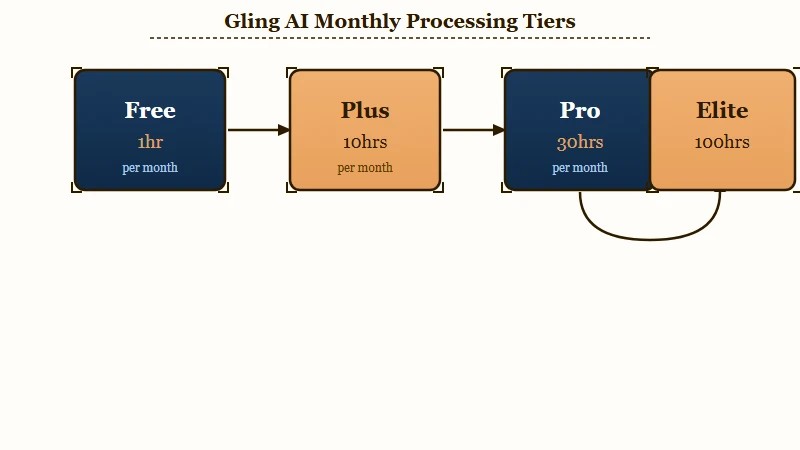
Here is how I would read the four tiers before picking one. The free plan is a demo, not a workflow, because the 720p cap and the watermark make exports unpublishable.
| Plan | Price (annual) | Monthly hours | Best for |
|---|---|---|---|
| Free | 0 dollars | 1 hour, 720p, watermark | Testing the workflow once |
| Plus | 10 dollars per month (20 monthly) | 10 hours, watermark-free | Weekly solo YouTubers |
| Pro | 20 dollars per month (40 monthly) | 30 hours | Multi-video-a-week creators |
| Elite | 50 dollars per month (100 monthly) | 100 hours | Daily podcast and interview shows |
One catch that no pricing page shouts about: unused hours do not roll over. If you film in batches and skip a slow month, that paid capacity is gone, so the plan you want is the one that matches your busiest month, not your average one.
Let me run the real math, because the hours number is meaningless on its own. Say you shoot 45 minutes of raw footage for every finished 10-minute video, with a few retakes baked in.
- The Plus plan gives you 10 hours, which is 600 minutes of processing.
- At 45 minutes of raw footage per video, that is about 13 finished videos a month.
- If you are a heavier shooter at 90 minutes raw per video, you drop to 6 or 7.
- Hit the ceiling and you wait until the reset, because there is no overflow and no rollover.
For most weekly creators, the 10-dollar Plus tier is the honest sweet spot. If you are publishing daily or running a multi-cam podcast, you will feel the Pro or Elite ceiling fast.
How Well Does Gling Remove Filler Words and Silences
Gling removes filler and silence safely but not completely, scoring about 85 percent accuracy and a 96.7 percent safety score while leaving roughly 22.5 percent of filler words behind.
It rarely cuts good content, but it is not a finished edit.
That safety score is the number I care about most, and it is the tool’s best trait. A 96.7 percent safety score means it almost never deletes a word you meant to keep, so you are not scrubbing back through hunting for butchered sentences. From my read of the benchmark data, it errs toward leaving too much in rather than cutting too much out, which is the right way to be wrong.
The cleanliness side is where reality bites. In one retake-heavy stress test, Gling left 180 redundant words in the cut where a competing tool left 43, and its general cleanliness score lands near 77.5 percent. In plain terms, plan on a ten-minute manual sweep after every export to catch the “uhs” it waved through.
Here is the workflow difference that sold me despite the cleanup tax.
Before: Drop a 60-minute raw talking-head file into a blank Premiere timeline and scrub for dead air and flubbed takes by hand, which usually eats two to three hours.
After: Run that same file through Gling, export the XML, and open a Premiere timeline already trimmed to the keeper takes, then spend ten minutes catching the filler it missed.
A 2026 update added what Gling calls Smart Thresholding and Sentiment Analysis, meant to tell a dramatic pause apart from dead air. Whether it works is genuinely contested, and that is the next section.
Where Gling AI Falls Short
Gling AI falls short on native exports, audio formats, and timing nuance, and some long-time users dispute its polished marketing claims.
The fixes are real but they cost you the “one-click” fantasy.
The export bug surprised me most. Several users report that Gling’s native MP4 render “loses framerate and gets jittery,” so the safe move is to ignore the direct video export and route everything through the XML handoff into a proper editor. If your source is variable-frame-rate iPhone footage, that jitter risk climbs.
Audio is the other trap. Gling exports audio as MP3 only, with no lossless WAV option, which is a real roadblock for podcasters who need clean files for a mixing pass. One editor flagged exactly this as their single biggest complaint, and I share it.
Then there is the timing claim, where the marketing and the user base openly disagree. Gling promotes its 2026 Smart Thresholding update as the fix for chopped comedic beats, but creators push back hard.
What users report: “It always ruins jokes, because it doesn’t understand timing,” one r/NewTubers creator wrote, while another said the pacing feature made their voice sound “off” and too fast.
I take the marketing as aspiration and the user reports as the ground truth here. If precise comedic timing is your whole brand, test the free tier on a real clip before you trust it.
And the pricing-honesty halo has cracks too, with more than one long-term user calling the plans “a bit pricey and a bit dishonest,” which is worth weighing against the glowing affiliate reviews.
Who Should Use Gling and Who Should Skip It
You should use Gling if you make dialogue-driven talking-head video and skip it if your footage is cinematic, music-timed, or full of overlapping speakers.
It is a specialist, and it fails the moment you hand it generalist work.
From everything I tested and read, the fit comes down to one question: is your video mostly one person talking to a camera? If yes, Gling earns its keep.
If no, it will fight you. Here is the quick filter I would use.
| Your footage | Is Gling a fit |
|---|---|
| Solo tutorials, commentary, talking-head YouTube | Strong yes, this is the core use case |
| Podcasts exported to DaVinci or Final Cut | Yes, multicam syncs natively there |
| Podcasts needing lossless WAV audio | No, MP3-only export blocks you |
| Cinematic, b-roll-heavy, or music-timed edits | No, it has no sense of pacing or rhythm |
| Vlogs with crosstalk, loud game audio, or wind | Risky, the AI breaks down in messy audio |
The edge cases are where it stumbles hardest. Background music playing in the room, two people talking over each other, a windy outdoor walk-and-talk, the loud game audio in a Let’s Play, all of these confuse the silence detection.
For multi-speaker work specifically, note that native multicam only syncs cleanly when you export to DaVinci Resolve or Final Cut; for Premiere or a flat MP4 you have to line up the cameras yourself first.
If you are weighing Gling against short-form clippers, that is a different job entirely. Tools like the ones in my Opus Clip review chop long videos into vertical clips, while Gling cleans up the long video itself. Many creators run both, and my guide to turning long videos into shorts shows where each fits in the chain.
How Gling Compares to Descript and Opus Clip
Gling is a faster, cheaper rough-cutter while Descript is a full editing studio and Opus Clip is a short-form clip generator.
They solve three different problems and are easy to confuse.
In my experience the cleanest way to think about it is by job. Gling does the trimming pass and exports to your editor.
Descript does the trimming plus transcription, voice tools, and publishing in one app, which I cover in the Descript review. Opus Clip and similar tools turn one long video into many vertical clips.
| Tool | Core job | Where it wins |
|---|---|---|
| Gling | Rough-cut talking-head video | Speed and price for solo YouTubers |
| Descript | Full edit in one app | Podcasters who want everything together |
| Opus Clip | Long-to-short clipping | Repurposing for TikTok and Reels |
For caption-first creators, neither Gling nor Descript is really the captions specialist, and my Captions app review covers that lane. The point I keep landing on is that Gling is a single tool in a stack, not the stack itself.
Is the Time You Save Worth Anything Without a Plan for It
The hours Gling saves only pay off if you funnel the viewers you reach somewhere you control.
Faster editing means more uploads, but uploads on rented land disappear the day an algorithm shifts.
This is the part I would not skip. With more than 500 hours of video uploaded to YouTube every minute, per Statista, the bottleneck was never the camera, it was the edit. The way I see it, the extra output a rough-cutter buys you is wasted if every new viewer lands on a platform that owns the relationship instead of you.
If you are going to ship more often, give those viewers a next step you own, like an email list or a simple link hub.
My walkthrough on converting viewers into subscribers gets into the tactics, and the free Creator Money Page template is the fastest way to stop leaking that attention. Editing speed is only worth paying for if it feeds something durable.
Pros and Cons of Gling AI
Gling’s strengths are speed, clean editor handoff, and local processing, while its weaknesses are incomplete cleanup, export quirks, and a desktop-only ceiling.
Here is how it nets out after real use.
What works:
- It collapses an hour of dead-air trimming into a few minutes for talking-head footage.
- The XML and EDL export drops cleanly into Premiere, Final Cut, and DaVinci with every cut intact.
- It processes locally on Mac or Windows, so large 4K files never crawl through a cloud upload.
- There is no credit system, so every paid tier unlocks every feature.
- It auto-picks the best of your repeated takes, not just the silent gaps.
What does not:
- It leaves roughly a quarter of filler words behind, so a manual sweep is mandatory.
- Native MP4 exports can turn jittery, forcing you through an editor to get clean output.
- Audio exports are MP3 only, with no lossless WAV for serious podcast work.
- It is desktop only with no mobile app, and unused monthly hours never roll over.
- Aggressive silence cuts can flatten comedic timing and intentional dramatic pauses.
My Verdict on Gling AI
Gling AI is worth it for solo talking-head creators on the 10-dollar Plus plan and not worth it for anyone doing cinematic, multi-speaker, or audio-critical work.
It is a sharp specialist with a narrow blast radius.
After putting it through its paces, I land on a qualified recommendation. If you publish weekly talking-head videos and you are tired of the first-pass slog, the Plus tier pays for itself the first time you skip a two-hour trim. The cleanup tax is real, but ten minutes of manual sweeping beats two hours of scrubbing.
I would steer clear if your work lives outside that lane. Cinematic editors, music creators, and podcasters chasing lossless audio will spend more time fighting Gling than it saves.
Test the free tier on one real clip first, because the fit tends to be binary. It either suits your footage or it does not.
Frequently Asked Questions
Is Gling AI free to use?
Gling offers a free plan with 1 hour of processing a month, but exports are capped at 720p and carry a watermark, so it works as a one-time test rather than a real workflow. Paid plans start at 10 dollars a month billed annually.
Can Gling AI export to Premiere Pro and Final Cut?
Yes. Paid plans export a clean XML or EDL timeline into Adobe Premiere Pro, Final Cut Pro, and DaVinci Resolve, preserving every AI cut so you can finish with b-roll, transitions, and color in your own editor.
How accurate is Gling at removing filler words?
Gling scores around 85 percent accuracy with a 96.7 percent safety score, meaning it rarely cuts good content. Its cleanliness is near 77.5 percent, so it leaves roughly a quarter of filler words for a short manual pass.
Does Gling AI work on mobile?
No. Gling is a desktop-only app for Mac and Windows that processes files locally on your machine. There is no iOS or Android app, so you cannot edit from a phone or tablet.
Is Gling AI better than Descript?
For fast rough cuts of talking-head video, Gling is cheaper and simpler. Descript is the better pick if you want transcription, audio tools, and publishing in one app rather than handing a timeline to a separate editor.
Quick Takeaways
- Gling AI is a rough-cut specialist for solo talking-head creators, not an all-in-one editor.
- It is safe but incomplete, leaving about a quarter of filler words for a ten-minute manual pass.
- Export through the XML handoff, not the native MP4, which users report comes out jittery.
- The 10-dollar Plus plan fits weekly creators; skip Gling entirely for cinematic or multi-speaker work.
- Pair faster editing with an owned next step like the free Creator Money Page template so the extra reach sticks.