
TikTok Community Guidelines Violation and How to Appeal It
TikTok Community Guidelines Violation and How to Appeal It
Your TikTok video was taken down? Most removals are automated and 1 in 20 is a mistake. Here is how to appeal it the right way and what never to do first.
- 1Why Your TikTok Video Was Taken Down
- 2What a TikTok Community Guidelines Violation Actually Means
- Why TikTok Says You Violated Community Guidelines for No Reason
- 3What Not to Do When Your Video Gets Removed
- 4How to Appeal a Removed TikTok Video
- 5What to Do When There Is No Appeal Button
- 6The Unoriginal Content Trap and How to Beat It
- 7How to Check Your TikTok Account Standing After a Violation
- 8How Strikes and the Creator Health Rating Work
- 9Frequently Asked Questions
- Why was my TikTok video removed with no reason?
- How do I appeal a removed TikTok video?
- What if there is no appeal button on TikTok?
- Should I delete a video TikTok took down?
- How many strikes until TikTok bans you?
- Is a TikTok community guidelines violation screenshot real or a scam?
- Is a removed video the same as a shadowban?
- 10Quick Takeaways
TL;DR: When your TikTok video is taken down for a community guidelines violation, an AI almost certainly pulled it with no human review, and TikTok’s own Q1 2026 enforcement report shows 4.80% of removed videos are reinstated after further review. The worst move is to delete the video, because that forfeits your one appeal and leaves the strike on your record. Appeal the original video while it is still public, within 30 days, and only once.
If your TikTok video was taken down, the first thing to understand is who took it down. It was almost certainly an automated system, not a person, and that system gets it wrong more often than TikTok likes to admit.
That changes how you should react. A removal is a fast machine call made at platform scale, with no careful human weighing your particular case. Treat it as a flag you can challenge, not a final ruling you have to accept.
This guide covers why videos get pulled, the one mistake that kills your appeal before you start, the exact steps to appeal, what to do when there is no appeal button, and how to stop original content from getting flagged again. I have leaned on the recovery tactics creators say worked, not the generic advice TikTok hands out.
Why Your TikTok Video Was Taken Down
Automated moderation takes down most TikTok videos with no human in the loop, and TikTok reinstates 4.80% of everything it removes once a person looks again.
That figure comes from TikTok’s own Community Guidelines Enforcement Report for Q1 2026: 184,012,576 videos removed worldwide, 8,838,710 put back. It is a platform-wide share and not a promise about your video, but it is the first reason to take an appeal seriously.
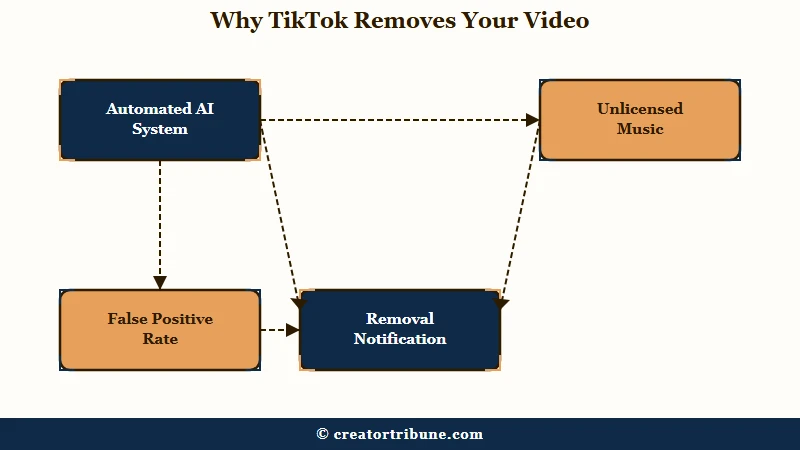
TikTok shifted to AI-led removals partly to spare human moderators from the worst content, and the machine now pulls videos the moment it thinks it sees a violation.
The most common triggers for creators are unoriginal or reused content, unlicensed music, spam-like behavior, dangerous stunts, and graphic content, with a handful of zero-tolerance categories like child-safety violations that bring an instant permanent ban.
What is a takedown vs a shadowban: A takedown removes the video and sends you a notification with an appeal option. A shadowban silently drops your reach by over 80% with no notice at all.
Knowing which one you are dealing with matters, because the fixes are different. If you got a notification naming a violation, that is a removal you can appeal.
If your views quietly cratered with no message at all, you are looking at a reach problem, and the two get confused constantly. I would always open Account check first, because a restriction that is visible and fixable often turns out to be sitting there in plain sight.
What a TikTok Community Guidelines Violation Actually Means
A TikTok community guidelines violation means the platform decided one of your posts broke a specific policy area, and a first violation normally earns a warning before any strike lands.
TikTok’s own support documentation lays out the sequence, and it is not the one most creators assume.
The first time content comes down for a community guidelines violation you get a warning, along with a notification naming which guideline the post broke and how to appeal it. The exception is severity: TikTok states that a severe first violation skips the warning stage entirely and can take the account with it.
Strikes are also not pooled into one running total. TikTok counts them by policy area, such as safety and civility, or by feature, such as comments or direct messages.
Three violations spread across three different policy areas therefore do not stack the way three in a single area do. That is why creators comparing notes get wildly different answers about how many violations it takes, and why a raw strike count on its own tells you almost nothing about how close you are to a ban.
Strikes expire 90 days after they land and stop counting toward a permanent ban at that point. Your own record lives in the app under Inbox, then System notifications, then Account updates.
Why TikTok Says You Violated Community Guidelines for No Reason
The notification reads as vague because an automated system generated it, but the specific policy area it cited is recorded in a place the notification itself does not show you. Open Inbox, then System notifications, then Account updates, and the named guideline is there.
Removals genuinely do get reversed at scale. TikTok’s Q1 2026 enforcement report puts it at 8,838,710 videos reinstated out of 184,012,576 removed, which works out to 4.80%.
Read that number carefully before you take heart from it. It covers all removed videos, so it says nothing about your personal odds, and a reinstatement is not TikTok conceding an error rate. What it does establish is that a removal is only a first pass, and appealing is how you force a second one.
What Not to Do When Your Video Gets Removed
Do not delete a removed TikTok video before you appeal, because deleting it forfeits your appeal and keeps the strike on your record.
This is the single most expensive mistake, and the instinct to scrub the flagged video is exactly backwards.
Here is the trap. Deleting the video does not remove the strike, and if you delete it and later win the appeal, TikTok cannot put the video back. You lose the content, the views, and the standing all at once.
The second mistake is burning your appeal on a rushed message. You get exactly one appeal per violation, so a sloppy first attempt is a wasted attempt. The way I see it, the removal notification gives you a 30-day window, so there is no reason to fire back in ten seconds.
How to Appeal a Removed TikTok Video
To appeal a removed TikTok video, open the video, tap More insights or Analytics, select the ineligible-post notification, and tap Appeal within 30 days.
TikTok then makes a decision within about 7 business days.
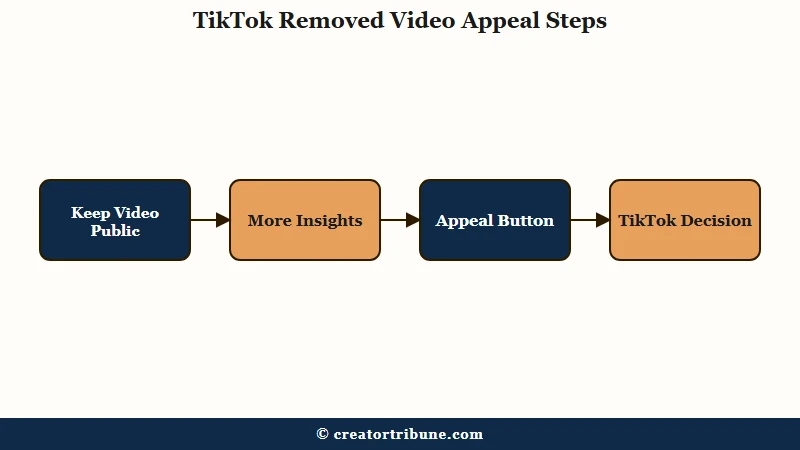
Here is the sequence I would follow, in order:
- Leave the video public. The review team has to be able to see it, and a private or deleted video cannot be reinstated.
- Open the removed or ineligible video and tap More insights at the bottom, or More options on the side.
- Select Analytics, then tap the notification for the flagged post.
- Tap Appeal at the top and write a short, specific case for why the removal was wrong.
- Submit once and wait the full 7 business days before assuming it failed.
TikTok Shop creators take a slightly different path, going to the Creator Health Rating page, opening Violations, selecting the specific violation, and tapping Appeal there. Whatever the path, the message you write carries the whole thing.
Before: “This is wrong, my video doesn’t break any rules, please put it back immediately.”
After: “This was original footage I filmed and edited myself. It does not contain the violation flagged. I believe this was an automated error and request a human review.”
One creator who got a monetization rejection for low-quality content reversed it in 24 hours by framing the flagged clip as a one-off experiment they had already moved on from. Calm, specific, and honest beats angry and vague every time.
What to Do When There Is No Appeal Button
If a TikTok video has no appeal button, escalate through the legal feedback form, an in-app Report a Problem ticket, or @TikTokSupport on X.
The in-app appeal is just the most obvious door, and several others still work when it is missing.
Plenty of creators hit a removal or ban with no appeal option at all. When that happens, the routes that still work are TikTok’s feedback form at tiktok.com/legal/report/feedback, an email to [email protected], the in-app Report a Problem flow under Settings, and a public reply to @TikTokSupport on X. For the bigger picture on disputing an account-level penalty, our TikTok ban appeal guide walks through the full process.
There is real disagreement on how hard to push. Official advice is to appeal once and be patient, and that is the right default.
One creator, though, reported clawing back a permanently banned account after six weeks by firing 25 in-app support tickets in a single day on a three-minute timer until a human finally picked it up. I would treat that as a desperate last resort, not a first move, because hammering the system can also dig you deeper.
The Unoriginal Content Trap and How to Beat It
TikTok’s AI often flags genuinely original videos as unoriginal when they are edited outside the app, and beating the claim takes specific photo proof.
This is the false flag that catches the most hardworking creators.
The pattern recognition that powers the moderation system can misread external edits, jump cuts, and color grading from tools like CapCut desktop or Premiere as stolen or low-effort.
What I would do is keep the final edits native to TikTok, using the app’s own sound effects, cuts, and text overlays, which creators report stops original work from getting flagged in the first place. If you have already been hit, the creator rewards rejection guide covers the monetization side of this.
If you have to prove ownership, TikTok wants four specific things, and screenshots of your editing software are not on the list. Here is how the common removal types map to the right move.
| Removal type | What it means | What to do |
|---|---|---|
| Community guideline violation | AI flagged graphic content or spam | Appeal the public video within 30 days |
| Unoriginal content flag | External edits read as reused | Submit set and equipment photos, edit in-app next time |
| Unlicensed music | A track was pulled or muted | Swap to a Commercial Music Library track |
| Stuck under review | Sitting in the moderation queue | Wait 15 to 60 minutes, do not delete |
| Silent reach drop | A shadowban or weak hook | Open Account check, then see our shadowban recovery guide |
The four proof items TikTok asks for are a photo of the host on set, the set background, at least one physical product shown in the video, and the actual filming equipment used. Gather those before you appeal an unoriginal-content claim, because a generic “it’s mine” rarely clears it.
How to Check Your TikTok Account Standing After a Violation
TikTok’s account standing tool is called Account check, and you reach it either through TikTok Studio or through the Safety Center.
Older guides still call it Account Status, so the name you are searching for may not match what the app actually shows you.
There are two routes. Through TikTok Studio: tap Profile, tap the Menu button at the top, select TikTok Studio, then tap Account check within More tools. Through the Safety Center: tap Profile, tap Menu, select Settings and privacy, tap Support, tap Safety Center, then tap Account check.
Account check reports on five things separately, and TikTok lists them as login, posting, commenting, editing your profile, and sending direct messages. A checkmark beside one means no issue and a warning sign means a restriction is sitting on that specific feature.
Spending a minute here before you appeal anything is worth it, because the per-feature split separates one removed video from an account-level restriction. A clean Account check with a single video missing is a far smaller problem than a warning sign next to Posts.
How Strikes and the Creator Health Rating Work
A removed video usually adds a strike that expires after 90 days, and TikTok Shop creators also lose Creator Health Rating points that gate features at 150, 100, 50, and 0.
Understanding the math tells you how close you are to a ban.
For standard accounts, penalties escalate from a warning, to a 24 to 48 hour suspension on uploading and commenting, to a 72 hour or week-long view-only restriction, and finally to a permanent ban once you are formally warned and keep going. The part I find reassuring is that strikes expire after 90 days, and that a first community guidelines violation normally earns a warning unless it is severe.
The newer Creator Health Rating applies only to TikTok Shop, so it matters to you only if you sell there. It replaced the old Violation Points system over the week of January 12 to 19, 2026, runs on a 0 to 1,000 scale, and starts a transitioning account at 200 points.
The published bands are the part to memorize: 200 to 1,000 counts as healthy, 151 to 199 needs attention, and 150 or below is unhealthy and exposes the account to milestone enforcement. Points come off for policy violations and poor performance, and creators can win some back by completing TikTok’s in-app compliance education.
Points reset after 90 days, so the path back to good standing is mostly patience plus clean posting. If platform penalties keep threatening your reach, building an audience you own through a creator money page is the real insurance.
Frequently Asked Questions
Why was my TikTok video removed with no reason?
An automated system likely flagged it for a suspected violation and sent a vague template message instead of naming the specific rule. TikTok reinstates 4.80% of removed videos after a second look, so genuine mistakes do happen. Open Inbox, then System notifications, then Account updates to see which guideline was actually cited before you appeal.
How do I appeal a removed TikTok video?
Open the video, tap More insights or More options, go to Analytics, tap the flagged-post notification, and hit Appeal. You get one appeal per violation within 30 days, and TikTok decides within about 7 business days. Keep the video public the whole time.
What if there is no appeal button on TikTok?
Use the feedback form at tiktok.com/legal/report/feedback, email [email protected], or file an in-app Report a Problem ticket under Settings. You can also reply publicly to @TikTokSupport on X. Be persistent but polite until a human agent responds.
Should I delete a video TikTok took down?
No. Deleting a removed video does not clear the strike, and if you later win the appeal, TikTok cannot restore the deleted video. Always leave it public while you appeal, then remove it only after the case is fully closed.
How many strikes until TikTok bans you?
There is no single published number, because TikTok counts strikes by policy area or by feature, so there is no one running total and violations in different areas do not stack the way repeats in one area do. Standard violations escalate from a warning to short suspensions to view-only restrictions before a ban, and strikes expire after 90 days. Severe violations such as child-safety breaches bring an instant permanent ban with no warning at all.
Is a TikTok community guidelines violation screenshot real or a scam?
A genuine violation notice only ever appears inside the app, under Inbox then System notifications then Account updates, and any resulting restriction is mirrored in Account check. TikTok does not send violation notices by direct message or by email asking you to click through to appeal or to verify your account. If a screenshot reached you from someone else, or a message is steering you toward an outside link, open Account check yourself before you act on it.
Is a removed video the same as a shadowban?
No. A removed video comes with a notification and an appeal option, while a shadowban is a silent reach drop with no message at all. Before assuming the worst, open Account check in TikTok Studio, because a genuine restriction on posting or commenting shows up there with a warning sign next to the affected feature.
Quick Takeaways
- An AI removed your video, not a human, and TikTok puts 4.80% of removed videos back after a second look, so appealing is worth it.
- Never delete a flagged video before appealing, deleting forfeits the appeal and the strike stays anyway.
- You get one appeal per violation within 30 days, so write a calm, specific case and submit it once.
- No appeal button means escalate through the legal feedback form, a support ticket, or @TikTokSupport on X.
- Edit original videos natively in the TikTok app to dodge the unoriginal-content false flag.
- Open Account check in TikTok Studio to see whether the hit was one video or an account-level restriction.


Hello TikTok Support Team,
I hope you are doing well. I am reaching out because my account seems to be under some restrictions, especially in my direct messages and when trying to make new friends or follow people.
I always try to use TikTok respectfully and follow all the community guidelines, so I am kindly requesting your assistance in reviewing my account. Please help me check what caused the restrictions and remove them if possible.
Thank you for your time, support, and understanding. I truly appreciate your help in restoring my account to normal.
Kind regards,
ashely8