How to Make a TikTok Account Private Without Killing Reach
How to Make a TikTok Account Private Without Killing Reach
Go private on TikTok in five taps under Settings and privacy. People can still search for your account, but only followers you approve can watch your videos.
- 1How to Make a TikTok Account Private
- 2What Changes When You Go Private
- 3Why Your Private Toggle Is Greyed Out or Missing
- 4What the Friends Only Setting Does
- 5Does Going Private Stop You Earning on TikTok
- 6Are Teen TikTok Accounts Private by Default
- 7Frequently Asked Questions
- How do I make my TikTok account private?
- What happens to my followers when I go private?
- Why can’t I make my TikTok account private?
- Can I make just one video private instead of my whole account?
- Does a private TikTok account still make money?
- Are TikTok accounts private by default for teens?
- 8Quick Takeaways
TL;DR: To make a TikTok account private, open Profile, tap the Menu icon, go to Settings and privacy, tap Privacy, and turn on Private account. Only people you approve can then follow you and watch your videos, while your name, username and photo stay public and people can still find your account in search. This guide covers the steps, what changes, the greyed-out toggle fix, and how to protect your privacy without losing reach.
Learning how to make a TikTok account private takes about five taps, but for a creator the setting does a lot more than hide your videos from strangers. The moment you go private, your posts stop reaching anyone you have not approved, and those strangers are where For You growth comes from.
Most guides skip that trade-off, and they also miss that going private leaves the account itself in plain view. TikTok’s help on private and public accounts says other people can still search for your account and see your name, username and profile photo. Your videos, LIVE videos, bio and likes are what lock, and Creator Rewards only counts unique views from the For You feed, so private and paid pull against each other.
So this guide does two jobs. It walks through the exact steps to go private, including how to lock a single video instead of the whole account, and it covers what changes, why the private toggle is sometimes greyed out, the friends-only middle ground, and how to protect your privacy without giving up your reach.
How to Make a TikTok Account Private
To make a TikTok account private, go to your Profile, tap the Menu icon, open Settings and privacy, tap Privacy, and turn on the Private account toggle.
Only people you approve can then follow you, watch your videos, LIVE videos, bio and likes, and see your followers and following lists.
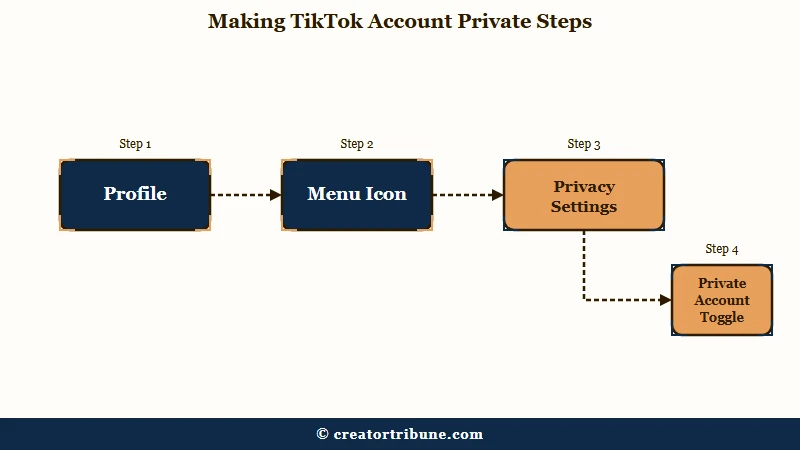
What is a private TikTok account: An account where only followers you approve can view your videos, LIVE videos, bio, likes, and followers and following lists. Your name, username and photo stay public, and other people can still search for your account.
The switch itself is quick. If a confirmation prompt slides up after you flip the toggle, confirm it, or the change will not stick. These steps follow TikTok’s help page:
- Open TikTok and tap Profile in the bottom right.
- Tap the Menu button (the three lines) at the top, then tap Settings and privacy.
- Tap Privacy.
- Turn on Private account, and confirm if a prompt appears.
You do not have to lock the whole account to get privacy on one clip. If you only want to hide a single video, tap the three dots on that post, open Privacy settings, and set Who can watch this video to Only you. That keeps your account public for reach while pulling one post out of view.
What Changes When You Go Private
When you go private, only approved followers can watch your videos, and nobody can Duet, Stitch, download or make stickers from them, or add them to their Stories.
Your name, username and profile photo stay visible to everyone, and your account still shows up in search.
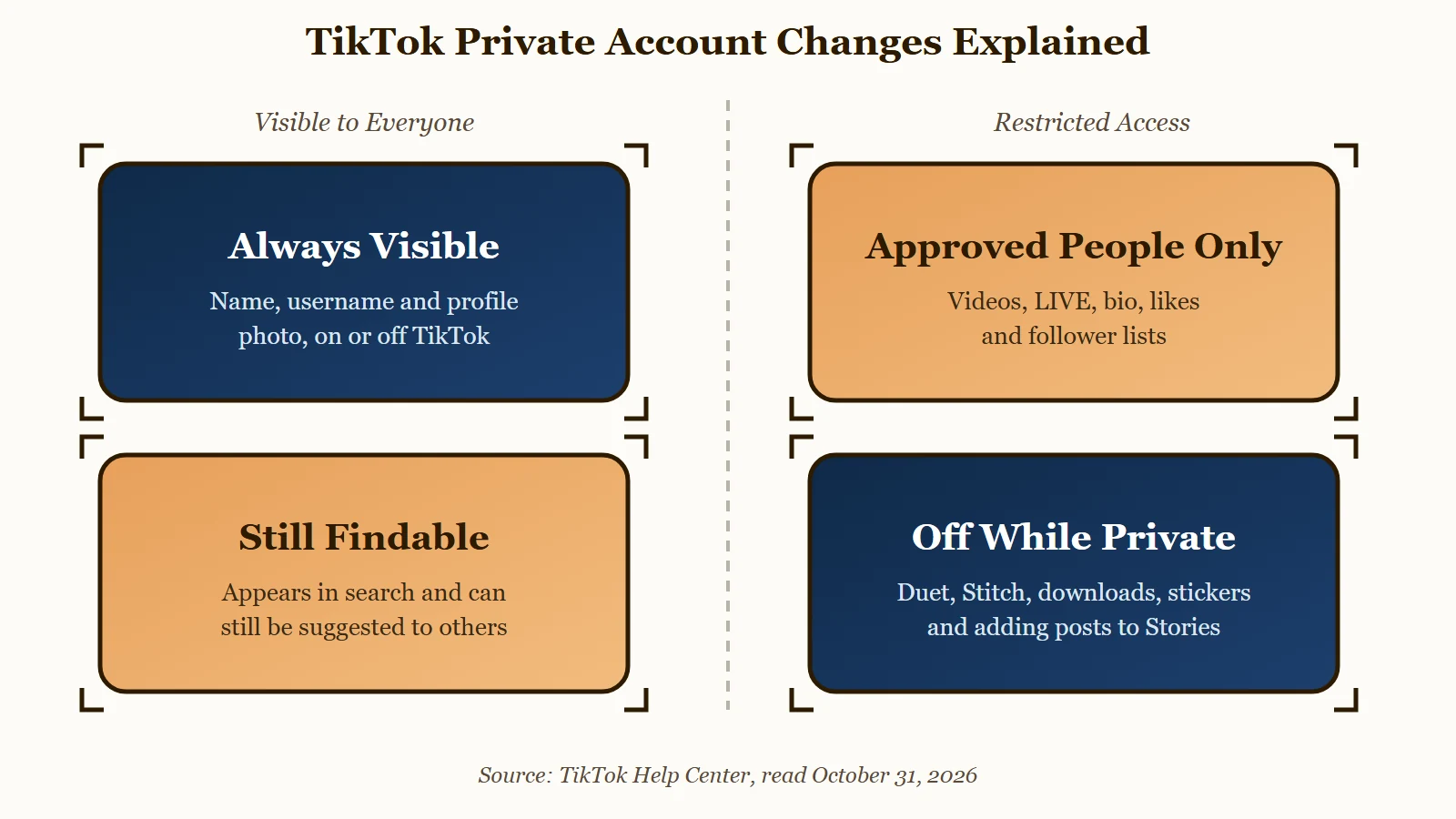
The reason I flag Duet and Stitch here is that they are two of the strongest discovery tools on TikTok, and TikTok’s help for Duets and for Stitch says you must have a public account to let others use your videos that way. Strangers can no longer follow you with one tap either. They have to send a request that you approve or deny.
One thing that surprises people is that going private is not the same as disappearing. Your handle and photo are always public, and TikTok’s suggested accounts help says it can still suggest a private account to others, with only the people you approve able to follow you.
That is also why going private never makes your profile read as account not found to other people. Here is what stays public versus what locks down when you go private.
| Element | On a private account |
|---|---|
| Name, username, photo | Always visible to anyone, on or off TikTok |
| Videos, likes, follower list | Only approved followers can see them |
| Duet, Stitch, downloads, stickers | Off for everyone while you stay private, and nobody can add your posts to their Stories |
| Search | Your account still appears, with your name, username and photo |
| For You feed | Only people you approve can watch your videos, so they cannot reach strangers there |
| Account suggestions | Still possible even with Suggest your account to others turned off, for people you follow, interact with or share mutual connections with, but only people you approve can follow you |
Why Your Private Toggle Is Greyed Out or Missing
The Private account toggle is greyed out or missing because you are on a Business account, and TikTok’s account types page describes Verified Business Accounts as public profiles.
The fix is switching back to a Personal account, which TikTok’s help also calls a General TikTok Account, though some users report the switch will not stick.
If you upgraded to a Business account for the analytics or the instant bio link, this catches a lot of creators off guard. Business profiles are public by design, so the private toggle either disappears or will not move. The clean fix is to switch back under Settings and privacy, then Account, then Business verification, where TikTok’s help says you follow the steps to switch your account type.
TikTok also advises against switching back and forth, because your business verification is not saved and you would have to verify again to get Business features back.
Where it gets messy is the glitch where the app keeps snapping you back to Business. TikTok’s help says that if you do not verify your business when asked, your account may automatically be converted into a General TikTok Account, but it gives no time frame. Frustrated users report faster workarounds, and I would try them in this order before you resort to waiting.
| Symptom | Likely cause | Fix |
|---|---|---|
| Private toggle greyed out | Account is set to Business | Switch back under Settings and privacy, Account, Business verification |
| Switch to Personal keeps reverting | Linked TikTok Shop or Seller account | Unlink Shop and Seller Center, then switch again |
| Still stuck on Business | Ad account permission is holding it | Sign in to TikTok Ads Manager on desktop and unlink the app |
| Nothing works in-app | A pending business verification | Contact TikTok under Settings and privacy, Help Center, Chat with us, as a last resort |
What the Friends Only Setting Does
The Friends setting limits a post to followers you follow back, a middle ground between fully public and fully private.
It lets you keep a public profile for reach while sharing some videos only with mutuals.
The way I see it, most creators who go private are trying to stop strangers from harassing them or lurking. You can get almost all of that protection without touching the private toggle, which is the move I would make first. TikTok gives you a set of controls that act like your own bouncer.
Turn off Suggest your account to others, which covers your phone contacts, Facebook friends and people who open or send links to you. TikTok notes it may still suggest you to people you follow, interact with or share mutual connections with. Restrict who can send you Direct Messages and mentions down to Friends, and switch on comment keyword filters so spam and abuse get hidden automatically.
Your public videos stay eligible for the For You feed the whole time. Some creators also keep the main account public and post personal clips from a second TikTok account set to private, which still shows up in search under its own name.
Before: You go fully private to stop strangers, and your videos stop reaching anyone you have not approved.
After: You stay public, turn off Suggest your account, lock DMs to Friends, and filter comments, so you get the safety without surrendering the algorithm.
Does Going Private Stop You Earning on TikTok
Going private makes Creator Rewards hard to earn from, because the program only counts qualified views from the For You feed and a private account’s videos can only be watched by people you approve. TikTok’s Creator Rewards eligibility list never mentions private accounts, but it does shut out Business accounts.
A video needs at least 1,000 qualified For You views before it earns anything, and TikTok counts a view only when it is unique, comes from the For You feed and lasts longer than 5 seconds. TikTok publishes no fixed rate per 1,000 views, and its How rewards work page says RPM depends on watch time and finish rates, search traffic, location, engagement and ad watch time.
If your videos are stalling even while public, the reasons behind low For You views are worth ruling out before you blame the privacy setting.
What is the Creator Rewards Program: TikTok’s main payout program for original videos at least one minute long, paying for unique For You feed views watched for more than 5 seconds. It needs a Personal account, and Business accounts are not eligible.
To be eligible in the first place you need a Personal account, an age of at least 18, 10,000 followers and 100,000 video views in the last 30 days, so a Business account disqualifies you outright. If your videos keep getting knocked out of the program, a Creator Rewards rejection usually has a fixable cause.
The bigger lesson I would take from all of this is that renting your reach from an algorithm is fragile. Building an owned channel with something like the free Creator Money Page template and turning views into subscribers protects you no matter what the privacy rules become.
Are Teen TikTok Accounts Private by Default
Teen TikTok accounts are private by default, and TikTok’s teen privacy page says both 13 to 15 and 16 to 17 year olds can switch to public later. Under-16 accounts keep stricter limits even when public: they cannot be Duetted, cannot use direct messages and cannot turn on downloads.
Two more defaults apply to every account under 18. Daily screen time is switched on at 1 hour for ages 13 to 17, and push notifications are muted from 9 p.m. to 8 a.m. for ages 13 to 15 and from 10 p.m. to 8 a.m. for ages 16 and 17, a schedule teens cannot change.
For the under-16 tier especially, the account behaves like a walled garden that parents can manage through Family Pairing. If a younger creator is stuck on a verification step, my guide on how to verify your age on TikTok covers the process.
There is a wider privacy story here too. TikTok’s 2026 policy update, which followed its shift to a US-based ownership entity, drew a backlash over language allowing the collection of precise location data, as CBS News reported on January 28, 2026.
If that worries you, check TikTok’s location permission in your device settings, since CBS reports the new language applies when location services are turned on there.
Frequently Asked Questions
How do I make my TikTok account private?
Open Profile, tap the Menu button, go to Settings and privacy, tap Privacy, and turn on Private account, confirming if a prompt appears. Only followers you approve can then see your videos and likes, though anyone can still find your account in search.
What happens to my followers when I go private?
Your current followers stay and keep full access to your content. New people cannot follow you automatically, they must send a follow request that you approve or deny before they see anything.
Why can’t I make my TikTok account private?
You are almost certainly on a Business account, which TikTok treats as a public profile. Switch back under Settings and privacy, then Account, then Business verification. If it keeps reverting, unlink any TikTok Shop first.
Can I make just one video private instead of my whole account?
Yes. Tap the three dots on the video, open Privacy settings, and set Who can watch this video to Only you. Your account stays public while that single clip is hidden.
Does a private TikTok account still make money?
Very little. Creator Rewards only counts unique For You feed views, a video needs 1,000 of them before it earns, and on a private account only people you approve can watch. You also need a Personal account, 10,000 followers and 100,000 views in the last 30 days to be eligible at all.
Are TikTok accounts private by default for teens?
Yes. Accounts for users aged 13 to 17 are set to private by default at sign-up, and both age groups can switch to public later. Under-16 accounts keep stricter locks either way: no Duets, no direct messages and no downloads.
Quick Takeaways
- Going private takes five taps (Profile, Menu, Settings and privacy, Privacy, Private account), and after that only people you approve can watch your videos.
- Creator Rewards only counts unique For You feed views, 1,000 per video before earnings start, so a private account has little to earn from.
- If the private toggle is greyed out, you are on a Business account, so switch back to Personal to unlock it.
- Use Friends-only posts and the Suggest your account toggle to protect your privacy without going fully private.
- A private account still appears in search and can still be suggested to others, so going private never makes you invisible.