
TikTok Something Went Wrong and How to Tell Which Fix Works
TikTok Something Went Wrong and How to Tell Which Fix Works
TikTok shows Something Went Wrong for nine unrelated failures. Two quick tests tell you which one you have before you clear anything.
- 1What Does Something Went Wrong Mean on TikTok?
- 2Is It TikTok’s Servers or Your Device?
- 3Why Does the Error Come Back Every Few Minutes?
- 4How Do You Fix Something Went Wrong on TikTok?
- 5Why Does TikTok Say Something Went Wrong for Everyone at Once?
- 6Which Fixes Do Nothing at All?
- 7Frequently Asked Questions
- Does something went wrong mean I have been banned on TikTok?
- Why does TikTok say something went wrong when I try to log in?
- Why does the error keep coming back every 15 minutes?
- Will clearing my cache fix something went wrong?
- How do I know if TikTok is down rather than broken for me?
- Does using a VPN cause this error?
- 8Quick Takeaways
TL;DR: TikTok shows “Something went wrong” as one fallback message for nine unrelated failures, from a screen time gate to an Oracle data center fault. Two quick tests, a private window and a second network, sort most of them in about thirty seconds, and where the message appears narrows the rest.
TikTok something went wrong is the least helpful sentence the app can show you. It appears when you open the app, log in, search, open a comment section, save a video to Favorites or upload.
Same message every time, and it tells you nothing about which of those situations you are in.
That vagueness is why the standard advice fails so often. Nearly every guide answers with the same list: clear your cache, update the app, reinstall. Those steps fix one or two of the causes below and do nothing for the rest.
The first thing I check is whether the error follows me across networks and browsers. That one question splits the causes into two groups and saves a lot of pointless tapping.

What Does Something Went Wrong Mean on TikTok?
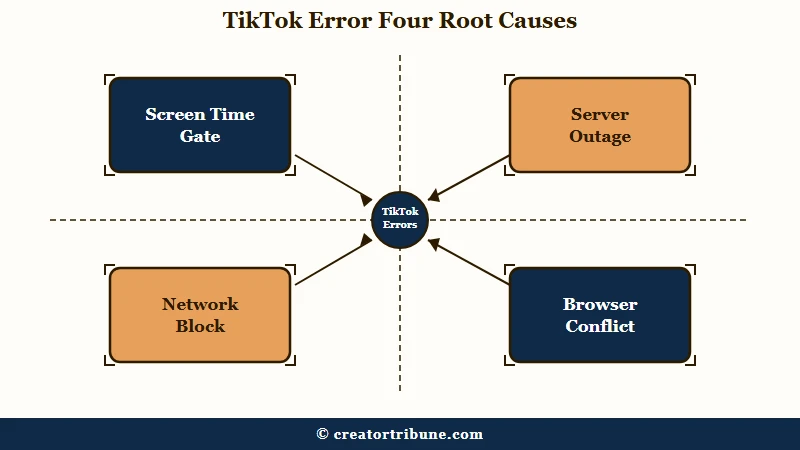
“Something went wrong” is TikTok’s generic fallback message, and it names no cause. TikTok shows it whenever a request fails without a specific error to display. That is why the same words cover outages, network blocks, browser conflicts, screen time limits, broken app installs, lockouts, failed sign-ins, spam limits and single broken features.
TikTok’s own Troubleshooting on TikTok page never names this message. As of October 2026 it lists one order for any app problem: restart the app and phone, update TikTok, switch between Wi-Fi and mobile data, clear the cache, then file a ticket.
The same page says TikTok tests features “with a limited number of users,” so “some new features or changes may not be available to you yet.” So a feature that fails for you while it works for a friend may not be switched on for your account yet.
This is the vaguest error I deal with on any major app, and the vagueness is doing real damage. When the message gives no code, people fill the gap with the scariest explanation available, which is usually a ban.
In practice, most people who see the message are looking at a network fault or a timer, and a real ban or restriction normally names itself on screen.
| Symptom | Likely cause | Fix |
|---|---|---|
| Fires every few minutes while scrolling, identical on Wi-Fi and mobile data | Daily screen time limit gate | Change screen time settings on tiktok.com |
| Comments will not load, view counts missing, uploads stall, friends affected too | Server-side outage | Wait it out and check TikTok or Oracle status posts |
| Works on mobile data but not your home Wi-Fi | Network filtering, proxy or DNS fault | Restart the router, turn off any VPN, test another network |
| Works in a private window but not a normal tab | Browser cookies, cached site data or an extension | Clear site data, disable ad blockers one at a time |
| Only the app fails while tiktok.com works in a browser | The app install or app version | Update the app, then repair or reinstall it |
| Appears at login after several failed tries | Account lockout | Stop retrying and let the attempts lockout expire |
| Appears right after Continue with Google, Apple or Facebook | The linked sign-in route | Log in with the phone number or email on the account |
| Likes, follows, comments or saves to Favorites fail right after a burst of them | A temporary limit on fast actions | Stop those actions for a day, then try again |
| Fails in one feature only, such as search, Shop, a playlist or a sports hub | That feature failing, or not offered to your account yet | Try it on tiktok.com, then submit a ticket from the app |
The fast-action limit is TikTok’s own rule, and its notices read “tapping too fast,” “commenting too fast” or “following too fast.” Its help page on those errors says it may temporarily disable an account that likes, comments or follows too quickly, to prevent spam. The unofficial daily numbers people report are collected in TikTok follow and like caps.
A two-day-old account ran into something like it in March 2026: after a run of likes and follows, every save to Favorites returned “something went wrong, please try again.” It came back after a day away, though another user saw likes stall the same night, so a server fault is possible too.
Where the message appears narrows the rest. If it shows only in search, TikTok search not working covers that feature. If an upload crashes or drops back into drafts without showing this message, why TikTok won’t post walks through those posting failures.
Is It TikTok’s Servers or Your Device?
Two tests answer this. Open TikTok in a private or incognito window, and open it on a different network such as a mobile hotspot. If it works in either one, the fault is local and no amount of waiting will help.
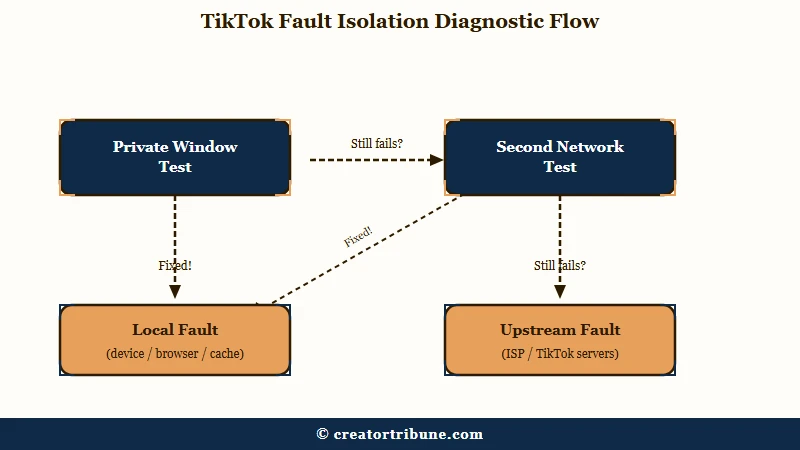
I run both before touching a single setting, because they cost thirty seconds and they split the table above into local faults and everything else.
A private window loads without your stored cookies, cached files, or extensions. If TikTok behaves there, the problem is one of those three things and nothing to do with TikTok itself.
A second network is the other half. If the app works on your phone’s mobile data but fails on home Wi-Fi, your browser and your account are fine. The block sits in the router, a proxy, a DNS setting or a network filter.
The browser test also works in reverse. On October 17, 2026, an r/TikTok user reported two weeks of the message on playlists, including ones saved to Favorites, in the phone app, while the same account worked on a laptop browser.
Clearing the cache, logging out and making a new account changed nothing for them. That points away from the account and toward the app on that phone or the playlist feature itself.
| Test | What you do | If it works there | What to fix |
|---|---|---|---|
| Private window | Open tiktok.com in incognito or a private tab | Your stored cookies, cache or an extension is the cause | Clear site data, then disable extensions one at a time |
| Second network | Switch to a mobile hotspot or different Wi-Fi | Your original network is filtering or misrouting traffic | Restart the router, disable VPN, check proxy settings |
| Both fail everywhere | Try a second device on a third network | Nothing local is wrong, the fault is upstream | Nothing on your end, wait for the platform |
Before: clear the cache, reinstall the app, change your password, then repeat all three when the error returns an hour later.
After: open a private window and a hotspot first, then fix only the layer those two tests point at.
Whichever layer the tests point to, the repair belongs there. If it is the browser or the desktop client, the walkthrough for TikTok not working on PC covers the sequence in more detail.
Why Does the Error Come Back Every Few Minutes?
An error that repeats every few minutes of scrolling, behaves the same on Wi-Fi and mobile data, and clears when you close the app is usually a screen time limit. The limit is surfacing as a generic failure instead of the time prompt it should show.
This is the cause that surprised me most, because it looks nothing like a settings problem. There is no countdown, no “you have reached your limit” screen, just the same generic message on a timer.
TikTok’s Screen time help page says the daily limit is on by default at 1 hour for anyone aged 13 to 17. At the limit, TikTok says you can close the app or enter the on-screen passcode to return to it.
For accounts under 13, a parent or guardian has to enter a passcode to grant 30 minutes more, PBS NewsHour reported when the limits were announced in March 2023.
What is a screen time gate: A time-based interruption that pauses the feed and asks for a passcode before you can continue scrolling.
The trap is what happens when that passcode prompt fails to draw. The gate still fires on schedule, the app still stops you, and the fallback message is what you see instead. If the screen time settings inside the app throw the same error, the control you need sits behind the thing that is broken.
An April 2026 post on r/TikTok fits this pattern: a full-screen “Something went wrong” over “Try again later” every five minutes, starting after the poster cleared an age restriction with a credit card. Switching to another account on the same phone stopped it, which ties the timer to the account.
The way out is to leave the app entirely. On tiktok.com, click your profile picture, then Settings, Screen time and Daily screen time, and switch the limit off. TikTok’s help page says screen time changes apply to both the app and the website.
Some people find the setting already off and the interruption still running, which points at a stale limit on the account rather than on the device.
How Do You Fix Something Went Wrong on TikTok?
Work outward from the cheapest test to the most disruptive fix. Run the private window and second network tests first, then repair only the layer they implicate, and leave reinstalling until last because it signs you out of a session you may need.
Here is the order I use, and the ordering matters more than any individual step:
- Force close the app and reopen it once. Confirm the error repeats before doing anything else.
- Open tiktok.com in a private window. If it loads, stop and fix your browser data or extensions.
- Switch to a mobile hotspot. If it loads, stop and fix your network, router or VPN.
- Check whether the error arrives on a timer while scrolling. If it does, change screen time settings from the website.
- Ask one other person whether the app is behaving. Widespread comment and upload failures mean a platform fault.
- Restart your phone and update TikTok from the App Store or Google Play, the first two steps on TikTok’s own troubleshooting page.
- Only now clear the app cache, and only if steps two through six neither fixed it nor pointed elsewhere. Tap Profile, the Menu button, Settings and privacy, then Free up space, and tap Clear next to Cache.
- Reinstall last, and only if the app fails while the website works normally.
Step seven is deliberately late. Clearing the cache is the most recommended fix for this error and the least likely to be the right one. It does have its place, and clearing the TikTok cache without losing drafts is worth doing properly when you get there.
If the app is closing itself rather than showing an error, that is a different fault with its own causes, and TikTok keeps crashing is the closer match.
Why Does TikTok Say Something Went Wrong for Everyone at Once?
When the whole platform is struggling, the error arrives alongside missing view counts, comments that will not load, and uploads that stall. Those symptoms together are server-side and no local fix touches them.
TikTok’s US operations moved to a new owner on January 22, 2026, when the joint venture with Oracle, Silver Lake and MGX closed. Oracle hosts US user data for the platform’s 170 million US users, and ByteDance retained 19.9 percent.
That transition came with visible instability. A winter storm knocked out power at US data centers days after the handover, leaving people unable to upload videos or see view counts.
On March 3, 2026, a technical error in Oracle’s Ashburn environment caused connection timeouts and increased latency, confirmed by both companies, with creators warned they might see lags in posting.
I do not buy the assumption that a platform-wide wobble means your account has been touched. When search results thinned out during the January outage, plenty of people read it as suppression, and the data center losing power was the duller and more accurate explanation.
Scope is the tell. An account problem leaves your friends scrolling normally while you stare at the message. An infrastructure problem takes down everyone on the platform at the same moment, which is what checking if TikTok is down is for.
Which Fixes Do Nothing at All?
Four widely shared fixes for this error have no mechanism behind them. They are clearing a desktop app’s cache to fix a browser problem, running Windows TokenBroker commands, chasing minimum browser versions, and treating a Singapore seller guide as global policy.
My rule here is that a fix needs a mechanism I can name, and these four do not have one.
Clearing the Windows app cache cannot repair tiktok.com in a browser. The website stores its cookies and cached files in the browser, so emptying an unrelated app’s storage leaves every one of them untouched.
The net stop TokenBroker command circulating in PC fix guides resets a Windows authentication service used by Microsoft Edge profiles. It does not touch TikTok credentials or TikTok’s servers.
Chasing a minimum supported browser version is a dead end too, because no current minimum is published for Chrome, Edge, Firefox or Windows. The related claim that TikTok requires Chrome traces back to a TikTok Shop Academy seller login guide written for Singapore and dated August 2023, which was never a global requirement.
The same pattern shows up on other platforms, and the same error on Instagram collects an almost identical pile of fixes that cannot work.
Frequently Asked Questions
Does something went wrong mean I have been banned on TikTok?
Rarely. A ban or restriction normally names itself, and this message is a generic fallback. If friends see the same failures at the same time, the fault is on TikTok’s side.
Why does TikTok say something went wrong when I try to log in?
Login failures usually come from stored browser data, a network block, or a lockout after repeated attempts. Try a private window first, then a different network before changing your password. If it appears after Continue with Google, Apple or Facebook, log in with the account’s phone number or email, or work through fixing that sign-in route.
Why does the error keep coming back every 15 minutes?
That timing pattern points at a daily screen time limit firing without its passcode prompt. Change the setting on tiktok.com under Settings, then Screen time, and TikTok applies the change to the app as well.
Will clearing my cache fix something went wrong?
Sometimes, but it is the wrong first move. Cache only explains a narrow set of failures, and it does nothing for outages, network blocks, or screen time gates.
How do I know if TikTok is down rather than broken for me?
Missing view counts, comments that will not load, and stalled uploads happening together are server-side. Confirm by asking someone on a different network and device.
Does using a VPN cause this error?
It can. VPNs and proxy settings reroute traffic in ways TikTok sometimes rejects, so turn any VPN off and retest before assuming the fault is with the app.
Quick Takeaways
- “Something went wrong” covers nine unrelated failures, so treat it as a starting point rather than a diagnosis.
- Run the private window and second network tests first. Thirty seconds of testing rules out most of the causes.
- If likes, follows or saves start failing right after a burst of them, stop for a day, since TikTok may temporarily disable accounts that act too fast.
- An error that repeats on a timer while scrolling is a screen time gate, and the setting is reachable from the website when the app blocks it.
- Missing view counts and stalled uploads across your whole feed mean a platform fault on TikTok’s side.
- Save cache clearing and reinstalling for last, because they are the most disruptive steps and the least likely to be the cause.