
Fix TikTok Not Working on PC and Web Browser
Fix TikTok Not Working on PC and Web Browser
TikTok not working on your PC or laptop but fine on your phone? Fix the browser first, then the Edge-run app, reverting likes and a foreign-language feed.
- 1Why TikTok Is Not Working on Your PC
- 2Common TikTok PC and Web Bugs Right Now
- 3How to Fix TikTok on PC Step by Step
- 4When It Is TikTok’s Servers and Not You
- 5Frequently Asked Questions
- Why can’t I see my liked videos on TikTok PC?
- Why do my TikTok likes keep disappearing on desktop?
- Is TikTok web down or is it just me?
- Why does TikTok only show a few creators in my Following feed?
- Does clearing cache delete my TikTok drafts or saved videos?
- 6Quick Takeaways
TL;DR: When TikTok is not working on PC but works on your phone, start with the browser: clear cache and cookies, test a private window, disable extensions and try a second browser. In October 2026 reports, likes and follows failed on PC, and follows kept reverting after cache clears, a fresh login and other browsers, which points at TikTok’s side more than your browser. The Windows TikTok app is a web app that Microsoft Edge runs, so clear Edge’s cache for it even if you never open Edge.
One test saves you an hour of troubleshooting. If TikTok not working on PC is your problem but the app loads fine on your phone with the same account, the platform is up and your account is not banned. The break is on that computer or in TikTok’s desktop site.
I see this confusion every time TikTok acts up on a computer. People assume the whole site crashed, or worse, that they got shadowbanned, when the usual cause is a stale browser cache or a corrupted login session sitting on their PC. The phone-versus-desktop split is the single most useful diagnostic you have, and most fix guides skip right past it.
This guide walks through the desktop and web bugs that hit TikTok users most often. They include likes and follows that undo themselves, a For You feed full of foreign-language videos, a liked tab showing your own uploads and videos that refuse to load. For each one I will tell you the likely cause and the exact fix, in the order I would try them.
What is a browser cache: A store of temporary files your browser keeps so pages load faster. When those files get out of date or corrupt, a site like TikTok can break in odd ways even though nothing is wrong with the site.

Why TikTok Is Not Working on Your PC
TikTok not working on PC usually traces to your browser data or your account, and a full server outage is the rarer cause.
If the mobile app works on the same account, the issue most likely lives on your computer, in your browser data or in that machine’s login session.
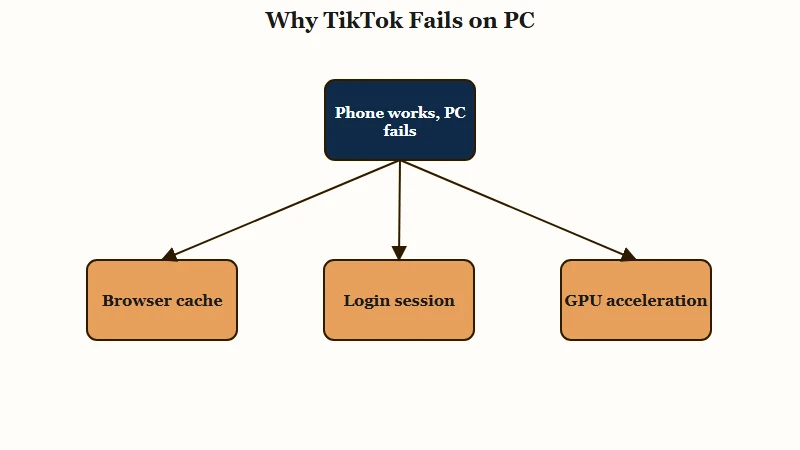
The way I see it, this is the first thing to establish before you touch anything else. Pull out your phone and open TikTok. If your feed, likes, and search all work there, you can stop worrying about an outage and start fixing your desktop.
A second account is the other quick test. When one account breaks on the desktop site while another works on the same machine, the fault is tied to that login’s session, its cookies or a limit on that account.
There is also a hardware-acceleration angle that older guides ignore. If videos load but stutter, freeze on a black screen, or lag badly while everything else on your PC runs fine, your browser’s GPU rendering is often the culprit. I will cover the toggle for that in the fix steps below.
Common TikTok PC and Web Bugs Right Now
The common desktop bugs are likes and follows that undo themselves, a For You feed full of foreign-language videos, the liked tab showing your own videos and videos failing to load.
Each one has a different root cause, so matching the symptom to the fix matters more than running every fix blindly.
The strangest of these is a like or follow that quietly undoes itself a few seconds later or on the next refresh. In r/TikTok reports from October 9 and October 15, 2026, it survived cache clears, a fresh login and three other browsers. A fresh login fixes it only when a broken session is the cause.
Several August and September posters had new accounts, and TikTok’s “too fast” help says it may temporarily disable accounts that like or follow too quickly. A September 2026 poster saw “you’re editing too fast” on an account made that day, on phone and desktop alike. If a second browser does not fix it, slow down and report it in the app rather than clearing more data.
A newer bug turned up on October 21, 2026. An r/TikTok poster said every video on the PC For You feed came from Russian- or Arabic-speaking countries while the phone feed was fine, and three replies within nine hours said the same. In a similar September report, the flood came with a new YouTube-style layout in Firefox, while Microsoft Edge on the same computer still showed normal recommendations.
The liked and favorited tabs redirecting to your own uploads is a UI mapping glitch on the web client. Your saved videos are safe. The page is pointing at the wrong place, which is why checking the same tab on mobile shows everything intact.
Here is the quick-reference table I would keep open while you work through it.
| Symptom | Likely cause | Fix |
|---|---|---|
| Liked or Favorited tab shows your own videos | Web UI mapping glitch or session corruption | Log out and back in, then clear cache. Check mobile to confirm saves are safe. |
| Likes or follows undo themselves after a few seconds | Broken session, a limit on new or fast-acting accounts, or a fault on TikTok’s side | Fresh login and a second browser. If both fail, slow down and report it in the app. |
| For You feed full of foreign-language videos | Desktop-only feed fault reported in September and October 2026 | Try a second browser. Phones were unaffected in the reports. |
| Only a few videos load, then a log-in prompt | Logged out, often after clearing cookies | Log back in. Logged-out viewing is temporary and cannot like, follow or message. |
| Following feed shows only 2 to 3 creators | Feed data filtered wrong by the desktop client | Log out, clear cache, reload. Switch account to confirm it is session-side. |
| Videos will not load or play | Stale cache, outdated browser, or extension conflict | Clear cache, update browser, test in a private window. |
| Video stutters or shows a black screen | Browser hardware acceleration or GPU driver | Toggle hardware acceleration off, update graphics driver. |
| Links open the app store instead of the video | Intentional redirect to push the mobile app | Use Request Desktop Site or a viewer extension. |
If your trouble is low views on your own posts rather than a loading bug, our guide on low TikTok FYP views covers that distribution side in detail.
How to Fix TikTok on PC Step by Step
Fix TikTok on PC by clearing browser data, refreshing your login session, and ruling out extensions and hardware acceleration, in that order.
Many desktop bugs clear in the first two steps, so I would not jump straight to reinstalling anything.
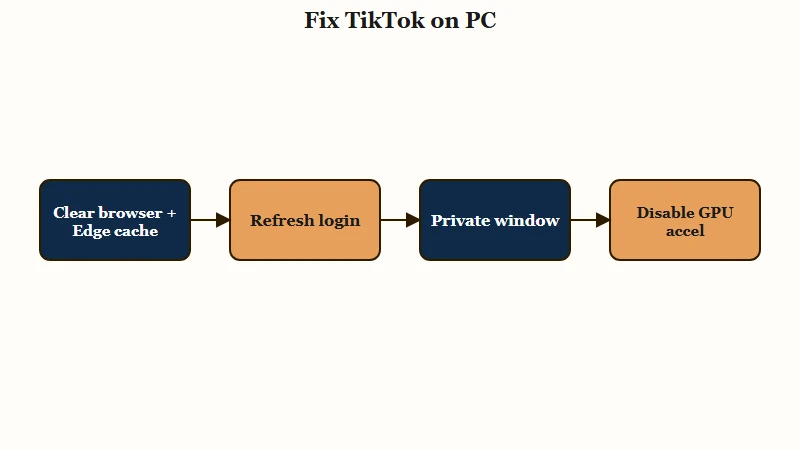
From my testing, cache and session data cause many of these desktop bugs, so I would run this sequence top to bottom and test after each step rather than doing everything at once.
- Clear your browser cache and cookies. In Chrome, open Settings, then Privacy and Security, then Delete Browsing Data, and select cached images and files plus cookies, or press Ctrl, Shift and Delete. In Safari, open Settings, then Privacy, then Manage Website Data, and remove the TikTok entries.
- Clear Microsoft Edge’s cache too if you use the Windows app. The Microsoft Store app has been a Progressive Web App since its June 2021 launch, per Windows Central, and Microsoft’s PWA documentation shows Edge loading PWAs installed from the Store. Clear Edge’s cache the same way you would in Chrome, and if Windows Settings shows Advanced options for TikTok, Microsoft’s repair guide says to try Repair, then Reset.
- Log out and back in. A fresh login rebuilds a broken session, which fixes the wrong liked tab and some self-unliking. If step 1 already logged you out, sign back in, since TikTok’s logged-out help says a logged-out visitor can watch only temporarily and cannot like, follow or message.
- Hard refresh the page. Press Ctrl and Shift and R together to force the browser to reload everything from scratch instead of from cache.
- Test in a private or incognito window, then in a second browser. A private window runs TikTok with no extensions and no stored data, so if it or a second browser works, an extension, your cache or that browser was the problem. Installing the Microsoft Store app counts as a switch to Edge, since Edge runs it.
- Disable extensions one at a time. Ad blockers, script blockers, and privacy add-ons are the usual offenders. Turn them off, reload, and re-enable them one by one to find the culprit.
- Turn off your VPN and switch networks. If TikTok will not open in any browser, disconnect any VPN, then load it over your phone’s hotspot. TikTok’s troubleshooting page suggests switching between Wi-Fi and mobile data to rule out the connection.
- Turn off hardware acceleration. If videos stutter or black-screen, open your browser settings, search for hardware acceleration, switch it off, and restart the browser. Update your graphics driver while you are at it.
- Try a different account. If a second account works on the same machine, the problem is tied to your main login, so try a full logout plus cookie clear. If likes or follows still revert after that, slow down and report it in the app.
Here is what good troubleshooting looks like versus the version that wastes your afternoon.
Before: TikTok looks broken on my laptop so I assume the site is down, refresh the page fifty times, then panic that my account got banned.
After: I open TikTok on my phone, see my feed loads fine, and now I know TikTok is up and my account is not banned. I clear my browser cache, clear Edge’s cache for the Windows app and log out and back in, and I am working again in three minutes.
If your desktop trouble is really the app freezing or closing rather than a web bug, the mobile-app side has its own causes, and our walkthrough on when TikTok keeps crashing handles that path.
When It Is TikTok’s Servers and Not You
It is TikTok’s side when the failure hits every device and network at once, or when many people report the same desktop-only fault on the same day.
If your phone on mobile data is also broken, then a local cache fix will not help and waiting it out is the right call.
What I would check first is the cross-device test again, but in reverse. Open TikTok on your phone using mobile data instead of your home Wi-Fi. If it is still broken there, the problem is bigger than your PC.
A handful of earlier desktop glitches genuinely were short server hiccups that resolved within a day or two. That happens, but it is the exception, and it is worth confirming before you assume it. Our breakdown on whether TikTok is down shows the exact signals that separate a real outage from a local fault.
TikTok also redirects browser links to the app store on some devices to push you into the mobile app, so a link that will not open in your browser is not always a bug. Using your browser’s Request Desktop Site option usually gets around it.
Uploads from a computer have their own limits. The TikTok Studio help says web uploads must be MP4 or WebM, at least 720×1280, up to 30 minutes long and under 10 GB, so a file outside those limits can fail to post.
Photo posts are murkier, since the same help describes web uploads only as video. Yet an October 12, 2026 r/TikTok poster said a desktop browser was the only place they could make a carousel, because the app kept turning their photos into a video. Our TikTok photo slideshow guide covers why that happens and what works from a computer.
If your uploads look soft or compressed after posting from desktop, that is a separate encoding issue covered in our guide on TikTok video quality after posting.
Going LIVE is the other desktop dead end that looks like a bug. TikTok’s LIVE comments help says going LIVE from a web browser needs LIVE Studio on Windows or OBS Studio, and only creators who meet TikTok’s requirements can go LIVE at all.
Frequently Asked Questions
Why can’t I see my liked videos on TikTok PC?
Your liked videos are not deleted. The desktop site has a known glitch where the Liked or Favorited tab points at your own uploads instead of your saved videos. Log out and back in, clear your cache, and confirm on mobile that your saves are still there.
Why do my TikTok likes keep disappearing on desktop?
A broken session can do it, and a fresh login and a cookie clear fix that. In October 2026 reports the same revert hit follows and survived both plus a switch to three other browsers, and in September two brand-new accounts lost likes and follows this way. TikTok says it may temporarily disable accounts that like too fast, so slow down and report it in the app.
Is TikTok web down or is it just me?
If TikTok works on your phone but not your PC, it is usually your browser or login session. A desktop-only bug such as the October 2026 foreign-language feed can still hit many users at once, so search r/TikTok for the symptom. If it is broken on your phone over mobile data too, then TikTok may be having a genuine outage.
Why does TikTok only show a few creators in my Following feed?
The desktop client is filtering your feed data incorrectly, collapsing it to a handful of accounts. Logging out, clearing cache, and reloading usually restores the full feed, and switching accounts confirms whether it is session-side.
Does clearing cache delete my TikTok drafts or saved videos?
No. Clearing your browser cache only removes temporary web files on that device. Your drafts live in the mobile app and your saved videos live on your account, so neither is affected by a browser cache clear.
Quick Takeaways
- The phone-versus-PC test is your fastest diagnostic. If mobile works on the same account, TikTok is up and you are not banned, so the fault sits on your PC or in TikTok’s desktop site.
- Clear Microsoft Edge’s cache even if you use the standalone Windows TikTok app, because that app is a web app Edge runs.
- A liked tab showing your own videos is a session bug. Likes and follows that keep undoing themselves after a fresh login point at TikTok’s side, such as a limit on new accounts.
- Toggle off hardware acceleration when videos stutter or black-screen, then update your graphics driver.
- Treat it as TikTok’s problem when every device fails at once, including your phone on mobile data, or when many desktop users report the same fault that day.