How to Make a Slideshow on TikTok When It Turns Into a Video
How to Make a Slideshow on TikTok When It Turns Into a Video
A TikTok slideshow stays swipeable when you tap Photo before Upload. Get the exact steps and the fix when your photos turn into a video.
- 1How Do You Make a Slideshow on TikTok?
- 2Why Does My TikTok Slideshow Turn Into a Video?
- Where Is the Switch to Photo Mode Button on TikTok?
- 3Why Is the Slideshow Option Missing on TikTok?
- 4How Do You Add Text to a Slideshow on TikTok?
- 5How Do You Add Music to a TikTok Slideshow?
- 6What Size Should Photos Be for a TikTok Slideshow?
- 7Can You Make a TikTok Slideshow on a Computer?
- 8Quick Takeaways
TL;DR: To make a slideshow on TikTok that people can swipe, tap the + button, tap Photo, then tap Upload and pick up to 35 photos. Photos added through Upload without choosing Photo, through a template or from another editing app come out as a video that viewers cannot swipe. If Photo is not there, look for a Photo tab after Upload or Switch to photo mode after Next, and update TikTok if neither appears.
How to make a slideshow on TikTok comes down to one tap, and the guides disagree on where it is. TikTok’s own help page on posting puts it first: “Tap Photo, then tap Upload to select photos from your device.”
A photo post holds up to 35 photos. Start anywhere else and TikTok can build a video instead, one your viewers cannot swipe.
In an October 2026 post on Reddit’s r/TikTok, a creator picked photos, pressed Next and got “a videoslideshow and not the standard one,” with no carousel option in sight.
Which format you post also changes how it performs, by TikTok’s own numbers. In a message to creators, TikTok said carousels get “2.9x more comments,” “1.9x more likes” and “2.6x more shares on average” than video posts, Modern Retail reported on April 9, 2024. Those numbers come from TikTok, not an independent study, but they are why I never let a carousel go out as a video by accident.
If Photo is not where the steps below put it, your app version probably places it elsewhere, and the section on the Switch to photo mode button covers the other two spots.

How Do You Make a Slideshow on TikTok?
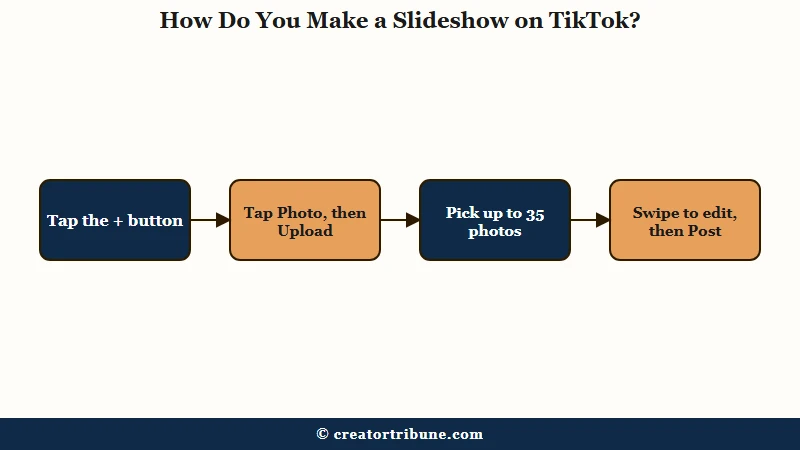
You make a slideshow on TikTok by tapping the + button, tapping Photo, then tapping Upload and choosing up to 35 photos. TikTok posts them as a photo carousel that viewers can swipe through at their own pace.
What is Photo Mode: TikTok’s carousel format for still photos. The photos advance on their own, and viewers can also swipe through them at their own pace.
TikTok announced Photo Mode with a batch of editing tools on October 6, 2022, and TechCrunch reported the update reached users “in the U.S. and most regions globally” that day.
The steps below come from TikTok’s own help page. The step I never skip is the second one, because on TikTok’s current layout, Photo has to come before Upload.
- Open TikTok and tap the + button at the bottom of the screen.
- Tap Photo, then tap Upload.
- Select your photos, up to 35.
- Tap Next. Swipe between the photos to add a filter, sound, text or stickers, or to crop one.
- Tap Next again to add a description and hashtags, edit the cover and set who can view the post.
- Tap Post, or tap Drafts to finish it later.
Step 4 is where you can tell which format you are building. TikTok’s help says that on this screen you “swipe to switch photos and make edits,” so if you can swipe from one photo to the next, you are building a carousel. If you cannot swipe and the preview plays your photos like a clip, you are building a video.
Step 5 hides two easy mistakes. Tap Next, not Your Story, unless you want the photos in your Story instead of your feed. Check who can view the post too, because TikTok’s help says new posts “retain your previous post’s privacy setting.”
Edit cover still appears in TikTok’s help for the screen in step 5. A December 2025 Reddit post said the cover option had disappeared for slideshows, and replies asking the same thing ran into May 2026. No reply offered a fix, so updating the app is the next thing to try, though it may not bring the option back.
| Feature | Photo Mode carousel | Video slideshow |
|---|---|---|
| How it plays | Photos advance on their own, and viewers can swipe at their own pace | Plays like a clip, with no swiping between photos |
| How you start it | Tap +, then Photo, then Upload | Upload without choosing Photo, a template, or another editing app |
| What it holds | Photos only, up to 35 | Photos and clips, up to 35 items per editing session |
| Sound | One sound for the whole post | One sound for the whole post |
| Creator Rewards | Not eligible | Not eligible when it is built from photos |
One carousel takes a few minutes by hand, so creators posting carousels every day across several accounts sometimes automate the tapping with a tool such as SMTasker, which drives Android phones you connect yourself.
Its own press release warns that automation breaking platform rules “may result in temporary restrictions, reduced functionality, account limitations or other actions,” so keep it away from an account you cannot replace. Use the five-day trial to confirm it can publish photo posts before you build a routine around it.
If your preview already plays like a clip, the next section shows which tap caused it.
Why Does My TikTok Slideshow Turn Into a Video?
A TikTok slideshow turns into a video when the photos go in through a video route. The usual ones are Upload without choosing Photo, an effect template, a clip mixed in with the photos, or a file saved from another editing app.
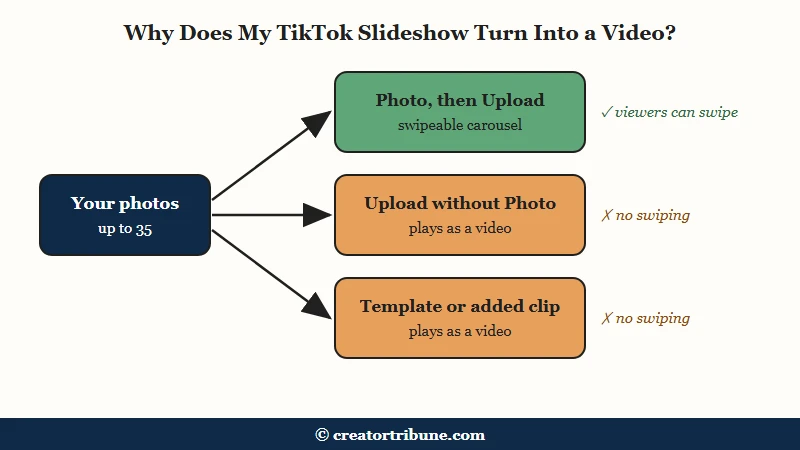
TikTok keeps photos and videos on separate routes. Its help page sends videos through the creation screen you see after tapping +, where “you can also tap Upload to add videos from your device,” and sends photos through Photo first. Photos picked from the video side usually get built into a slideshow that plays like a clip.
Tapping Upload straight from the creation screen is the slip I guard against most, so Photo is always my first tap. Here is the difference in practice:
Before: Tap +, tap Upload, select 12 photos, tap Next. The preview plays the photos one after another like a clip, and you cannot swipe.
After: Tap +, tap Photo, tap Upload, select the same 12 photos, tap Next. You can swipe from one photo to the next and edit each one.
Two more video routes are easy to miss. For effect templates, TikTok’s editing help has you tap Create, pick a template, then “select photos or videos to add to the template.” The same page says the editor takes up to 35 items “which can include photos and videos,” while a photo post holds photos only, so adding even one clip builds a video.
| What you tapped | What TikTok builds | What to do instead |
|---|---|---|
| + then Upload, without choosing Photo | A video that plays your photos in order | Go back and choose Photo, or tap Switch to photo mode if your app offers it |
| Create, then an effect template | A video built on the template | Use Photo, then Upload, and add a sound yourself |
| Photos plus a video clip | A video, since a photo post holds photos only | Post the clip separately |
| A slideshow saved from CapCut or another editor | A single video file | Upload the original photos through Photo |
| Upload on tiktok.com in a browser | A video upload | Move the photos to your phone and post from the app |
If you want the video version on purpose, those same routes are how you get it. It will not earn money from the Creator Rewards Program, which pays eligible creators for qualified views.
TikTok’s program rules count content with “single or multiple photos” as not original and require videos of at least one minute, and Creator Rewards rejections covers the rest of that program’s rules.
If a slideshow already went out as a video, repost the photos through Photo. Deleting the video first is reversible for a while, because TikTok’s help on deleting posts says a deleted post stays in Recently deleted for up to 30 days.
Where Is the Switch to Photo Mode Button on TikTok?
The Switch to photo mode button shows up in some TikTok versions, after you select photos and tap Next. TikTok’s current help page on posting never names it and starts the photo route with Photo before Upload instead.
Published guides put the photo choice in three different places, most likely because TikTok has moved it between app versions:
- On the creation screen you see after tapping +, as Photo. This is what TikTok’s own help page describes today: tap Photo, then Upload.
- At the top of the upload screen, as a Photo tab beside Video. TokPortal’s March 2026 guide describes this layout.
- At the bottom of the editing screen after you tap Next, as Switch to photo mode. Metricool’s November 2025 guide puts it there, and MakeUseOf’s launch coverage described the same button in October 2022.
I check those three spots in that order and stop at the first one my app shows. If none of them appear, the Photo option is missing on your account, and the next section covers that.
Why Is the Slideshow Option Missing on TikTok?
The slideshow option goes missing on TikTok when the app is out of date, and on some accounts and phones it stays missing even on the newest version. TikTok’s help gives no reason, so start with an update and work down the list.
The missing Photo option is an old problem. On Reddit, a Pixel 6a owner on the newest app at the time could not find the switch in October 2023. A July 2026 post said TikTok “doesn’t even give me the option to when I select photos.”
When the option vanishes for months, it is easy to assume TikTok dropped Photo Mode, and I don’t buy that, since its help page still walks through the photo route step by step. My order runs from the cheapest fix to the most drastic one:
- Update TikTok from the App Store or Google Play. TikTok’s help lists “Make sure you’re running the latest version of TikTok” among its basic fixes for posting trouble.
- Close TikTok fully, restart the phone, then open the app and tap + again.
- Clear the app’s cache, another fix on TikTok’s own list. It leaves drafts in place but can sign you out now and then, so clearing the cache safely starts with knowing your password.
- Post any draft you want to keep, then switch to another account or log out and back in, and restart the app. TikTok’s drafts help says drafts “can’t be shared or transferred between various accounts.” In one Reddit thread, switching accounts and then closing and reopening the app worked for the original poster and for one of the two people who tried it afterwards.
- Report it inside TikTok. Tap “Need more help?” in TikTok’s in-app help, follow the steps to submit a ticket and add a screenshot of your creation screen.
Leave a reinstall off the list unless you have nothing to lose. TikTok’s drafts help says they may be removed when TikTok “has been uninstalled, then reinstalled on a device.” In a March 2026 Reddit post, a reinstall and a cache clear both failed for a creator who had not been able to make slideshows “since around 2022.”
If drafts did vanish after a reinstall or a logout, why TikTok drafts disappear covers what can still be recovered.
If Photo never shows up, one workaround still gets your photos posted. A June 2026 Reddit reply suggested creating a video and adding photos “instead of video clips.” That gives you a slideshow viewers watch rather than swipe, so I treat it as a stopgap for a post that has to go out today.
How Do You Add Text to a Slideshow on TikTok?
You add text to a TikTok slideshow one photo at a time. On the editing screen, swipe to the photo, tap Text, type your words, then drag them into place before you swipe to the next photo.
Keep the words inside the photo itself. In an October 2025 Reddit post, text placed in the black space above or below a photo “disappears behind the black,” even though older slideshows from the same creator had text there. I keep one short line per photo, near the middle, where the caption and buttons do not cover it.
The text steps in TikTok’s help, plus one for a carousel, run like this:
- Tap the Text button on the side panel.
- Type your words and tap Done.
- Pick a font, then tap the color wheel to change the text and background colors.
- Press and hold the text to drag it where you want it, and pinch with two fingers to resize it.
- Swipe to the next photo and repeat.
The caption under the post is separate from the text on the photos. TikTok’s developer documentation allows photo posts a title of up to 90 characters and a description of up to 4,000, so a long caption fits.
How Do You Add Music to a TikTok Slideshow?
You add music to a TikTok slideshow on the editing screen by tapping the sound control and picking one track. A TikTok post carries one sound, and it plays while viewers move through the photos.
Add the sound before you tap Drafts. In a September 2026 Reddit post, a creator saved a slideshow draft with no sound and found no way to add one later. My fix in that spot is to rebuild the post from the original photos and pick the sound first.
TikTok’s sounds help page says you can add a sound “while on the editing screen.” Changing it later replaces the old one, because “all previous background music and voices will be replaced.”
Business accounts get a smaller library. TikTok’s help says a Business Account “cannot use music on TikTok that’s not licensed for commercial use,” so a song can vanish on a brand account. If you want audio you made yourself, adding your own sound walks through it.
A Trim button should sit next to the sound you pick, according to TikTok’s help. An August 2026 Reddit post said there was no scissors icon to trim the audio when posting slideshows, though trimming still worked on a regular video.
If your app shows the same gap, a sound that has to start mid-song means choosing between a trimmed video and an untrimmed carousel.
What Size Should Photos Be for a TikTok Slideshow?
Photos for a TikTok slideshow fill the screen best at a 9:16 shape, such as 1,080 by 1,920 pixels, cropped before you upload. TikTok’s posting help sets no size for photo posts, and the API outside apps use to post caps photos at 1080p and 20MB.
TikTok’s media transfer guide for its Content Posting API lists JPEG and WebP images, a “Maximum of 20MB for each image” and a “Maximum 1080p” resolution. That makes 1,080 by 1,920 the safe target for a tall photo.
Crop outside TikTok. A September 2026 Reddit reply said cropping inside the app “doesn’t usually work” and that “if there’s any non 9:16 pics in the carousel it messes up the whole post.” I crop every photo to 9:16 on my phone before it goes anywhere near TikTok.
| Photo setting | Safe target |
|---|---|
| Shape | 9:16, tall |
| Size | 1,080 by 1,920 pixels |
| File type | JPEG or WebP |
| File size | Under 20MB per photo |
| Crop | Before upload, outside TikTok |
Tall images such as comic panels need a different fix. Place each one on a 1,080 by 1,920 canvas with a plain or blurred background, as a September 2026 Reddit reply on comic panels suggested, so the panel stays centered instead of getting enlarged.
If a slideshow went out as a video and looks soft, blurry TikTok uploads covers the video quality settings.
Can You Make a TikTok Slideshow on a Computer?
TikTok’s help describes browser uploads only as video uploads. If your browser upload screen shows no photo option, a swipeable slideshow made on a computer needs a scheduler that posts through TikTok’s Content Posting API.
For a web browser, TikTok’s help page gives the steps as “Click Upload at the top” and “Click Select video to upload or Select file,” with no photo option named.
In April 2026, a creator on Reddit found that tiktok.com “only shows me that I can upload a video online and not a slideshow.” In June 2026, another asked when TikTok would make slideshows “available for desktop users.”
Scheduling tools are the way around it. TikTok’s developer documentation says the API accepts photo posts of “up to 35 photo content URLs,” so a tool built on it can publish a real carousel. Pick one that has passed TikTok’s review, because the developer guide says “All content posted by unaudited clients will be restricted to private viewing mode.”
For a single post, I send the photos to my phone and post from the app, since a scheduler takes more setup than one post is worth. Save the scheduler for a weekly batch.
Quick Takeaways
- Choose the photo option, whether your app shows Photo before Upload, a Photo tab or Switch to photo mode after Next, and TikTok builds a swipeable carousel.
- Upload without choosing Photo, an effect template, a clip in the mix or a file from another editor all produce a video.
- If Photo is missing, update and restart first, post any drafts before you log out, switch accounts or reinstall, and report it in the app if it never returns.
- Add text one photo at a time and pick the sound before saving a draft, then crop every photo to 9:16 before uploading.
- From a computer with no photo option on the upload screen, use a scheduler that has passed TikTok’s API review, or move the photos to your phone.