TikTok Unable to Authorize and the Fix for Every Login Method
TikTok Unable to Authorize and the Fix for Every Login Method
TikTok unable to authorize usually means a Google, Facebook, Apple or X sign-in failed to vouch for you. Find which login broke and the fix that works.
- 1Why Does TikTok Say Unable to Authorize?
- Is Unable to Authorize a Sign That You Are Banned?
- 2Which TikTok Login Method Is Failing?
- 3What Should You Do Before Reinstalling or Unlinking Anything?
- 4How Do You Fix Unable to Authorize With Google, Facebook or Apple?
- Why Does Continue With Google Fail?
- Why Does Continue With Facebook Fail?
- Why Does Continue With Apple Fail?
- 5Can You Still Log In to a TikTok Account Made With X?
- 6Why Does TikTok Say Unable to Authorize When You Create an Account?
- 7Do Old iPhones, VPNs or the Wrong Clock Cause It?
- 8What Should You Do If Nothing Fixes Unable to Authorize?
- 9How Do You Stop TikTok Login Errors From Coming Back?
- 10Quick Takeaways
TL;DR: TikTok shows “Unable to authorize. Please try again” when a sign-in cannot be completed, most often because the Google, Facebook, Apple or X account you use does not vouch for you. TikTok no longer supports X or Instagram as sign-up methods, so those accounts are the most exposed. Add a phone number and email wherever you are still logged in, then fix the sign-in method that failed.
The TikTok unable to authorize error usually appears right after a reinstall, a new phone, or a tap on Continue with Google, Facebook, Apple or X. The full message reads “Unable to authorize. Please try again,” and trying again rarely changes anything. Until it clears, your drafts and DMs sit behind that screen.
Most fix lists repeat the same generic steps, like clearing the cache and reinstalling, without asking which login you used. I put one step ahead of all of them: getting a phone number or email onto the account before you reinstall or unlink anything.
This guide sorts the error by the sign-in method that failed, using TikTok’s own help pages and the settings pages at Google, Facebook, Apple and X. You will know which button broke, what to check on the other company’s side, and when to file a ticket instead of tapping again.

Why Does TikTok Say Unable to Authorize?
TikTok says unable to authorize when it cannot complete a sign-in, most often because your Google, Facebook, Apple or X account does not finish the hand-off proving you own the TikTok account.
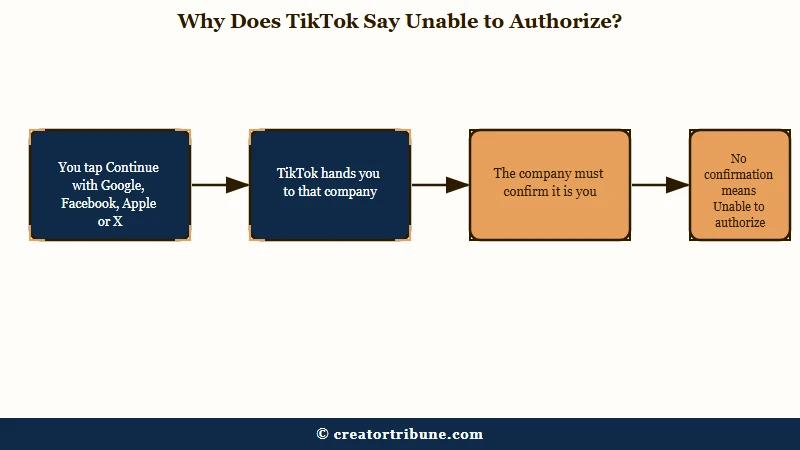
What is a third-party login: Signing in to TikTok with a Google, Facebook, Apple or X account instead of a TikTok password, so the other company confirms who you are.
TikTok’s own account creation guide states the first rule plainly: “Instagram and X (formerly Twitter) are not supported sign-up methods.” The same guide adds that if you “previously signed up for a TikTok account using X, you may still be able to log in.”
That word “may” is why I treat any X-based account as at risk. An account built on an X or Instagram login is running on a sign-in method TikTok has stopped promising to support.
A second rule in that guide catches people on the sign-up screen. Each phone number, email address and social media account “can only be linked to one TikTok account.” A Google or Apple ID that already belongs to an old TikTok account cannot open a new one.
The message is also old. A February 2021 question on Apple’s support community describes the same words after a switch to a new iPhone, and 1,497 people have marked it “Me too.”
TikTok support told that poster the problem sat with Apple’s login system. An Apple community specialist suggested it was specific to the new iPhone instead, since the same Apple ID still worked on the poster’s Mac and old iPhone. A fresh install did not fix it, and the question closed with no fix on record, which is why this guide starts with the login method.
Is Unable to Authorize a Sign That You Are Banned?
The message on its own is no ban notice, because TikTok reports bans through a notification and the Account status page.
TikTok’s rules on violations and bans say the owner “will be notified” when TikTok takes action, and Account status shows one of four states: Healthy, Fair, Severe or Banned. If any phone or browser still has you logged in, check Account status there before assuming the worst.
Which TikTok Login Method Is Failing?
The fix depends on the button you tapped, so name it first: Google, Facebook, Apple, X, or the sign-up screen for a brand new account.
My first question for anyone stuck here is which button they tapped, because each one hands you to a different company with its own settings. The table below maps each version of the error to the cause worth checking first and the first thing to try.
| Where you see the error | Cause to check first | First fix to try |
|---|---|---|
| Continue with Google | A different Google account picked, or TikTok’s link removed on Google’s side | Pick the Google account you signed up with, then check Google’s linked apps page |
| Continue with Facebook | Facebook’s Apps, websites and games setting is turned off | Turn that setting back on in Facebook’s Apps and websites page |
| Continue with Apple | This phone is not signed in to your Apple Account, or two-factor authentication is off | Sign in under Settings and confirm two-factor authentication |
| Continue with X | X is no longer a supported TikTok sign-up method | Use Forgot password with a phone or email, or file a ticket |
| Sign up for a new account | That Google, Apple or Facebook ID already belongs to another TikTok account | Use a different login method, or recover the old account |
| Works on tiktok.com or another phone, fails in this app | App, network or phone settings on this one device | Update the app and the phone, switch networks, turn off any VPN |
If the error appears no matter which button you tap, the phone or the network is the likelier culprit, so jump to the section on phones and networks below. A different message, “Maximum number of attempts reached,” means TikTok paused logins after too many tries, and that lockout has its own fix.
What Should You Do Before Reinstalling or Unlinking Anything?
Before you reinstall TikTok or remove it from Google, Facebook, Apple or X, add a phone number and email to the account from any device where you are still logged in.
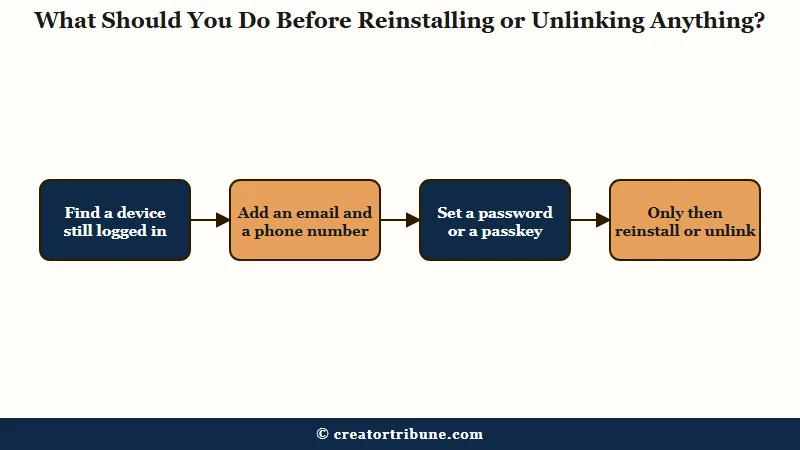
Reinstalling logs you out, and a log-out is the moment a broken third-party login strands an account. A fresh install also failed in both the 2021 Apple case above and a May 2026 iPhone 8 case covered below, and it erases drafts saved on that phone.
TikTok’s password reset guide says that “if you joined TikTok using another social media account, you’ll need to reset the password from that platform.” Until a phone or email is on file, TikTok’s own reset has nowhere to send a code.
I keep a phone number and an email on every account I run for exactly this reason. It takes about two minutes, and it turns a dead-end lockout into an ordinary password reset.
TikTok’s email and phone guide lists the in-app path to add an email or phone, so use any phone or tablet where TikTok still opens your account:
- In the TikTok app, tap Profile, then the Menu ☰ button, then Settings and privacy.
- Tap Account, then Account Information.
- Tap Email, enter an address you control, tap Send code, then enter the code.
- Go back and add a Phone number the same way.
- If Password appears under Account, set one too, so the account no longer depends on any outside login.
Before: Continue with Facebook fails, you delete and reinstall TikTok, the drafts on that phone are gone, and Forgot password has no email or phone to send a code to. After: You open TikTok on a tablet where it still works and add an email and phone under Account Information. Then you tap Use phone / email / username on the phone and log in with the code.
If no device is still logged in, skip ahead to the section for your login method.
How Do You Fix Unable to Authorize With Google, Facebook or Apple?
The fix for these three usually sits in the other company’s settings, which decide whether TikTok is allowed to sign you in.
These three pages are where I look before touching TikTok itself. Only remove and re-approve a link after the safety step above, because removing it can sign TikTok out on that phone.
| Login | Where to check | What to look for |
|---|---|---|
| myaccount.google.com/linkedapps, then Sign in with Google | TikTok listed under the Google account you signed up with | |
| Settings and privacy, Settings, Apps and websites | Apps, websites and games turned on under Preferences | |
| Apple | Settings, your name, Sign in with Apple | TikTok listed, plus two-factor authentication turned on |
| X | X settings, Apps and sessions | Leave TikTok connected, since TikTok no longer takes X sign-ups |
Why Does Continue With Google Fail?
Continue with Google can fail when you pick a different Google account than the one tied to TikTok, or when the link was removed on Google’s side.
The account picker shows every Google account on the phone, so tap the one you used at sign-up. To check the link itself, Google’s linked apps help page says to open the linked apps page and choose Sign in with Google. Pick the app and tap See details, where Stop using Sign in with Google removes the link.
Google notes that “if you delete a link, Google stops automatic sign-in to the app,” so the next attempt asks you to approve TikTok again. Do that only once a phone or email is on your TikTok account.
Why Does Continue With Facebook Fail?
Continue with Facebook fails when Facebook’s Apps, websites and games setting is off, because Facebook then refuses every app login it is asked to confirm.
Facebook’s help page on this setting is blunt: with it off, “you won’t be able to log into apps, games and websites using Facebook.” The switch sits under Settings and privacy, Settings, Apps and websites, then Preferences.
This is the check I would run first on any Facebook-based account, because the setting is easy to flip during a privacy cleanup and the TikTok error never names it. A July 2026 report shows how it plays out: an account that only ever used Facebook was reinstalled, and Continue with Facebook then either did nothing or returned the error.
Why Does Continue With Apple Fail?
Continue with Apple fails when the phone is not signed in to your Apple Account or two-factor authentication is off, since Apple requires both for Sign in with Apple.
Apple’s Sign in with Apple page lists both requirements: “You need to be signed in to your Apple Account. You also need two-factor authentication turned on.”
Confirm both on any new iPhone first. In the 2021 Apple question above, both were already in place and a fresh install did not help, so Apple’s specialists sent the poster to Apple Support.
Apple’s app management page shows where TikTok sits: Settings, your name, then Sign in with Apple. Deleting TikTok there signs you out of it, so keep that as a last step.
Can You Still Log In to a TikTok Account Made With X?
Sometimes: TikTok dropped X as a sign-up method and says older X accounts only “may still” log in, so plan to recover the account another way.
Coverage of the change dates back to at least October 2024, when Dataconomy reported that TikTok “no longer supports logging in or creating accounts using Twitter (now called X).” A September 2025 report shows the result, with account recovery through X returning “unable to authorise.”
I don’t buy the idea that waiting a few days fixes this one, since the login method itself is unsupported. Instagram sign-ups are in the same position, and TikTok’s guide does not even give them a “may still” line.
The routes that work run through a phone number or email on the account:
- If TikTok still opens on any device, add an email and phone first, as shown above.
- If not, tap Forgot password? on the login screen and try every email and phone number you might have used.
- If neither is on the account, tap Recover account under Forgot password? and answer the identity questions. TikTok’s reset guide says it may ask for “your registered email, phone number, or previous passwords.”
- File a ticket with your sign-up method and a screenshot, as covered at the end of this guide.
Why Does TikTok Say Unable to Authorize When You Create an Account?
On the sign-up screen, the error usually means the Google, Apple or Facebook ID you picked already belongs to another TikTok account, and TikTok allows one account per login.
TikTok’s sign-up troubleshooting asks you to make sure an account “is only associated with one login method” and to check whether you “logged in to an old TikTok account with the same login method.” Its next line is the rule itself: “You need to create new accounts with a different login method.”
It can also stop a brand new account, as in a July 2025 report, where creating one gave the same error as logging in. A deleted account also holds its email or phone for 30 days before it is erased, per TikTok’s email and phone guide, so a fresh sign-up with that address fails until then.
If the old account on that login was banned, appeal it instead of opening a new one. TikTok’s ban rules say a new account made after a severe ban can be restricted or banned while the old ban “remains active,” so a careful appeal is the only route I trust there.
Do Old iPhones, VPNs or the Wrong Clock Cause It?
An old iPhone alone does not explain it, since TikTok still supports iPhone 8 and iOS 14, so check the app version and the phone’s network and clock settings instead.
The App Store listing for TikTok version 47.0.0, released September 22, 2026, asks only for iOS 14.0 or later, and iPhone 8 and iPhone X are on its supported list. The phone’s age by itself is not the cause.
A late May 2026 report came from an iPhone 8, where “unable to authorise access” appeared on Google sign-in while the same account logged in fine in a browser and on a PC. That split points at the app or the phone’s settings.
I would still turn off any VPN and set the clock to automatic before anything bigger, because both checks take seconds. TikTok’s troubleshooting steps cover app updates and networks, and the VPN and clock checks join them here:
- Update TikTok in the App Store or Google Play, and update the phone’s system software.
- Switch from Wi-Fi to mobile data, or the reverse, and turn off any VPN.
- Set the phone’s Date and Time to update automatically.
- Restart the phone, then try the login once more.
If the app then shows “Something went wrong” instead, that message has a separate set of causes.
What Should You Do If Nothing Fixes Unable to Authorize?
File a ticket through TikTok’s help center with your sign-up method and a screenshot of the error, the two details TikTok’s sign-up guide asks for.
From a logged-out phone, the web route works: open any TikTok help article in a browser, click No under “Was this helpful?”, then Need more help?, and follow the steps to submit a ticket. The guide to reaching TikTok support covers the other channels if the ticket stalls.
I’d write the ticket so a support agent can act on it in one read:
Vague: “I can’t log in, please help.” Specific: “Since October 4, Continue with Google shows ‘Unable to authorize. Please try again.’ on my iPhone 13, iOS 26, TikTok 47.0.0. Username @yourname, signed up with Google in 2023. Login at tiktok.com still works. Screenshot attached.”
If the account cannot be recovered and was never banned, starting over is allowed. SMTasker is one tool creators use to schedule posts and run Instagram, TikTok and Threads accounts on real Android phones while a new account grows. It offers a trial before you pay, and the review spells out the platform-terms risk that comes with any automation.
How Do You Stop TikTok Login Errors From Coming Back?
Keep a phone number, an email and a passkey on the account, so no single outside login can lock you out again.
TikTok’s passkey guide puts the setup under Settings and privacy, Account, then Passkey. It needs iOS 16 or later with iCloud Keychain and two-factor authentication, or Android 9.0 or later with a screen lock. Once set, the passkey works on other devices signed in to the same Apple or Google account.
TikTok began rolling passkeys out on iPhone in July 2023, as TechCrunch reported. A passkey is the first thing I set up on any account I care about now, since it does not depend on a Facebook or X login.
A lockout is also a reminder that followers on one app are only reachable while you can log in. Keep a second way to reach them, such as a creator money page with an email signup.
Quick Takeaways
- “Unable to authorize” usually means the Google, Facebook, Apple or X account you signed in with did not vouch for you, so the fix starts with that login method.
- TikTok no longer supports X or Instagram as sign-up methods, and says older X accounts only “may still” log in.
- Add a phone number and email under Settings and privacy, Account, Account Information before you reinstall or unlink anything.
- On the sign-up screen, the error usually means that login already belongs to another TikTok account, so use a different method or recover the old one.
- If nothing works, file a ticket with your sign-up method and a screenshot, then add a passkey once you are back in.