How to Remove Unavailable Sounds From TikTok Favorites for Good
How to Remove Unavailable Sounds From TikTok Favorites for Good
Unavailable sounds stuck in your TikTok Favorites will not delete from the sound page. Here is the create flow route that removes them for good.
- 1How Do You Remove Unavailable Sounds From TikTok Favorites
- 2Why Does the Un-Favorite Button Disappear on Dead Sounds
- 3Why Does the Fix Not Work on a Business Account
- 4What Are the Different Kinds of Unavailable Sound
- 5Does Clearing Your Cache Remove Stuck Favorites
- 6Why Does My Favorites Count Not Match What I Can See
- 7Are Third Party Bulk Removal Tools Safe to Use
- 8Frequently Asked Questions
- Why can I not unfavorite a sound on TikTok?
- Does switching to a Personal account bring my sounds back?
- Will clearing my cache remove unavailable sounds?
- Do unavailable sounds ever come back?
- Is it safe to delete a collection showing a phantom count?
- Can I remove all my TikTok favorites at once?
- 9Quick Takeaways
TL;DR: The un-favorite button still exists. It is not on the sound’s own page, which dies when the sound does, so every guide that sends you there fails. Open the create flow with the plus button, tap Add sound, open Favorites, and tap the filled bookmark. On a Business account that list is filtered to the Commercial Music Library and your stuck sound will not appear at all until you switch back to Personal.
If you want to remove unavailable sounds from TikTok Favorites, you have probably already tried the obvious thing. You tap the dead sound, you expect the little bookmark to un-fill, and you get a blank screen or a bounce back to a feed of sounds you never asked for.
Then you go looking for help and the advice splits down the middle. Google’s own AI summary says TikTok gives you no direct button to unfavorite an audio track once it goes unavailable. Five auto-generated TikTok pages on that same results screen tell you to select the sound and choose remove.
Both halves are wrong in a way that matters. The button is real, and it is not where anyone is pointing you.
What follows is the route that works, the two situations where it will not, and the way to tell within about ten seconds which situation you are in. I keep my own saved list short, so I have run into every one of these states.
How Do You Remove Unavailable Sounds From TikTok Favorites
Unavailable sounds are removed through the video creation sound picker, not the sound’s own page.
The picker builds its list from your saved references rather than from each sound’s detail page, so it still renders and still responds when the underlying sound is gone.
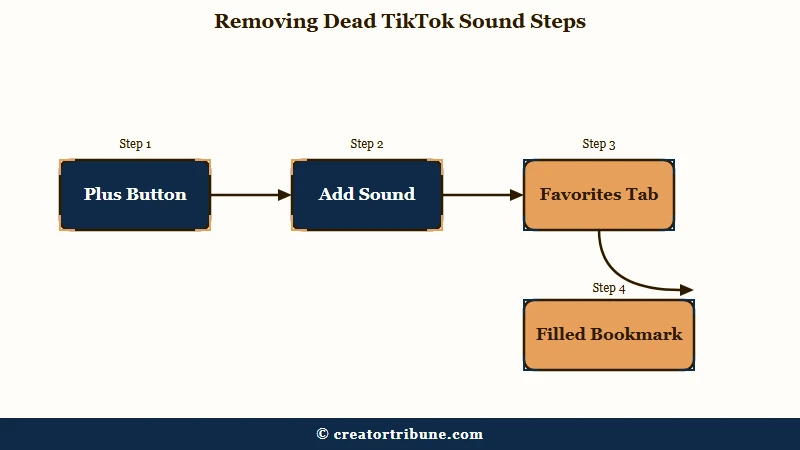
Here is the sequence I use, and it takes under a minute once you know where you are going:
- Tap the plus button at the bottom of the app, as though you were about to record.
- Tap Add sound at the top of the recording screen.
- Open the Favorites tab inside the sound picker.
- Find the dead sound and tap its filled-in bookmark banner to un-fill it.
- Back out of the recording screen and return to it to force the list to refresh.
Step 5 is not padding. The picker caches its state, and people watching the list report entries flipping status in front of them after they leave and come back. If a sound looks like it did not take, leave the camera and re-enter before you decide the method failed.
That refresh step is the one I skipped the first time, and it cost me a good ten minutes of thinking the whole route was broken.
The difference between the failing route and the working one is worth seeing side by side:
Before: Profile, Favorites, Sounds, tap the unavailable sound, look for a remove option. The sound’s page is deprecated along with the sound, so there is nothing to tap.
After: Plus button, Add sound, Favorites tab, tap the filled bookmark. The picker never loads the dead page, so the toggle survives.
Why Does the Un-Favorite Button Disappear on Dead Sounds
Your Favorites list stores a pointer to a sound ID, not the audio itself.
When the sound is pulled, the record it points at stops rendering, and the un-favorite control that lived on that record goes with it. Your pointer stays behind.
TikTok’s own documentation is direct about how permanent some of this is. Where a creator deletes an original sound they uploaded, TikTok states it “will be permanently removed from all videos that use that sound, including your own.” There is no restore path on that one.
Sounds also go dark for reasons that have nothing to do with the uploader. TikTok removes audio it finds to “violate intellectual property or other Community Guidelines,” and separately for copyright restrictions, and the notification rules differ depending on whose sound it was. If someone else uploaded it, TikTok says “you won’t get a notification if this happens.”
The thing that changed the experience is on TikTok’s side, not yours. The app used to draw a grey placeholder box where a removed item had been, which gave you something to press. Those placeholders are gone, so removed items now vanish from view while their IDs stay in your account.
That single interface decision is what turned an annoyance into a trap. My read is that it was meant to tidy the list up, and it did the opposite.
Why Does the Fix Not Work on a Business Account
On a Business account the sound picker is filtered to the Commercial Music Library, so a stuck mainstream track will not appear in the Favorites tab at all.
The removal route depends on seeing the sound in that picker. Filter the picker and you have filtered away the thing you came to delete.
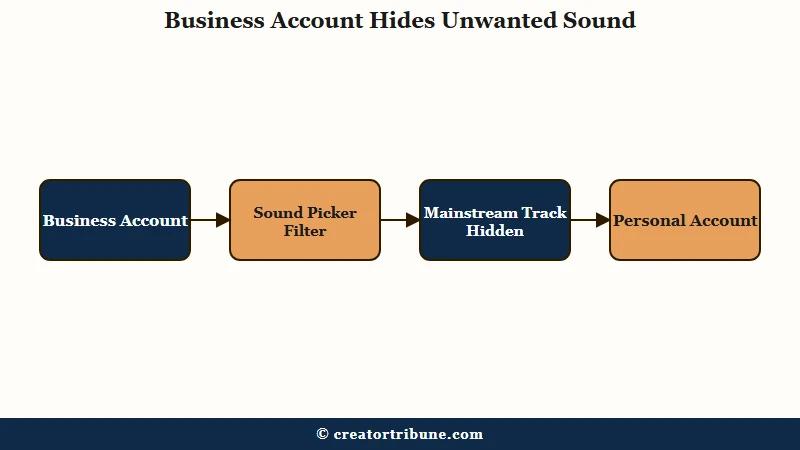
No guide connects these two facts, which is why a working fix keeps getting reported as broken. TikTok’s advertising documentation spells out the split plainly. For a Business account, “when you start a new video and click on Add Sound, you will only see sounds from the Commercial Music Library.” For a Personal account, “you will see all sounds.”
So if you favorited a chart song on a Personal account and later switched to Business, that song is still in your Favorites, still counted, and now invisible in the one screen that could remove it. Nothing is broken. The list is being filtered out from under you.
| Account type | What the Add sound picker shows | Can you clear a stuck mainstream sound |
|---|---|---|
| Personal | Every sound, general library included | Yes, the Favorites tab lists it |
| Business | Commercial Music Library only | No, it is filtered out of the picker |
Switching back to Personal through Settings and Privacy, then Account, restores the full picker and lets you finish the job. One caution matters before anyone treats this as a permanent workaround. Running a real business on a Personal or Creator account to dodge the commercial licensing rules breaks TikTok’s terms.
Switch to clean your list, switch back, and post your business content under the account type that matches what you do. My rule is that the account type should follow the work, not the music library. The same licensing logic sits behind music stripped from uploads, which catches Business accounts the same way.
What Are the Different Kinds of Unavailable Sound
Four separate states all display as unavailable, and only two of them can be cleared by you.
Sorting yours into the right row saves you from grinding on a fix that was never going to work.
| What you see | Likely cause | What removes it |
|---|---|---|
| Sound greyed out, page will not open | Sound pulled for copyright, guidelines, or uploader deletion | Create flow picker, Favorites tab, tap the bookmark |
| Sound missing from the picker entirely | Business account filtered to the Commercial Music Library | Switch to Personal, clear it, switch back |
| Sound listed but showing no favorite state to toggle | Orphaned reference with no live record behind it | Nothing user-facing, wait for a server-side cleanup |
| Favorites count higher than the items you can see | Orphaned IDs still counted after the item stopped rendering | Nothing user-facing, the count is cosmetic |
The bottom two rows are the honest bad news. One person described hitting a saved sound that sat in their favorites while showing no favorite state at all, and there is no toggle to press on something the app will not admit is there.
Region matters too, and it produces a state that looks like deletion but is not. When Universal Music Group’s catalogue came off TikTok, some tracks went fully silent while others stayed audible and threw a “this sound isn’t available in your country” error on interaction.
CBC reported on the dispute that pulled music by Drake, Justin Bieber and hundreds of other artists off the platform. A geoblocked sound is still alive somewhere, which is why it behaves differently from a deleted one.
The same regional rules govern reusing audio across platforms, and they are worth knowing before you build a posting routine around a track.
Catalogue churn is not finished either. TikTok and UMG signed a new multiyear agreement in May 2026 that added machinery for pulling unauthorised AI-generated tracks, so the supply of newly dead sound IDs keeps replenishing.
That is my best explanation for why this problem is growing rather than fading.
Does Clearing Your Cache Remove Stuck Favorites
Clearing the cache fixes favorites that fail to load, and does nothing for favorites pointing at deleted content.
The two get confused constantly because they look identical from the outside.
The split is clean once you name it. A cache clear rebuilds local data, so it helps when the Favorites tab renders blank, stalls, or refuses to save new items. It cannot help when the item you want gone no longer exists on TikTok’s servers, because there is no local copy standing between you and the problem.
People who have tried it on large libraries say so plainly. One report from someone working through a badly bloated collection: “Clearing cache, switching devices, etc. doesn’t change anything.” That is the expected result for an orphaned reference, not a sign they did it wrong.
Worth clearing up a related worry, since it comes up whenever cache advice appears: clearing the TikTok cache does not touch your drafts or log you out. It is a safe thing to try. It is just aimed at a different problem than this one.
There is one nearby case where cache advice is genuinely right. If your favorite sounds vanished rather than got stuck, that is usually a loading or region issue, and saving your own sounds covers where they live and why they sometimes fail to show.
Vanishing and refusing to leave are opposite symptoms with opposite fixes. I still clear my own cache when the app starts misbehaving, just never for this.
Why Does My Favorites Count Not Match What I Can See
The counter tallies saved IDs, and the grid only draws items that still exist, so deleted content inflates the number invisibly.
You are not miscounting. One user documented a profile reading 604 saved posts against 253 that were visible and listable.
The mechanism is TikTok’s removal of the grey placeholder tile. Removed sounds and videos used to occupy a tile you could select and unsave. With the tile gone, the ID keeps counting and offers you no surface to act on.
It gets stranger at volume. Someone clearing roughly 30,000 favourites ended up with collections reporting counts like 2, 38 and 390 while displaying no videos whatsoever. The remainder in every case was orphaned IDs the app could not render.
My honest position is that this one is not worth your energy. The count is cosmetic, nothing is hiding in there, and deleting a glitched collection will not take your live favorites with it.
Chasing a number down to zero when the leftovers are unrenderable is a losing afternoon.
Are Third Party Bulk Removal Tools Safe to Use
TikTok ships no bulk delete for favorites, and the third-party tools filling that gap all want your account credentials.
That trade is the whole decision, and I would not make it to save some tapping.
The browser extensions are the weaker option on their own merits, before the account question even comes up. Reviews describe them stalling partway, scrolling without unfavoriting, failing entirely on hidden or locked items, and tripping TikTok’s rate limits.
Open-source scripts doing the same job build in a mandatory three-second pause between calls specifically to stay under those limits, which tells you how tight the ceiling is.
There are native mobile apps that promise the same one-tap clear, and they are smoother than the extensions. They still need to sign in as you. Handing full account access to a third party to tidy a list is a poor exchange, particularly for anyone whose account earns money.
The create flow route is the answer I stick with, residue and all. It clears the sounds that can be cleared, it costs nothing, and it leaves the account alone.
If a bulk tool is the only path you will consider, change your password afterwards.
Frequently Asked Questions
Why can I not unfavorite a sound on TikTok?
The un-favorite control lives on the sound’s own page, and that page is taken down when the sound is removed. Use the create flow instead. Tap the plus button, tap Add sound, open Favorites, and tap the filled bookmark there.
Does switching to a Personal account bring my sounds back?
Switching back to Personal restores the full sound picker, including general-library tracks a Business account cannot see. Your favorites were never deleted, only filtered. Go to Settings and Privacy, then Account, then switch account type.
Will clearing my cache remove unavailable sounds?
No. Clearing the cache fixes favorites that will not load or save, not favorites pointing at deleted content. There is no local copy of a removed sound to clear, so the entry survives the reset.
Do unavailable sounds ever come back?
Some do. Sounds pulled in a licensing dispute can return when a new deal is signed, as the Universal Music Group catalogue did. Sounds deleted by the person who uploaded them are gone permanently, and TikTok says so directly.
Is it safe to delete a collection showing a phantom count?
Yes. The leftover number is orphaned IDs for content that no longer exists, and your live favorites sit in your main saved list. Deleting the glitched collection will not remove anything you can still see.
Can I remove all my TikTok favorites at once?
Not through TikTok. There is no native bulk delete, and the third-party extensions and apps offering one need your login credentials. I would clear what the create flow route reaches and leave the rest.
Quick Takeaways
- The un-favorite button is not missing, it is in the create flow picker: plus button, Add sound, Favorites tab, tap the filled bookmark.
- Business accounts see only the Commercial Music Library in that picker, so switch to Personal before you try to clear a mainstream track.
- Clearing your cache fixes favorites that will not load and does nothing to favorites pointing at deleted sounds.
- A favorites count higher than what you can see is orphaned IDs, it is cosmetic, and no user action clears it.
- Skip the bulk-removal extensions and apps. They want your account login to save you some tapping.