Instagram DMs Not Loading and How to Tell Which Fix You Need
Instagram DMs Not Loading and How to Tell Which Fix You Need
Instagram DMs not loading usually means one of four separate failures, and each needs a different fix. Work out which one you have before you reinstall.
- 1Why Are My Instagram DMs Not Loading?
- 2Is Instagram Down or Is It Just My Account?
- 3Why Do New Messages Only Show Up After I Refresh?
- 4Why Will My Old Instagram Messages Not Load?
- 5Why Does the Message Button Do Nothing on a Profile?
- 6Should I Reinstall Instagram to Fix DMs Not Loading?
- 7Frequently Asked Questions
- Why are my Instagram DMs not loading but everything else works?
- How do I know if Instagram DMs are down for everyone?
- Will reinstalling Instagram fix my DMs not loading?
- Why can I open old chats but not message someone new?
- Where did my old Instagram messages go?
- How long does an Instagram messaging block last?
- Why are my Instagram comments not loading either?
- 8Quick Takeaways
TL;DR: Instagram DMs not loading is four different problems wearing the same costume, and the standard advice only solves one of them. Before you clear anything, check whether push notifications still arrive and whether your messages load on the web. Those two answers rule out most of the fixes that cannot possibly work, and the symptom table below settles the rest.
Every guide about Instagram DMs not loading gives you the same five steps. Check your connection, restart the app, clear the cache, log out, reinstall.
Google’s own AI answer gives that list, then asks you follow-up questions, which is a quiet admission that the list did not settle anything.
Those guides all miss the same thing. Four genuinely different failures push people to type that search, and they need four different responses. One cannot be fixed by you at all, one survives a full reinstall, one has a two-tap workaround almost nobody documents, and one was never a loading problem.
Instagram carried 2.99 billion monthly active users in 2025 according to Statista’s platform figures, so when the messaging layer stumbles it stumbles at enormous scale. That scale is also why generic advice spreads so fast.
This is about messages that never appear in the first place. If your messages were there and then vanished, that is a different failure, and if your messages appear but refuse to send, that one is different again.
Why Are My Instagram DMs Not Loading?
Instagram DMs not loading comes down to four separate failures: a server side outage, a client sync failure, a message history backfill failure, or a messaging restriction that only looks like a bug.
Each one has a distinct signature, and the fix for one does nothing for the others.
Two quick tests do most of the sorting. Do push notifications for new messages still arrive on your phone? And do your DMs load when you open instagram.com in a browser?
I run both before touching a single setting. Between them they tell you whether the fault sits on Instagram’s side and whether it is confined to the app, which takes about thirty seconds and rules out most of the standard advice.
| What you see | Which failure it is | What to do |
|---|---|---|
| Inbox empty or spinning, but DM notifications still arrive | Server side outage | Nothing. Wait it out. |
| New messages appear only after refresh, close, or account switch | Client sync failure | Force a resync. Reinstalling will not help. |
| Recent messages fine, older ones will not load when scrolling up | History backfill failure | Open the chat from the person’s profile. |
| Existing chats work, but the Message button on a profile fails | Messaging restriction | Stop sending. Wait out the block. |
What is a backfill: the process where the app pulls older messages down from the server on demand, rather than storing your whole history on the phone.
The table is the short version. The sections below give you the test that confirms each one.
Is Instagram Down or Is It Just My Account?
If your inbox renders empty while push notifications for new DMs still arrive on your lock screen, the outage is on Instagram’s side and nothing you do on your phone will fix it.
That combination is the single cleanest diagnostic in this whole article.
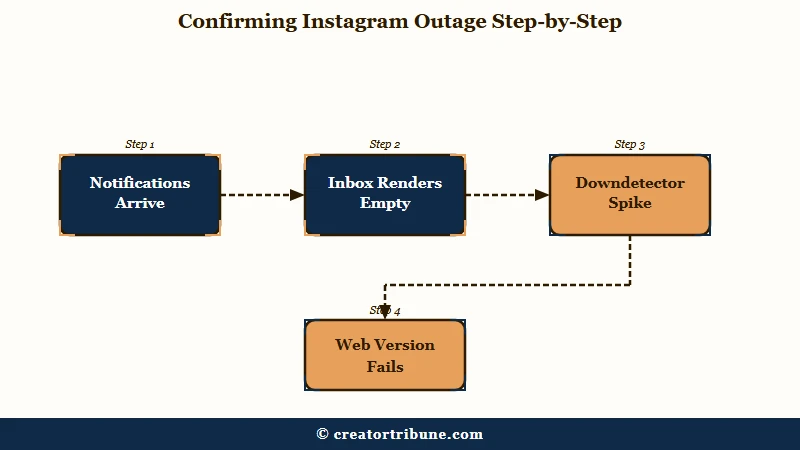
The reason it works is that notifications and message content travel different roads. Push alerts are handed to Apple and Google’s delivery networks, so they keep arriving even when Meta’s own message database cannot serve your inbox.
Getting a notification for a message you then cannot see proves the message exists and was delivered, which rules out your connection, your cache, and your phone entirely.
Instagram had a run of these in July 2026, including a roughly two hour DM failure on July 22 that peaked near 4,000 Downdetector reports, followed by a second one the next day. Meta’s own status page sat on “No Known Issues” through the first one.
Downdetector is the better signal here, and it is not close. Treating the official status page as your source of truth will tell you nothing is wrong while thousands of people are reporting the same failure you have.
Collateral damage is the second tell. During one March incident, chat background themes disappeared at the same moment DMs stopped loading, and came back disabled afterwards.
Several unrelated messaging features breaking together points squarely at a deployment problem on their end.
Why Do New Messages Only Show Up After I Refresh?
A client sync failure is when the app itself works normally but new messages appear only after you manually refresh, force close, or switch accounts, and it survives a full reinstall.
This is the state that makes people furious, because they have already done everything the guides told them to do.
The giveaway is partial rendering. Inside one open conversation, some messages show and others do not, which no connection problem produces. If the network were the issue you would get all of it or none of it, not a thread with holes in it.
Skip the reinstall on this one. It cannot reach the problem, and there is a concrete reason why on iPhone.
Meta’s secure storage design keeps a recovery code in the device keychain, and iOS keychain entries persist after an app is deleted. The reinstalled app finds the same stored state waiting for it, which is why people reinstall, watch their history reappear instantly, and find the identical bug still there.
What does work is forcing the client to rebuild its sync state. Switch to another account and back, or pull down to refresh at the top of the inbox.
On iPhone, check that Background App Refresh is enabled for Instagram. iOS throttles background updates for apps it treats as low priority, and a throttled app only syncs when you open it.
Why Will My Old Instagram Messages Not Load?
If recent messages are fine but scrolling up gives you a spinner or an error, that is a history backfill failure, and opening the same conversation from the other person’s profile usually forces it to load.
My read is that this two-tap workaround is the most useful thing on this page, and it appears in almost no published guide.
The trick is two taps. Search the person’s username, open their profile, and tap Message from there instead of opening the thread from your inbox. The app treats that as a fresh request for the conversation and pulls the history down, where the inbox route kept serving you the broken cached view.
Before: open the inbox, tap the chat, scroll up, watch the spinner hang on older messages.
After: search the username, open their profile, tap Message, and the past thread loads in full.
Sending a single message into the thread has the same effect for many people, since an outbound message forces a sync round trip. If neither works, check the conversation on instagram.com, because the web client fetches history independently and will usually show you everything the app is hiding.
One genuine cause of missing old messages is not a bug at all. Instagram ended encrypted chats on May 8, 2026, and encrypted threads from before that date were not carried over.
If the messages you cannot load are old encrypted ones, they are gone rather than slow, and no amount of refreshing will bring them back.
Why Does the Message Button Do Nothing on a Profile?
When your existing chats open and work normally from the inbox but the Message button on someone’s profile does nothing, you are looking at a messaging restriction, not a loading failure.
Reinstalling cannot touch this, because the limit lives on Instagram’s servers against your account.
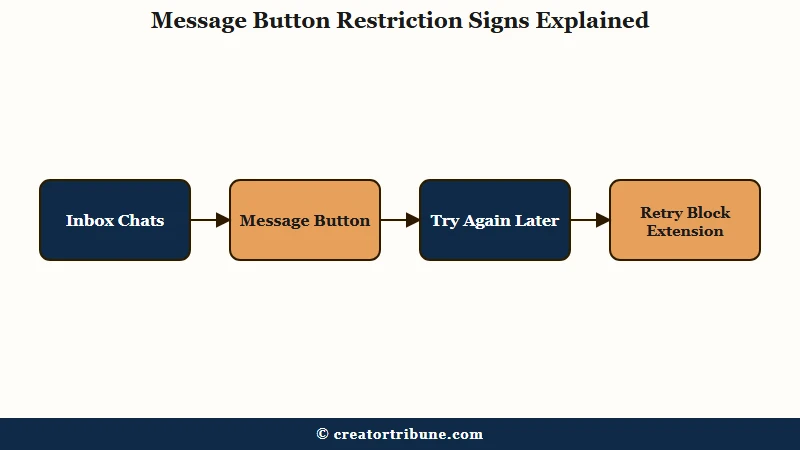
A loading bug would break your existing threads too. I treat a working inbox as proof the app itself is fine, which is what makes this state so easy to misread.
There is a second test that splits this state in two, and it matters because the two causes have opposite answers. Try the Message button on several different profiles.
If it fails on every one, the restriction is on your account. If it fails on one profile and works on the rest, that person has set their account to refuse message requests from people they do not follow, and the button disappears by design.
Instagram does not publish its limits. The observed ceilings for messaging people who do not follow you sit around 50 to 100 per day on an established account, and 20 to 50 on an account under 30 days old.
Group chats cap at 32 people. Message a non follower from their profile and you generally get one message through until they accept.
The worst thing you can do here is keep tapping send. Repeated attempts during a block get logged as further violations and extend it, turning a 24 to 48 hour timeout into three days, seven days, or a 30 day restriction on starting new conversations. Learn how long each block lasts before you trigger a longer one.
Low activity is no protection either, which surprises people. Dormant accounts carry lower trust scores, so a quiet account that suddenly sends a burst of messages trips the spam filter faster than a busy one does.
Should I Reinstall Instagram to Fix DMs Not Loading?
Reinstalling helps with roughly one of the four failures and is useless for the other three, which is why it is the most oversold fix on this topic.
Nothing about it is harmful. It is just aimed at the wrong target most of the time.
Published advice openly contradicts itself here. Several troubleshooting sites promise a reinstall will resolve message loading problems, while reporting on the July 2026 global Meta outage told users plainly not to delete accounts, change passwords, or repeatedly reinstall, since none of that addresses a fault in the company’s own systems.
Both cannot be right, and which one applies depends entirely on which of the four states you are in.
| Failure | Does reinstalling help | Does clearing cache help | What does work |
|---|---|---|---|
| Server side outage | No | No | Waiting. Confirm on Downdetector first. |
| Client sync failure | No, stored state survives it | Sometimes | Switch accounts and back to force a resync. |
| History backfill failure | Rarely | Rarely | Open the chat from the person’s profile. |
| Messaging restriction | No, the limit is server side | No | Stop sending entirely and wait it out. |
The same disagreement runs through two other popular tips, so treat both with suspicion:
- Do not use a VPN to get around message limits. One guide recommends it as a workaround; others list VPN use as a trigger that gets accounts flagged in the first place.
- Do not lean on the iOS Offload App button as a cache fix. It clears local data including saved drafts and login state, and it does nothing to a server side restriction.
- Do not delete conversations hoping to unstick the inbox. You lose the messages permanently and the underlying sync state is unchanged.
Work in this order instead. Check notifications against an empty inbox to rule out an outage, check the web to rule out a device problem, try the profile route to force a backfill, and only then consider clearing app data. Leave the reinstall until the very end.
Frequently Asked Questions
Why are my Instagram DMs not loading but everything else works?
That pattern points to a client sync failure or a messaging restriction rather than an outage. If your feed and Stories load normally, your connection is fine. Check whether existing chats still open from the inbox, since that separates a sync problem from a restriction.
How do I know if Instagram DMs are down for everyone?
Check whether push notifications for new messages still arrive while your inbox sits empty. That combination means messages are reaching your phone but the inbox cannot render them, which is server side. Downdetector is a faster signal than Meta’s status page, which has stayed on “No Known Issues” during real outages.
Will reinstalling Instagram fix my DMs not loading?
Usually not. On iPhone the app’s stored state survives deletion through the device keychain, so the same problem often returns immediately.
Reinstalling also cannot lift a server side messaging restriction. Try the web version and the profile workaround first.
Why can I open old chats but not message someone new?
Your account is likely restricted from starting new conversations. Test the Message button on several profiles. Failing on all of them means the limit is on your account, while failing on just one means that person does not accept message requests from non followers.
Where did my old Instagram messages go?
If they are from encrypted chats predating May 8, 2026, they were not migrated when Instagram ended encrypted messaging and cannot be recovered in the app. If they are ordinary messages that will not load when you scroll up, open the conversation from the person’s profile to force the history to load.
How long does an Instagram messaging block last?
A first block typically clears in 24 to 48 hours. Repeated attempts to send during the block extend it, escalating to three days, seven days, or a 30 day restriction on new conversations. Stop sending entirely and wait rather than retrying.
Why are my Instagram comments not loading either?
Comments run on a separate surface from DMs, so the two can fail independently. If both are broken at once that points to a wider outage, and comments failing on their own has its own set of causes including filter settings.
Quick Takeaways
- Two tests do most of the sorting. Are notifications still arriving, and do the DMs load on the web.
- Notifications arriving into an empty inbox means an outage on Instagram’s side, so stop troubleshooting your phone.
- Old messages that will not load will often appear if you open the chat from the person’s profile instead of the inbox.
- A Message button that fails on every profile is a restriction on your account, and every retry makes it last longer.
- Reinstall last rather than first, and check instagram.com before you clear anything.