Why Does Instagram Pause My Music and How to Make It Stop
Why Does Instagram Pause My Music and How to Make It Stop
Instagram has paused people's music and podcasts on launch since October 2026. See the iPhone switch that worked for 11 of 13 people, and what to skip.
- 1Why Does Instagram Pause My Music When I Open It?
- Why Does Instagram Still Pause My Music on Silent?
- 2How Do I Stop Instagram From Pausing My Music on iPhone?
- 3Is Instagram Pausing Music a Bug or an Update?
- How Do I Report Instagram Pausing My Music?
- 4How Do I Get My Music Back After Instagram Pauses It?
- 5Does Instagram Pause Music on Android Too?
- 6Quick Takeaways
TL;DR: Instagram pauses your music because it switches on its own audio when it launches, and since October 2026 it does this even with your feed muted and your iPhone on silent. Neither Instagram nor iOS has a switch made for this. The best-tested fix is Settings, Apps, Instagram, Live Activities: turn it off, or on and off again.
What is a Live Activity: A live update an app pins to your iPhone’s Lock Screen, such as Maps directions or a delivery order.
Since October 2026, opening Instagram on an iPhone has stopped whatever is playing, from Spotify to podcasts, and sent people back to the music app to press play. So why does Instagram pause my music now, when it used to leave it alone?
Your music app is fine, and so is your phone. Instagram now grabs the iPhone’s audio at launch, even with a muted feed, which most people had not seen before October. If what broke is the music inside Instagram, such as the Music sticker in chats, that is a different problem.
Two iPhone settings get passed around as the fix, and they did not do equally well. In two Reddit threads on r/iphone, from October 11 and October 28, 11 people said turning off Instagram’s Live Activities worked and 2 said it did not. The autoplay switch many guides lead with worked for 11 people and failed for 15, so Live Activities is where I start.
Why Does Instagram Pause My Music When I Open It?
Instagram pauses your music because it switches on its own audio the moment it launches, and iOS stops other apps’ music when an app does that without opting to share. Since October 2026 it can happen at launch even when nothing in your feed is playing sound.
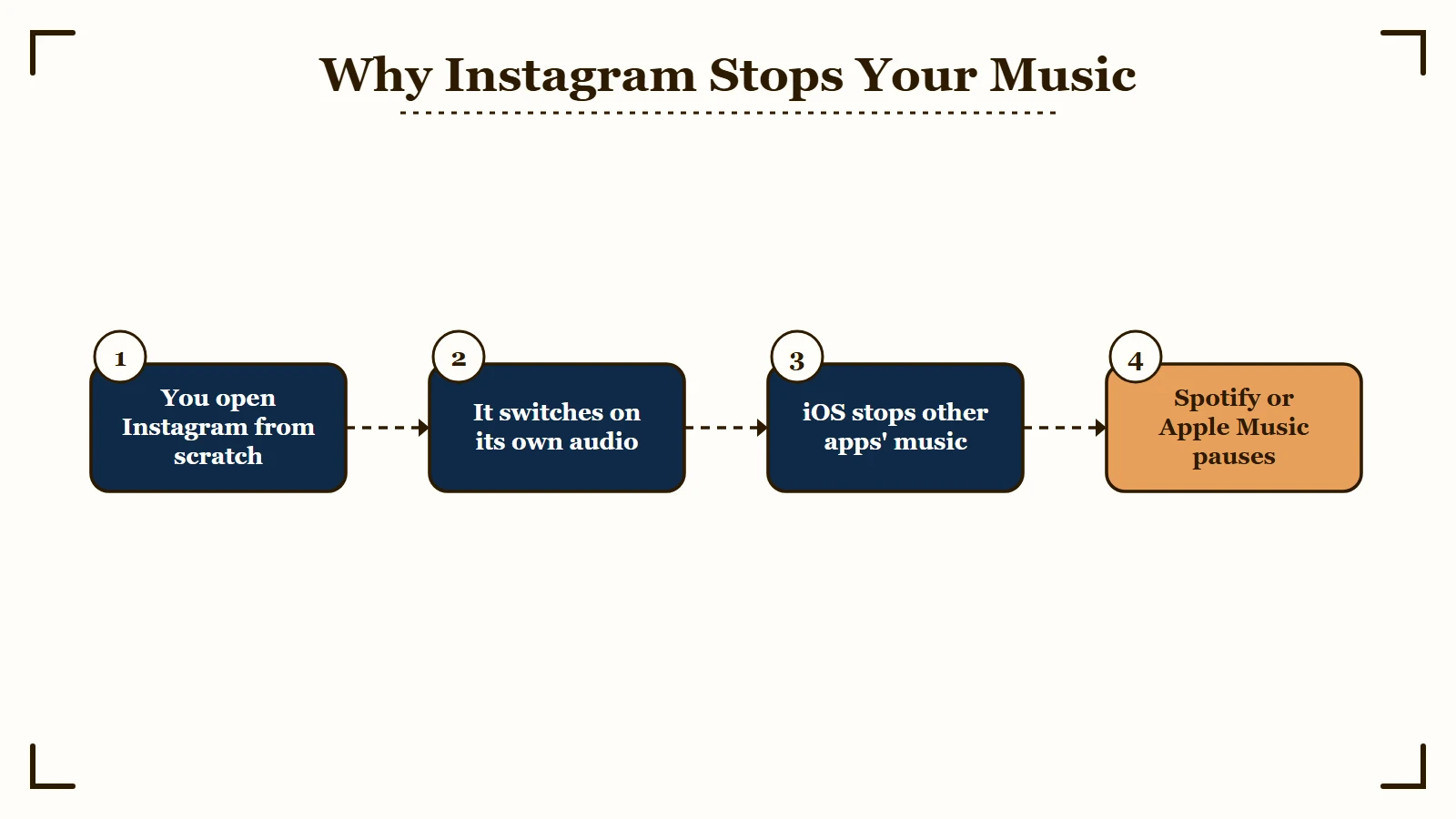
Every iPhone app that plays sound tells iOS whether that sound can share the speaker. Apple’s developer documentation says an app’s sound is “nonmixable” by default, and that switching it on “will interrupt any other audio sessions which are also nonmixable.” Music playing in the background is exactly what gets interrupted, so Spotify or Apple Music stops.
Apps can choose to mix their audio with audio from other apps instead, so your music keeps playing under their sound. The app makes that choice, and iOS has no setting made to override it, which is why the fixes below are workarounds.
The person who started one r/iphone thread on it found that opening Instagram from scratch paused the music, while going back to an Instagram that was already open did not. That is why I tell people to stop swiping Instagram away. A November 2 post on r/ios ties the pause to the top of the feed, saying it comes when a video or a post with music loads first.
A muted video can still claim the audio. Answering Android users in January 2022, a Spotify Community moderator explained it: “sometimes a video is not truly muted, it still initiates the audio codec and reserves it for itself.” The same answer said Spotify “doesn’t have administrator audio access,” so the phone favors whatever app is in front.
Why Does Instagram Still Pause My Music on Silent?
Instagram now claims the iPhone’s audio at launch whether or not your phone is on silent, so Silent mode no longer reliably protects your music. It used to be enough: a November 9 r/Instagram post recalls muted videos playing on a silent iPhone while the music kept going, until the poster tapped one. Now that poster’s music stops anyway.
That old behavior matches how Instagram described its sound settings in 2017. TechCrunch reported that Instagram opens with video sound off, keeps your last sound choice for the rest of the session, and resets to off when you close the app.
On r/iphone, two more people said the pause still happens with their phone always on silent, and one said silent mode helps. What bothers me is that a feed which starts silent never needed your music to stop. Silent mode cannot be trusted to protect your music now, so use the settings in the next section instead.
How Do I Stop Instagram From Pausing My Music on iPhone?
The fix with the best record is turning off Instagram’s Live Activities in iPhone Settings, or turning it on and off again if it is already off. In the October 11 and October 28 r/iphone threads, it worked for 11 of the 13 people who reported back.
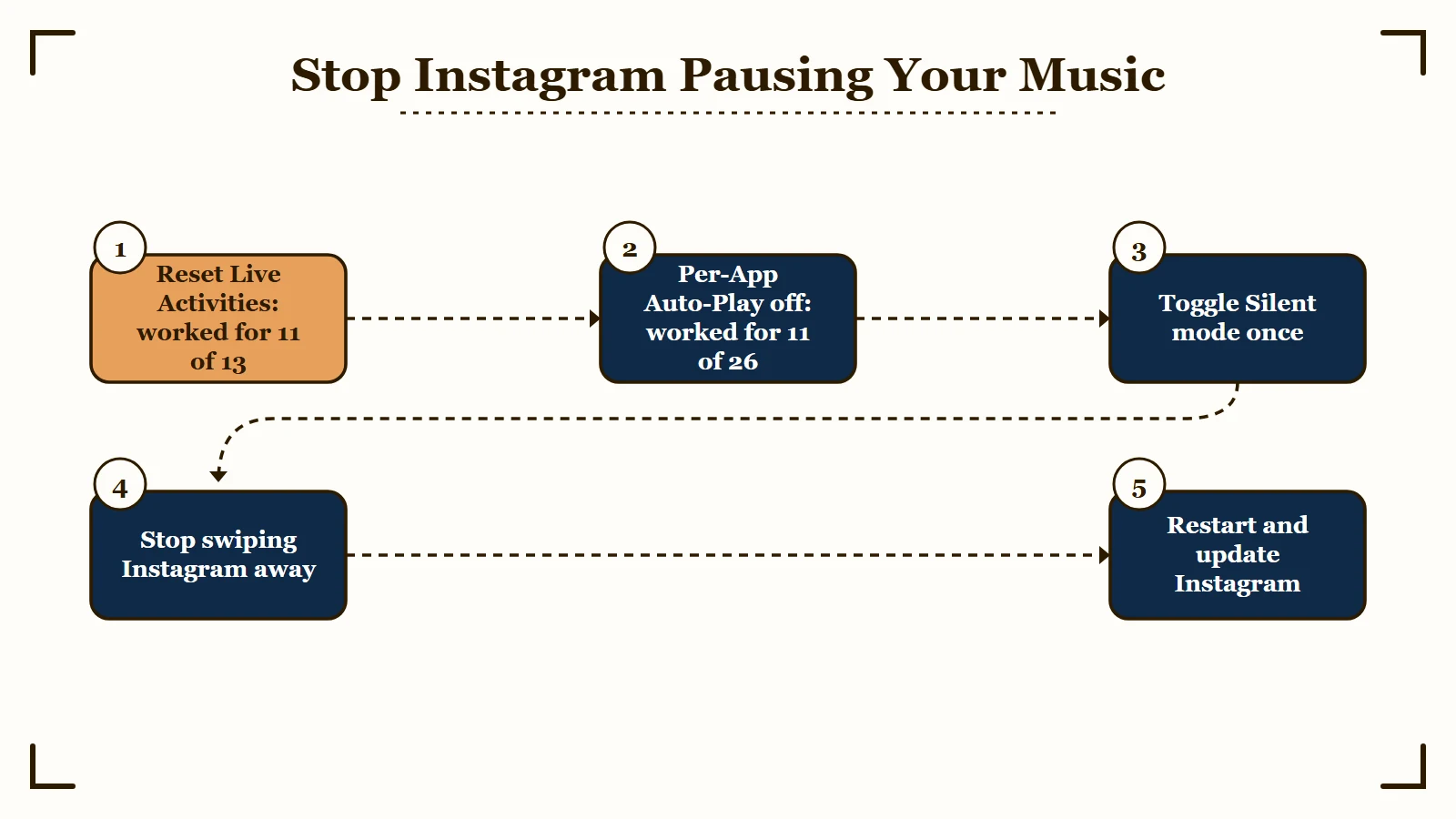
Here is the order I would work through, best record first:
- Reset Instagram’s Live Activities. Open Settings, tap Apps, tap Instagram, then tap Live Activities and turn it off, or turn it on and back off if it is already off. If the music still stops, flip it again, since some people needed several tries before it stuck.
- Turn off autoplay for Instagram only. Go to Settings, Accessibility, Per-App Settings, tap Add App and choose Instagram, as Apple’s steps describe. Tap Instagram in the list and turn off both Auto-Play Video Previews and Auto-Play Animated Images, because the first switch alone is not always enough.
- Flip Silent mode once. Open Control Center and tap the Silent mode button, per Apple’s ringer steps, then tap it again. Switching from silent to ring and back once can be enough to stop the pauses.
- Stop swiping Instagram away. The pause seems to come on a fresh launch, so leaving Instagram open in the app switcher gives it fewer chances to restart its audio.
- Restart Instagram and update it. Close it from the app switcher just this once, reopen it, and check the App Store for an update. If Instagram is also freezing or closing on its own, this crash guide covers the slower repairs.
I still put Live Activities first, even though Instagram has not explained why that switch matters. Apple’s iOS 27 guide describes the Lock Screen’s music controls as Live Activities, the only documented link between that switch and your music.
The same guide notes that “Not all apps have a Live Activities setting,” so if Instagram shows none on your iPhone, start at step 2. It is not a guaranteed fix either, and Instagram can still pause the music now and then with it off.
The autoplay switch is weaker than its reputation. Apple’s own description says Auto-Play Video Previews “allows apps such as the App Store to automatically play video previews,” and it never says other apps have to follow it. It worked for only 11 of the 26 people on r/iphone who reported back, and it can fix Facebook while Instagram keeps pausing your music.
| What people tried | Where it is | How it went |
|---|---|---|
| Live Activities off, or on and back off | Settings, Apps, Instagram, Live Activities | 11 worked, 2 did not |
| Auto-Play Video Previews and Animated Images off | Settings, Accessibility, Per-App Settings, Instagram | 11 worked, 15 did not |
| Silent mode switched on and off once | Control Center, Silent mode | 1 worked, 0 did not |
| Phone kept on silent | Control Center, Silent mode | 1 worked, 3 did not |
| Instagram restarted | App switcher | 1 worked, 0 did not |
| Microphone access turned off for Instagram | Settings, Apps, Instagram | 0 worked, 2 did not |
Counts come from the two r/iphone threads linked above, plus the r/ios and r/Instagram posts linked earlier, as of November 23, 2026.
Skip reinstalling Spotify. A Spotify moderator suggested a clean reinstall when the same complaint came up in December 2022, and a reply there warns you will lose any downloaded tracks. Turning off Instagram’s microphone access has not helped either, so stick to the steps above and stop at the first one that works.
Is Instagram Pausing Music a Bug or an Update?
The pause looks like an unannounced Instagram change, since it hit iPhones running very different versions of iOS in the same weeks. People in one r/iphone thread were on iOS 18.3 and iOS 27, and some said it began without any iOS update at all.
The complaints arrived in a wave. The first r/iphone thread, from October 11, opens with “Overnight, instagram is suddenly pausing my music,” and its poster later guessed it was an update “to make people watch more reels.” New posts kept coming through November 20, and Instagram has not said why, so treat that theory as a guess.
The release notes say nothing about it. Instagram’s App Store listing shows ten iPhone updates from version 449.0.0 on October 2 to 456.0.0 on November 16, and every release note is the same single line about performance and stability. My read is that this is Instagram’s doing, and the release log confirms only that nobody announced it.
Other apps do the same. People on r/iphone said Facebook has paused their music for months, one of them for about two years, and that Snapchat and Reddit do it too. Instagram has done it before as well, since the same complaint reached Spotify Community in December 2022.
How Do I Report Instagram Pausing My Music?
Report it from inside Instagram with Report a Problem, which attaches your device and account details for you. Instagram’s Report a technical problem article gives the path: tap your profile picture, tap Menu, tap Help (listed under More info and support), then tap Report a Problem.
Instagram then offers two ways in: tap “Report problem without shaking” to open the form, or shake your phone. A report that names your Instagram version and what you already tried gives Instagram more to work with than a one-line complaint.
Before: “music keeps stopping when i open insta fix it”
After: “Opening Instagram 456.0.0 from a fresh launch pauses Spotify on my iPhone, even with the feed muted and Silent mode on. Live Activities for Instagram is off. Going back to Instagram when it is already open does not pause the music.”
If Instagram’s report button itself will not send, the fixes in our Instagram reports guide apply here too. One report with those details is enough.
How Do I Get My Music Back After Instagram Pauses It?
Press play from the Lock Screen, Control Center or your AirPods, and if the player has disappeared, open the music app and start the song there. Apple’s Lock Screen guide puts the play and pause controls under Now Playing.
Sometimes the pause breaks more than the song. One Spotify listener on r/iphone said their Lock Screen player vanished, Control Center showed “not playing” and their AirPods could only change the volume. Another listener in that thread said Spotify dropped out of CarPlay and the steering-wheel controls stopped working.
Work up from the quickest step:
- Tap play on the Lock Screen or in Control Center.
- If it says Not Playing, open the music app and press play there.
- If the song still will not start, close the music app from the app switcher and open it again.
- Restart the iPhone if nothing else brings it back.
I keep the restart for last because it takes the longest. In the car, leave Instagram closed until you park, and if incoming Instagram calls also cut into your headphones, turning off Instagram calls stops that separately.
Does Instagram Pause Music on Android Too?
Yes, it can, because Android lets only one app hold audio focus at a time, though the reports since October come mostly from iPhone owners. Android’s developer guide says that from Android 12 the system “forces audio playback from an app to fade out when another app requests audio focus.”
Spotify cannot override that on its own. A Spotify moderator said in December 2020 that there was “currently no way to give the Spotify app priority over all other sounds” on Android. A reply in the same thread points to Poweramp and GoneMAD, two music players with settings to ignore audio focus requests.
Samsung phones have a separate route. Samsung’s support page says Separate app sound lets an app “play media sounds on a Bluetooth speaker or headset that is separate from the other sounds.” You set it under Settings, Sounds and vibration, and it needs a Bluetooth device connected.
When a reply in a Spotify Community thread laid out these steps in November 2022, the next person answered “This worked perfectly!!” On a Galaxy with Bluetooth headphones, this is the setting I’d reach for, with your music app sent to the headphones.
Quick Takeaways
- Instagram pauses your music because it takes over the iPhone’s audio when it launches, a change that reached even muted feeds in October 2026.
- My first move is Settings, Apps, Instagram, Live Activities: turn it off, or on and off again, which worked for 11 of 13 people in two r/iphone threads.
- The Accessibility autoplay switch is a weaker second try at 11 of 26, and leaving Instagram open in the app switcher avoids the fresh launch that seems to trigger the pause.
- To get a paused song back, press play on the Lock Screen or in Control Center, and open the music app if the player has vanished.
- If both settings fail, no other fix worked for more than one person in those threads, so use Report a Problem with your Instagram version and recheck after each update.