Instagram Report Not Working and Why It Came Back No Violation
Instagram Report Not Working and Why It Came Back No Violation
Instagram report not working or came back as no violation? See why Instagram leaves reported content up and the steps that get it a second look.
- 1Why Is My Instagram Report Not Working?
- 2Why Does Instagram Say a Reported Comment Doesn’t Break Its Rules?
- Does Reporting It More Times Get It Removed on Instagram?
- 3How Do You Check the Status of an Instagram Report?
- 4How Do You Request a Review of an Instagram Report?
- 5Can You Take an Instagram Report to the Oversight Board?
- Can EU Users Appeal an Instagram Report Outside Meta?
- Where Do You Escalate an Instagram Report in India?
- 6How Do You Hide Offensive Comments on Your Own Instagram Posts?
- 7What If the Instagram Report Button Won’t Send?
- 8Which Reason Should You Pick When Reporting on Instagram?
- Does Instagram Tell Someone You Reported Them?
- 9What Should You Do Today After a No Violation Reply?
- 10Quick Takeaways
TL;DR: An Instagram report that is not working either fails to send or comes back saying the content doesn’t go against Instagram’s Community Guidelines. Since January 2025, Meta’s systems need a much higher degree of confidence before they take content down, which makes a “no violation” reply more likely on anything borderline. Open Reports under Help to request a review, which Instagram says usually comes within 24 hours, and hide the comments on your own posts while you wait.
In one r/Instagram post, comments calling a local election candidate a racial slur, typed with a “<” in place of a “c”, were reported twice. Both times, Instagram came back saying there was no violation and offered emotional support or a block. That is the harder kind of Instagram report not working: the report goes through, and nothing changes.
Instagram’s own help pages explain where a “no violation” answer comes from. Its page on hiding comments describes content that “doesn’t go against our Community Standards, but may be age-inappropriate, disrespectful, or offensive (example: racial slurs, curse words, or scams)”. So Instagram expects some offensive comments to stay up, and it hands you filters for them instead.
That one sentence tells me more about where Instagram draws its line than any rejection notice does. Removal is for content that breaks a specific rule, and everything below that bar is left for you to hide.
Why Is My Instagram Report Not Working?
An Instagram report that isn’t working usually fails in one of two ways: it never sends, or it sends and Instagram decides the content doesn’t go against its Community Guidelines. Each one has its own fix, so the first job is working out which one you have.
When a report of mine stalls, I check Reports under Help first, because the update there tells me which problem I have. Match what you see to a row below.
| What you see | What it means | What to do |
|---|---|---|
| The Report button spins or does nothing | An app glitch or an old app version | Update Instagram, then try the report on instagram.com |
| An error appears when you send it | A temporary fault or a wider outage | Check whether Instagram is down, then retry or send a bug report |
| You can’t find the post or profile | The poster blocked you, or the content is gone | Ask a friend with an account to report it |
| The comment vanished for you, but others still see it | Reporting hides a comment from you, which isn’t removal | Check Reports for Instagram’s decision |
| “Doesn’t go against our Community Guidelines” | It was reviewed and left up | Request a review from Reports in your Help menu |
| No update shows up at all | Not every report appears in Support Requests | Report it again under the exact rule it breaks |
Find your row, then go to the section below that matches it.
Why Does Instagram Say a Reported Comment Doesn’t Break Its Rules?
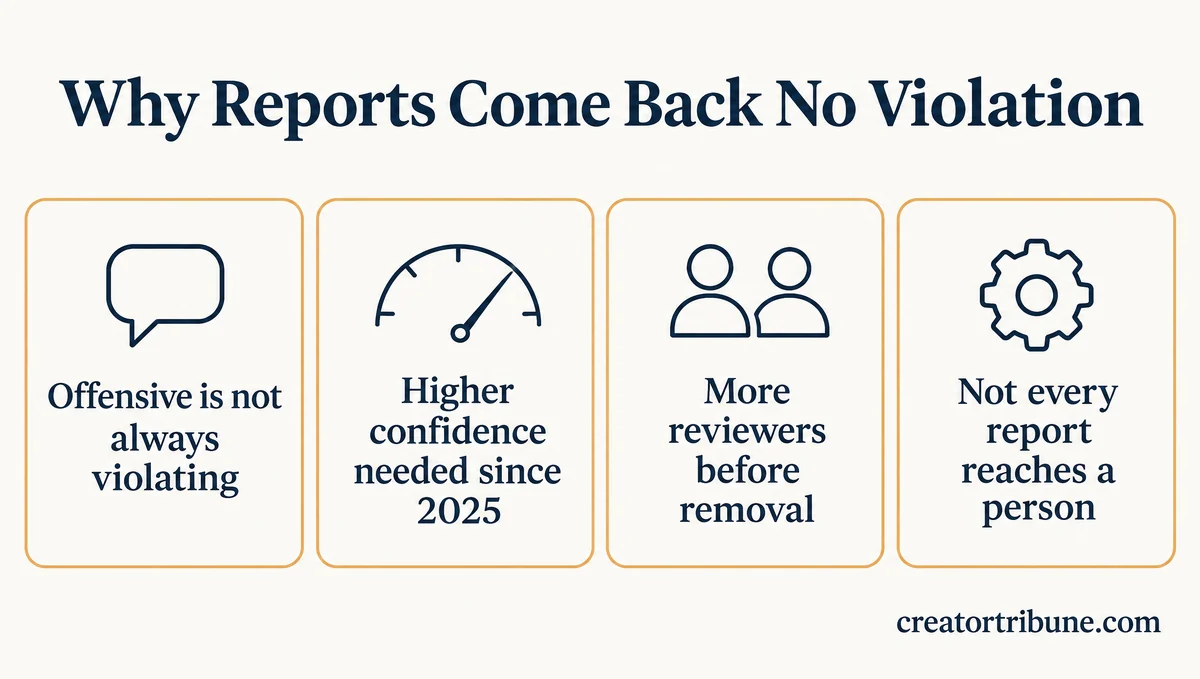
Instagram leaves a reported comment up when it doesn’t find a specific rule broken, and since January 2025 Meta’s systems need far more confidence before content is taken down. Offensive and violating are two different lines on Instagram.
Meta’s hateful conduct policy says “We remove dehumanizing speech, allegations of serious immorality or criminality, and slurs.” The same policy allows slurs used to condemn speech, to report on it, or self-referentially “where the speaker’s intention is clear,” so every report of a slur forces a call about context.
On January 7, 2025, Meta announced a change to how that call gets made. Joel Kaplan, Meta’s chief global affairs officer, wrote that Meta would tune its systems “to require a much higher degree of confidence before a piece of content is taken down.” He added that “in more cases, we are also now requiring multiple reviewers to reach a determination in order to take something down.”
The same post said automated systems would stay focused on illegal and high-severity violations, such as terrorism, fraud and scams. For less severe violations, Meta wrote, “we’re going to rely on someone reporting an issue before we take any action.” TechCrunch covered the change the same day.
I read the confidence rule as a tiebreaker, and since January 2025 that tiebreaker goes to leaving the content up. Meta’s May 29, 2025 update to its January post reported “a roughly 50% reduction in enforcement mistakes on our platforms in the United States from Q4 2024 to Q1 2025.”
A person may not see your report at all, either. On its page about prioritizing content review, Meta asks whether human teams review every user report and answers “Not necessarily.” It says its technology decides on its own when it can analyze the content.
The Oversight Board is the independent board that rules on appeals of Meta’s content decisions. Its 2024 annual report notes that Meta “completed an audit of its slur lists in 22 countries with elections in 2024.”
That suggests slur enforcement leans on lists of words, and a slur typed with a “<” in place of a letter can fall outside what a system recognizes. The decision then rests with a reviewer, if one sees it.
Does Reporting It More Times Get It Removed on Instagram?
Sending more reports on one comment is not a documented way to get it removed, because Instagram describes one test: whether the content goes against its Community Guidelines. A new report under the right reason is a better second try than repeating the first one.
Instagram’s page on content it didn’t remove says it will hide or remove reported content “if we find that it goes against our Community Guidelines,” and it says nothing about how many people reported it. I don’t buy the idea that a crowd of reports forces a takedown.
How Do You Check the Status of an Instagram Report?
Your report status lives in what Instagram calls Support Requests: in the app, tap Profile, Menu, Help, Reports and violations, then Reports. Each report shows when Instagram acted and what it decided.
On a computer, click More in the bottom left, then click Settings. Click Help, then Support Requests, then Reports, per Instagram’s report status page, and a Request review option sits on the report when one is available.
The same page warns that “every report you’ve made may not be viewable in Support Requests.” Instagram’s reporting help pages give no time for the first review, only for the second look.
That missing-report caveat frustrates me more than any other line on Instagram’s help pages, because a report that never appears leaves you nothing to appeal. A reported comment also drops out of your own view, and Instagram’s comment report page notes “this doesn’t mean the comment was removed by Instagram.”
Even when the content stays up, your report can still shape your own feed. Instagram says it may use your report to make similar content appear lower in your feed and in recommendations like Suggested Posts and Explore. If a report never shows up, report the content again so you have a decision to work with.
How Do You Request a Review of an Instagram Report?
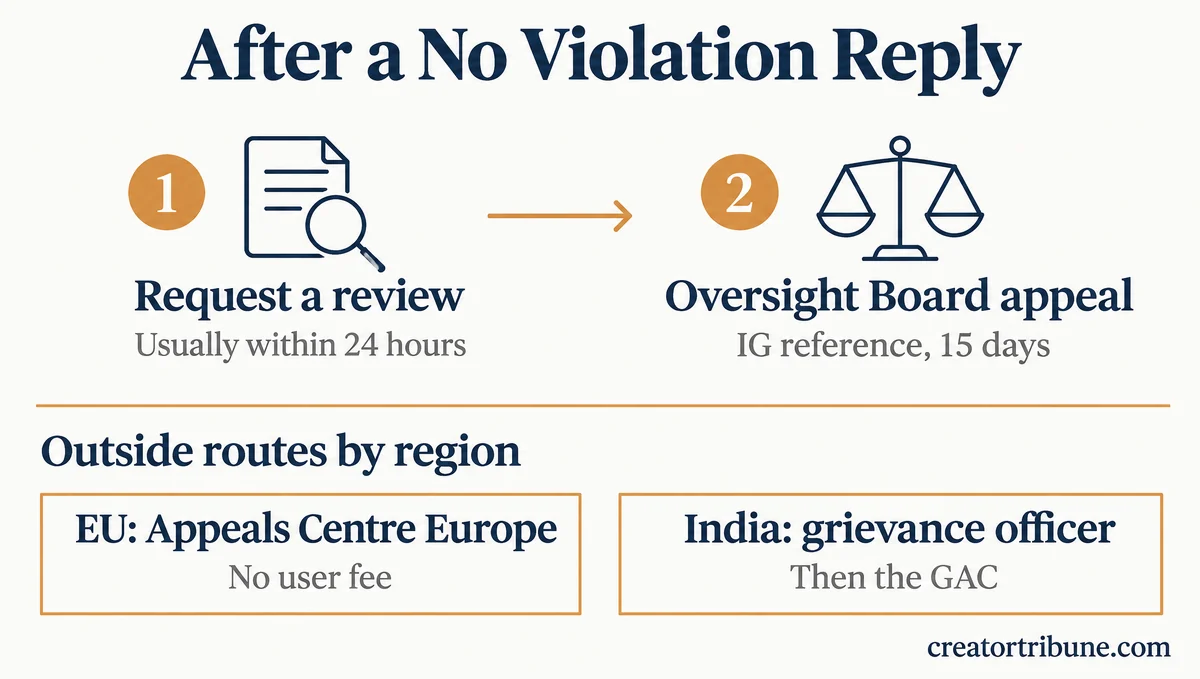
You request a review from the decision update in your Help menu: open Reports, tap the update, then See report details and Request review. Instagram says the second look usually happens within 24 hours.
I always send the review request, because it takes about two minutes and it is the only step that opens the door to an Oversight Board appeal. On the Instagram app:
- Tap Profile or your profile picture in the bottom right.
- Tap Menu in the top right.
- Below More info and support, tap Help.
- Tap Reports and violations, then tap Reports.
- Open the update Instagram sent about its decision, then tap See report details.
- Tap Request review, tap Continue, tap Continue again, then tap Submit request.
If Instagram finds it made a mistake, it says it will tell you and remove the content you reported. Some types of content can’t be sent for a review at all, and Instagram’s help page says it is “adding more options.”
Send the request now, then check Reports again in a day for the second decision.
Can You Take an Instagram Report to the Oversight Board?
Yes, if Instagram upholds its decision after your review request and an Oversight Board reference number appears in your Support Requests; you then have 15 days from the decision to appeal. The board picks only a small number of the appeals it receives.
Instagram’s Oversight Board help page says the reference number “begins with IG, followed by 8 numbers and letters.” You copy it, follow the on-screen link to the board’s website, log in with the account the number was issued to, and answer a few questions about the content you reported.
Expect long odds. The board’s 2024 annual report counts 558,235 appeals that year, 22% of them from Instagram, against 65 decisions issued. That works out to about one decision for every 8,600 appeals across Facebook, Instagram and Threads.
My take is that the appeal is worth filing for hate aimed at a public figure, where one ruling can push Meta to change how a rule is enforced. For a single nasty comment on your own post, the filters in the next section will do more for you this week.
Can EU Users Appeal an Instagram Report Outside Meta?
Yes, people in the EU can take reported content that is still visible on Instagram to the Appeals Centre Europe, which currently charges users no fee.
The Appeals Centre Europe accepts disputes about content on Facebook, Instagram, TikTok, Pinterest, Threads, YouTube and Google Maps, including cases where content you reported is still up. Anyone located in the European Union can submit a dispute.
Where Do You Escalate an Instagram Report in India?
In India, the step after Instagram’s own process is a complaint to its grievance officer, followed by an appeal to the government’s Grievance Appellate Committee (GAC). The committee only hears cases that went through the officer first.
The grievance officer guide is written around disabled accounts, but its walkthrough of the complaint form and the GAC appeal applies to a reported comment too.
How Do You Hide Offensive Comments on Your Own Instagram Posts?
Turn on Hide unwanted comments and Hidden Words, then use Restrict on one account or Limits on whole groups; none of it waits on Instagram removing anything. Hidden comments still count toward your comment total, and the person who wrote one won’t know it was hidden.
| Control | What it does | Where to find it |
|---|---|---|
| Hide unwanted comments | Hides comments with common offensive words, phrases or emojis. On by default, with None, Some or More levels. | Menu, How others can interact with you, Comments |
| Hidden Words custom list | Hides comments and message requests that contain the words, numbers or emojis you add. | Menu, How others can interact with you, Hidden words |
| Restrict | Their new comments show only to them unless you approve, and you get no notifications for them. | Tap and hold their comment, then Restrict account |
| Limits | Hides new comments and chats from groups such as recent followers, for up to four weeks at a time. | Menu, How others can interact with you, Limit interactions |
The custom list hides the entries you give it, so add the swapped spellings as well as the plain one. Separate each entry with a comma.
Before: loser
After: loser, l0ser, los3r, lo$er, l o s e r
Limits is the control I reach for first when a flood of comments arrives. Instagram’s Limits page says it can hide new comments and chats from recent followers, meaning accounts that started following you in the last week. Restrict suits one persistent account, because their comments stay visible to them and nobody else.
On your own posts you can also delete an inappropriate comment outright, and after you report one, Instagram offers to restrict or block the person who wrote it. Hidden Words works on typed text, so a slur printed inside an image comment needs a manual Hide or a report.
Instagram lets you manually hide comments only under your own posts, so comments on someone else’s post are that account’s to hide or delete. In that case, send the account owner the comments you reported and ask them to delete them or restrict the commenter.
What If the Instagram Report Button Won’t Send?
When a report won’t send, update Instagram, retry on instagram.com or another device, then file a bug through Report a Problem. Instagram’s reporting help pages don’t mention any limit on how many reports you can send.
I’d try the web version before reinstalling anything, because it rules the app in or out in under a minute. Work through these in order:
- Update Instagram from the App Store or Google Play, which is the first step on Instagram’s technical problem page.
- Close the app fully, reopen it, and report again.
- Try instagram.com in a browser. On a computer, click Options above the post, or hover over a comment and click Options, then click Report.
- Check whether Instagram is down before you troubleshoot further.
- Open Account Status, below More info and support in your Menu, to see whether any features are restricted on your account.
- If the poster blocked you, ask a friend with an account to report it, and send them the link and screenshots.
- Report the bug through Profile, Menu, Help, Report a Problem, then shake your phone on the broken screen or tap Report problem without shaking. Tick Include Complete Logs and Diagnostics if you see it.
You may see advice to wait 24 to 48 hours before reporting again, but none of Instagram’s reporting help pages says that. Start with step 1 and stop at the first step that works.
Which Reason Should You Pick When Reporting on Instagram?
Pick the reason that names the rule the content breaks, such as “Violence, hate or exploitation” for a slur, rather than “I just don’t like it.” The reason you pick is the one part of a report you fully control.
Instagram’s report page lists nine reasons for a post, and a profile can also be reported for pretending to be someone else or for belonging to a child under 13. Matching the reason to the rule is the one habit I’d teach anyone who reports comments often.
| What you are reporting | Reason to pick | Worth knowing |
|---|---|---|
| A slur or hateful comment | Violence, hate or exploitation | Report the comment itself, not just the post |
| Harassment aimed at you | Bullying or unwanted contact | Restrict or Limits can run at the same time |
| A scam message or fake giveaway | Scam, fraud or spam | Report it before you tap any link in it |
| A fake account using your photos | Pretending to be someone else, on the profile | Only you or your representative can report it, with photo ID |
| Your video reposted without permission | Intellectual property | The one report type that isn’t anonymous |
“I just don’t like it” sits first on the list, but it names no rule. Save it for content you only want to see less of.
Does Instagram Tell Someone You Reported Them?
No, Instagram reports are anonymous, except intellectual property reports, and the account you report won’t see who reported it. That holds even when Instagram leaves the content up.
The person may still get a notice that their comment “may have been hurtful to others,” with the choice to delete it or keep it, even when it breaks no rule. Instagram’s notice page says “the people who reported your content are anonymous,” and the person can’t respond to those reports.
What Should You Do Today After a No Violation Reply?
Request the review today, report the comment again under the reason that names the broken rule, and clean up your own posts with Hidden Words and Restrict while you wait. Save the Oversight Board for hate aimed at a public figure, and use the EU or India route if you live there.
If the content is still up after the second decision, I stop spending time on the report and put it into the filters that keep it off my posts. Instagram’s own help pages hand that part of the problem back to you, and the filters work the same day.
Quick Takeaways
- A “no violation” reply means Instagram didn’t find that the content broke a specific rule, and since January 2025 Meta’s systems need much more confidence before they take content down.
- Request a review from Reports in your Help menu; Instagram says the second look usually comes within 24 hours.
- An Oversight Board appeal needs an IG reference number and must be filed within 15 days, and the board issued 65 decisions against 558,235 appeals in 2024.
- On your own posts, Hide unwanted comments, a custom Hidden Words list with swapped spellings, Restrict and Limits work today without waiting on anyone.
- I treat a report that won’t send as an app fault first: update, try instagram.com, then use Report a Problem.