
My TikTok FYP Is in Another Language and How to Get English Back
My TikTok FYP Is in Another Language and How to Get English Back
Is your TikTok FYP suddenly in Russian, Arabic or another language? Find out if it is an outage or your account, and what to try before a refresh.
- 1Why Is My TikTok FYP in Another Language All of a Sudden?
- Is a Foreign-Language TikTok FYP a Glitch or Your Account?
- 2Why Does TikTok Keep Showing Me Videos in a Language I Don’t Speak?
- 3How Do I Get My TikTok FYP Back to English?
- Should You Refresh Your TikTok For You Feed to Fix the Language?
- What If Your TikTok FYP Is Still Foreign After a Refresh?
- 4Will Changing the TikTok App Language Fix My FYP?
- Does TikTok’s Translation Setting Change Which Videos You See?
- 5Can a VPN or a Trip Abroad Change Your TikTok FYP Language?
- 6Quick Takeaways
TL;DR: A TikTok FYP that suddenly turns Russian, Arabic or Chinese is usually a problem on TikTok’s side. During outages like the one on November 24, 2026, the For You feed falls back to a generic mix of popular videos, and it returns when TikTok does. If the foreign videos stay once TikTok works normally, tap Not interested, check Personalized feeds and your VPN, and refresh your feed only as a last resort.
What is the FYP: TikTok’s For You feed, the main stream of recommended videos, ranked for each account from what it watches, likes and skips.
Why is my TikTok FYP in another language? That question filled r/TikTok on the afternoon of November 24, 2026, while TikTok was down.
In six threads posted between 2:42 and 4:11 p.m. ET, at least 18 accounts said their For You feed had switched languages or countries. Eleven went to Russian, 2 to Arabic, 1 to Chinese and 3 to videos from their own country, and 1 didn’t name the language. The poster of one r/TikTok thread saw comment sections stop loading, and then “everything turned into Russian on my fyp.”
Another poster asked “Why is my entire fyp russian all of a sudden,” and in the main outage thread, one reply called it “the default fyp a new account would get.”
TikTok told Newsweek that “a brief technical issue” had been resolved, and a reply in another thread says a feed of local videos was fixed the same afternoon. That glitch cleared within hours, but TikTok’s January outage ran for more than a day.
A full feed refresh throws away everything your feed learned about you, so I check whether the problem is TikTok’s before I touch a single setting. The fixes below run in that order.
Why Is My TikTok FYP in Another Language All of a Sudden?
Your TikTok FYP usually switches to another language all of a sudden because TikTok’s recommendations failed and the feed fell back to a generic mix of popular videos, often from other countries. It happened during outages in January and November 2026, and in smaller waves between them.
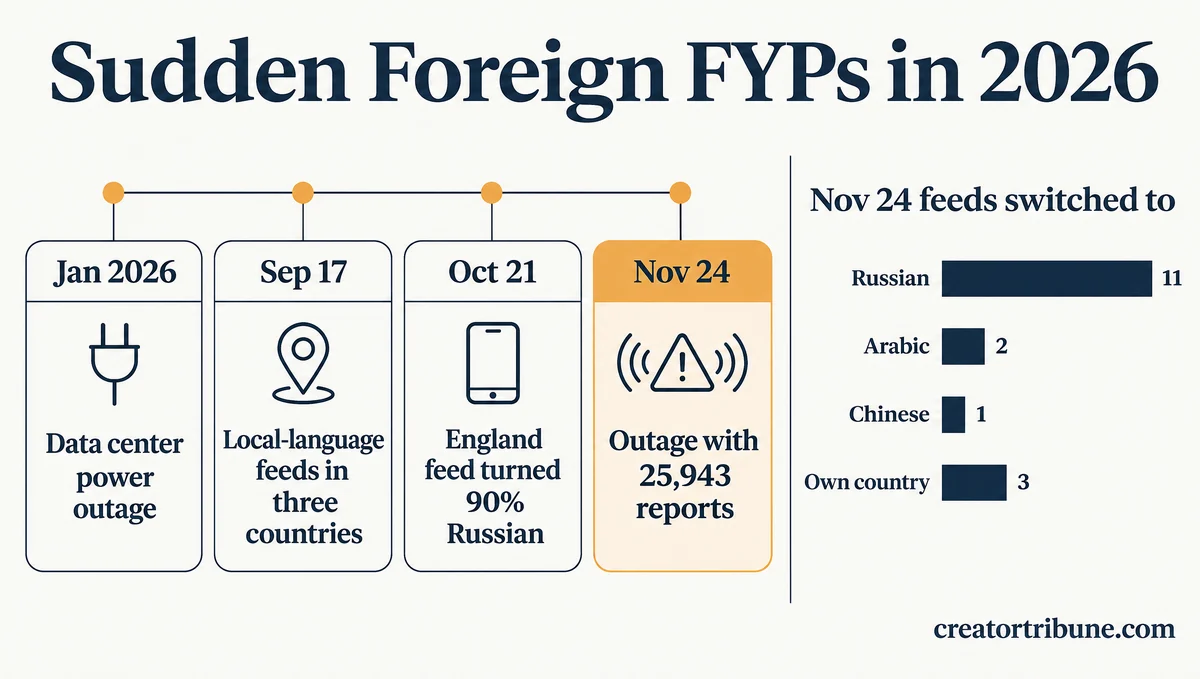
The November 24 outage is the most recent. Newsweek reported 25,943 Downdetector reports starting just after 2 p.m. ET, down to about 2,000 by 3:30 p.m. Profiles, reposts and favorites threw errors at the same time, and for some people only LIVE streams would load.
January 2026 lasted longer. After a power outage at a US data center, ZDNET reported on January 26 that “The For You page is not customized,” with Reddit users seeing only videos in Russian. Bugs first reported on Sunday, January 25, were still being fixed on Monday night, and TikTok blamed “a power outage at a US data center impacting TikTok and other apps we operate.”
Smaller waves came in between. On September 17, feeds switched to local-language videos for people in Azerbaijan, Turkey and Kazakhstan, and one of them described “generic videos that you usually see when you first download the app.” On October 21, a TikTok user in England with no VPN found their feed “90% Russian language videos.”
Four dates in ten months is why I treat a sudden switch as TikTok’s problem until TikTok is working normally again.
Is a Foreign-Language TikTok FYP a Glitch or Your Account?
A foreign-language TikTok FYP is a glitch when it starts all at once, covers almost every video and arrives with other broken features, like comments that won’t load. A slow drift toward one language over several days points to your own account’s signals instead.
One tell from November 24 surprised me. One poster found every video in Russian “with the ads only being from my country,” which suggests the ads still knew where the viewer was while the feed did not.
A language switch on its own is no sign of a hacked account either. If you also see logins or posts you don’t recognize, deal with those first.
| What you see | Likely cause | What to do |
|---|---|---|
| Every video switched at once, and profiles or favorites say “Something went wrong” | A TikTok outage | Wait it out, or see the Something went wrong fix |
| Foreign videos, but the ads are still local | Personalization dropped out | Wait for TikTok, then log out and back in |
| A few foreign videos creeping in over days | Watch time on foreign clips | Tap Not interested and swipe fast |
| A foreign feed since a trip or a VPN | Your IP or SIM points to another country | Turn the VPN off and keep watching |
| Foreign videos only on your computer | A desktop feed bug | See TikTok on PC |
| Only popular videos, right after you refreshed | The refresh restarted your feed | Watch and like what you want to see |
Why Does TikTok Keep Showing Me Videos in a Language I Don’t Speak?
TikTok keeps showing you videos in a language you don’t speak because what you watch outweighs your language setting, and time spent on foreign clips counts as interest. Your location and the country a video came from also count.
TikTok’s own explanation lists three kinds of For You signals. Your interactions come first, then details about each video, including “the country in which the content was published,” then your own “Device settings, language preference, location, time zone and day, and device type.” TikTok says that for most users, interactions such as watch time “are generally weighted more heavily than others.”
That ranking explains the slow drift. Pausing on a Russian clip to work out what is going on adds watch time, one of the interaction signals TikTok weighs most heavily. The habit that bothers me most is watching a foreign video to the end only to figure out why it showed up.
Language and location matter most when TikTok knows little about you. In a Knight Institute paper, Princeton computer scientist Arvind Narayanan says demographic signals, “more importantly, language and geography,” are useful “when a user first joins the platform.” He adds that “once the user starts leaving a behavioral record, its importance rapidly diminishes.”
TikTok describes three cases where your history stops steering the feed. A new TikTok account starts with popular posts and “Content influenced by your location and language settings.”
A refreshed feed starts with “some popular content.” Turning off Personalized feeds makes For You “a Popular feed” serving content “from your region and internationally.”
An outage feed looks a lot like that starter mix, which fits the new-account comparison in the November 24 outage thread. TikTok hasn’t explained why so many of those feeds were Russian. The same signals apply in every language, so a TikTok feed that turns Spanish all of a sudden has the same causes and the same fixes.
How Do I Get My TikTok FYP Back to English?
You get your TikTok FYP back to English by waiting out any outage, then using Why this post and Not interested, checking Personalized feeds and your VPN, and retraining the feed with English videos. The Refresh your For You feed option comes last, because TikTok says it can’t be undone.
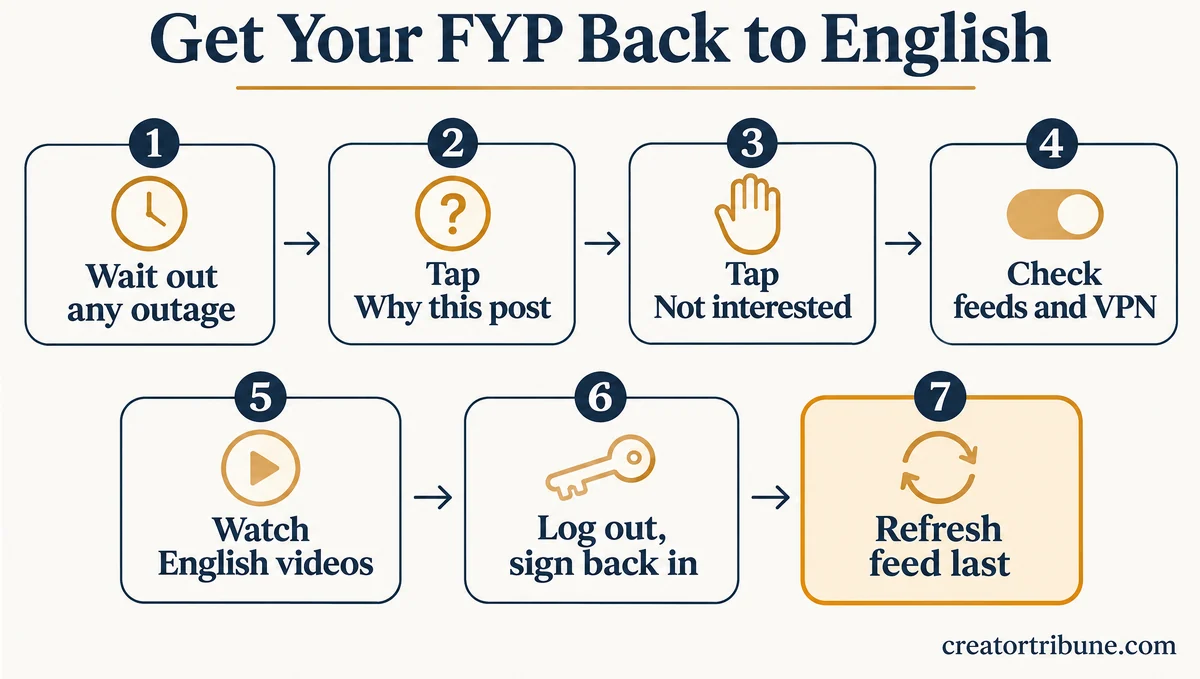
This is the order I work through, cheapest first:
- Wait it out if TikTok is having problems. Check whether TikTok is down before you change anything. In a September 17 thread, one person’s feed came back within minutes, then broke again when they refreshed to test it.
- Ask TikTok why. Press and hold a foreign video and tap Why this post. TikTok’s For You help says the reasons can include “This post is popular in your country,” and the Adjust your For You option sits on the same screen.
- Tap Not interested on each foreign video. Press and hold the video and choose Not interested, which TikTok says makes it “show you fewer posts like that.” Swipe past any you don’t mark within a second or two.
- Check Personalized feeds and your VPN. Go to Profile, Menu, Settings and privacy, Content preferences, then Personalized feeds, and make sure it’s on if your app shows it, because with it off your For You feed is TikTok’s Popular feed. Turn off any VPN set to another country while you’re at it.
- Retrain with English videos. Search for topics you like in English, watch a few of those videos to the end, like them and follow two or three English-speaking creators. Give it a few days, since one feed in the Azerbaijani-feed thread was still messed up four days later.
- Log out and sign back in, once TikTok works and you know your password. Results are mixed. A June post from Pakistan was “back to normal” after the poster logged out, refreshed the feed, tried a new account and signed back in. Another September 17 poster had re-logged in with no change.
- Refresh your For You feed as a last resort. Go to Profile, Menu, Settings and privacy, Content preferences, then Refresh your For You feed.
Before: A Russian video starts, you watch it to the end to work out why it’s there, then open the comments to check.
After: You swipe away within two seconds, press and hold the next foreign video, tap Not interested, then search a topic you watch in English and finish two of those videos.
I don’t count on clearing the cache here, since it isn’t among the feed controls TikTok lists. Manage topics under Content preferences lets you customize each topic, such as sports or food and drinks, based on your preference. That makes it the wrong tool for a language problem.
Should You Refresh Your TikTok For You Feed to Fix the Language?
Refreshing your For You feed is worth it only when foreign videos keep coming after TikTok is working normally and Not interested hasn’t helped.
TechCrunch described the feature at its March 2023 launch as surfacing content “as if you have just signed up for TikTok.” TikTok’s help page adds that you’ll see “some popular content” first, and that only the For You feed changes, so your Following feed, profile and inbox stay as they are.
I never refresh in the middle of an outage, because a starter feed is what the outage already handed out. Resetting your FYP walks through the refresh and the first days after it.
What If Your TikTok FYP Is Still Foreign After a Refresh?
If your TikTok FYP is still foreign after a refresh, report it through TikTok’s Help Center chat and keep tapping Not interested while you wait.
TikTok’s problem-report page puts the in-app route under Profile, Menu, Settings and privacy, Help Center, then Chat with us. Expect little from it: the June poster reported the Russian feed and says TikTok replied that “everything is fine.”
Will Changing the TikTok App Language Fix My FYP?
Changing the TikTok app language won’t fix your FYP on its own, because App language sets the words in TikTok’s menus and buttons. TikTok weighs what you watch more than your language preference.
| Setting | Is it a For You signal? | Fixes a foreign feed? |
|---|---|---|
| App language | Language preference is listed, weighed below watching | Not on its own |
| Translation | Not listed | No sign it does |
| VPN or travel | Location is listed, read from your IP and SIM | Turning the VPN off helps, gradually |
| Account region | Set at sign-up from your SIM or IP | Leave it alone |
App language is the only language setting on TikTok’s language help page, which says “You can change the language displayed in your TikTok app at any time.” You’ll find it under Profile, Menu, Settings and privacy, Language, App language, then Done.
TikTok does list “language preference” among its For You signals, so an English app language does no harm, but it says your watching counts for more. If your Language screen also shows a list of preferred languages, keep English on it and remove any language you don’t read. That screen takes ten seconds to look at, so I look once and go back to Not interested and retraining.
Does TikTok’s Translation Setting Change Which Videos You See?
There’s no sign that TikTok’s translation setting changes which videos you see, because it isn’t one of the For You signals TikTok lists. A November 22 poster suspected it after Russian and Chinese videos showed up with no VPN and no foreign videos watched.
The watch-time trap matters more to me here. If translated captions keep you on foreign clips longer, that extra watch time still counts as interest.
Can a VPN or a Trip Abroad Change Your TikTok FYP Language?
A VPN or a trip abroad can change your TikTok FYP language, because TikTok estimates your location from your IP address, SIM card region and device settings. A new location brings in local popular videos until your watching history outweighs it.
TikTok’s location help page says that with Location Services off, TikTok will “estimate other approximate location information based on your device or network information, such as SIM card region, IP address, and device system settings.” A VPN server in another country changes that IP signal, and so can the network you join on a trip.
Turn the VPN off, or pick a server in your own country, then keep watching normally while the feed adjusts. After a trip, keep using Not interested and watching English videos while the feed catches up.
Account region is a separate setting. TikTok’s account region page says it is set at sign-up from “the region of your SIM card or IP address.”
TikTok also warns that “once you change your country or region, you may not have the option to change it again.” I leave account region alone for a feed problem, because the feed recovers and a region change may not.
Quick Takeaways
- A sudden Russian, Arabic or Chinese FYP is usually TikTok’s side: on November 24, 2026, at least 14 accounts in six r/TikTok threads saw it during an outage.
- Wait until TikTok works again before you change any setting, then use Why this post and Not interested on the foreign videos.
- Make sure Personalized feeds is on under Content preferences if your app shows it, and turn off any VPN set to another country.
- App language only changes the menus, so retrain the feed with English videos and save the Refresh your For You feed option for last.
- Outage feeds came back within hours on November 24, but one September feed was still messed up four days later, so I give retraining a few days before reporting it.