How to Reset Your TikTok FYP Without Starting a New Account
How to Reset Your TikTok FYP Without Starting a New Account
Your TikTok FYP showing random videos? Here is how to reset your For You feed in one tap, keep your account, and retrain it fast in 48 hours.
- 1How to Reset Your TikTok FYP in One Tap
- 2Why Your For You Feed Drifts Off Your Niche
- 3Why Your Feed Feels More Random Right After a Reset
- 4The First 48 Hours After a Reset Decide Everything
- 5Manage Topics and Other Ways to Steer Without a Full Reset
- 6How Creators Use FYP Resets as a Research Tool
- 7Frequently Asked Questions
- Does resetting my TikTok FYP delete my account or drafts?
- How long does it take to retrain the FYP after a reset?
- Is clearing my watch history or cache the same as a reset?
- Can I reset my TikTok FYP on a PC or desktop?
- Will resetting my feed cause a shadowban?
- 8Quick Takeaways
TL;DR: You can reset your TikTok FYP in one tap with the official Refresh your For You feed button, no new account required. It wipes your recommendation signals but keeps your followers, drafts, saved videos, and DMs. The retraining work happens in the next 48 hours, and there is a data-backed way to do it fast.
If you searched how to reset your TikTok FYP, you have probably hit the same wall I did: half the guides online swear there is no reset button and your only option is to burn your account and start fresh. That advice is years out of date.
TikTok shipped an official one-tap reset, and it lives three menus deep where almost nobody looks. Your feed drifting off your niche is not a sign you broke something. It is the algorithm doing exactly what it was built to do, and you can steer it back.
Here is what you came for: the exact menu path, what the reset keeps versus what it wipes, and the 48-hour routine that decides whether your new feed locks onto your niche or stays a random mess. I will also cover the creator angle nobody writes about, using a deliberate reset as a trend-research tool.
I run this reset a few times a year on purpose, so this is the version I wish I had found the first time my feed went sideways.
How to Reset Your TikTok FYP in One Tap
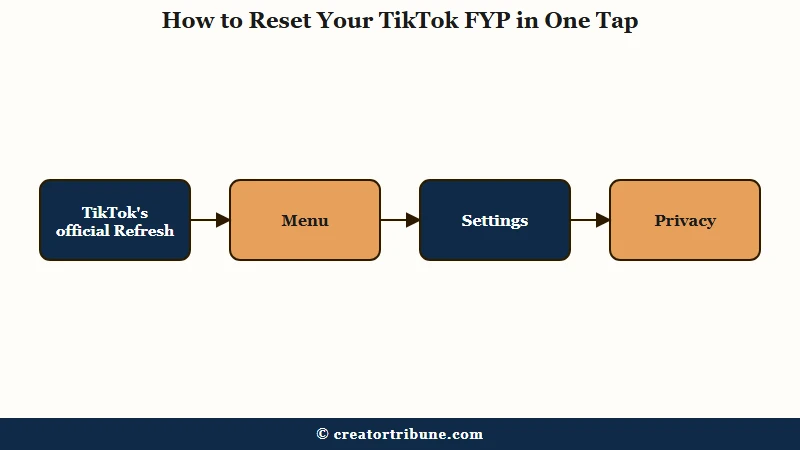
The fastest way to reset your TikTok FYP is the official Refresh your For You feed feature, found under Profile, Menu, Settings and privacy, Content preferences.
It returns your recommendations to a clean slate without touching your account.
I avoided this for months because I assumed a reset meant losing everything. It does not. The Refresh tool only clears the interest signals behind your For You page, nothing else.
Here is the path I walk every time:
- Open your Profile and tap the Menu icon (the three lines, top right).
- Go to Settings and privacy, then Content preferences.
- Tap Refresh your For You feed and confirm.
In some regions you can also trigger it straight from a video. Long-press the clip or tap Share, choose Why this video, then Adjust your For You, then Refresh your For You feed. One thing to know before you commit: the action is permanent and cannot be undone, so there is no going back to your old feed once you confirm.
What surprised me most is how little it really removes. The reset preserves your followers, your DMs and inbox, your drafts, your saved and published videos, your profile, and your entire Following feed. You are wiping the recommendation memory, not the account.
Why Your For You Feed Drifts Off Your Niche
Your FYP drifts because TikTok constantly tests new content on you through an exploration phase, then narrows down once it thinks it has you figured out.
A few stray videos watched late at night can tip the whole system.
The way I see it, the feed is never sitting still. TikTok’s ranking system scores every candidate video with a weighted formula that looks roughly like this: watch time, likes, shares, and follows all add to a video’s score, while a tap on Not interested subtracts from it. One academic breakdown of the system writes it as score = w1·pWatchTime + w2·pLike + w3·pShare + w4·pFollow - w5·pNotInterested, and that minus sign is the lever most people ignore.
What is the exploration phase: The stretch where TikTok deliberately shows you content outside your known interests to test new reactions, before it shifts into exploitation and doubles down on what you engage with.
So when you binge one off-topic rabbit hole, you feed the exploration engine fresh signals, and it chases them. This is the same algorithmic behavior behind why videos flop on TikTok but spread on Instagram, and it is why a feed that was dialed into your niche can scatter in a weekend.
If your problem is low views on your own posts rather than a messy feed, that is a different issue covered in low TikTok FYP views.
Why Your Feed Feels More Random Right After a Reset
A fresh feed feels more chaotic for a day or two because liking videos pushes TikTok into heavy exploration before it commits to your interests.
This is normal and temporary.
This is the part that trips people up, and it is backed by real audit data. Researchers who ran controlled tests on fresh TikTok accounts found that liking videos triggers a strong exploration phase first, and it takes interacting with roughly 1,000 videos before the algorithm shifts into heavy exploitation of those specific likes (per an arXiv algorithmic audit of TikTok personalization). In plain terms, your early signals get tested widely before they get trusted.
This is the trap I fell into early. People panic on day one and reset again, which only restarts the clock.
The fix is not another reset. The fix is feeding the system clean, consistent signals and giving it the short window it needs.
TikTok is enormous, with 1.5 billion monthly active users, so the recommendation engine is tuned for scale and speed, not for your patience on hour one. Give it the right inputs and it moves quickly.
The First 48 Hours After a Reset Decide Everything
The 48 hours after a reset are when TikTok is most sensitive to your signals, so a focused watching routine then is worth more than a week of casual scrolling later.
Treat it like training, not browsing.
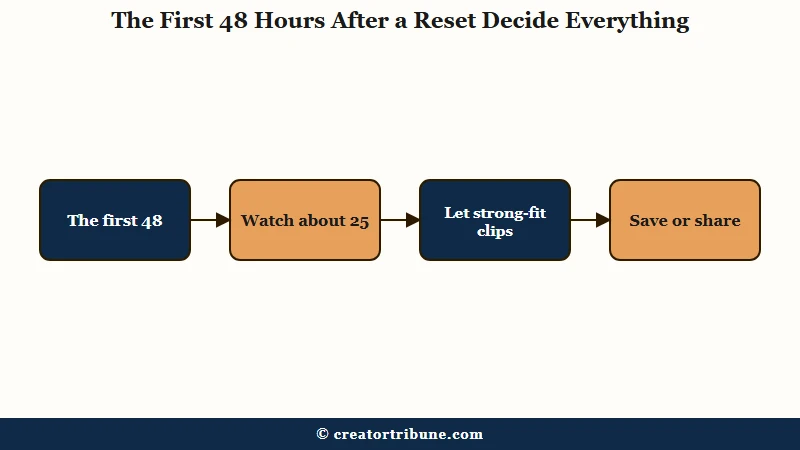
Audit data points to a concrete target: watching around 25 videos in your niche over roughly a day is enough to seed a clear algorithmic profile. You do not need to scroll for hours. You need to scroll with intent.
Cache and history myths waste the most time here, so here is the sequence I trust right after a reset:
- Search your niche directly (a keyword, a creator, a sound) and watch the results, do not wait for the FYP to guess.
- Let strong-fit videos loop. Watching a clip to 400% of its length (about four full loops) sends a far bigger signal than a single play.
- Save or share the best ones to yourself instead of just liking. A save trains your feed far harder than a double-tap.
- Skip off-niche videos fast, within the first second, and never comment on them.
- Follow two or three accounts that define your niche.
That fourth step matters more than it looks. If a video annoys you and you comment to argue, TikTok reads that engagement as interest and serves you more of it, because the formula counts the interaction, not your mood.
Here is roughly how the signals stack up, based on creator testing and platform behavior:
| Action | Relative training weight | What it tells the feed |
|---|---|---|
| Save to favorites | Around 10x a like | Strong, durable interest in this exact topic |
| Share | Around 7x a like | High value, worth showing to others like you |
| Loop to 400 percent | Major personalization spike | You are hooked on this format, send more |
| Watch to completion | Baseline strong signal | This content held you, relevant fit |
| Like | 1x baseline | Mild positive nudge, easy to drown out |
| Not interested | Negative weight | Subtracts from this video type in real time |
A quick before and after from my own feed makes the routine concrete.
Before: I reset and then scrolled passively for an evening, liking a few things here and there. Come morning, the feed was generic viral filler, cooking hacks, and street interviews, none of it my niche.
After: I reset again, searched three creators in my niche, let four of their videos loop, saved the two best, and tapped Not interested on everything off-topic. Inside two days the feed was about 80 percent on-niche and getting sharper.
Manage Topics and Other Ways to Steer Without a Full Reset
If your feed is only slightly off, you are better off nudging it with Manage Topics, Not interested, and a watch-history cleanup than hitting the nuclear reset.
A full reset floods you with generic content while it relearns, which is overkill for small problems.
The newer Manage Topics tool is the one I reach for most now. It sits under Profile, Menu, Settings and Privacy, Content Preferences, Manage Topics, and gives you sliders to dial categories like creative arts, fashion and beauty, food and drink, sports, travel, and humor up or down. It only affects your For You feed, not your Following feed or profile, and at the moment it is a United States rollout, so it may not appear for everyone yet.
Two other levers get misunderstood constantly, so let me be blunt about them. Clearing your watch history removes the influence of past videos and is a useful soft cleanup. Clearing your cache does nothing to your recommendations, because your preferences live on TikTok’s servers, not on your phone (that one is purely a storage and performance fix, which I cover in clearing your TikTok cache).
Here is how the options compare when you are deciding how hard to go:
| Method | What it resets | What it preserves | Best for |
|---|---|---|---|
| Refresh your For You feed | All FYP recommendation signals | Followers, drafts, saved videos, DMs, Following feed | A feed that is badly off your niche |
| Manage Topics sliders | Volume of specific categories | Everything else, including your interest history | Fine-tuning without starting over |
| Clear watch history | Influence of previously watched videos | Followers, content, all settings | A gentle cleanup of recent signals |
| Clear cache | Nothing about your feed | Everything | Lag and storage only, not the algorithm |
| New account | Everything, including your audience | Nothing | Almost never, you lose your equity |
One caution from experience: do not mass-unfollow accounts to force a clean feed. Unfollowing a few stale accounts is fine, but a big unfollowing spree can trip TikTok’s security limits and dent your visibility, which is the opposite of what you want.
How Creators Use FYP Resets as a Research Tool
For creators, a deliberate reset is a research instrument. It drops you back into TikTok’s exploration phase, where rising trends surface before they saturate. Used on purpose, it is one of the cheapest competitive-research moves available.
The most useful thing a reset gives a creator is a clean baseline. When my feed is heavily personalized, I only see the trends the algorithm already ties to me. A fresh feed shows me what is breaking out in a niche before my own bias filters it, which is gold for spotting a rising sound or format early.
I also use a controlled reset to test my own assumptions. If I want to know whether a hook style or topic is genuinely catching, a reset strips out my old viewing history so I am reading the niche, not my own echo chamber. Pair that with a sharp sense of the best time to post and you are making decisions on signal instead of guesswork.
The honest tradeoff is that resetting your main feed costs you your personalization, so some creators keep a separate burner account purely for clean niche research and leave their main feed intact.
Either way, the deeper lesson is that you never fully own an algorithmic feed, which is why I keep pushing creators to build something they control. If you want a simple starting point, a free creator money page walks through turning feed-dependent attention into an audience you own.
To be clear, resetting your own For You feed has zero effect on the reach of videos you post. Your content’s distribution is decided by how other viewers respond to it, not by what you watch, so you can reset as often as you like without risking a shadowban on your account.
Frequently Asked Questions
Does resetting my TikTok FYP delete my account or drafts?
No. The Refresh your For You feed feature only clears your recommendation signals. Your followers, drafts, saved videos, published posts, DMs, and Following feed all stay exactly as they were.
How long does it take to retrain the FYP after a reset?
You will see relevant shifts within a few hours of focused watching, but the real relearning happens over the first 48 to 72 hours. Watching about 25 niche videos with intent in that window seeds a clear profile fast.
Is clearing my watch history or cache the same as a reset?
No. Clearing watch history is a soft cleanup that removes some past influence. Clearing cache only frees storage and does nothing to your recommendations, since your preferences are stored on TikTok’s servers.
Can I reset my TikTok FYP on a PC or desktop?
The official Refresh button is a mobile app feature and usually is not on desktop. Reset on your phone first and it carries over, or manually retrain on desktop by skipping off-niche videos and searching your niche.
Will resetting my feed cause a shadowban?
No. Resetting the feed you watch has no effect on how your own videos are distributed. Consumption and content reach are separate systems, so a reset is safe for your account standing.
Quick Takeaways
- The official Refresh your For You feed button resets your FYP in one tap, no new account needed, under Settings and privacy, Content preferences.
- A reset wipes recommendation signals only and keeps your followers, drafts, saved videos, and DMs.
- Expect a day of chaos first, then train hard in the 48-hour window with around 25 niche videos, loops, and saves over likes.
- For small problems, use Manage Topics sliders and Not interested instead of a full reset, and never clear cache expecting an algorithm fix.
- Treat deliberate resets as trend research, then build an audience you own so you depend less on a feed you cannot control.