Instagram Instants Disappeared and Why Your Other Account Has It
Instagram Instants Disappeared and Why Your Other Account Has It
Instagram Instants disappeared from your inbox? Bring a hidden pile back with one swipe, and see why a second account still has it. Start with the fix.
- 1Why Did Instagram Instants Disappear From Your Inbox?
- Can Teen Account Limits Hide Instagram Instants?
- 2How Do You Turn Instagram Instants Back On?
- 3Why Is Instagram Instants on One Account but Not the Other?
- Can an Account Restriction Take Away Instagram Instants?
- 4Did Instagram Instants Go Away?
- 5Why Does the Instants App Say Instants Is Not Available?
- 6How Long Do Instants Stay on Instagram?
- 7What Should You Do If Instagram Instants Never Comes Back?
- 8Quick Takeaways
TL;DR: If Instagram Instants disappeared from the bottom right of your inbox, two controls hide it: a swipe to the right and the Hide Instants in Inbox setting. Press and hold that empty corner and swipe left, then turn the setting off under Content Preferences. If both checks come up empty and Instants still works on your other account, the feature is off for this account on Instagram’s side, so check Account Status and report a problem instead of reinstalling.
What is Instagram Instants: Instagram’s disappearing-photo feature, launched May 13, 2026, that sends unedited camera photos to Close Friends or mutual followers, landing in a pile at the bottom right of their inbox.
Instagram Instants disappeared from one person’s main account and kept working on their second account, on the same phone, according to a November 16 r/Instagram post. The poster’s Account Status was clean and the app was up to date. Even the standalone Instants app turned that account away with “Instants is not available at this time.”
Missing Instants is a steady complaint. Fifteen recent reviews of Instagram on Google Play say Instants is missing from their account entirely. They turned up in the newest 1,194 reviews at each of the one-, two- and three-star levels, 3,582 in all, posted from October 29 to November 16.
Two different problems leave the bottom right corner of your inbox blank, and they cost very different amounts of time. A pile hidden with a swipe comes back in five seconds, and I check that corner first every time. A feature switched off for one account can swallow an afternoon of reinstalls that change nothing.
Why Did Instagram Instants Disappear From Your Inbox?
Instagram Instants disappears from your inbox when you swipe it away, when Hide Instants in Inbox is on, when a Teen Account limit applies, or when Instagram switches the feature off for that one account. An empty corner is how you tell a real problem from a quiet day.
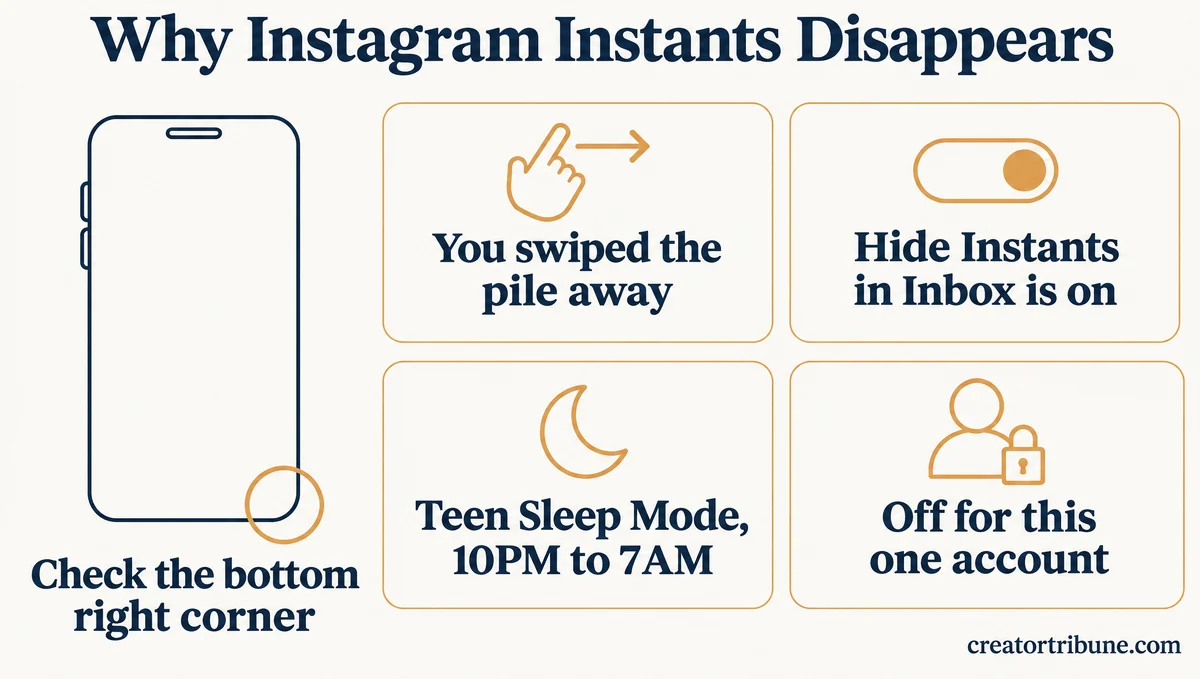
Instagram’s help page on Instants says that “If there are no instants to see, Instants will appear on the right,” so the icon should sit there even on a day when nobody has posted. I lean on that one line more than any setting, because a blank corner means the pile is hidden or the feature is off.
| What you see | Likely cause | What to do |
|---|---|---|
| The corner went blank right after you swiped the pile | You snoozed Instants | Press and hold the bottom right corner, then swipe left |
| No pile, and no instants from anyone | Hide Instants in Inbox is on | Switch it off in Content Preferences |
| Instants is gone at night on a teen account | Teen Sleep Mode, 10PM to 7AM | Wait until 7AM |
| Instants is missing on one account but works on another | The feature is off for this account | Check Account Status, then report a problem |
| One friend’s instants never arrive | You don’t follow each other, or they share only with Close Friends | Follow them back, or ask who they share with |
| No Instants on a computer or an emulator | Instants only runs on phones | Use the iPhone or Android app |
Find your row, then use the matching fix below. If the rest of your inbox is failing too, check whether Instagram is down or work through DMs that won’t load first.
Can Teen Account Limits Hide Instagram Instants?
Yes, on a Teen Account, Instagram restricts Instants by default between 10PM and 7AM, and time spent on Instants counts toward the teen’s daily limit. Meta lists both as protections that switch on automatically.
Meta’s launch post for Instants says Sleep Mode mutes notifications and “access is restricted by default between 10PM and 7AM for teens.” It adds that if a parent already supervises a teen on Instagram, “that supervision automatically extends to Instants.”
Parents of supervised teens also get a notice the first time their teen downloads the Instants app. A teen whose Instants vanishes every evening and returns every morning has most likely hit Sleep Mode, which lifts at 7AM.
How Do You Turn Instagram Instants Back On?
To turn Instagram Instants back on, press and hold the empty bottom right corner of your inbox and swipe left, then switch off Hide Instants in Inbox under Content Preferences. Both controls take under a minute, so try them before anything that touches the app itself.
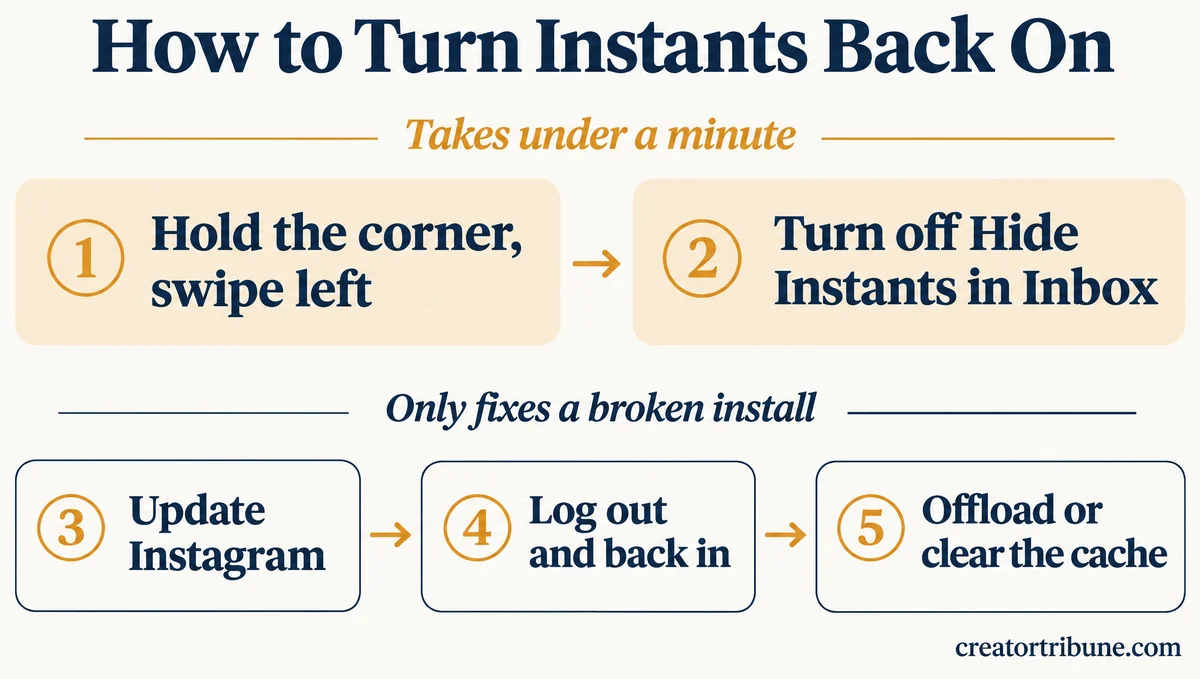
This is the order I work through, cheapest first:
- Open your inbox, press and hold the empty bottom right corner, and swipe left.
- Tap your profile, tap the three-line menu, scroll to Content Preferences, and switch Hide Instants in Inbox off.
- Update Instagram from the App Store or Google Play.
- Log out of the account and log back in.
- Offload the app on iPhone (Settings, General, iPhone Storage, Instagram, Offload App) or clear its cache on Android (Settings, Apps, Instagram, Storage), then reopen it.
Step 1 undoes a snooze. Instagram’s help page says you can hide instants “by swiping right on Instants, or have instants reappear by tapping and holding in the bottom right corner and swiping left.” Meta’s launch post calls that swipe a way to “temporarily stop receiving them,” so the pile is only paused.
Before: the bottom right corner of your inbox is blank, with no pile and no Instants icon, even on a day when friends say they sent you instants.
After: you press and hold that blank corner and swipe left, and the pile, or the Instants icon if nobody has sent you anything, shows up in the corner again.
Step 2 reverses the setting. TechCrunch’s walkthrough gives the path: go to your profile, open the three-line menu, scroll to Content Preferences, and use the Hide Instants in Inbox toggle. While it is on, “you will no longer see the Instants feature in your inbox,” and you “won’t see any Instants that people have sent you.”
If Content Preferences is not where the path says, type Content preferences into the search bar at the top of Settings.
Steps 3 to 5 can only help when the app itself is at fault, and they will not help an account that has the feature switched off. In the posts and reviews linked on this page, those steps went 0 for 6 on accounts missing Instants, including a June thread and a November 13 post.
Offloading removes the app and reinstalls it when you tap it again, and a November 1 review on Instagram’s Google Play listing says Instants was gone after a reinstall. That is why step 5 comes last.
If you came here to get rid of Instants, the same two controls work in reverse: swipe the pile right to snooze it, or switch Hide Instants in Inbox on. Neither one removes the separate Instants app from your phone.
Why Is Instagram Instants on One Account but Not the Other?
When Instagram Instants works on one account but not another on the same phone, and the swipe and the Hide Instants setting check out, the feature is off for that account on Instagram’s side. Instagram’s own help pages allow for features that reach some accounts before others.
The feature is off on Instagram’s side when all three of these are true:
- Pressing and holding the blank bottom right corner, then swiping left, brings nothing back.
- Hide Instants in Inbox is off under Content Preferences, or does not appear there at all.
- Another account on the same phone still shows Instants.
Instagram’s technical problems page says: “Keep in mind that you might also be experiencing an issue if a feature isn’t available to everyone yet.” Instagram also told TechCrunch in April that it was “exploring multiple versions of Instants to see what people like.”
The split also shows up on r/Instagram. In a November 16 post, the main account lost Instants months earlier while a second private account on the same phone kept it. A thread from June describes every alt account having Instants while the main account has none.
One November 6 review on Instagram’s Google Play listing reads: “Instants aren’t available in one of my account. I’ve other accounts, but they’ve instants, I’ve also updated multiple times and deleted and reinstall also..pls fix it.” Another 15 of those 3,582 reviews say Instants video or filter tools are missing or broken, and six say those tools never reached their account, which fits a feature that reaches accounts in stages.
What bothers me most is that nothing in the app tells you which group you are in. Account Status is the closest thing to an answer, so it is the next check.
Can an Account Restriction Take Away Instagram Instants?
Yes, an account restriction can take Instants away, and the feature may stay gone after the restriction ends. Check Account Status on any account that lost Instants before you change anything else.
A late October Reddit post describes a restriction dated October 22: “They took my instants, i cant call certain people and they took my location off of notes.” An October 2 review on the Instants App Store listing says the account was falsely restricted, and once that was lifted, “I lost the instance feature, and I have never got it back since.”
To check your Account Status:
- Tap your profile.
- Tap the menu in the top right.
- Under More info and support, tap Account Status.
Instagram’s Account Status page says it shows “Features you can’t use,” which is where a restriction that took Instants would appear.
If it lists a restriction, how Instagram action blocks expire explains the timing. A clean Account Status makes an active restriction less likely, though an October 13 r/Instagram post describes restrictions that Account Status did not show.
Did Instagram Instants Go Away?
No, Instagram has not removed Instants: its help pages still describe the feature, and the standalone Instants app ranked #9 in Social Networking on the US App Store on November 18, 2026. Facebook videos titled “Instagram Instants Feature Removed” turn out to be May tutorials on switching the feature off.
The app is still getting updates. Its US App Store listing showed version 456.0 on November 17, and its Google Play listing showed an update dated November 17, with more than 5 million downloads.
I don’t buy the shutdown theory while Instagram keeps shipping versions of the app. The regulatory news about Instants so far concerns its safety checks.
On October 6, The Guardian reported that the UK regulator Ofcom was investigating whether Meta carried out adequate checks before launching Instants, including whether children could access it. The possible outcomes run from a formal warning to a fine of up to 10% of global revenue, and opening an investigation does not ban the feature.
Why Does the Instants App Say Instants Is Not Available?
The Instants app shows “Instants is not available at this time” to accounts that are missing Instants in the main Instagram app, so it cannot unlock the feature for them. It is a second door into the same feature, and both doors open onto the same account.
Meta’s launch post says the app gives “immediate access to the Instants camera” and that “Instants work the same across both apps.” In a November 16 r/Instagram post, the app answered “Instants is not available at this time” for the account that had lost Instants. A November 13 review on the Instants Google Play listing reports the same message at login.
I treat that login message as useful, because it pins the problem on the account. If every account on your phone gets the message, the Instants app may not have reached your country yet.
The app started as a test in Spain and Italy, which TechCrunch reported on April 23, and Meta’s launch post says it is “rolling out in select countries.” On November 17 it was listed in the US App Store and on Google Play in the US. Meta’s launch post says Instants became “available globally” as a feature inside Instagram on May 13, while the app went only to select countries.
| What you see | Where you see it | What it means | What to try |
|---|---|---|---|
| “Instants is not available at this time” | Logging in to the Instants app | The account has no Instants | Log in with another account to confirm, then report it from Instagram |
| “Unavailable on this device” | A “Try Instants” story inside Instagram | Instants is not on for this account or phone | Try another account on the same phone, then report it |
| No Instants option at all | Instagram on a computer | Instants does not run on computers | Use the iPhone or Android app |
| No iPad version of the app | An iPad | The App Store lists it as Only for iPhone | Use an iPhone or an Android phone |
| No pile in the inbox | An Android emulator such as BlueStacks | An emulator can miss Instants | Use a real phone |
Instagram’s help pages on Instants say the feature “isn’t available on computers, but it is available on these devices,” meaning the iPhone and Android apps. A BlueStacks user found no Instants in the emulator, then saw it appear when the same account logged in on a friend’s phone.
How Long Do Instants Stay on Instagram?
An instant you receive can be opened once within 24 hours of being sent, and then it is gone, while the instants you send stay in a private archive for up to a year.
Instagram’s help page says “Each instant can be viewed once,” and that you reach the archive by tapping Instants on the right of your inbox, then Archive in the top right. Deleting an instant from the archive unshares it for anyone who has not opened it yet.
The standalone app keeps a second copy. Its help page says “your instants will automatically be saved to your phone’s camera roll” unless you turn off Save instants to photos. Instants you sent from that app may still be in your gallery.
The archive can outlive the pile. In one r/Instagram post, a person whose Instants had been gone for months got a one-time prompt about expiring instants that opened the camera and an archive dating back to March 2026. Instagram tested Instants inside the app in some regions before the May launch, which likely explains the early date.
I save anything I want to keep from the archive on the day I send it, because losing the Instants pile can also cut off the archive behind it. Screenshots will not save someone else’s instant, because Meta blocks them, which our screenshot guide covers in more detail. Disappearing chat messages are a separate feature, explained in why Instagram messages disappear.
What Should You Do If Instagram Instants Never Comes Back?
If Instagram Instants never comes back after the swipe, the setting and an update, stop reinstalling, check Account Status, and send one detailed bug report from the account that lost it. After that, the fix sits with Instagram.
That’s the order I’d follow when only one account lost Instants, and it costs about ten minutes. To report it, tap your profile, the menu, Help, then Report a Problem.
Instagram’s technical problems page says you can then go back to where you saw the problem and shake your phone, so do it from the inbox that is missing Instants. Attach screenshots of both inboxes, the one with Instants and the one without.
Reinstalling is the step I skip here. An October 2 review on the Instants App Store listing says Instagram kept telling the reviewer to uninstall and reinstall, and the feature never came back.
If you need Instants now, use an account that already has it, such as the other account where it still works. Instants only reach the Close Friends or followers you follow back on whichever account sends them.
Quick Takeaways
- A blank bottom right corner means Instants is hidden or off, because the icon shows even when nobody has sent you anything.
- Press and hold that corner and swipe left to undo a snooze, then switch off Hide Instants in Inbox under Content Preferences.
- Instagram has not removed Instants, and the standalone app was still charting in the US App Store on November 18, 2026.
- If the swipe and the setting check out and Instants still works on another account on the same phone, the feature is off for this account, and reinstalling is unlikely to change it.
- Check Account Status for a restriction, then send one Report a Problem with screenshots of both inboxes.