Submagic vs Captions and Which One Burns Your Budget
Submagic vs Captions and Which One Burns Your Budget
Submagic vs Captions compared on pricing, credits, caption accuracy, and reliability. See which short form tool fits TikTok and Reels before you pay.
- 1What Is the Real Difference Between Submagic vs Captions
- 2How Much Do Submagic and Captions Cost
- 3Which Tool Has Better Captions and Accuracy
- 4What Can Captions Do That Submagic Cannot
- 5Submagic vs Captions Feature Comparison
- 6Which Is Better for TikTok vs Instagram Reels
- 7Who Should Choose Submagic
- 8Who Should Choose Captions
- 9Final Verdict Submagic vs Captions
- 10Frequently Asked Questions
- Is Submagic or Captions cheaper?
- Does Captions or Submagic have a free plan?
- Which tool is better for faceless channels?
- Why do my Submagic exports look glitched?
- Can I use Captions on Android and desktop?
- Which is better for TikTok captions?
- 11Quick Takeaways
The Verdict: Submagic vs Captions comes down to two opposite cost models, not a price tag. Captions charges credits per edit, so heavy experimenting drains a month fast, while Submagic gives flat renders but glitches often enough that you pay in re-exports. Pick Captions if you shoot and edit on your phone, pick Submagic if you batch caption-heavy clips on a desktop.
If you have been comparing Submagic vs Captions, you have probably noticed the marketing makes them sound almost identical. Both promise auto-captions, both target TikTok and Reels, both wave around the word “viral.” The real difference is hiding in how each one charges you, and it is not the headline monthly price.
Captions runs on a credit system, where every export and restyle quietly spends from a monthly pool. Submagic gives you flat renders on a plan, which sounds better until you hit the reliability tax that comes with it. I have come to think of this as credit economy versus render reliability, and which one stings depends entirely on how you work.
By the end of this you will know the exact pricing for both, where each tool wins for TikTok versus Reels, and the one budgeting trap that catches new Captions users in the first week.
Both our Submagic review and our Captions app review go deeper on each tool alone, but this is the head to head.
What Is the Real Difference Between Submagic vs Captions
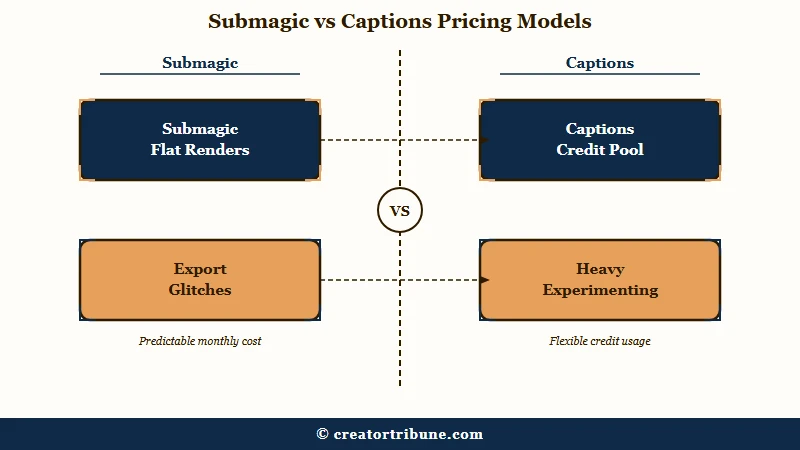
The core difference is the cost model. Captions bills credits per edit so experimentation gets expensive, while Submagic offers unlimited renders on a plan but ships inconsistent exports, so you pay in wasted time instead of credits.
What is a credit: In Captions, a credit is the unit spent each time you process a video. Basic caption styles cost a few credits, advanced AI edits cost far more.
From what I have seen, this single distinction predicts whether you will be happy with either tool. If you are the kind of creator who tries fifteen caption styles before settling on one, Captions punishes that habit because each restyle on the high-end templates can cost real credits.
If you value fast batch output and clean templates, Submagic suits you, as long as you can tolerate re-exporting a chunk of your clips.
Submagic leans web and desktop first, with a library of bold animated caption presets and auto B-roll. Captions leans mobile first, built around recording, editing, and exporting entirely on your phone. That platform split is the second big fork in the road, and I will come back to it.
How Much Do Submagic and Captions Cost
Captions is cheaper to enter, starting at $9.99 per month for Pro, while Submagic starts at $19 per month billed monthly.
The catch is that Captions plans are metered by credits and Submagic plans are gated by export quality.
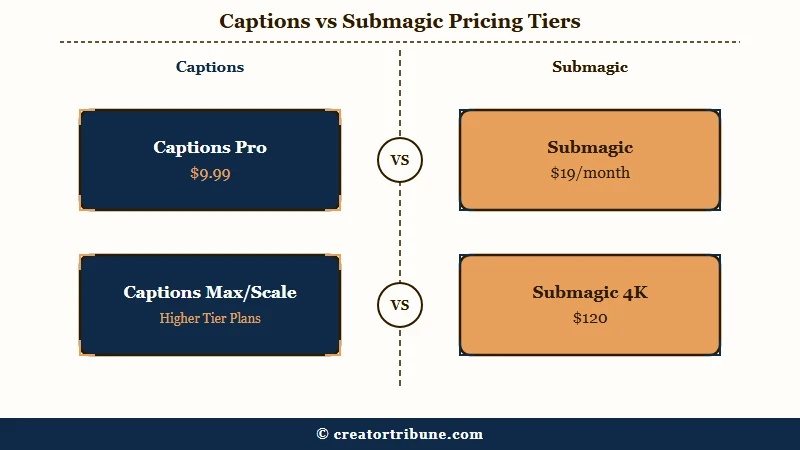
Here is how the paid tiers break down. I would read the credit column on the Captions side as carefully as the dollar column, because that is where the real spending happens.
| Plan | Submagic | Captions |
|---|---|---|
| Free | 3 videos, no card needed | 60 to 200 lifetime credits, no watermark |
| Entry | Starter $19/mo ($12 annual), 1080p cap | Lite $4.99/mo (Android only) |
| Mid | Pro $39/mo ($23 annual), 2K, Storyblocks B-roll | Pro $9.99/mo, 200 monthly credits, AI Eye Contact |
| High | Business plus API $120/mo, 4K Ultra HD, 100 API min | Max $24.99/mo, 500 credits, Mirage avatar |
| Scale | Not offered | Scale from $69.99/mo (1,400 credits) up to $279.99 (5,600) |
The free tiers tell you a lot about each company’s thinking. Submagic hands you 3 full videos with no credit card, which is enough to judge the output but not to run a channel. Captions advertises a free plan, but those 60 to 200 credits are a one-time lifetime grant, not a monthly refill, so the free experience ends the moment they run dry.
One detail that matters for budget planning is what happens when you cancel. Submagic users report that any leftover credits are wiped immediately when a subscription ends, so you cannot bank them for a quiet month. Captions states plainly that monthly plans are non-refundable, even if a technical fault stops you from using the tool.
Which Tool Has Better Captions and Accuracy
Submagic edges Captions on raw English accuracy, testing around 94 to 96 percent on clear speech versus 93 to 95 percent for Captions, but the gap collapses in noisy or non-European audio.
For most creators the caption quality is close enough that workflow matters more.
The way I see it, accuracy numbers only tell half the story. Submagic claims 48 languages, but the recognition quality drops sharply outside major European ones, which makes it close to unusable for Asian or Arabic content. Captions supports captions in 101 languages and dubbing into 46, and it handles multiple languages spoken in a single video, which is a genuine edge for bilingual creators.
Where Submagic clearly leads is caption style. It ships more than 20 high-energy presets with bold animations, emoji, and word-by-word highlighting, the look most associated with viral TikToks. Captions keeps its caption styling cleaner and simpler, then spends its energy on AI features like Eye Contact and avatars instead.
Our Opus Clip vs Submagic breakdown covers how Submagic’s caption styling compares to the other big clipper, if extraction speed is also on your mind.
What Can Captions Do That Submagic Cannot
Captions offers AI Eye Contact, a Mirage avatar that generates video from a text script using a clone of your own face, and AI Dubbing that preserves your voice tone across 30 plus languages.
Submagic has none of these, because it edits existing footage rather than generating talent.
What is B-roll: B-roll is supplementary footage layered over your main clip, like stock video of a city or a laptop, used to illustrate a point and hold attention.
These generation features are why I would point faceless and talking-head creators toward Captions. The Mirage avatar, added in 2026 alongside new Flux 1.1 Pro and Luma Photon models on the higher tiers, lets you produce new talking-head clips from a script without standing in front of a camera. AI Eye Contact quietly warps your gaze toward the lens while you read, which solves the dead-eyes teleprompter problem that plagues a lot of solo creators.
There is a real limit to be aware of though. Several of the headline features, including AI Zoom, AI Censor, and the Teleprompter, are exclusive to the iOS app. If you run an Android or desktop workflow, you are missing exactly the automation that makes Captions famous, so check the platform fine print before you subscribe.
Submagic vs Captions Feature Comparison
Here is the side-by-side on the features creators ask about most. I have weighted this toward the things that change your daily workflow rather than spec-sheet trivia.
| Feature | Submagic | Captions |
|---|---|---|
| Cost model | Flat renders per plan | Credits spent per edit |
| Main platform | Web and desktop | Mobile first, iOS and Android |
| Caption styles | 20 plus animated viral presets | Cleaner, fewer high-impact templates |
| AI avatar and eye contact | None | Mirage avatar plus AI Eye Contact |
| B-roll | Storyblocks B-roll on Pro and Business | Focus on generated talent, not stock |
| Export quality | 1080p, 2K, or 4K by tier | 4K on iOS and Web standard |
| Reliability | Glitched exports reported often | More stable, mobile dependent |
One counterintuitive line in that table is export quality. Most people assume the pricier-looking tool gives better resolution, yet Submagic locks 4K behind its $120 Business plan while the Captions iOS app does 4K as a standard capability. If pristine resolution for Reels or Shorts matters to you, that gap is worth a second look.
Which Is Better for TikTok vs Instagram Reels
Submagic is the better fit for fast, caption-heavy TikTok and Reels clips, while Captions wins for faceless or talking-head content you shoot and edit on a phone.
Neither tool is locked to one platform, so the choice tracks your content style more than the app you post to.
For a TikTok creator pumping out talking clips with punchy on-screen text and stock cutaways, Submagic’s preset library and auto B-roll get you there in fewer clicks. The animated word-by-word styles are exactly the aesthetic that performs in the For You feed, and you can batch several clips in one sitting on a desktop.
For a Reels creator building a faceless channel or scaling talking-head output, Captions is the stronger studio. The Mirage avatar and AI Eye Contact let you generate or polish on-camera content without a real shoot, and the whole pipeline lives on your phone. According to Statista’s TikTok user data, the platform draws over a billion monthly users, so the format choice you optimize for here scales across an enormous audience.
Here is the quick decision framework I would use:
- Choose Submagic if you mostly add captions and B-roll to footage you already filmed, and you work on a computer.
- Choose Captions if you want to record, caption, and export on your phone, or you need an avatar and eye-contact correction.
- Choose Captions if your content is multilingual or aimed at non-European language audiences.
- Choose Submagic if animated viral caption styles are your signature look and you batch clips in volume.
Example scenario: Say you post 20 short videos a month. On Captions Pro, plain auto-captions run about 3 credits each, so 20 clips spend roughly 60 of your 200 monthly credits. Switch to the high-end AI Edit styles at about 15 credits each and the same 20 clips cost 300 credits, more than the plan holds, so you get pushed to the Max tier. On Submagic those 20 renders do not cost credits, but if 40 percent come out with off-center titles or audio drift, you re-export 8 of them and the cost shows up as time instead of money.
Who Should Choose Submagic
Choose Submagic if you batch caption-heavy clips on a desktop and want the animated viral preset look without metering every edit. It rewards volume and punishes fussiness about reliability.
In my experience the ideal Submagic user is a creator or small agency cranking out a steady stream of talking clips, who values flat output over per-edit accounting. The Storyblocks B-roll on the Pro tier is a genuine time-saver when you want cutaways without leaving the editor. If you mostly post in English and want that bold word-by-word caption style, this is the faster path.
The trade-off you are accepting is consistency. Independent testing and the r/ContentCreators community report that Submagic exports come out clean only around 60 percent of the time, with the rest showing off-center titles, audio drift, or corrupt projects. Budget for re-exports, and avoid leaning on it the hour before a hard deadline.
Who Should Choose Captions
Choose Captions if you shoot and edit on your phone, want generated talent like avatars and eye contact, or create in multiple languages. Just respect the credit math so you do not get pushed up a tier by accident.
The way I see it, Captions is the better all-in-one mobile studio. Recording with a teleprompter, fixing your gaze with AI Eye Contact, and exporting in 4K all happen on the device in your hand. For faceless channels, the Mirage avatar is close to a category of its own, since repurposing one recording into a week of clips becomes far easier when the talent is generated.
The discipline Captions demands is credit awareness. Plain caption styles are cheap at a few credits, but the high-end AI Edit styles run much higher, so testing a dozen looks on a single video can drain a Pro month before you publish a thing. Settle on a style early, then process.
Final Verdict Submagic vs Captions
Captions is the better mobile-first, feature-rich choice for solo and faceless creators, while Submagic is the better desktop batch tool for caption-heavy viral clips.
What I would do is match the tool to my workflow first, because once you do that the cost model stops being a trap.
| Criteria | Submagic | Captions |
|---|---|---|
| Entry price | $19/mo monthly | $9.99/mo Pro |
| Best for | Desktop batch caption clips | Mobile, faceless, talking head |
| Standout feature | Animated viral presets plus B-roll | Mirage avatar and AI Eye Contact |
| Main risk | Glitched exports around 40 percent | Credit drain on AI Edit styles |
| Languages | 48 claimed, weak outside Europe | 101 captions, 46 dubbing |
Frequently Asked Questions
Is Submagic or Captions cheaper?
Captions is cheaper to start, with a Pro plan at $9.99 per month versus Submagic’s $19 per month billed monthly. Captions also has a $4.99 Lite plan on Android, though it meters usage by credits rather than flat renders.
Does Captions or Submagic have a free plan?
Both do, but they work differently. Submagic gives you 3 full videos with no credit card, while Captions offers 60 to 200 lifetime credits that do not refill each month, so the free Captions experience ends once those credits are spent.
Which tool is better for faceless channels?
Captions is better for faceless content. Its Mirage avatar generates talking-head video from a text script using a clone of your likeness, and AI Eye Contact polishes real footage, while Submagic only edits existing video and adds B-roll.
Why do my Submagic exports look glitched?
Submagic exports are inconsistent, coming out clean around 60 percent of the time per independent testing and creator reports. Off-center titles, audio sync drift, and corrupt projects are common, so re-exporting is often the fix and worth budgeting time for.
Can I use Captions on Android and desktop?
Partly. Captions has Android and web versions, but several headline features including AI Zoom, AI Censor, and the Teleprompter are iOS only, so an Android or desktop workflow misses some of the tool’s best automation.
Which is better for TikTok captions?
Submagic is stronger for classic viral TikTok captions, with more than 20 animated word-by-word presets and auto B-roll. Captions keeps styling simpler and invests in AI generation features instead, so it suits talking-head TikToks more than caption-driven ones.
Quick Takeaways
- Submagic vs Captions is a cost-model choice: Captions meters credits per edit, Submagic gives flat renders but glitches about 40 percent of exports.
- Captions starts cheaper at $9.99 per month and wins for mobile, faceless, and multilingual creators thanks to Mirage avatars and AI Eye Contact.
- Submagic wins for desktop batch work and animated viral caption styles, as long as you budget time for re-exports.
- Watch the Captions credit trap: high-end AI Edit styles can drain a 200-credit Pro month in about a dozen tests, so lock a style early before processing.