Instagram Comment Limit and the Hidden Per-Hour Cap
Instagram Comment Limit and the Hidden Per-Hour Cap
Instagram comment limit explained: daily caps, the hidden hourly ceiling, what triggers comment blocks, character rules, and the viral-reply scenario most miss.
- 1Daily Comment Limits by Account Age
- 2What Triggers a Comment Block
- 3The Hidden Hourly Ceiling Most Articles Miss
- 4Character Limit and Content Quality Scoring
- 5The Viral Moment Reply Scenario
- 6Comment Block Durations
- 7The Recovery Sequence for Comment Blocks
- 8What Doesn’t Work for Comment Blocks
- 9Comment Filters as a Trust Signal
- 10Edge Cases for Solo Creators
- 11Frequently Asked Questions
- How many comments can I leave per day on Instagram?
- Why is Instagram blocking me from commenting even when I’m under the daily limit?
- How long does an Instagram comment block last?
- Can I leave comments with links on Instagram?
- How do I reply to all comments on a viral post without getting blocked?
- What is the character limit for Instagram comments?
- Does Meta Verified protect me from comment blocks?
- 12Quick Reference
TL;DR: Instagram caps daily comments around 100 to 200 for established accounts and 30 to 50 for new ones. The hourly cap is the real ceiling at 8 to 14 per hour. Comment content variance matters as much as count. Identical wording, emoji-only spam, and link-comments trigger blocks regardless of total. Viral-moment replies count differently but still cap at 300 to 400 per day. The 20 to 50 second interval rule is the underdocumented constraint.
I have hit the Instagram comment block twice on the same account in the same week. The first time from a hashtag-engagement campaign where I left 60 thoughtful comments in 90 minutes. The second time, three days later, from replying to a viral Reel’s comments with too-similar wording.
Both times I was inside the daily cap. Both times the hourly pacing or content variance was the trigger. The lesson took me about a year to fully internalize: Instagram’s comment system has a different rule set than likes or follows, and the constraints most articles publish are missing the actual ceiling.
This guide is the comprehensive comment-limit playbook. The real daily numbers, the hidden hourly cap, what triggers comment-specific blocks, the character constraints, the viral-reply rules, and the recovery sequence specific to comment blocks.
If you are running outbound comment-engagement campaigns or replying to a viral moment, this is the operational manual that keeps your account intact.
Daily Comment Limits by Account Age
Mature accounts can leave 100 to 200 comments per day, but the actual safe ceiling is much lower because the hourly cap kicks in first.
New accounts under 3 months should plan for 30 to 50 daily comments at most.
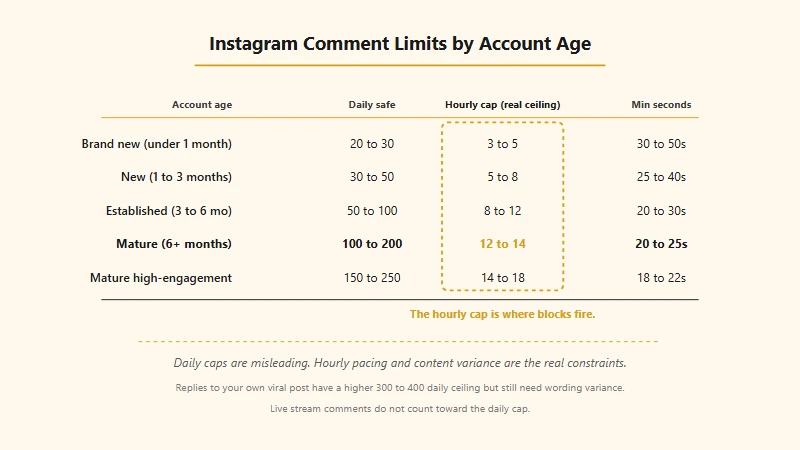
| Account age | Safe daily comments | Safe hourly comments | Min seconds between comments |
|---|---|---|---|
| Brand new (under 1 month) | 20 to 30 | 3 to 5 | 30 to 50 |
| New (1 to 3 months) | 30 to 50 | 5 to 8 | 25 to 40 |
| Established (3 to 6 months) | 50 to 100 | 8 to 12 | 20 to 30 |
| Mature (6+ months) | 100 to 200 | 12 to 14 | 20 to 25 |
| Mature high-engagement | 150 to 250 | 14 to 18 | 18 to 22 |
A few details worth pulling out.
The “Min seconds between comments” column is the underdocumented constraint. Instagram’s bot-detection model weights minimum-time-between-actions heavily. Below 20 seconds and you read as automated. Below 10 and you trigger immediately. New accounts need 30+ second gaps because their trust score is lower.
The hourly cap is the practical ceiling, not the daily. A mature account can hit 14 comments in an hour without issue, but doing 14 every hour for 8 hours straight (a daily total of 112) almost always triggers a block by hour 5 or 6 because the variance pattern reads as scripted. The daily total of 100 to 200 is the absolute outer limit, not the operating zone.
What Triggers a Comment Block
Comment blocks fire on content quality, pacing, and link content. Total count is the smallest factor. These are the patterns that get creators blocked:
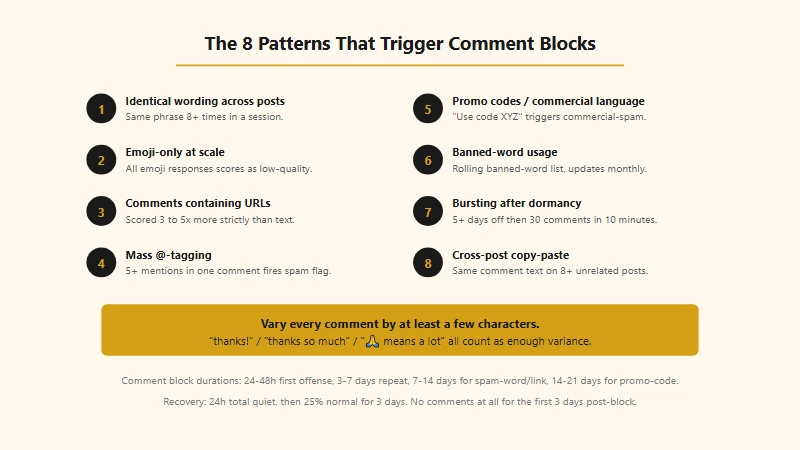
- Identical or near-identical wording. “Nice 🔥” or “Great post!” 8+ times in a session, even across unrelated posts. The exact same emoji string is the fastest flag.
- Emoji-only comments at scale. A pattern of nothing but emoji responses reads as low-quality engagement-farming, regardless of how few you post.
- Comments containing URLs. Link-containing comments are scored 3 to 5 times more strictly than text-only. Three link comments in a session triggers immediate review even if your daily total is well under cap.
- Mass-tagging in comments. @-mentioning more than 5 accounts in a single comment.
- Promo codes or commercial language. Phrases like “use code XYZ for 20% off” trigger commercial-spam flags regardless of context.
- Banned-word usage. Instagram maintains a rolling banned-word list that updates monthly. Comments containing those words get auto-suppressed and accumulate spam flags. If your comments are vanishing entirely, our comments not loading fix covers the full troubleshooting path.
- Bursting after dormancy. A 5+ day inactive period followed by 30+ comments in 10 minutes is the textbook bot signature.
- Cross-post copy-paste. Pasting the same 50-character comment on 8 unrelated posts in 15 minutes.
Item 1 is the most common trigger. Creators replying to multiple commenters on their own viral video often default to “thanks!” or a single emoji, and the repetition fires the block faster than the volume does.
The Hidden Hourly Ceiling Most Articles Miss
The hourly cap is the real constraint, not the daily total. Most ranking guides publish the daily ceiling (100 to 200 for mature accounts) but skip the hourly limit (8 to 14) where blocks really fire.
The math: if your safe hourly cap is 12 comments and you operate 8 active hours a day, your safe daily ceiling is 96 (well under the published “200”). Pushing past 100 comments in a day usually means you exceeded 12 to 14 in at least one hour, which is the trigger.
The reason: Instagram’s spam model weights hourly variance more heavily than daily totals. A creator doing 12 comments every hour for 12 hours straight (daily total 144) is much more likely to trigger blocks than someone doing 8 comments in one peak hour, then 4, then 12, then 6, then 0 for two hours, then 10. The variance is the human signature.
If you are running a comment campaign, plan around 8 to 12 comments per active hour with substantial gaps in between. Do not target the daily cap.
Character Limit and Content Quality Scoring
Instagram comments cap at 2,200 characters but the practical sweet spot is 50 to 200. Comments under 10 characters often score as low-quality. Comments over 500 risk truncation in some feed views.
The technical limit is generous (2,200 characters, same as captions), but content quality scoring kicks in at the short end. Single-emoji comments accumulate “low-quality” flags. One-word comments (“Wow”, “Yes”, “Same”) are similar.
What scores high:
- Comments that respond to specific content in the post (not generic).
- Comments that ask a relevant question or add value.
- Comments that reference what was said or shown in the video.
- Comments with at least one full sentence (12+ words is the soft threshold).
What scores low:
- Single emojis or short emoji strings.
- Generic affirmations (“Nice”, “Cool”, “Love this”).
- Comments that could fit any post.
- Comments that match recent comments you left elsewhere.
The content scoring affects future trust score, not just the immediate block risk. An account with 80 percent low-quality comments and 20 percent high-quality has its safe-zone reduced by 20 to 40 percent over weeks, eventually triggering the reach suppression our Instagram shadowban diagnostic guide helps you identify.
The Viral Moment Reply Scenario
Replying to comments on your own viral post counts differently from outbound commenting. Inbound replies have a higher daily ceiling (300 to 400 vs the standard 100 to 200) but content variance still matters.
When a Reel goes viral and you have 800 new comments in 24 hours, you can answer all 800 without hitting blocks IF the wording varies enough. The key constraints:
- Vary every reply by at least a few characters. “thanks!” / “thanks so much” / “🙏 means a lot” / “appreciate that” are all enough variance.
- Stay under 80 to 100 replies per hour. The hourly cap still applies even on inbound replies.
- Mix in occasional longer thoughtful replies (30+ characters). A pattern of 5 short replies broken by one longer one looks much more human.
- Take breaks. 20 minutes of replies, then 30 minutes off, then another 20 minutes.
The break pattern is critical. Creators who lock in for 90 minutes straight responding to a viral moment usually trigger a 24-hour comment block by the end of the session. Spread it across 6 to 8 sessions over the day.
If your video gets 1,500+ comments in 24 hours, you may want to stop replying personally and use the comment-pinning feature instead. Pinning 3 thoughtful comments at the top signals high engagement without requiring you to push past safe ceilings.
Comment Block Durations
| Block scenario | Typical duration |
|---|---|
| First-offense comment block (rate) | 24 hours |
| First-offense comment block (content) | 24 to 48 hours |
| Second comment block within 30 days | 3 to 7 days |
| Spam-flagged-word block | 7 to 14 days |
| Link-comment-triggered block | 7 to 14 days |
| Commercial spam (promo code) block | 14 to 21 days |
| Account-level engagement disable | 7 to 30 days |
| Permanent comment disable | Permanent (rare, after multiple appeals) |
The link-comment and promo-code rows produce some of the longest blocks because they signal explicit commercial spam intent. If you are running affiliate links or coupon codes, never put them in comments. Use the bio link or DM trigger pattern instead.
The Recovery Sequence for Comment Blocks
The standard Instagram recovery pattern applies, with two comment-specific modifications:
- Delete the most recent 5 to 10 flagged comments before the cooldown starts. Stale flagged comments score as continuing evidence of spam through the cooldown window.
- Do not comment at all for the first 3 days after the block lifts. Likes and follows can resume at quarter-capacity, but comments specifically need a longer dormancy.
The full sequence:
- Hour 0 to 2. Stop everything. Close the app.
- Hour 2 to 24. Do nothing in the app.
- Hour 24. Try liking one post (not commenting). If it succeeds, the comment block is lifted.
- Days 1 to 3. No comments at all. Likes at 25 percent of normal. Follows at 25 percent.
- Days 4 to 7. 50 percent of normal everything. Resume careful commenting at 3 to 5 thoughtful comments per day.
- Days 8 to 14. 75 percent of normal activity, scaling comments back to half normal.
- Day 15+. Full activity restored.
Worked Before/After:
Before: Creator’s Reel goes viral Tuesday. They reply to 90 comments in 60 minutes (90/hr peak), hit the comment block at minute 62. They wait 30 minutes, try to reply again, popup. They retry every 15 minutes through the afternoon. By Wednesday morning the block has extended to 72 hours. Their next outbound comment campaign Thursday triggers a 7-day block because the algorithm is still flagged. Total recovery: 14 days.
After: Same viral moment Tuesday. They reply to 60 comments in 75 minutes (48/hr peak), well below the 80 to 100 ceiling. Take a 30-minute break. Reply to 50 more in the next hour. Take 45 minutes off. Reply to 40 more. By end of day they answered 150 comments without a single block. Wednesday they continue with 100 more replies, paced similarly. By Thursday they are back to normal outbound commenting at full capacity.
What Doesn’t Work for Comment Blocks
The standard non-fixes apply specifically to comment blocks:
- Resetting password. Cosmetic.
- Reinstalling the app. Cosmetic.
- Switching device or IP. Adds an evasion flag.
- Creating a new account. New account inherits restriction state.
- Posting more content during the block. Does nothing toward unblocking.
- Commenting from a friend’s account on your own posts. Detected as account contamination.
- Buying “engagement boosts” with bot comments. Triggers a separate commercial-spam penalty on top of the original block.
The Wi-Fi to cellular data switch occasionally helps clear soft IP-tied suppressions but does not affect comment-specific blocks.
Comment Filters as a Trust Signal
Setting up Instagram’s built-in comment filters signals to the algorithm that you are managing your community carefully. Accounts with filters configured score modestly higher in the trust model.
How to configure (worth doing on every account):
- Settings → Privacy → Comments → Manual Filter
- Add 20 to 30 spam-pattern words (“free followers”, “DM me”, emoji-only patterns)
- Enable “Hide Offensive Comments” and “Hide Most Reported Words”
- Optionally restrict comments to followers only on specific posts
The trust boost from filters is small but compounds with other signals (verified phone, business account, regular Lives, original content ratio). Accounts that combine all of those score 10 to 20 percent higher in the safe-zone calculation.
Edge Cases for Solo Creators
ManyChat trigger DMs as a comment-bypass workaround. Instagram approves keyword-triggered DMs through partners like ManyChat. If you are running a campaign where commenters trigger a DM with a link, the DM goes through Meta’s official Messenger Platform API and has separate rate limits from manual DMs. You can send hundreds of trigger DMs per day without comment-block risk because the comment that triggers them counts as inbound engagement, and the DM itself is not “your comment” being sent at scale.
The 20-tag carousel exception. Carousels allow tagging up to 35 users per slide vs 20 for single-image posts. Tagging 25 collaborators in a carousel comment is safer than tagging 21 in a feed-post comment. The carousel surface is treated as a tagging-friendly content format.
Mass-deleting old flagged comments. If you have spent the last week leaving generic emoji-only comments and want to reset your trust score before a campaign, mass-deleting those comments before they accumulate in your spam-pattern history is sometimes effective. Delete within 30 minutes of posting for the cleanest reset. Beyond 24 hours, the flag is logged and deletion does not help.
Live stream comments do not count toward the daily cap. Comments left during your own Instagram Live broadcast are tracked separately from feed comments. You can reply to viewer comments live for an hour without burning through your daily comment budget. This makes Live a relatively safe channel for high-volume engagement.
Frequently Asked Questions
How many comments can I leave per day on Instagram?
Mature accounts can safely leave 100 to 200 comments per day. New accounts under 3 months should stay between 30 and 50. The hourly cap (8 to 14 for mature accounts) is the practical ceiling because attempting to fill the daily cap in 4 hours triggers blocks regardless of total.
Why is Instagram blocking me from commenting even when I’m under the daily limit?
The block is most likely from comment content (identical wording, emoji-only spam, link content) or hourly pacing (more than 14 in an hour for mature accounts). Daily count alone rarely triggers blocks if pacing and content quality are clean.
How long does an Instagram comment block last?
A first-offense comment block lasts 24 to 48 hours. Repeat offenses within 30 days stretch to 3 to 7 days. Spam-flagged-word and link-comment violations can extend to 14 to 21 days. The longest blocks come from commercial-spam patterns like promo codes in comments.
Can I leave comments with links on Instagram?
You can but they are scored 3 to 5 times more strictly than text-only comments. Three link-containing comments in a session can trigger an immediate review even if your daily total is low. For affiliate or coupon promotion, use the bio link or DM trigger pattern instead.
How do I reply to all comments on a viral post without getting blocked?
Vary every reply by at least a few characters. Stay under 80 to 100 replies per hour. Take 20 to 45 minute breaks every 60 minutes. Mix in occasional longer thoughtful replies. Replies to your own posts count differently from outbound comments and have a higher daily ceiling (300 to 400).
What is the character limit for Instagram comments?
2,200 characters per comment, same as the caption limit. The practical sweet spot is 50 to 200 characters because content scoring favors thoughtful responses over both very short and very long comments.
Does Meta Verified protect me from comment blocks?
No. Meta Verified raises support priority and modestly improves discovery, but provides zero protection against comment blocks. The same daily and hourly limits apply, the same triggers fire, and the same recovery timelines hold.
Quick Reference
If you are scanning, here is the compressed version:
- Daily safe comments: 30-50 (new), 50-100 (established), 100-200 (mature). 200 is the absolute ceiling.
- Hourly safe cap: 3-5 (new), 8-12 (established), 12-14 (mature). This is the real constraint.
- 20 to 50 second gap between comments. New accounts need the longer end.
- Content variance is non-negotiable. Identical wording flags faster than volume.
- Link-comments are scored 3-5x more strictly. Skip links in comments entirely.
- Replies to your own viral video have a higher 300-400/day ceiling. Still need wording variance.
- First-offense block is 24-48 hours. Repeat: 3-7 days. Link/spam-word: 7-14 days. Promo-code: 14-21 days.
- Live comments don’t count toward daily cap. Live is a safe high-volume engagement channel.
For the cross-action picture, the Instagram daily limit cheat sheet covers every action’s daily ceiling, the action blocked recovery guide walks through the full recovery playbook for any block type, and the follow limit deep-dive covers the 7,500 cap and follow-specific blocks. For the platform’s official framing, see Instagram’s Community Guidelines.
If you are looking at a comment block popup right now: close the app, set a 24-hour timer, and resist the urge to test. After the cooldown lifts, do not comment at all for 3 days. The comment-block heals slower than the like-block, and the 3-day comment-fast is the difference between a 24-hour interruption and a 14-day extended cooldown.