Turn On Captions on TikTok Again When the Option Disappears
Turn On Captions on TikTok Again When the Option Disappears
TikTok captions option gone? The switch now lives in the Share menu. See how to turn captions on again, and how to get them when TikTok shows none.
- 1How Do You Turn On Captions on TikTok?
- Is There Still a Captions Switch in Accessibility Settings?
- 2Why Is the Captions Option Missing on TikTok?
- When Did TikTok Captions Start Disappearing?
- 3Why Do TikTok Captions Work on One Phone but Not Another?
- 4Does Reinstalling TikTok Bring Captions Back?
- 5How Can You Get Captions on TikTok Without the Captions Button?
- 6Why Did TikTok Caption Translation Disappear?
- 7How Do You Make Sure Viewers See Your TikTok Captions?
- 8How Do You Report Missing Captions to TikTok?
- 9Frequently Asked Questions
- Where is the captions setting on TikTok now?
- What does “Show captions (unavailable)” mean on TikTok?
- Why did my TikTok captions disappear?
- Will reinstalling TikTok fix missing captions?
- Can I get captions on TikTok without the captions button?
- Can I edit TikTok captions after posting?
- 10Quick Takeaways
TL;DR: TikTok’s help page puts the captions switch in the Share menu: tap Share on a video with speech, scroll to Captions and turn on Show captions. If the button is gone everywhere, test a second device, reinstall once your drafts and login are safe, and turn on your phone’s own live captions. TikTok has not publicly explained why the switch vanishes.
If you are looking up how to turn on captions on TikTok because the option vanished, the switch may only have moved. TikTok’s help page for viewers now keeps it in the Share menu, while guides such as wikiHow’s April 2025 walkthrough still point to Settings and privacy, then Accessibility.
For some accounts the switch is gone from every menu at once. Reports on r/TikTok go back to at least a January 2023 thread. They were still arriving on 13 September 2026, when a hard-of-hearing viewer lost both their captions and the option between two app opens.
TikTok launched auto captions in April 2021 to help people who are “hard of hearing or deaf,” according to its launch announcement. Captions are the one TikTok setting I never switch off, so a missing switch is the first thing I fix on any phone I set up.
Below are the three places the switch can live, a two-minute test for whether your phone is at fault, and the checks to run before deleting the app. Creators also get a section on reaching viewers who have lost the switch.

How Do You Turn On Captions on TikTok?
You turn on captions on TikTok from the Share menu. Open a video with speech, tap Share, scroll across the bottom row to Captions and switch on Show captions, or long-press the video and pick Captions and translations.
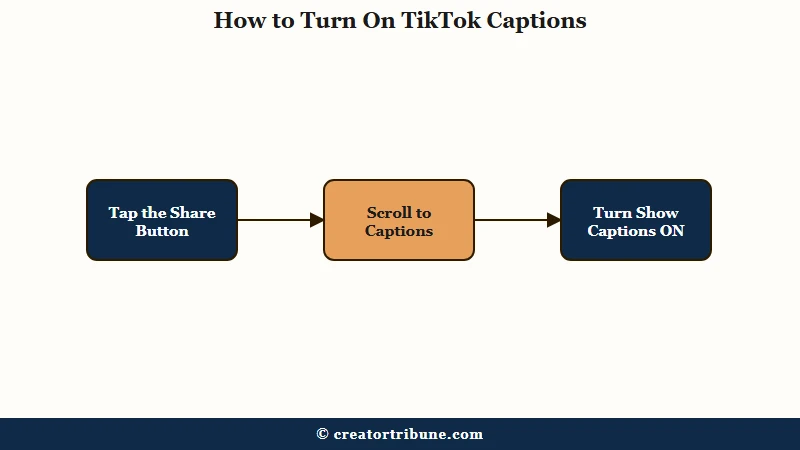
TikTok’s help page gives the Share route and adds a catch: you “can only manage captions when the post contains them.” The page also warns that the button hides at the far end of the row: “You may need to scroll across to find it.”
- Open a video where someone is talking, since a music-only clip usually has no captions to show.
- Tap the Share arrow on the right side of the video.
- Swipe the bottom row of icons sideways until Captions appears.
- Tap Captions and switch Show captions on.
The Royal National Institute for Deaf People (RNID), a UK charity, documents a second route in its guide to TikTok captions. Long-press a clear part of the screen, choose Captions and translations, then toggle Show captions. When a video has no automatic captions, RNID notes that the label reads “Show captions (unavailable)”.
I check the Share row before anything else, because it is the route TikTok itself documents and it takes ten seconds.
Is There Still a Captions Switch in Accessibility Settings?
TikTok’s viewer help page walks through its Accessibility menu, covering animated thumbnails, color contrast, reduced motion and text size, and it lists no captions switch there. wikiHow’s guide, last updated in April 2025, still describes an “Always show auto-generated captions” switch in that menu, so some app versions may carry it.
An Accessibility menu with no captions entry does not prove anything is broken. Go back to the Share menu and test a video with speech.
| Where you look | What you see | What it means |
|---|---|---|
| Share menu, bottom row | Captions, then Show captions | The documented switch, working normally |
| Long-press menu | Captions and translations | The second route to the same switch |
| Either menu | Show captions (unavailable) | This video has no automatic captions, so try one with speech |
| Settings and privacy, Accessibility | No captions entry | Normal on current versions, so use the Share menu |
| Every menu, on every video | No captions option anywhere | The missing-switch fault covered below |
Work down the table from the top, and treat your app as faulty only once a talking video shows no Captions button anywhere.
Why Is the Captions Option Missing on TikTok?
TikTok has never publicly explained why the captions option vanishes, and it has published nothing about the fault. One account can have captions on one device and none on another, which points to something tied to each install of the app.
An update is the first fix everyone reaches for, and it is a weak bet here. Updating did not bring the switch back in an August 2026 thread or for a new Galaxy A55 owner in November 2024.
My read is that TikTok sets this switch for each device, though the company has never confirmed a cause. That would explain how one account can show it on a tablet and hide it on a phone. If captions still show on another device, a reinstall on the broken one is worth a try, and if they are gone everywhere, the problem most likely sits on TikTok’s side.
The switch can also come back with no action on your side. In a July 2026 thread, the poster’s missing captions came back on their own by mid-August, with no fix applied.
When Did TikTok Captions Start Disappearing?
The fault is older than it looks, and TikTok has posted nothing about it. Every row below links to the public thread it comes from.
| When | What happened | Source |
|---|---|---|
| January 2023 | No captions switch in Accessibility, the menu every guide pointed to | r/TikTok |
| January 2024 | The Captions button vanished from the Share menu for a hard-of-hearing viewer, and a reinstall fixed it for another viewer in the thread but not for the poster | r/TikTok |
| November 2024 | A new Galaxy A55 showed no captions in any menu while the owner’s old phone kept them | r/GalaxyA55 |
| January 2026 | Captions gone from the long-press menu and from Accessibility settings | r/TikTok |
| August 2026 | Auto captions stopped, then the feature disappeared, and an update failed where one reinstall worked | r/TikTok |
| 12 and 13 September 2026 | Subtitles and translation gone from the feed and from Settings, then captions vanished between two app opens | r/TikTok and r/TikTok |
The January 2026 report landed right after TikTok’s US business moved to a new joint venture, and its poster brought up “the ownership change.” The 2023 and 2024 rows show the fault predates the new owners, and TikTok has not linked the two.
Keep those dates in mind for the report you send later, because a fault this old needs a precise report to get noticed.
Why Do TikTok Captions Work on One Phone but Not Another?
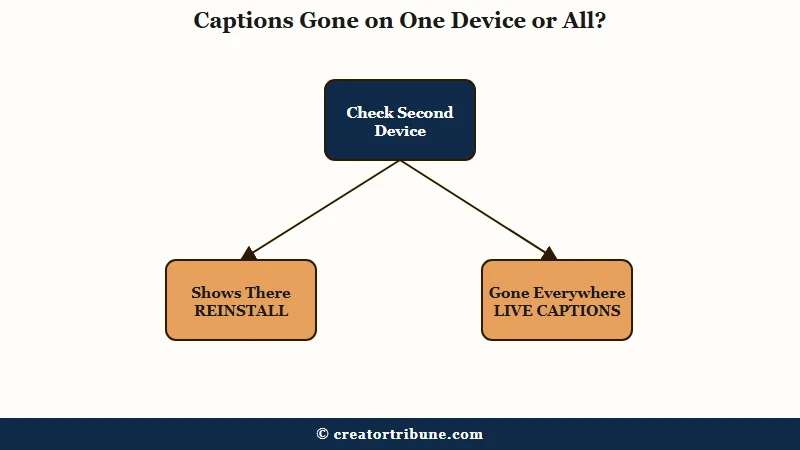
TikTok captions can vanish on one device while another device on the same account keeps them. When that happens, the fault sits with that copy of the app and your account still has captions, and a second device tells you which case you have in about two minutes.
On 12 September 2026, captions left one viewer’s iPad but stayed on their smartphone, on the same account. A day later, a deaf viewer had captions on a tablet and none on a phone, even after reinstalling and restarting.
A new phone cuts both ways. A new Galaxy S26 and a new Galaxy A55 both arrived without the switch, and another A55 owner in that A55 thread always had captions, so the model alone does not explain it.
The reverse happens too. One viewer who lost captions in January 2024 got them back only after moving to a new Android phone.
A working second device is good news to me, because it proves your account still has captions. Here is the test:
- Log in to your account on a second phone, a tablet or a friend’s device.
- Open a video with speech and look for Captions in the Share row.
- If Captions is there, the fault is on your phone, so move to the reinstall steps below.
- If it is missing everywhere, the change most likely sits on TikTok’s side, so turn on your phone’s live captions and report it.
Run this test before you delete anything, because it decides which half of this guide you need.
Does Reinstalling TikTok Bring Captions Back?
Reinstalling TikTok can bring the captions switch back, but it is not a sure fix. Give it one try once your drafts are saved and you know you can log back in.
A clean reinstall brought the switch back for one viewer in January 2024 and on an iPhone running iOS 26 in September 2025.
One reinstall in August 2026 worked too. It failed for the poster of that January 2024 thread, who reinstalled several times, and for the deaf viewer with the working tablet.
Two things can go wrong when you delete the app. TikTok drafts live only on your phone, so deleting the app deletes them, and a login you cannot complete locks you out of far more than captions.
In a July 2026 case, TikTok support told a viewer whose captions had vanished to log out and back in. The account was tied to a phone number the viewer no longer had, and they could not get back in.
I would never delete TikTok before checking both, since a lost account costs far more than a lost switch. Do it in this order:
- Save every draft you care about to your camera roll.
- Go to Profile, tap the Menu button, then Settings and privacy, Account and Account information, and confirm the phone number and email are ones you can still reach.
- Clear the cache from inside the app first, since clearing the TikTok cache keeps your drafts and your login.
- If Captions is still missing, delete TikTok, restart the phone and install it again.
- Log back in, open a video with speech and check the Share row.
On an iPhone, Offload App (Settings, General, iPhone Storage, TikTok) keeps your drafts, but it keeps the app’s data too, so it is not the same clean start. If the switch is back, you are done, and if it is not, the next section gets you captions anyway.
How Can You Get Captions on TikTok Without the Captions Button?
You can get captions on TikTok without its button by turning on your device’s own live captioning. Live Captions on iPhone, Live Caption on Android and Live Caption in Chrome on a computer all caption spoken audio as it plays, TikTok included.
What is Live Captions: A phone or browser feature that turns speech playing on the device into on-screen text in real time, with no help from the app you are watching.
This is the fix I hand to deaf and hard-of-hearing viewers first, because it keeps working whatever TikTok does to its menus next. Apple’s iPhone guide says Live Captions can follow “the audio in any app,” and Google’s Android help page lists videos among the media Live Caption covers.
| Device | How to turn it on | Limits to know |
|---|---|---|
| iPhone | Settings, Accessibility, Live Captions, then turn on Live Captions. Tap the Live Captions box and choose iPhone Audio | iPhone 11 or later, and not every language, country or region. Apple warns that accuracy may vary |
| Android | Press a volume button, tap More under the volume controls, then Live Caption. Or search Live Caption in Settings | Android 10 and up. If it is missing, Google says to check with your phone’s maker |
| Computer (Chrome) | In Chrome, open More, then Settings, Accessibility, and turn on Live Caption | English by default, with other languages added from the same page |
Google says Android’s captions are processed on the phone and “never stored,” and Chrome’s help page makes the same promise for the browser.
Apple also warns about accuracy, since its guide says Live Captions “shouldn’t be relied upon in high-risk or emergency situations.” That is fine for a feed of short videos.
If the smaller TikTok Lite app is offered in your country, captions still worked in TikTok Lite for one viewer after they vanished from the main app. Turn on your device’s live captions now, even if TikTok’s switch works, and the next disappearance costs you nothing.
Why Did TikTok Caption Translation Disappear?
Caption translation is a separate feature from captions, and it has been vanishing on its own through 2026. TikTok launched translations for captions and video descriptions in July 2022 on “select videos” and has made no announcement about pulling them.
TechCrunch reported that the 2022 launch covered nine languages, including English, Spanish, Korean and Mandarin, and added translation for text stickers. The controls have since been disappearing piece by piece.
In May 2026, one viewer’s Language page showed nothing beyond the app language, and the long-press Translate option on comments went missing for some viewers in August.
On 12 September, one poster found subtitles and translation gone from both the feed and Settings. Devices split here too: in June 2026, one iPhone 17 owner had none of the translation options still showing on their iPhone 13.
When the Language page shows only the app language, there is nothing left there for me to switch, so I report it and move on. Instagram has gone the other way and switches translation on by default, with its own auto-translate off switch for anyone who wants original audio.
On a computer, Chrome can translate what a TikTok video says out loud. Chrome’s Live Caption help page describes a Live Translate option that sends the captions to Google and returns them in over 100 languages. It works from spoken languages such as Spanish, Korean, Japanese and Chinese, so turn it on only if you are comfortable with that text leaving your device.
Check the long-press menu for Captions and translations first, then report the fault if translation is missing there too.
How Do You Make Sure Viewers See Your TikTok Captions?
The only captions every viewer sees are words that are part of the picture. A viewer who has lost the switch cannot turn on auto captions, so type your key lines on screen or burn captions into the video before you post.
Creator captions are still worth adding, and TikTok’s creator help page lays out the path. The steps take under a minute on a short video.
- Tap the Add post button, then record or upload your video.
- On the preview screen, tap Captions on the side panel, and opt in if TikTok asks the first time.
- Read each line, fix names and slang, then tap Save.
- On the post screen, tap More options, then Select video language, so automatic captions come out in the right language.
Automatic captions can now be fixed after posting. TikTok’s help page says to open your video, tap the caption, tap Edit captions and then Save, so a typo no longer means deleting the post and uploading it again.
RNID’s guide adds two practical notes. In RNID’s tests, automatic captions generated only in the mobile app, not on TikTok’s website on a computer. Its guide also says captions should sit where they “do not obscure the lips” of anyone talking to camera, which matters to viewers who lip-read.
My rule is to put the hook line on screen as text on every talking video, because it reaches the viewer with no captions switch and the viewer scrolling on mute.
Before: A 40-second talking video goes up with automatic captions only. A viewer whose switch vanished sees your face and no words at all.
After: The same video carries its three key lines as on-screen text from the Text tool, with automatic captions switched on as well. Every viewer gets the point, whatever their menus show.
Burned-in text from an editor such as CapCut works the same way, since the words become part of the video file. Add the on-screen lines before you post, because they are the one caption layer no viewer setting can hide.
How Do You Report Missing Captions to TikTok?
You report missing captions from Profile, the Menu button, Settings and privacy, then Report a problem. A report that names your phone, your app version and what still works gives TikTok something it can act on.
TikTok’s Report a problem page gives the path, and it takes about a minute:
- Tap Profile at the bottom, then the Menu button at the top.
- Tap Settings and privacy, then Report a problem.
- Pick the closest topic and describe the fault.
Vague: “captions not working pls fix”
Specific: “The Captions option is missing from the Share menu and the long-press menu on every video since 12 September. iPhone 15, iOS 26, latest TikTok update. Captions still work on my iPad with the same account, and a reinstall did not help.”
Expect a generic answer at best. One viewer who reported it in August got back a list of suggested fixes. A viewer in the 12 September thread reported it twice and heard nothing, so file the report and keep your live captions on while you wait.
TikTok set the bar itself. Its auto captions launch announcement names The Deaf Collective among the groups it works with.
A 2021 deaf community post from TikTok quotes the National Association of the Deaf’s CEO on ending “the often repeated cycle of being left behind.” That line is why I report the fault every time instead of waiting it out.
Send the report today, then check the Share row after each app update.
Frequently Asked Questions
Where is the captions setting on TikTok now?
Tap Share on a video with speech, scroll across the bottom row to Captions and turn on Show captions. Long-pressing the video and choosing Captions and translations reaches the same switch. TikTok’s help page lists no captions switch under Accessibility.
What does “Show captions (unavailable)” mean on TikTok?
It means that video has no automatic captions, usually because it has no clear speech. Try a video where someone is talking, and if the switch works there, your app is fine.
Why did my TikTok captions disappear?
TikTok has not publicly explained it. The switch can vanish on one device while another device on the same account keeps it, so check a second device first, then reinstall once your drafts and login are safe.
Will reinstalling TikTok fix missing captions?
Sometimes, but not always. Save your drafts to your camera roll and confirm the phone number and email on your account before deleting the app, then check the Share menu after reinstalling.
Can I get captions on TikTok without the captions button?
Yes. Turn on Live Captions on iPhone under Settings and Accessibility, Live Caption on Android from the volume controls, or Live Caption in Chrome on a computer. Each one captions spoken audio as it plays, TikTok included.
Can I edit TikTok captions after posting?
Yes, for automatic captions. TikTok’s help page says to open your video, tap the caption, tap Edit captions, change or remove lines and tap Save. You no longer need to delete the post and upload it again to fix a caption.
Quick Takeaways
- The documented captions switch sits in the Share menu, so tap Share, scroll across to Captions and turn on Show captions.
- “Show captions (unavailable)” means that video has no automatic captions, not that your app is broken.
- If captions work on another device with your account, the fault is on your phone, and a reinstall is worth one try after you save drafts and check your login.
- Live Captions on iPhone, Live Caption on Android and Live Caption in Chrome give you captions even when TikTok’s switch is gone.
- Creators should put key lines on screen as text, because viewers who lost the switch never see automatic captions.