CapCut Lagging While Editing and the Fixes That Really Work
CapCut Lagging While Editing and the Fixes That Really Work
CapCut lagging while you edit often means the preview is struggling while the export stays clean. Here is how to find and fix the real cause.
- 1Why Is CapCut Lagging While You Edit?
- 2Does CapCut Lag Mean My Export Will Be Ruined?
- 3How Do I Turn On Proxy Mode in CapCut?
- 4Why Does Having Too Many Drafts Slow CapCut Down?
- 5Does CapCut Pro Fix Lagging?
- 6How Do I Fix CapCut Lagging on My Phone?
- 7How Do I Fix CapCut Lagging on PC or Mac?
- 8Is CapCut Lagging Right Now or Is It My Device?
- 9Frequently Asked Questions
- Why is my CapCut lagging even on a new phone?
- Does clearing cache in CapCut delete my videos?
- Is CapCut lagging right now for everyone?
- Will proxy mode reduce my final video quality?
- Why does CapCut lag more with captions on the timeline?
- 10Quick Takeaways
TL;DR: CapCut lagging during editing is usually the preview window struggling to decode your footage in real time, and the exported file often comes out perfectly smooth. Run a 5 second test export before you change a single setting. If the export is clean, turn on proxy mode and stop worrying; if the export stutters too, the cause is your source footage or your device.
CapCut lagging in the middle of an edit is the kind of problem that makes you want to throw your phone. You drag the playhead, the preview freezes, the audio keeps going, and the whole thing feels broken.
Most guides send you straight to “clear your cache” and leave it there. That fixes the problem maybe a fifth of the time and wastes your evening the rest of the time.
CapCut is not a niche tool where this only affects a handful of people. It is the most downloaded video editor on mobile worldwide, so a huge share of short-form creators are hitting this same wall.
What I want to do here is give you the diagnosis before the fix. You will find out whether your lag is a display problem or a real one, which settings move the needle, and which popular advice is a waste of money.
Why Is CapCut Lagging While You Edit?
CapCut lagging while editing is a real-time decoding problem, where your device has to rebuild compressed video frames fast enough to play them back as you scrub.
File size matters far less than how the footage was compressed.
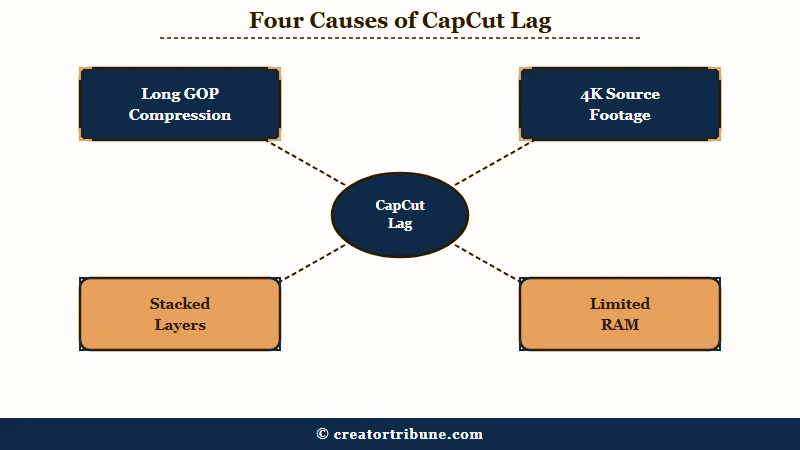
Modern phone cameras record in H.264 or H.265, and both use what is called long GOP compression. This single detail explains more timeline stutter than every cache tip combined, and I would start any diagnosis here.
What is long GOP: A compression method that saves one complete frame roughly once per second and mathematically rebuilds the frames in between from surrounding motion data.
When you scrub the playhead, your processor cannot just read a frame off the disk. It has to reconstruct that frame from its neighbours, on demand, over and over. That is why a small 4K clip can choke a timeline that handles a much larger 1080p file without complaint.
Stacked layers make it worse. Every filter, sticker, caption track and transition sitting on the same moment has to render together in that same instant.
Does CapCut Lag Mean My Export Will Be Ruined?
Usually no. CapCut prioritises editing responsiveness over preview fidelity, so a choppy preview very often exports as a completely smooth file.
This is the single most useful thing to know before you troubleshoot.
CapCut’s own help documentation concedes this for transitions, noting they may lag in preview yet appear smooth after export. Most guides skip past that line entirely and send you into an hour of settings changes for a problem that was never in your video.
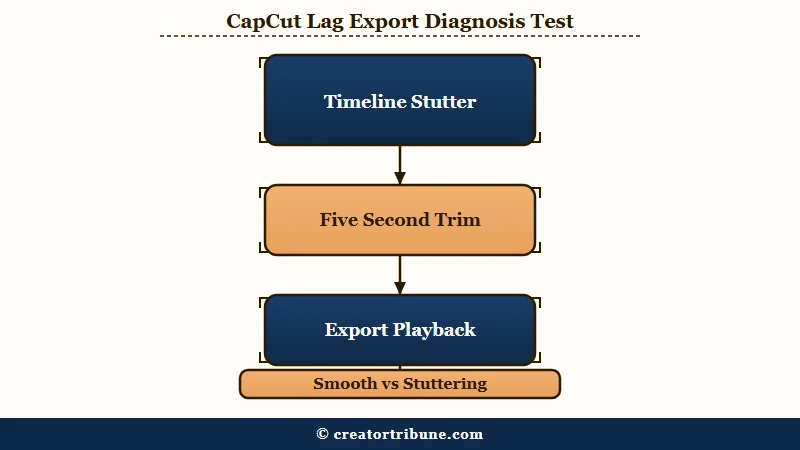
The way I see it, you should always spend 30 seconds proving what you are dealing with before spending an hour fixing it. Export a short test clip and watch it back.
- Find the section of your timeline that stutters worst.
- Trim your export range to about 5 seconds around it.
- Export at your normal settings and play the file back outside CapCut.
- If the exported clip is smooth, your project is fine and you only need the preview fixes below.
- If the exported clip stutters in the same place, the problem is your source footage or your device, and you need the deeper fixes further down.
This is the same logic as checking whether TikTok video quality after posting reflects a genuine problem or just a preview artifact. Judge the exported file, since that is the only version your audience ever sees.
How Do I Turn On Proxy Mode in CapCut?
Proxy mode is the most effective single fix for timeline lag, and it works by editing against small stand-in copies of your clips while keeping the originals for export.
On desktop it lives under Settings then Performance.
What is proxy mode: A setting that swaps your heavy source clips for lightweight low resolution copies while you edit, then automatically restores the full quality originals when you export.
Turn on Proxy and pick either 720p or 540p. Your final export quality is untouched, because CapCut swaps the originals back in at render time.
There is a trade-off nobody mentions, and I would rather you hear it now than discover it when your drive fills up. Generating proxies adds roughly 20% to 40% to your project’s storage footprint, and a 10 minute 4K clip can take a minute or more to process before you can edit smoothly.
Before: 4K 60fps source clips loaded straight onto the timeline, preview drops frames every time you scrub, and every trim takes two seconds to respond.
After: Proxy enabled at 540p under Settings then Performance, timeline scrubs in real time, export still renders from the original 4K files at full quality.
If your storage is already tight, clear space first. Proxy generation on a nearly full drive will make things worse before it makes them better.
Why Does Having Too Many Drafts Slow CapCut Down?
Accumulated saved drafts degrade CapCut’s performance even when your device still reports plenty of free storage, because the app carries every project’s working data. This cause appears nowhere in CapCut’s official help pages.
It is the top answer in the highest ranking community thread on this problem, and it has been sitting there for years while published guides copy the official documentation instead. I would check this early, especially if you are the kind of person who starts five versions of a video and never deletes the rejects.
On desktop you can clear draft working files directly. Open Settings, then Draft, then click the delete icon next to the cache size readout.
On mobile the fix is manual. Go through your drafts list, export anything you want to keep, and delete the rest rather than letting fifty half-finished projects sit there.
Creators who have watched TikTok drafts disappearing are understandably nervous about deleting anything, so export first and delete second. Once a draft is exported to your camera roll, removing it from CapCut costs you nothing.
Does CapCut Pro Fix Lagging?
No. CapCut Pro does not improve editing performance, because lag comes from your device’s decoding and rendering capacity rather than your subscription tier. Paying will not make your timeline smoother.
This myth is widespread enough that it shows up in app store reviews, where users write that buying the Pro membership is the only way to stop the lag. Community threads from paying subscribers asking how to fix lag on CapCut Pro tell you plainly that it did not work.
There is an uncomfortable wrinkle I would want to know about first. Pro unlocks more premium effects and AI features, and stacking those on your timeline increases the local rendering load, so you can pay for a subscription and end up with a slower edit than before.
Buy Pro for the features if you want them. Do not buy it as a performance upgrade.
How Do I Fix CapCut Lagging on My Phone?
On mobile, lag is usually caused by low free storage, heat, or background apps competing for memory, and the fixes are storage and thermal management rather than app settings. Phones throttle themselves deliberately when they get hot.
I would start with storage, because it is the one people underestimate. CapCut needs room to write working files, and performance falls off a cliff once your phone drops below roughly 10% free space, so aim to keep at least 3GB to 5GB clear.
Heat is the other big one. A long editing session pushes the processor hard, the device hits its thermal limit, and it deliberately slows itself down to protect the hardware. Put the phone down for ten minutes, take it off the charger, and take the case off if it is a thick one.
Here is the order I would work through on a phone:
- Check free storage and clear space until you have at least 3GB free.
- Close every background app rather than leaving them suspended.
- Let the device cool down if it feels warm to the touch.
- Clear the CapCut cache. On Android go to Settings, Apps, CapCut, Storage, then Clear cache. On iPhone use Settings, General, iPhone Storage, CapCut, then Offload App before reinstalling.
- Delete old drafts you no longer need, exporting anything worth keeping first.
- Restart the phone, then reopen CapCut.
Clearing an app cache is the same routine that solves a lot of platform problems, and the process mirrors clearing the TikTok app cache closely enough that if you have done one you can do the other. Note that offloading on iPhone removes the app but keeps your data.
For reference, CapCut’s mobile baseline is Android 5.0 or iOS 11.0 with at least 2GB of RAM and 1GB of free storage. Those are minimums for the app to run at all, not targets for comfortable 4K editing.
How Do I Fix CapCut Lagging on PC or Mac?
On desktop the fastest wins are lowering preview quality and forcing CapCut onto your dedicated graphics card, neither of which affects your export quality. Both take under a minute.
The preview setting is the one I would change first. Click the three lines icon above the preview window, open Preview, and switch from Best quality to Best performance. Your export resolution does not change.
On Windows you can assign CapCut your dedicated GPU directly. Open Windows Settings, then System, Display, Graphics, add CapCut.exe to the list, open Options, and set it to High performance.
Two more desktop specifics worth knowing. Keep your project media on internal storage rather than an external or cloud drive, because read speed becomes the bottleneck long before your processor does. And if the lag only happens while typing text, switch your keyboard input method, which is an odd but documented cause of input delay in the desktop app.
| Platform | First thing to try | Where to find it | Baseline spec |
|---|---|---|---|
| Windows PC | Proxy mode at 540p, then High performance GPU | Settings, Performance. Then Windows Settings, System, Display, Graphics | Windows 10 64-bit, Core i3, 4GB RAM |
| Mac | Hardware acceleration plus preview on Best performance | Settings, Performance. Preview icon above the player | macOS 11 Big Sur, Intel i5 or Apple Silicon, 8GB RAM |
| iPhone and Android | Free up storage, cool the device, clear cache | Phone Settings, Apps or Storage, then CapCut | Android 5.0 or iOS 11.0, 2GB RAM, 1GB free |
| Browser version | Close other tabs, drop preview resolution | Chrome or Edge, editor settings panel | 64-bit OS, 8GB RAM, Chromium browser |
Is CapCut Lagging Right Now or Is It My Device?
Timeline scrubbing runs entirely on your own hardware, so a slow internet connection cannot cause preview lag while you edit. Network problems affect a different set of features.
This distinction matters because there is bad advice circulating on it. At least one page ranking on the first page for this problem is published by a proxy vendor claiming server latency and API throttling are the real culprits behind CapCut lag, and it recommends routing your traffic through their network.
That diagnosis does not survive contact with the facts. Local timeline scrubbing is a decoding workload that happens offline on your device, and no amount of network optimisation touches it. I would not spend money on a proxy service to fix a rendering problem.
Network speed genuinely does affect cloud templates, asset downloads, AI features like auto captions, and upload times when you share. If those are what feel slow, your connection is worth looking at. If the timeline itself stutters while you drag the playhead, it is your hardware.
For the rare case where CapCut itself is having an outage, an independent status monitor will tell you faster than the app will. If several people are reporting problems in the same window, wait it out rather than reinstalling. The same principle applies when TikTok keeps crashing and you cannot tell whether the fault is yours.
| Symptom | Likely cause | Fix |
|---|---|---|
| Preview stutters, export is smooth | Real time decoding load in preview only | Turn on proxy mode, lower preview quality |
| Preview and export both stutter | Source footage codec or frame rate mismatch | Match project frame rate to source, re-encode footage |
| Lag builds up over weeks | Draft and cache accumulation | Delete old drafts, clear app cache |
| Slows down after 20 minutes of editing | Thermal throttling | Cool the device, remove case, unplug charger |
| Only text typing lags on desktop | Keyboard input method conflict | Switch input method or toggle width mode |
| Templates and AI tools slow, timeline fine | Network latency to servers | Check connection, this is not a timeline problem |
Frequently Asked Questions
Why is my CapCut lagging even on a new phone?
New phones still throttle when hot and still struggle with 4K long GOP footage. Check free storage first, keep at least 3GB clear, then let the device cool. Recording at 1080p instead of 4K removes the cause entirely.
Does clearing cache in CapCut delete my videos?
No. Clearing the cache removes only temporary working files that the app rebuilds on its own, so your drafts and exported videos stay where they are. Offloading the app on iPhone also preserves your data.
Is CapCut lagging right now for everyone?
Check an independent status monitor rather than CapCut’s own app. Timeline lag while editing is almost always local to your device, so a widespread outage would show up as login, template, or upload failures instead.
Will proxy mode reduce my final video quality?
No. Proxy files are used only while you edit, and CapCut swaps your original full resolution clips back in automatically at export. The trade-off is storage, roughly 20% to 40% extra, not quality.
Why does CapCut lag more with captions on the timeline?
Every caption track renders live during preview, so caption-heavy short-form edits stack rendering work on the same moments. Finish your cuts first and add captions last, which keeps the timeline responsive during the part of editing that needs the most scrubbing.
Quick Takeaways
- Run a 5-second test export before changing any setting, because a choppy preview usually exports perfectly smooth.
- Proxy mode at 540p or 720p is the single most effective fix, and it costs you 20% to 40% more storage rather than any export quality.
- Deleting old drafts fixes lag that no cache clear will touch, and it is the one cause missing from official documentation.
- CapCut Pro does not make editing faster, and its extra effects can make your timeline slower.
- If your timeline stutters while you scrub offline, the cause is your hardware, so ignore anyone selling a network fix.