What Account Not Recommended Means on TikTok and the Fix
What Account Not Recommended Means on TikTok and the Fix
TikTok account not recommended to others? Here is what it means and the exact steps to get back on the For You feed in 2026.
- 1What “Not Recommended to Others” Really Means
- 2Why Your TikTok Account Is Not Recommended
- 3How to Fix a TikTok Account That Is Not Recommended
- 4How Long the Not-Recommended Status Lasts
- 5Frequently Asked Questions
- What does “not recommended to others” mean on TikTok?
- How do I turn recommendation back on?
- Is “not recommended” the same as a shadowban?
- How long does a not-recommended status last?
- How do I check if my TikTok account is restricted?
- Why is my account not eligible for the For You feed?
- 6Quick Takeaways
What’s Changed: A TikTok account marked “not recommended to others” is either a privacy toggle you can flip in ten seconds, or an algorithmic restriction from a policy trip. Check the toggle first, then run Account Check in TikTok Studio. In 2026 the fastest-rising cause is unlabeled AI content, so that is the first thing to audit if the toggle is already on.
If your TikTok account is not recommended to others, do not panic and do not start deleting videos yet. Half the people who see this message have a privacy toggle switched off, and that is a ten-second fix, not a penalty.
The other half are dealing with an actual reach restriction, and unlabeled AI content is now one of the biggest triggers. TikTok says it has labeled more than 3 billion videos as AI-generated, using Content Credentials, creator labels, and its own invisible watermarking together. If you have been posting AI clips without the label, that is likely your problem.
I want to show you how to tell which situation you are in, then walk you through the exact menu paths to check your status and turn recommendation back on. The order matters, because fixing the toggle when the real issue is a strike just wastes three days.
What “Not Recommended to Others” Really Means
“Not recommended to others” means one of two things: a privacy setting you turned off, or a platform restriction that keeps your content off the For You feed. Telling them apart is the whole first step.
The privacy version is the “Suggest your account to others” toggle. When it is off, TikTok stops showing your account to strangers and, the part people miss, it also blocks search engines from finding you. An account can look shadowbanned to the outside world because of one switch in the settings menu.
The restriction version is different. Here TikTok has decided your content is unsuitable for broad recommendation, so it limits your reach on the For You feed and makes you harder to find in search, no matter what your privacy settings say.
The platform calls this content distribution prioritization. Everyone else calls it a shadowban.
The way I see it, the single most useful thing you can do is figure out which camp you are in before you change anything. One is a setting. The other is a standing issue you have to clear.
Why Your TikTok Account Is Not Recommended
Your TikTok account is most likely not recommended because of engagement bait, unlabeled AI content, recycled clips, or spam-like behavior that cost the algorithm its trust. These are the triggers TikTok really enforces, not the myths.
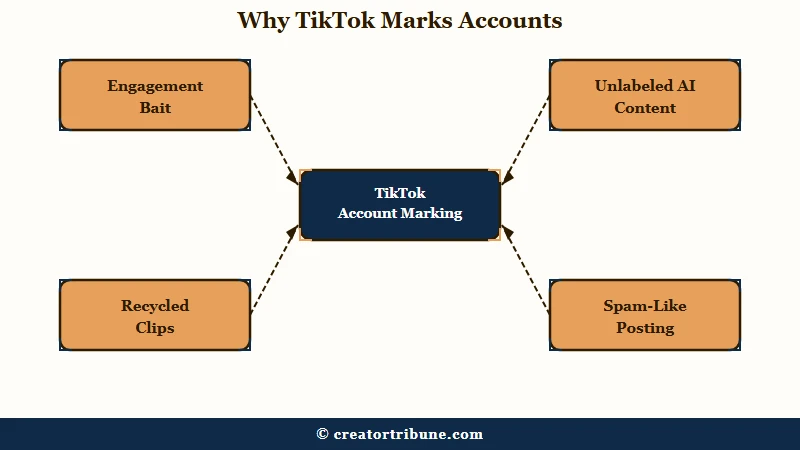
Engagement bait is the one I watch creators trip on without realizing. TikTok specifically penalizes phrases like “Comment your birth month,” “Follow me and I’ll follow back,” “Tag 3 friends,” and “Search this on TikTok to find out.” Those exact call-to-actions read as gaming the system, and they suppress the video that contains them.
The 2026 sleeper is AI labeling. TikTok integrated C2PA Content Credentials to auto-detect synthetic media, and missing the label now triggers silent suppression, as documented in Partnership on AI’s TikTok case study. If the system applies an AI label from detected metadata, you cannot remove it after posting, so trying to delete and re-upload only digs the hole deeper.
Re-uploading fails because the visible label is not the only marker. Alongside C2PA metadata, TikTok now applies an invisible watermark that only TikTok can read, which it describes as harder for others to strip out. Stripping the visible label or exporting through another editor does not clear that layer, so the second upload arrives carrying the same signal as the first.
There are a few more worth knowing. Recycled content, meaning viral clips re-uploaded with no real editing, gets flagged as unoriginal.
TikTok Shop sellers who flood their feed with non-interactive product videos in a short window can also hit posting limits. And accounts for users aged 13 to 15 have the recommendation toggle locked off permanently, which is a safety feature, not a penalty you can appeal.
| Symptom | Likely cause | What to do |
|---|---|---|
| New account, never recommended | “Suggest your account” toggle off | Turn it on in Settings, Privacy |
| Reach died after AI posts | Unlabeled synthetic media | Label AI at upload, never after |
| Specific videos flagged | Engagement bait captions | Remove bait phrases, appeal the post |
| Whole account suppressed | Community guideline strike | Pause posting, wait out the strike |
| Under-16 account | Hard-coded safety lock | Cannot be enabled, not a penalty |
How to Fix a TikTok Account That Is Not Recommended
To fix a not-recommended TikTok account, check the privacy toggle first, run Account Check in TikTok Studio, then appeal or reset depending on what it shows.
Here is the order I would run it in, because doing it backwards wastes days.
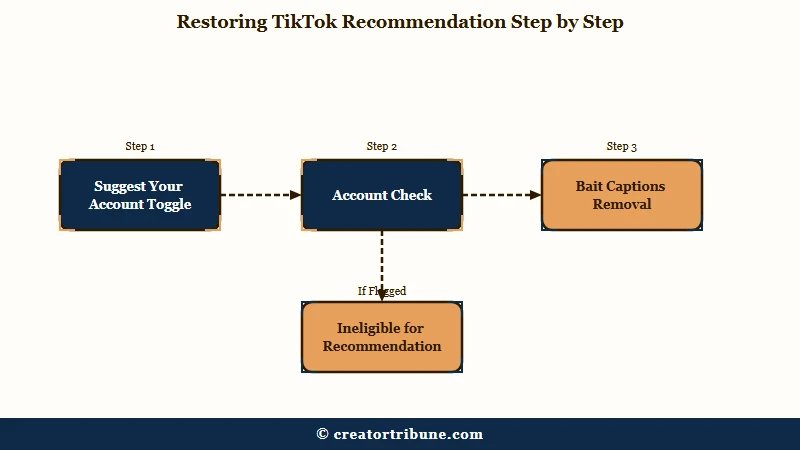
- Check the toggle. Go to Settings and privacy, then Privacy, then “Suggest your account to others” and turn it on. If that was the issue, you are done.
- Run Account Check. Tap Profile, the Menu icon, TikTok Studio, More tools, then Account check. A checkmark means you are clear, a warning sign means there is a restriction.
- If a post is flagged, appeal it. Tap the “Ineligible for recommendation” notice below your username, review the flagged videos, and tap Appeal.
- If the cause is content, fix the content. Remove engagement-bait captions, label any AI videos, and stop re-uploading recycled clips.
- If you have a strike, pause posting for three to five days, then return with original, high-retention content to rebuild trust.
The appeal path is worth getting right. From your profile, the account-wide “Ineligible for recommendation” notice is more efficient than appealing videos one at a time, since it covers the whole standing issue at once. You can also reach appeals from your Inbox notifications.
A quick audit of your captions usually surfaces the problem fast. The fix is rewriting the call-to-action so it invites a real response instead of farming one.
Before: “Follow me and I’ll follow back. Comment your birth month and tag 3 friends to enter.”
After: “I broke this editing trick into three steps below. Tell me which one you are stuck on and I will reply with a fix.”
If your reach is down but Account Check shows no restriction, you may be dealing with a softer suppression rather than a formal flag. Our TikTok shadowban recovery guide and the breakdown of why TikTok FYP views drop cover that case in depth.
How Long the Not-Recommended Status Lasts
A not-recommended status usually lasts 7 to 14 days once you stop the behavior that caused it, and formal strikes clear after 90 days. The exact timeline depends on how serious the trigger was.
Lighter trust issues resolve fast. Minor flags often lift in 2 to 7 days, moderate violations take 7 to 14 days, and repeat or serious violations can stretch to several weeks. The common thread is that the clock only starts once you stop the behavior, so continuing to post bait or unlabeled AI just resets it.
Formal Community Guidelines strikes work on a separate timer. A strike expires after 90 days and stops counting toward a permanent ban, so a clean three-month stretch genuinely resets your standing. If you want to confirm you are flagged in the first place, our “am I shadowbanned” test walks through the checks.
What I would not do is keep deleting and re-uploading in a panic. That reads as spam-like behavior to the algorithm and can deepen the suppression you are trying to escape. If the account is fully restricted rather than just not recommended, our TikTok ban appeal guide covers the escalation path.
Frequently Asked Questions
What does “not recommended to others” mean on TikTok?
It means your account is either set to private from recommendations via the “Suggest your account” toggle, or restricted by TikTok so your content stays off the For You feed. The first is a privacy setting, the second is an enforcement action you have to clear.
How do I turn recommendation back on?
If it is the toggle, go to Settings and privacy, Privacy, then “Suggest your account to others” and turn it on. If it is a restriction, appeal through the “Ineligible for recommendation” notice on your profile or fix the flagged content and wait for standing to restore.
Is “not recommended” the same as a shadowban?
Effectively yes. TikTok calls it content distribution prioritization, and the community calls it a shadowban. Both silently cut your reach on the For You feed and in search while letting you keep posting normally.
How long does a not-recommended status last?
Usually 7 to 14 days after you stop the trigger, with minor issues clearing in 2 to 7 days. Formal Community Guidelines strikes expire after 90 days and stop counting toward a ban.
How do I check if my TikTok account is restricted?
Use the Account Check tool. Tap Profile, the Menu icon, TikTok Studio, More tools, then Account check. A checkmark means no issues, a warning sign means a feature or post is restricted.
Why is my account not eligible for the For You feed?
The usual causes are engagement bait, unlabeled AI content, recycled or unoriginal clips, missing the Paid Partnership label on ads, and spam-like posting. Each one signals the algorithm to stop trusting and recommending the account.
Quick Takeaways
- Check the “Suggest your account to others” toggle first, since half of “not recommended” cases are a privacy setting, not a penalty.
- Unlabeled AI content is a top trigger in 2026, and TikTok now stacks invisible watermarking on top of C2PA metadata, so re-uploading does not clear the flag.
- Run Account Check in TikTok Studio to see a checkmark or warning sign before you change anything.
- Remove engagement-bait captions like “comment your birth month” and “follow for follow,” which TikTok penalizes by name.
- Most restrictions lift in 7 to 14 days once you stop the trigger, and formal strikes clear after 90 days.