Least Interacted With on Instagram and How to Find It Again
Least Interacted With on Instagram and How to Find It Again
Least Interacted With on Instagram ranks your own likes and Story reactions over 90 days. See why it goes missing and how to get the list back.
- 1What Does Least Interacted With Mean on Instagram?
- 2How Do You See Least Interacted With on Instagram?
- 3Why Is Least Interacted With Missing on Instagram?
- Did Instagram Remove Least Interacted With?
- 4Is the Least Interacted With List on Instagram Accurate?
- 5What Is Most Shown in Feed on Instagram?
- 6How Do You Unfollow Accounts on Instagram Without Getting Blocked?
- Does Instagram Notify Someone When You Unfollow Them?
- 7Quick Takeaways
TL;DR: Least Interacted With on Instagram is a category at the top of your Following list that shows the accounts you have liked and reacted to least over roughly the last 90 days. It is built from your actions on their posts and Stories, and nothing in the 2020 launch details says it counts what they do on yours. If the Categories row has vanished, switch the list’s sort to earliest followed and look again before assuming Instagram removed it.
Most people who go looking for Least Interacted With on Instagram want one thing, a fast way to trim a following list that grew too long to scroll. Once you hit Instagram’s cap of 7,500 accounts, you cannot follow anyone new until you unfollow someone. At roughly five seconds per unfollow, even 1,000 of them means about 80 minutes of tapping, and the category spares you the scrolling by gathering the accounts you ignore in one place.
The catch is that the category keeps disappearing. In February 2026, an Instagram user posted on Threads that “the entire feature is gone” partway through a cleanup. A fix was posted that May in an r/Instagram thread about the same problem, and it is quick: change the Following sort to earliest.
I treat a missing row as a display fault first. Instagram has made no announcement about removing it.

What Does Least Interacted With Mean on Instagram?
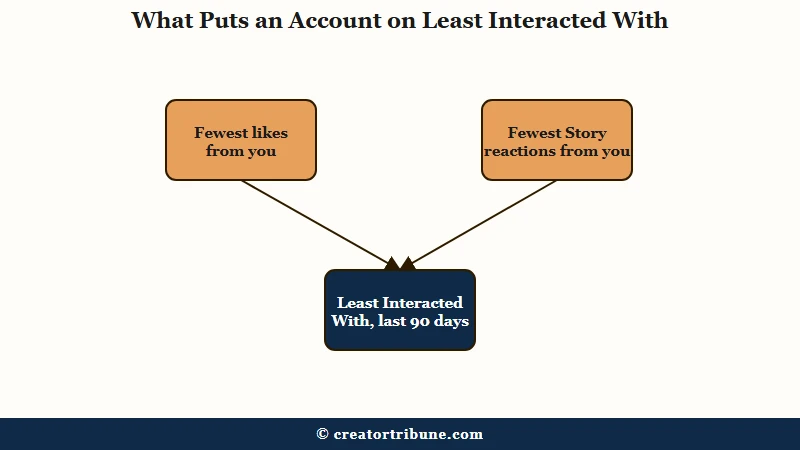
Least Interacted With on Instagram means the accounts you follow that you have liked or reacted to least over about the last 90 days, ranked by your own activity on their posts and Stories.
Instagram added the category on February 6, 2020, as TechCrunch reported, next to a second one called Most Shown in Feed. An Instagram spokesperson told TechCrunch that “over time, your interests and relationships can evolve and change,” and the two lists were built to help you prune to match.
The working definition still comes from that launch. Search Engine Journal’s report says “Instagram uses data from the past 90 days to create these categories” and that it counts actions “such as liking posts and reacting to stories.” Instagram’s Help Center has no page on the categories, so those 2020 details are the only public definition.
The 90-day window matters more to me than the name. An account you loved last spring can land on the list after one quiet season, even if you would hate to lose it. Treat every name on it as a candidate to check by hand.
How Do You See Least Interacted With on Instagram?
You see Least Interacted With on Instagram by opening your profile, tapping your following count, and choosing Least Interacted With under Categories at the top of the list.
The path takes five steps in the app:
- Open Instagram and tap your profile picture at the bottom right.
- Tap the following count at the top of your profile.
- Find Categories at the top of the list, above the accounts.
- Tap Least Interacted With to open the list.
- Tap Following beside an account to unfollow it, or tap its name to check the profile first.
I open each profile before tapping Following, because the list can file a friend under strangers. Mashable’s walkthrough describes the list as “the 50 accounts you have interacted with the least in the past 90 days.” That makes it a shortlist of your quietest follows.
The sort control at the top of that screen launched the same day, February 6, 2020. Instagram’s launch thread on X added a pro tip: “You can also sort accounts from earliest to latest followed.”
If the top of your Following list shows only sort choices such as Default, Latest and Earliest, the Categories row is missing for your account. Go straight to the fix below.
Why Is Least Interacted With Missing on Instagram?
Least Interacted With can go missing on Instagram after an app update, through a display fault, or because your account was not given the feature. The first fix to try is sorting your Following list by earliest.
Sorting by earliest brought the row back in a May 2026 reply to an r/Instagram thread started by someone stuck at the 7,500 cap. Later replies to it, through late June, say it worked for them as well.
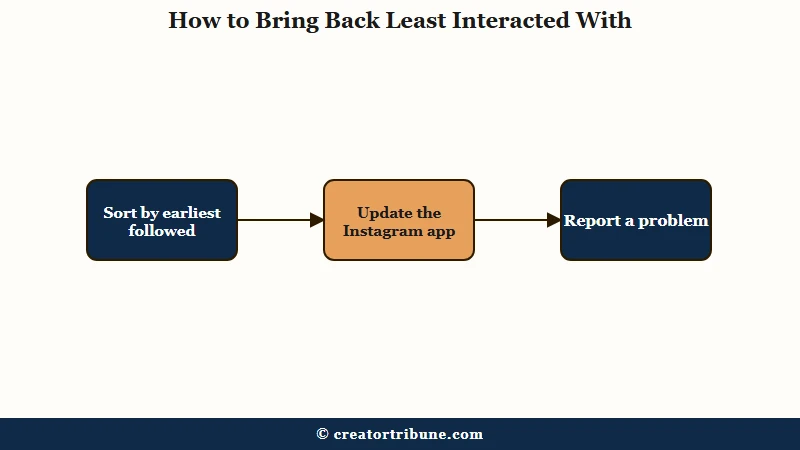
The order below runs from cheapest to slowest, and I stop at the first step that works:
- Open your Following list and tap the sort control at the top.
- Choose earliest followed, then scroll back to the top and look for Categories.
- Switch the sort back to default, and if Categories disappears again, use the earliest sort whenever you need the list.
- Update Instagram from the App Store or Google Play, since Instagram’s troubleshooting page for broken features says to “try updating the app” first.
- If the row is still gone, go to your profile, tap the menu, then Help and Report a problem, and describe the missing Categories row.
Instagram’s troubleshooting page also warns that you might be seeing an issue “if a feature isn’t available to everyone yet.” So a missing row may mean your account has not been given the feature at all.
Reinstalling did not help the author of a November 2024 reply on r/InstagramMarketing, who reinstalled several times and still had no category more than a week later.
| What you see | What it can point to | What to try |
|---|---|---|
| Only Default, Latest and Earliest at the top of Following | The Categories row did not load | Sort by earliest, then scroll back to the top |
| Categories vanished right after an app update | A fault in that app version | Update again, then use Report a problem |
| Categories on one of your accounts but not another | Something tied to that account, such as how many it follows | Report it from the account missing the row |
| Still missing a week after reinstalling | Something on Instagram’s side, not your phone | Report it, then work through the Earliest sort by hand |
Account size may play a part, though Instagram has never said so. In an April 2024 r/Instagram post, one person’s account following about 7,000 was missing the row while their 3,000-follow account still showed it.
If the row never comes back, the Earliest sort is your fallback list. TechCrunch’s launch report pitched that sort for when you want to “clear out your earliest adds,” and your oldest follows are often the ones that have gone quiet.
Did Instagram Remove Least Interacted With?
Instagram has not announced any removal of Least Interacted With, and the category was still in use in October 2026, though reports of it going missing for some accounts go back to 2020.
Posts about it vanishing run from 2020 through 2026. In a January 2024 thread asking exactly that, the first reply was “Mine is still there.”
I don’t buy the removal theory while the same list still loads on other accounts.
Is the Least Interacted With List on Instagram Accurate?
The Least Interacted With list is a rough guide built from your own activity, such as likes and Story reactions, over about 90 days, so a friend you message daily can land on it.
The 2020 launch details answer the question raised in an October 2026 r/Instagram post, which asked whether the list counts the accounts “I interact with (and not vice versa).” It does. Nothing in the launch description counts their likes or comments on your posts, so a fan who likes everything you share can still top your list.
Messages are the bigger blind spot. The launch coverage names likes on posts and reactions to Stories, and nothing about direct messages, so a friend you talk to every day in DMs may still land on the list. As an April 2025 reply on r/InstagramMarketing put it, “good friends and collaborators pop up on there constantly.”
I’d check the two-way history on any name you recognize before tapping Following. Instagram’s Shared activity screen shows the likes, comments and tags you and another account have exchanged, plus when you followed each other, though not your DMs. From your Following list, tap Options next to a profile and choose See shared activity.
Before: Open Least Interacted With and unfollow every name on it in one sitting.
After: Open Least Interacted With, run See shared activity on every name you know, keep friends and collaborators, and unfollow the rest a few at a time over several days.
The list also only covers people you follow. If the accounts you want gone are followers, removing a follower is a separate control.
What Is Most Shown in Feed on Instagram?
Most Shown in Feed is the second Following category, listing the accounts whose posts Instagram placed in your feed most over about 90 days, and some of them can be accounts you rarely interact with.
Search Engine Journal’s launch report flagged that overlap: “users may find some of the ‘most shown’ accounts in their feed are also accounts they don’t interact with very often.” Those overlapping accounts fill your feed while earning few taps from you.
Favorites is the better lever for me, because it changes the feed directly. Instagram’s Favorites help page says favorites make posts “appear higher in your feed,” and that “removing people from your favorites does not unfollow these accounts.” Tap the Instagram logo at the top of your feed, tap Favorites, then add accounts from there.
| Instagram control | What it shows | What it is built from | What you can do with it |
|---|---|---|---|
| Least Interacted With | Accounts you follow but rarely engage with | Your own activity, such as likes and Story reactions, over about 90 days | Unfollow, mute, or check Shared activity first |
| Most Shown in Feed | Accounts filling your feed most | How often their posts reached your feed over about 90 days | Mute or unfollow the ones you scroll past |
| Favorites | Accounts you picked by hand | Your own choice | Their posts appear higher in your feed |
Use Least Interacted With to find the dead weight, then put the handful of accounts you never want to lose into Favorites so they stay near the top.
How Do You Unfollow Accounts on Instagram Without Getting Blocked?
Unfollow from Least Interacted With in small batches spread over several days, because Instagram publishes no safe unfollow rate and fast mass unfollowing has led to action blocks.
What is an action block: A temporary limit Instagram places on actions such as following, unfollowing, liking or commenting, often shown with a “Try Again Later” message.
The only following number Instagram publishes is the cap. Its follow limit page says “Instagram doesn’t allow anyone to follow more than 7,500 people,” and that anyone above it “did so before this change was made.” No Help Center page gives a daily or hourly unfollow figure.
Our follow limit guide lays out the follow and daily-action ranges creators work within, as practice rather than published rules. Moving fast has a real cost. A user in a February 2021 r/Instagram post was “action blocked for a whole week” after unfollowing people from this exact list.
The routine I follow for a big cleanup is slow on purpose:
- Start with Least Interacted With, since those accounts cost you the least to lose.
- Check Shared activity on any name you know before you tap Following.
- Stop after a small batch, then come back later in the day or tomorrow.
- Stop all unfollowing for at least a day at the first “Try Again Later” or block message.
- Watch for accounts reappearing hours after you unfollowed them, a sign you went too fast.
For scale, the Threads user quoted above was removing 50 accounts a day before the list vanished.
If unfollowed accounts keep coming back, the snap-back section of our unfollowing guide covers why. If a block lands anyway, the action block guide covers how long each type lasts.
Creators clearing thousands of follows sometimes hand the job to software. SMTasker runs Instagram actions, unfollows included, from an Android phone you connect yourself, but no tool knows a limit Instagram has never published. Our full SMTasker review says it suits operators running several accounts at once, and to skip it if you run one account you care about.
Does Instagram Notify Someone When You Unfollow Them?
No. Instagram’s Help Center tells app users that “People won’t be notified when you unfollow them,” and that holds when you unfollow from the Least Interacted With list too.
Their profile then says Follow instead of Following on your side, per the app version of Instagram’s unfollow help page. They can still spot the change if they look through their own follower list.
Muting is what I do with relatives and old classmates whose posts I skip but whose follow I want to keep. Instagram’s mute help page says “Instagram won’t let them know you muted them.” Tap Following on their profile, tap Mute, then turn on Posts, Stories or both.
Mute the accounts you want to keep but rarely watch, and work through the rest of Least Interacted With a small batch at a time.
Quick Takeaways
- Least Interacted With ranks the accounts you follow by your own activity toward them, such as likes and Story reactions, over about 90 days.
- If Categories is missing, sort your Following list by earliest followed, then update the app and use Report a problem. If it never returns, work through the Earliest sort by hand.
- Run See shared activity on any name you know before unfollowing, since good friends and collaborators can still land on the list.
- Instagram does not notify people you unfollow, and it does not tell anyone you muted them.
- Spread unfollows over several days, because Instagram publishes no safe unfollow rate and fast unfollowing has led to blocks lasting up to a week.