Instagram Filters Not Working After Meta Pulled Your Effects
Instagram Filters Not Working After Meta Pulled Your Effects
Instagram filters not working? Meta deleted creator effects in 2025 and has moved the rest since. Find the change that hit you and the fix.
- 1Why Are My Instagram Filters Not Working?
- 2What Happened to the Instagram Filters Made by Creators?
- 3Where Did Oslo and the Classic Instagram Story Filters Go?
- How Do You Find an Old Filter in Browse Effects?
- How Do You Use the DM Camera for Old Filters?
- 4Why Can’t I Add Effects to Photos From My Camera Roll?
- 5Why Do Instagram Filters Work on Video but Not on Photos?
- What If the Filter Still Does Nothing After Done?
- 6Why Are Filters Missing on Only One Instagram Account?
- 7What Else Stops Instagram Effects From Working?
- Why Do Face Effects Need Your Permission?
- Is There a Daily Limit on Instagram AI Effects?
- Do Instagram Effects Work on Older Phones?
- 8Where Is Browse Effects on Instagram Now?
- 9Frequently Asked Questions
- What happened to the Instagram filters?
- Why can’t I search filters on Instagram?
- How do I get Instagram filters back?
- Why do my filters work on videos but not photos?
- Why are filters missing on only one of my accounts?
- Do old Stories lose an effect that was deleted?
- 10Quick Takeaways
TL;DR: When Instagram filters stop working, the cause usually sits on Instagram’s side. Meta deleted every creator-made effect on January 14, 2025, Instagram swapped out classic Story filters like Oslo in September 2025, and by March 2026 it had folded Effects and Restyle into one AI-heavy menu. Clearing your cache fixes none of those, so match your symptom to the table below before you change a single setting.
Instagram filters not working is rarely a single bug. Your saved effects vanish, or the search inside Browse effects comes back empty. Sometimes the filter you tap on a Story photo leaves it looking exactly the same.
Instagram’s own Help Center adds to the confusion. As of September 2026, its camera effects page still says “To see effects from independent creators, swipe all the way to the left and tap More effects.” Meta removed those effects on January 14, 2025.
When a filter disappears on me, the first thing I check is whether Instagram ever owned it. That one question sorts most cases in under a minute, and it saves the hour people lose clearing caches for a problem no cache caused.
Below is a table that matches each symptom to its cause, followed by the two routes that still reach Oslo, a one-tap fix for Story photos, and what to do when only one account is affected.
Why Are My Instagram Filters Not Working?
Most cases of Instagram filters not working trace to a change Instagram made on purpose or to a glitch on its side, which is why clearing the cache rarely helps.
Find the row that matches what you see, then jump to that section.
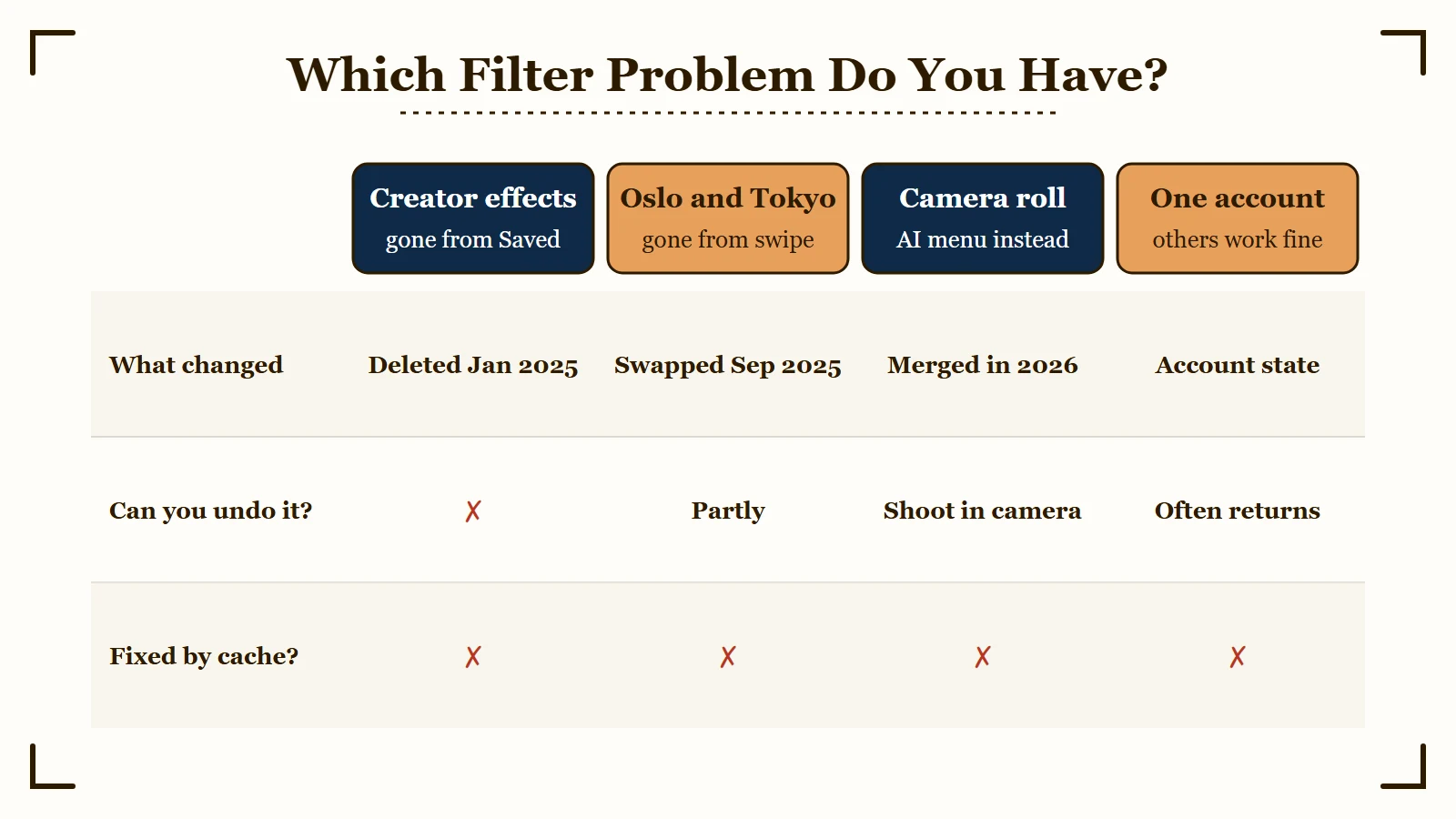
| What you see | What changed | What to do |
|---|---|---|
| Saved creator effects are gone and search finds only Instagram’s own | Meta deleted all third-party effects on January 14, 2025 | Nothing restores them, so pick an Instagram-made effect |
| Oslo, Tokyo or Buenos Aires missing from the Story swipe | Instagram replaced its Story filter set in September 2025 | Search the name in Browse effects, or shoot in the DM camera |
| The effects button on a camera-roll upload shows AI presets | Effects and Restyle merged into one menu by March 2026 | Record inside the Instagram camera with the effect on |
| A real-time filter on a Story photo shows no change | A preview glitch on photos, present since at least May 2026 | Pick the filter anyway and tap Done |
| Classic filters look identical and never apply | A rendering glitch with no confirmed fix | Try Done and the DM camera, then report it |
| Filters missing on one account while another works | A state held on that account by Instagram | Report it and wait, because reinstalling does nothing |
Three rarer causes, a face-effect consent prompt, Meta’s daily cap on AI effects and older phones, get their own section further down.
The test I run first is the account swap. If a second account on the same phone still has its filters, your phone and your app are fine, and the section on one-account problems below is the one to read.
If every account on the phone lost its effects on the same day, check whether Instagram is down before anything else. After that, clearing Instagram’s cache is worth one try, and that guide shows how to do it without losing drafts.
What Happened to the Instagram Filters Made by Creators?
Meta deleted every effect built by outside creators and brands on January 14, 2025, when it closed its Meta Spark platform.
Effects that Meta made itself stayed, which is why a search in Browse effects now returns only Instagram’s own designs.
Meta announced the shutdown of Spark, its augmented reality (AR) effects platform, on August 27, 2024. Its post said effects built by third parties, “including brands and our wider community of AR Creators,” would stop being available on the closing date, while “AR Effects owned by Meta will continue to be available.”
The Verge reported the shutdown the same day, describing Spark as the platform behind face filters that “make you look old or reimagine you as a cartoon character.” Every look built on it by someone outside Meta left Saved and search at the same moment, which is why a filter search now turns up so little.
A saved effect is only a bookmark to something Instagram controls, and I treat mine that way. When Instagram pulls an effect from its gallery, it leaves my Saved tab too, and no setting on the phone brings it back.
Posts you already made are safe. The Verge noted at the time that “any videos that have used Spark-based AR effects will stay up,” so old Stories and Reels keep their looks even though nobody can apply those effects to anything new.
Instagram’s Help Center has not caught up. Its Add Effects and Filters page still says Browse effects shows “more effects from Instagram and from independent creators.” The camera effects page calls the same button More effects, and both instructions now lead to a gallery of Meta’s own effects.
Each change since 2022 broke something different, and the timeline below shows which:
| When | What Instagram or Meta changed | What stopped working | Can you get it back? |
|---|---|---|---|
| May 2022 | AR effects paused in Texas and Illinois, then brought back in Texas behind a consent prompt | Face effects for anyone who declines the prompt | Yes, by accepting it |
| January 14, 2025 | Meta Spark closed and every creator-made effect deleted | Saved creator effects and most effect searches | No |
| September 2025 | Classic Story swipe filters replaced by a new set that includes Lo-res | Oslo, Tokyo, Buenos Aires and others in the swipe | Partly, through Browse effects or the DM camera |
| October 23, 2025 | Restyle added to Stories under the paintbrush icon | Nothing on its own | Nothing to fix |
| March 2026 | Effects and Restyle merged into one Effects menu | Stackable effects on camera-roll uploads | Only by recording in the live camera |
| July 2026 | Over 30 AI effects built on Meta’s Muse Image model, US only | Nothing, it adds AI presets | Nothing to fix |
If the effect you want was creator-made, stop searching for it and pick the closest Instagram-made look instead.
Where Did Oslo and the Classic Instagram Story Filters Go?
Instagram replaced most of its classic Story swipe filters in September 2025 with a new set that includes Lo-res, Soft Light, Graphite and Gritty.
Oslo, Tokyo, Buenos Aires, Jaipur and Cairo left the swipe, and several of them can still be reached through Browse effects or the camera in Direct Messages.
Instagram tested the new set on iOS with eleven names: Fade, Grainy, Graphite, Gritty, Handheld, Hyper, Lo-res, Midnight, Simple, Soft Light and Zoom Blur, according to SocialBee’s Instagram update log. Because it arrived as a test, two phones on the same app version could show different filter sets.
Lagos and Abu Dhabi left the Story swipe too, but the camera inside Direct Messages kept the older set after the Story camera lost it (r/Instagram). That leaves two routes back.
My take is that the DM camera is the better of the two, because it hands back the old set in one place instead of making you save filters one at a time.
How Do You Find an Old Filter in Browse Effects?
- Open the Story camera.
- Swipe the row of effects to the last icon and tap the magnifying glass.
- Type the filter’s name, such as Oslo or Buenos Aires.
- Tap the bookmark on the result so it sits in your camera row.
A filter saved this way works only while you shoot with it on. It will not recolor a photo you already took, so the old habit of swiping through looks after the shot is gone on this route.
How Do You Use the DM Camera for Old Filters?
- Open any chat in Direct Messages and tap the camera icon.
- Swipe through the filters and take the photo.
- Save the photo to your phone.
- Post it to your Story from your camera roll.
If your DM camera shows the new set as well, the swap has reached that screen on your account too, and the nearest match in the new set is the realistic substitute.
Why Can’t I Add Effects to Photos From My Camera Roll?
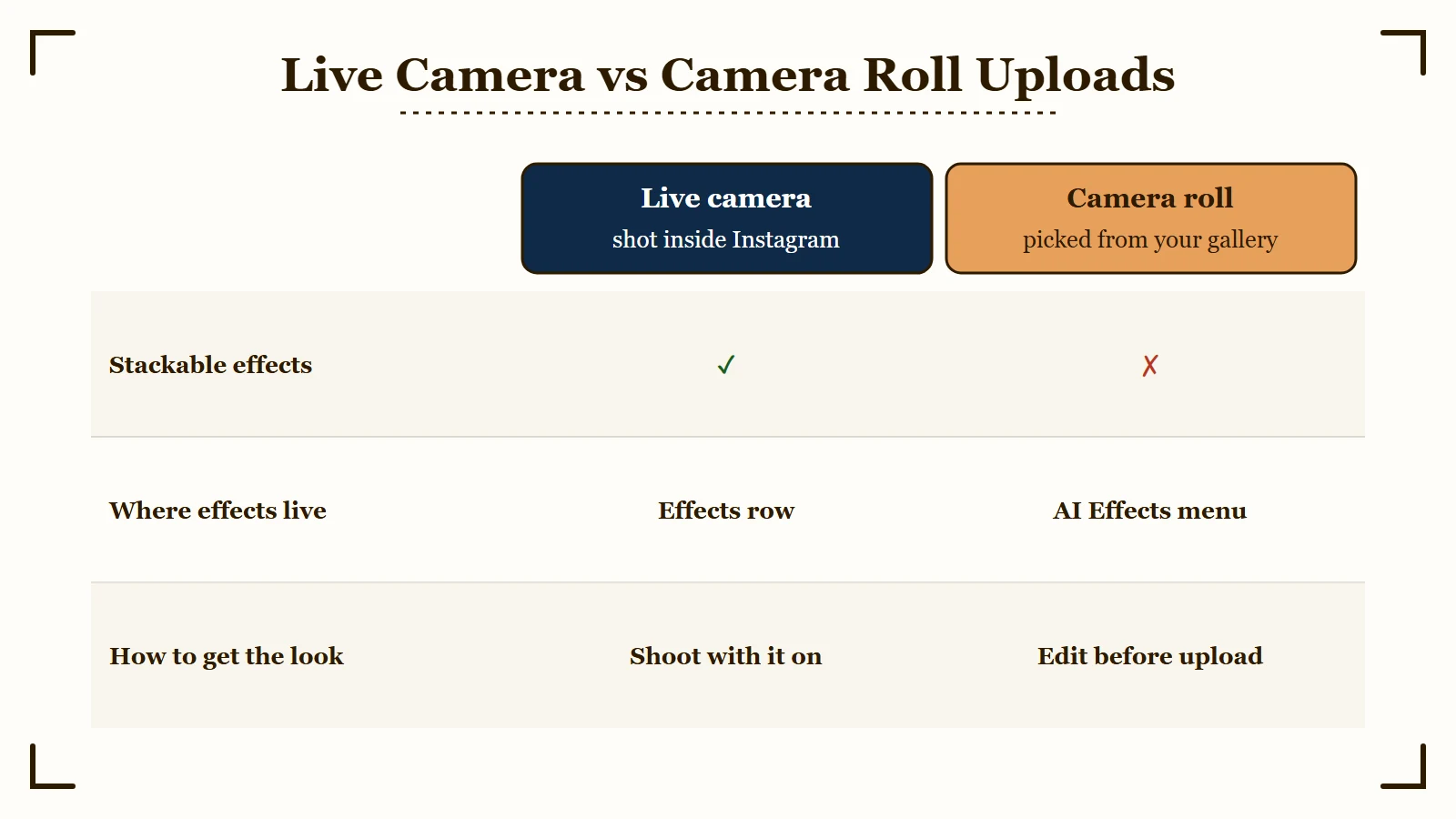
Since early 2026, the effects button on a camera-roll photo or video opens Instagram’s AI Effects menu, and you can no longer stack several effects on an upload the way the live camera allows.
By March 2026, Instagram had merged its Effects and Restyle sections into that one menu.
Restyle reached Stories on October 23, 2025, in “the ‘Restyle’ menu located at the top of Instagram Stories when tapping the paintbrush icon,” as TechCrunch reported. Radu Oncescu, who tracks Instagram changes, flagged the merge on Threads on March 3, 2026.
Video recorded inside the Instagram camera can still carry a stackable effect. A clip recorded with your phone’s own camera and uploaded later cannot, and on uploaded photos the effects button opens AI presets that behave more like a retouch tool (r/Instagram).
Single real-time filters still sit in that menu for photos, one at a time. They often fail to show in the preview, and the section on photos below covers the one-tap fix.
July 2026 pushed further in the same direction. Instagram added over 30 AI effects built on Meta’s Muse Image model, shown as a carousel of thumbnails that preview each effect on your photo. Its announcement says “These updates are available in the US only.”
The live camera is where I apply effects now, since it is the one screen where the stackable effects still load:
- Open the Story or Reels camera instead of picking a file from your gallery.
- Choose the effect from the row or from Browse effects.
- Shoot or record with the effect on.
- For a clip you already recorded, apply the look in an outside editor before you upload it.
If the AI side of that menu is what bothers you, turning off Meta AI covers which parts can be switched off, and Restyle can only be partly avoided.
Why Do Instagram Filters Work on Video but Not on Photos?
On Story photos, a real-time filter often shows no change in the preview and then applies once you tap Done.
The glitch has shown up since at least May 2026 and leaves video alone, which is why one filter can work on a clip and fail on a still.
The workaround comes from an r/Instagram thread where AI “film styles” kept working on photos while real-time filters appeared to do nothing. I reach for it before touching any setting, since it costs one tap.
- Add the photo to your Story.
- Open the effects and pick the real-time filter you want, even if the preview does not change.
- Tap Done.
- Check the Story card before you post, since the filter should now be on the photo.
Before: You add a camera-roll photo, tap Rio de Janeiro, see no change, then cycle through five more filters and give up.
After: You tap Rio de Janeiro once, tap Done without waiting on the preview, and the filter is on the photo when the editor closes.
If the filter posts fine but the photo comes out soft, that is compression, and why Stories look blurry covers that fix.
What If the Filter Still Does Nothing After Done?
When classic filters sit in the tray and never apply, even after Done, you have a rarer glitch with no confirmed fix. In a June 2026 thread, updating, clearing the cache and reinstalling all left it unchanged.
Try the DM camera route above, since it runs through a different camera. Then send Instagram a screen recording through Report a problem, found under Settings and activity, then Help, where a Shake phone to report a problem switch also lives.
Why Are Filters Missing on Only One Instagram Account?
Filters that vanish on one account while another account on the same phone works are tied to that account on Instagram’s side, so reinstalling the app cannot fix them.
The messages that come with it read “Some effects are currently unavailable” or “Unable to use effect.”
Saved effects disappear and search returns only Instagram’s default effects, while a second account on the same phone behaves normally (r/Instagram). Instagram has not published an explanation for it.
It often clears on its own. Accounts in a 2024 thread got their effects back after anywhere from a day to nearly two weeks, with no update or reinstall.
Reinstalling is the step I would skip. The problem does not live on your phone, and deleting the app wipes drafts stored on the device, so save your drafts before any heavy fix.
- Run the account swap to confirm only one account is affected.
- Screen-record the empty effects gallery on that account.
- Send the recording through Report a problem.
- Give it a few days before trying anything bigger.
What Else Stops Instagram Effects From Working?
A face-tracking consent step, a daily cap on AI effects and old hardware can each block effects, and clearing the cache fixes none of them.
Each one needs its own fix.
I don’t buy the common advice to hunt for a face and hand effects toggle, because most people will never have one.
Why Do Face Effects Need Your Permission?
Meta switched off AR effects in Texas and Illinois in May 2022 to prevent “meritless and distracting litigation” under state biometric laws, and it promised an opt-in to bring them back, CNET reported. In Texas the effects returned within days, “only after Meta added an option that asks users to agree to the use of the features,” according to the Texas Tribune.
If you declined that prompt, face effects stay off until you allow them. Instagram’s help page for the setting is region-locked: opened from outside the regions it covers, it shows only “This information isn’t available in your area.”
Is There a Daily Limit on Instagram AI Effects?
Instagram’s AI effects run on Meta’s image models, and Meta caps free use each day. Its AI usage help page says “If you reach your free daily usage limit, you can upgrade to a paid Meta One Core or Meta One Premium plan, or wait and try again later when your free limit refreshes.”
Meta does not publish the number, so the only fixes are waiting or paying.
Do Instagram Effects Work on Older Phones?
Instagram’s Add Effects and Filters page warns that “effects aren’t supported on some older devices.” If a newer phone shows effects on the same account, the device is the limit, and no setting will change it.
Where Is Browse Effects on Instagram Now?
Browse effects sits at the end of the effects row in the Story camera, behind a magnifying glass icon. Your saved effects live under the bookmark icon at the top left of the gallery it opens, and in the Reels camera you tap Effects instead.
- Tap Create, the plus icon, then choose Story, or swipe right from anywhere in your Feed.
- Swipe the row of round effect icons at the bottom until you reach the last one.
- Tap the magnifying glass to open Browse effects.
- Search by name, or tap the bookmark icon at the top left to see what you saved.
Instagram’s own help pages call this button More effects in one place and Browse effects in another, and both names mean the magnifying glass. In some 2026 builds the camera opens with an empty effects row, and the effects sit behind the magnifying glass in tabs, one of them for saved effects (r/Instagram).
I keep my handful of regular effects bookmarked, since opening Saved is faster than searching each time. If your Saved tab comes up empty, the effects in it were most likely creator-made ones, which Meta deleted on January 14, 2025.
Frequently Asked Questions
What happened to the Instagram filters?
Three changes removed or moved them. Meta deleted all creator-made effects on January 14, 2025, Instagram replaced classic Story filters like Oslo in September 2025, and by March 2026 it had merged Effects and Restyle into one AI-heavy menu.
Why can’t I search filters on Instagram?
Search in Browse effects only returns effects Meta made, because every creator-made effect was deleted on January 14, 2025. If search returns nothing at all on one account while another works, the problem sits with that account.
How do I get Instagram filters back?
Classic Story filters such as Oslo can be found by name in Browse effects and saved, or used through the camera inside Direct Messages. Creator-made effects deleted in January 2025 cannot be restored.
Why do my filters work on videos but not photos?
A preview glitch on Story photos hides real-time filters. Pick the filter anyway and tap Done, and it usually appears on the photo. Videos are not affected.
Why are filters missing on only one of my accounts?
That account is in a state on Instagram’s side, often shown as “Some effects are currently unavailable.” Reinstalling does not help. Report the problem and give it a few days, because it often clears on its own.
Do old Stories lose an effect that was deleted?
No. Stories and Reels you already posted keep the effect. The January 2025 shutdown only stopped anyone from applying those effects to new posts.
Quick Takeaways
- Creator-made Instagram effects were deleted on January 14, 2025, and no setting or reinstall brings them back.
- Oslo and the other classic Story filters left the swipe in September 2025, and Browse effects or the DM camera still reach several of them.
- On a camera-roll upload the effects button now opens AI presets, so shoot inside the Instagram camera when you want a stackable effect.
- If a filter shows nothing on a Story photo, pick it and tap Done before assuming it is broken.
- Test a second account before you reinstall anything, because a one-account problem lives on Instagram’s side.