Higgsfield AI Review With the Credit Costs the Plans Leave Out
Higgsfield AI Review With the Credit Costs the Plans Leave Out
We pay for Higgsfield and tracked every credit. See what each plan buys, where it falls short, and whether it is worth it for you.
- 1How Does Higgsfield AI Hold Up in a Hands-On Review?
- 2How Much Does Higgsfield AI Cost Each Month?
- What Does Unlimited Mean on Higgsfield?
- Is There a Free Version of Higgsfield AI?
- 3How Many Videos Do Higgsfield Credits Buy?
- Do Higgsfield Credits Roll Over?
- 4What Does Higgsfield AI Do Well?
- 5Where Does Higgsfield AI Fall Short?
- 6Is Higgsfield AI Legit?
- How Do You Cancel Higgsfield and Get a Refund?
- Can You Use Higgsfield AI Videos Commercially?
- 7Who Should Pay for Higgsfield AI?
- What Are the Best Higgsfield AI Alternatives?
- 8Is Higgsfield AI Worth It?
- 9Quick Takeaways
Bottom Line: Higgsfield is worth paying for if you make short videos every week and want Kling, Seedance, Veo and GPT Image in one account. Its plan cards count videos at the cheapest settings, monthly credits expire, and the unlimited perks work only on the website. Start on monthly Pro and check the credit price of each clip before you run it.
This Higgsfield AI review starts with the number that decides your bill. Higgsfield’s pricing page promises 60 Seedance 2.5 videos a month on the $43, 900-credit version of its Pro plan, but that count only holds for 5-second clips at 480p, the cheapest setting the model has. I pay for Higgsfield and run our article images and sample video ads through it every day, so the costs below come from a working account.
Over our first month on the account, from October 9 to November 10, 2026, we spent 3,284 credits. Video took 83 percent of them, and our three Seedance 2.5 clips averaged 190 credits each, nearly seven times the 28-credit average of our 74 Kling 3.0 clips. When our Pro plan started on November 9 with 600 credits, 294 of them were gone 18 hours later.
Disclosure: Creator Tribune earns a commission if you subscribe through the Higgsfield links on this page, and Higgsfield gave us a 3,000-credit promotional month from October 9 to November 8. Our current Pro plan is paid for, and nobody at Higgsfield saw this review before it went live.
My short version is that Higgsfield is a strong studio for short video with a price list that takes real work to read.

How Does Higgsfield AI Hold Up in a Hands-On Review?
Higgsfield AI holds up as one account for many strong image and video models, but its credit costs make the monthly bill hard to predict. The camera tools are good, and the price of a clip swings hard with the model, its length, its resolution and whether sound is on.
What is Higgsfield AI: A web studio that runs other companies’ image and video models, such as Kling, Seedance, Veo and GPT Image, plus its own Soul models, from one credit balance.
Most of the models on Higgsfield come from other companies: Kling, Seedance, Veo, Wan, MiniMax Hailuo, FLUX.2, Nano Banana and GPT Image. Higgsfield wraps them in its own tools, including Cinema Studio for camera moves, Soul ID and Elements for keeping a face or a product the same across shots, and Marketing Studio for product ads.
I lean hardest on a part most reviews skip, the Higgsfield connector for Claude. It lets an AI assistant pick a model, quote the credit cost and run the job, and most of our article images since mid-October came out of it at 0.25 to 2.75 credits each.
Jobs paid in credits come back fast for us. GPT Image 2.6 stills arrive in about 30 seconds and 15-second Kling 3.0 clips in about six minutes. If you only ever use one of these models, check that model’s own app first, because Higgsfield earns its price when you switch between several.
How Much Does Higgsfield AI Cost Each Month?
Higgsfield AI costs $9, $29 or $79 a month on its website for 120, 600 or 1,800 credits, and yearly billing cuts Pro to $23 and Max to $59 a month. The checkout inside the Claude connector sells a second ladder, Plus at $49 for 1,000 credits and Ultra at $129 for 3,000 credits.
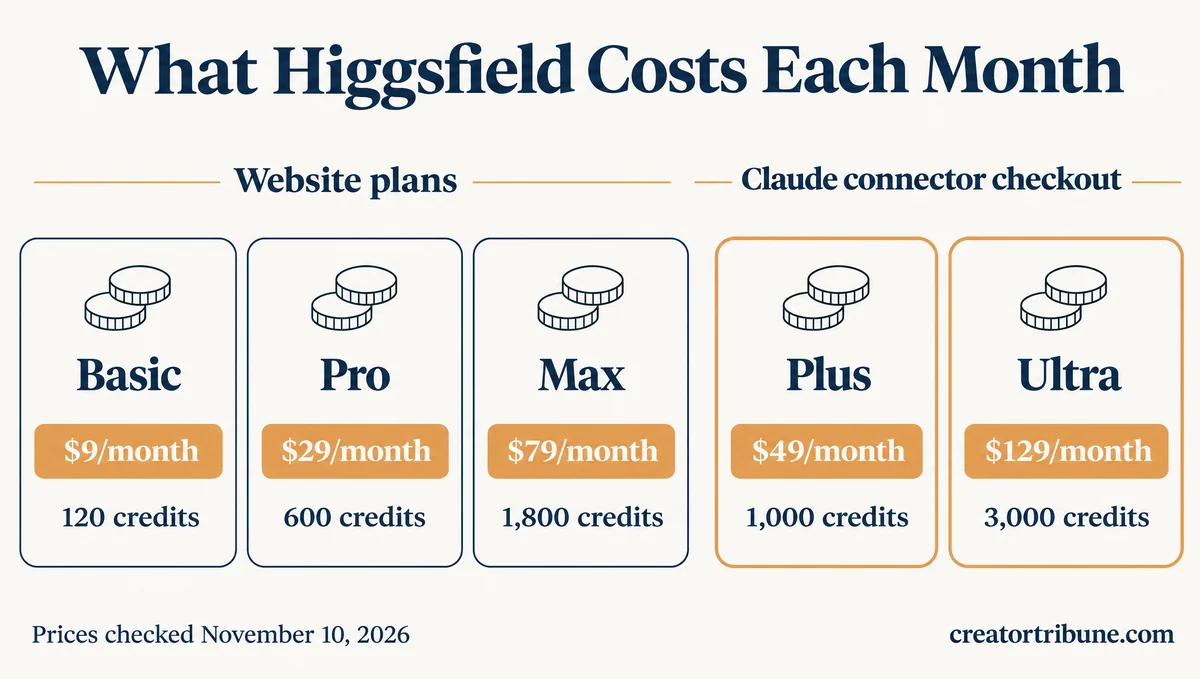
| Plan | Monthly | Billed yearly | Credits a month |
|---|---|---|---|
| Basic | $9 | $9 a month | 120 |
| Pro | $29 | $23 a month | 600 |
| Pro, larger credit option | $43 | $34 a month | 900 |
| Max | $79 | $59 a month | 1,800 |
| Plus (Claude checkout) | $49 | $39 a month | 1,000 |
| Ultra (Claude checkout) | $129 | $99 a month | 3,000 |
Prices checked on Higgsfield’s pricing page and in its Claude connector checkout, November 10, 2026. Prices exclude VAT and local taxes.
Two price ladders run at the same time, and price guides around the web quote both plus older ones. That is why one search for Higgsfield pricing turns up entry prices of $5, $9, $15 and $19 side by side. Trust the page you are about to pay on over any price guide.
Per credit, monthly Pro costs about 4.8 cents, monthly Max about 4.4 cents and yearly Max about 3.3 cents. Basic is the worst deal at 7.5 cents a credit, so I treat it as a test plan rather than a working one.
What Does Unlimited Mean on Higgsfield?
Unlimited on Higgsfield means a named list of models, mostly image models, that you can run without spending credits for a set window, such as 7 days on the current plan cards. The perk works only on the Higgsfield website, and those jobs wait in a slower queue than credit jobs.
Is There a Free Version of Higgsfield AI?
Higgsfield has a Free plan, but it comes with no monthly credits and runs one generation at a time. Higgsfield’s pricing FAQ calls it limited access to selected models, and the compare table marks commercial use as not included on Free. Our account got a one-time grant of 10 credits at signup, enough to try a few images and nothing more.
How Many Videos Do Higgsfield Credits Buy?
Higgsfield credits buy far fewer videos than the plan cards suggest once you pick 720p, sound or longer clips. The 600 credits on Pro buy 40 five-second Seedance 2.5 clips at 480p but only 17 at 720p, and 60 five-second Kling 3.0 clips with sound.
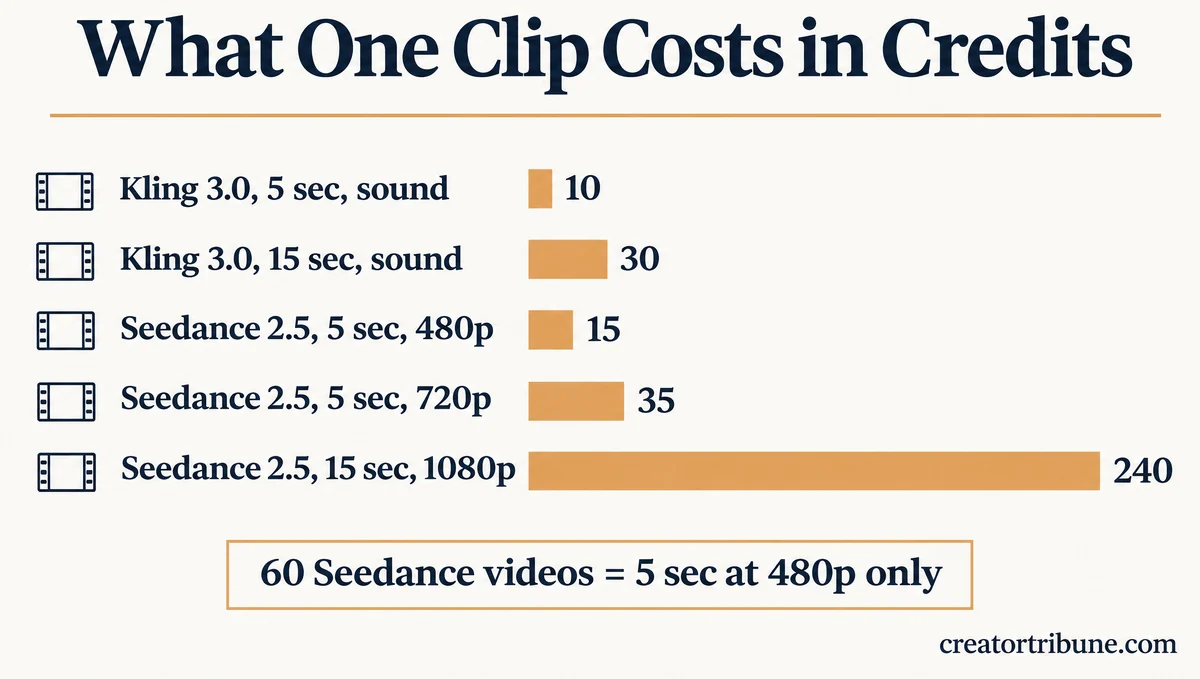
The plan cards price everything at the floor. The 900-credit Pro card’s 60 Seedance 2.5 videos work out to 15 credits each, and 15 credits is what Higgsfield charges for a 5-second Seedance 2.5 clip at 480p. Pick 720p and the same clip costs 35.
| Job | Credits | How many 600 credits buy | Cost on monthly Pro |
|---|---|---|---|
| Kling 3.0, 5 seconds, sound on | 10 | 60 | $0.48 |
| Kling 3.0, 15 seconds, sound on | 30 | 20 | $1.45 |
| Kling 3.0, 15 seconds, 4K | 90 | 6 | $4.35 |
| Seedance 2.5, 5 seconds, 480p | 15 | 40 | $0.73 |
| Seedance 2.5, 5 seconds, 720p | 35 | 17 | $1.69 |
| Seedance 2.5, 15 seconds, 1080p | 240 | 2 | $11.60 |
Credit costs are the quotes Higgsfield returns before each job runs, checked November 10, 2026. Dollar costs use monthly Pro at $29 for 600 credits.
Sound is the other quiet cost. The model table on the pricing page lists Kling 3.0 at about 7 credits per 5 seconds, which is the silent price of 7.5. Switch sound on and the quote rises to 10, a third more.
Veo costs far more per second than Kling. The pricing page’s model table lists Veo 3.1 at about 40 credits per 4-second clip at 720p or 1080p, or about 16 on Veo 3.1 Fast. At the standard price, 600 credits buy about 15 Veo clips, roughly $1.93 each on monthly Pro.
Before: “Pro with 900 credits says 60 Seedance 2.5 videos, so I can post two a day.”
After: “Those 60 videos are 5-second, 480p clips at 15 credits each. At 720p the same 900 credits buy 25 clips, and at 15 seconds and 1080p they buy 3.”
Across our first month, 74 Kling 3.0 clips cost 2,108 credits while three Seedance 2.5 clips cost 570. Kling is the model I reach for first, because a 15-second clip with sound costs 30.
On Pro, 294 of our 600 credits went in the first 18 hours, 268 of them on ten Kling clips for a batch of sample ads. At that pace a full Pro month lasts about a day and a half.
Failed jobs come back as credits. Five of our images failed during the month and each was refunded automatically, but finished clips that look wrong are charged in full. When three of four 5-second Kling re-rolls came back rendered sideways inside a vertical frame, all four still cost 10 credits each.
Do Higgsfield Credits Roll Over?
Higgsfield subscription credits do not roll over: they expire at the end of each monthly cycle, and annual plans refresh every 30 days. Higgsfield’s pricing FAQ says so directly, and Section 9.4 of its Terms of Use adds that unused credits expire when an account is cancelled. When our promotional month ended on November 8, the 22.51 credits left in the balance were removed that day.
Top-up packs last 90 days under Section 9.6 and cost more per credit than Pro or Max. The 500-credit pack is $29, about 5.8 cents a credit, against 4.8 cents on monthly Pro, so I spend down before the cycle date and buy a bigger plan before I buy top-ups.
What Does Higgsfield AI Do Well?
Higgsfield AI does six things well, led by many strong models in one account, cheap images, real camera control and jobs you can run from Claude.
- One account for many models. Moving from Kling 3.0 to Seedance 2.5 or GPT Image 2.6 takes a menu click instead of a second subscription. That convenience is the main reason I keep paying.
- Cheap images. GPT Image 2.6 costs 0.25 credits at low-quality 1K, 1 credit at medium 2K and 2.75 at high-quality 2K, and Nano Banana Pro costs 2. Across our month, 337 image jobs cost about 480 credits in total.
- Camera control that looks directed. Cinema Studio adds camera moves and multi-shot setups on top of the models. A returning customer on r/generativeAI says camera movement “feels directed, not random” and that the same subject holds up across angles better than in other tools.
- Consistent characters and products. Soul ID trains a reusable character from 5 to 20 photos, and Elements stores reference faces and products for a series that needs the same person in every clip. Keeping a look steady across a long run still takes care, and this batch consistency workflow covers the rest.
- It runs inside Claude. The connector lets Claude pick a model, quote the cost and run the job, and it is how I make most of the images on this site.
- No watermark on paid output. None of the images we generate on Pro carry a watermark, including the three on this page. A two-year-plan subscriber on r/HiggsfieldAI prefers generating Nano Banana Pro images inside Higgsfield for the same reason, plus higher resolution and more control.
Where Does Higgsfield AI Fall Short?
Higgsfield AI falls short on predictable costs, unlimited plans that work only on the website, slow queues at busy times, and prompt filters that block harmless requests. Three of them sit in the pricing page’s footnotes and FAQ, so they are easy to miss before you pay.
- Plan cards count videos at the cheapest settings. I budget from the per-clip quote instead, and you should too.
- Unlimited stops at the website. A footnote on the pricing page says unlimited models and free generations work only on the Higgsfield website, not through AI-assistant connectors like the one for Claude or the command line. Every job I run from Claude spends credits for that reason.
- Unlimited jobs wait longer. Higgsfield’s pricing FAQ says unlimited generations run in a standard queue whose speed can drop at peak hours, while credit jobs run in the priority queue. One reviewer on Trustpilot saw typical waits of 5 to 20 minutes stretch to 1 or 2 hours, and a two-year-plan subscriber in an r/HiggsfieldAI thread accepts “a longer queue” as the trade.
- The interface is crowded. The menu runs to Genjutsu, Shorts Studio, Content Factory, Ads Studio, Playable, Mangaka, AI Influencer and more. The same subscriber calls the UI “cluttered and gimmicky”, and another member of that thread notes the unlimited toggle can reset when you switch between image and video tools.
- Prompt filters block harmless requests. The same subscriber had a logo animation, in which one letter jumps onto another, blocked for sounding violent, and got it through by having Gemini reword the prompt. Expect to rephrase a few prompts that should never have tripped a filter.
- Models can change under you. Section 1.7 of Higgsfield’s Terms of Use lets it swap or retire any model at any time, as long as the service stays broadly similar. In November the GPT Image 2.5 model we had used for a month left the catalog, and jobs on it came back as an unknown model.
- Kling 3.0 ignores some instructions. Even with “no text” in the prompt, it invents lettering on signs and end cards, so I check every end card before a clip goes out.
Is Higgsfield AI Legit?
Higgsfield AI is a legitimate, well-funded company, and its scam reputation comes mostly from unlimited plans that did not work the way buyers expected. Former Snap executive Alex Mashrabov founded it in 2023, and TechCrunch reported a $400 million raise at a $5.4 billion valuation in August 2026.
The scam talk traces back to unlimited plans. One creator on r/generativeAI wrote that “Unlimited wasn’t unlimited,” after burning through credits in seven days with no refund. Months later they came back, now pay about $50 a month for Plus, and rate its camera control above the alternatives they tried.
A reply in the same thread puts it plainly: the product is fine, and the old unlimited marketing was the problem.
As of November 10, 2026, Higgsfield holds 4.0 on Trustpilot from 5,384 reviews, with 62 percent at five stars and 19 percent at one star. The profile is claimed, Higgsfield invites customers to review it, and it replies to 96 percent of negative reviews. I read the one-star reviews for the complaints and the five-star ones with that invitation in mind.
Auto-refill draws the sharpest billing complaints. One reviewer on that Trustpilot page says auto-refill charged them twice on the same day, and support refunded the second charge. A commenter on r/HiggsfieldAI was refused a refund on the second of two 108.10-euro auto-refill charges, even after support confirmed in writing that its credits were unused.
The billing screen in the Claude connector opens with an auto-refill pitch, so I keep auto-refill off and buy credits by hand.
How Do You Cancel Higgsfield and Get a Refund?
You cancel Higgsfield in your account settings and keep the plan until the paid period ends. Refunds cover only a first subscription payment or an unused credit top-up, requested within 7 days and before you use any of its credits, while an upgrade refund is at Higgsfield’s discretion. Follow these steps in order:
- If you are past the refund window, use your remaining credits before the period ends, because they expire with the plan.
- Turn auto-refill off if you ever switched it on.
- Cancel in your account settings. The plan stays active until the end of the paid term, with no prorated refund under Section 10.4 of the Terms.
- For a refund, ask within 7 days of your first purchase and before generating anything. Section 9.3 excludes renewals and allows a service fee of up to 6 percent. The same section covers an unused top-up, including an auto-refill charge, if you ask within 7 days of that charge.
- In the EU, EEA or UK, Section 17.2 adds a 14-day right of withdrawal, used by emailing Higgsfield support. It lapses once Higgsfield starts supplying credits or outputs, so ask before you generate anything.
One subscriber in the same r/HiggsfieldAI thread had trouble cancelling early on, so take a screenshot of the confirmation screen when you cancel.
Can You Use Higgsfield AI Videos Commercially?
You can use Higgsfield output commercially on any paid plan, and Higgsfield’s Terms of Use claim no ownership of what you make. The pricing table marks commercial use as not included on Free, while Section 4.4 of the Terms says Higgsfield does not restrict commercial use of outputs. Keep client work on a paid plan until the two match.
Section 4.4 also lets Higgsfield use your prompts, uploads and outputs to train its models, unless you delete them or work under an enterprise agreement. If a client’s unreleased product is in your prompt, read that clause before you upload.
Who Should Pay for Higgsfield AI?
Higgsfield AI suits creators who make short video every week and switch between several models. If you use one model or only need images, a single cheaper tool fits better. For everyone else my pick is monthly Pro, because it shows your real credit burn before you commit to a year.
| If you are | Pick | Why |
|---|---|---|
| Posting short-form video most days | Higgsfield Pro, monthly | 600 credits buy 20 to 60 Kling 3.0 clips a month before re-rolls, with Seedance and Veo a click away |
| Using one model for everything | That model’s own app | You pay for the one model instead of a menu you will not use |
| Making thumbnails and covers only | An image-first tool | Higgsfield’s value is in switching video models, and images are cheap almost everywhere |
| An agency making product ads every week | Higgsfield Max, monthly then yearly | 1,800 credits a month, and yearly billing at $59 a month works out to about 3.3 cents a credit |
| Planning to run it from Claude or another AI assistant | Any plan, budgeted in credits | Unlimited models work only on the website, so every connector job spends credits |
One warning for faceless channels. YouTube’s AI slop crackdown stripped revenue from channels it classifies as mass-produced AI video, and Instagram’s AI-generated profile label now targets profiles that feature an AI-generated person. Higgsfield makes the clips, and a channel built only on them still carries that risk.
What Are the Best Higgsfield AI Alternatives?
The best Higgsfield AI alternative depends on the job: a single model’s own app for one-model creators, and an image-first tool for creators who rarely make video. Kling’s own app is the obvious pick if Kling 3.0 is all you use, and our Kling AI review covers its credit math. Runway, Krea, OpenArt and Freepik also bundle several models, and each prices credits differently, so compare what your most common clip costs on each.
For thumbnails and covers alone, an image-first tool such as Midjourney fits better.
Is Higgsfield AI Worth It?
Higgsfield AI is worth it if you post AI video every week and check the credit price before each job. For everyone else, expiring credits and two price ladders make it an expensive way to experiment.
I stay on Pro because one account covers Kling 3.0 for clips, GPT Image 2.6 for article images and Seedance 2.5 for the rare shot that needs it. A month like our first one, at 3,284 credits, would outrun even Max, so I price every clip before it runs and upgrade only in months the ad work needs it.
The weak spots that cost money sit on the billing side: plan cards that count videos at 480p, credits that expire, unlimited perks that stop at the website, and an auto-refill pitch you can ignore. Learn those four once and the platform gets far easier to budget. If that fits how you work, try Higgsfield on monthly Pro for one cycle and watch where the credits go before you commit to a year.
Quick Takeaways
- Higgsfield’s plan cards count Seedance 2.5 videos at 5 seconds and 480p, and at 720p a 5-second clip costs 35 credits, not 15.
- Kling 3.0 is the value model at 10 credits per 5-second clip with sound, about 48 cents on monthly Pro.
- Credits expire every cycle, and unlimited perks work only on the Higgsfield website, never through the Claude connector.
- A first subscription payment is refundable only within 7 days and before you use any credits, so treat your first paid month as the trial.
- Start on monthly Pro, keep auto-refill off, and commit to a yearly plan only after your monthly spend settles.