Instagram DM Music Not Working When Your Friends Still Have It
Instagram DM Music Not Working When Your Friends Still Have It
Instagram DM music not working on just your account? See why the music option vanishes while friends keep it, and the steps worth trying first.
- 1Why Is Instagram DM Music Not Working on Just Your Account?
- Did Instagram Remove Music From DMs?
- 2How Do You Send Music in an Instagram DM?
- 3Which Fixes Bring Back Music in Instagram DMs?
- 4Can Your Account Type or Country Block Music in Instagram DMs?
- 5Why Does a Song in an Instagram DM Say Unavailable or Not Play?
- 6How Can You Share a Song in Instagram DMs Without the Music Sticker?
- 7Quick Takeaways
TL;DR: When Instagram DM music is not working on your account but your friends still have it, the fault usually sits with your account. If a second account on the same phone still shows Music, updating, reinstalling and clearing the cache will not bring the sticker back. Send songs from Instagram in a browser instead, and report it from Help with logs turned on.
What is the Instagram music sticker: The Music tile inside a chat’s Stickers menu that sends a playable song clip from Instagram’s music library into a DM or group chat.
Instagram DM music not working on just your account, while friends keep sending songs, is how this problem showed up for most people in November 2026. Thirteen different accounts said the Music option had vanished from their chats in six posts across r/Instagram, r/InstagramSupport and r/instagramAsk between November 12 and 17, 2026. Most of those posts say friends, or the poster’s own second account, still had it.
None of the thirteen reported getting it back with the usual fixes, and reports sent through the app changed nothing.
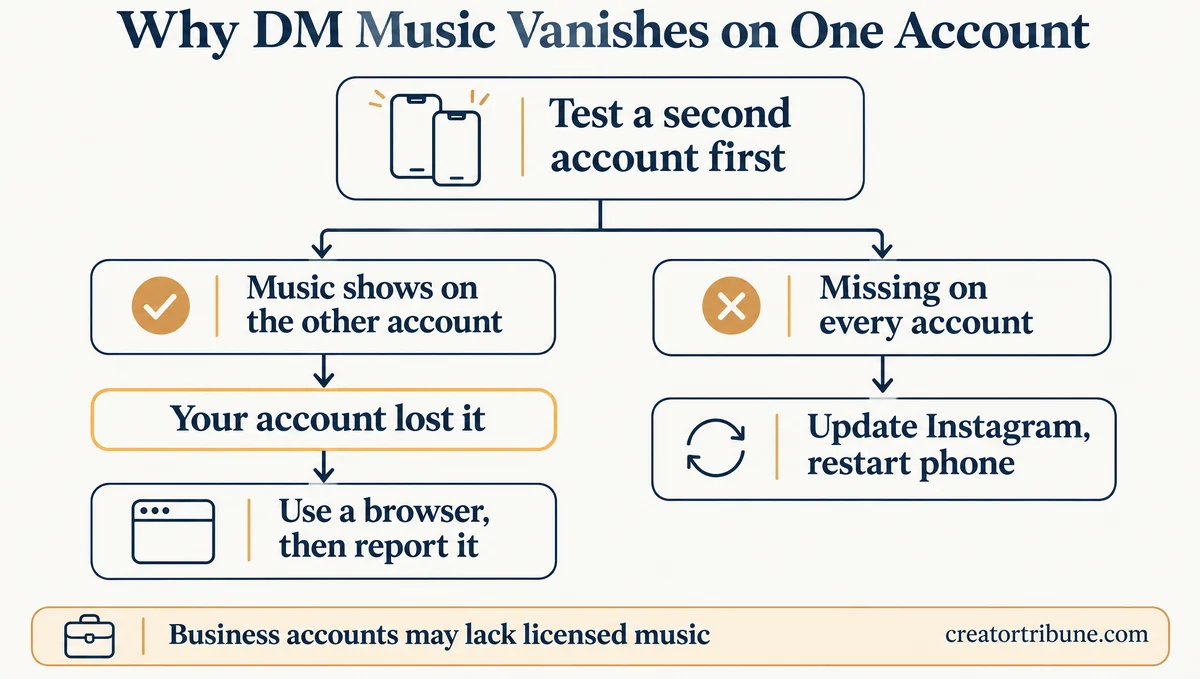
Working through every usual fix costs about half an hour, and most of it is wasted on this problem. The test I trust takes two minutes: open a second account on the same phone and look for Music under Stickers.
Why Is Instagram DM Music Not Working on Just Your Account?
Instagram DM music most likely stops working on one account because Instagram has turned the Music sticker off for that account on its side, while the phone, app version and country still support it.
The person who started the first November post could still send music from their second account but not from their main one. Their screenshot of the chat sticker tray shows a Cutouts tile, Instagram’s tool for turning photos into stickers, and no Music option. Another poster wrote that “its only on one account” and that the feature is available in their country.
Phone model and location do not explain it either. The person who started the r/instagramAsk thread is on a personal account with no restrictions and says everyone in their state with the same phone still has the option. Replies there came from Android and iPhone users, in India and outside it.
Google Play and a third Reddit post show the same pattern. A November 14 review of Instagram on Google Play, left on version 455.0.0.51.72, reads “I cant send songs to my chats anymore but my friends still can? what gives???” A November 16 r/Instagram post says the same thing: “everyone else can but the button just isn’t there anymore.”
Instagram’s own help center hints at the reason. Its Report a technical problem article says you “might also be experiencing an issue if a feature isn’t available to everyone yet.”
My read is that this is an account-level switch on Instagram’s side. The same pattern has been taking Instagram Instants, its disappearing-photo feature, off single accounts since June, and one main account was still without Instants months later.
| What you see | Likely cause | What to do |
|---|---|---|
| Music is gone under Stickers on one account but shows on your other account | The option is off for that account | Use Instagram in a browser and report it from Help |
| Music is gone on every account on your phone | An old app version or a stuck app | Update Instagram, then restart the phone |
| Music is gone and you run a business account | Licensed music may not be available for that account type | Check your account type, then see the section on account type below |
| A sent song says content unavailable | The chat did not load the song card | Close the chat and open it again |
| A friend cannot play a song you sent | The track is not available where they are | Paste a link to the song instead |
Did Instagram Remove Music From DMs?
Instagram has not removed music from DMs, because its help article on sending music in a chat is still live with the same steps and most accounts still have the option.
No Instagram announcement mentions taking music out of chats. One thing feeds the rumor: Instagram’s own list of message types for chats leaves music out, even though the separate music article is still up. I treat a missing sticker as an account problem until Instagram says otherwise.
How Do You Send Music in an Instagram DM?
You send music in an Instagram DM through the Stickers button in the chat, where Music opens a library you can search, preview and tap to send as a playable sticker.
Instagram’s Send music in a chat article lists these steps for Android, iPhone and iPad:
- Tap Messages at the bottom of the screen.
- Tap a chat in your inbox, or tap Compose in the top right to start a new one.
- Tap Stickers in the bottom right of the message bar.
- Tap Music.
- Search for a song, browse, or pick a suggestion, then tap Play to preview it.
- Tap the song when you are ready, and it sends to the chat on its own.
You and your friend can tap the sticker to play or pause the clip. To skip ahead or go back, Instagram says to tap and hold the message and then tap See info, a control I wish Instagram put on the sticker itself.
Music sharing in DMs started in March 2022 with 30-second song previews through Apple Music and Amazon Music, TechCrunch reported. The Music option in the sticker tray arrived in February 2025, when Instagram’s own announcement described a 30-second preview with a spinning vinyl of the album. It searches only Instagram’s audio library, so there is no button for an audio file saved on your phone.
The help article has no computer version, which makes the browser route below an undocumented workaround. A November 16 review of Instagram on Google Play says the option to pick which part of a song to send has gone too. A missing clip picker may be part of the same change.
If Music is missing at step 4, the fixes below are the ones worth your time.
Which Fixes Bring Back Music in Instagram DMs?
Using Instagram in a web browser is the only fix that brought back music in Instagram DMs in the November 2026 reports. Updating, reinstalling, clearing the cache, switching account types and reporting it did not restore the sticker in the app.
Here is every fix the November posters tried and what it did, drawn from the r/instagramAsk thread and the r/InstagramSupport post, with my estimate of how long each takes.
| Fix | Time it takes | Brought Music back? |
|---|---|---|
| Update Instagram | About 3 minutes | No, the option stayed gone after updating |
| Restart the phone, or log out and back in | About 4 minutes | No |
| Offload, reinstall or clear the cache | About 5 minutes | No |
| Switch account type | About 3 minutes | No |
| Report a problem | About 5 minutes | No change yet, even after three reports |
| Instagram in a web browser | About 3 minutes | Yes, for two posters |
Here is the order I recommend, quickest test first. The whole run takes about 20 minutes, and step 1 tells you whether the rest is worth doing.
- Open a chat on a second account on the same phone, tap Stickers and look for Music. If you need one, setting up a second account takes a few minutes and keeps your main one safe.
- Update Instagram in the App Store or Google Play, then close and reopen the app. Instagram’s bug report page asks for this before any report.
- Check Account Status. Tap your profile picture, tap Menu in the top right, then tap Account Status below More info and support. Instagram’s Account Status page says restrictions can take away “certain features you can no longer use.”
- Open instagram.com in Chrome or Safari, log in, open the chat and look for the music option there. The r/InstagramSupport poster could send songs this way, and so could an r/Instagram poster on their phone’s browser.
- Report it from Help, with the details in the example below.
If the second account has Music and yours does not, steps 2 to 5 are all you need, so skip the reinstalls. If Music is missing on both accounts, the app is the likelier cause, so update Instagram and restart the phone before you report it. The latest replies in the r/instagramAsk thread, posted on November 17, still had no fix.
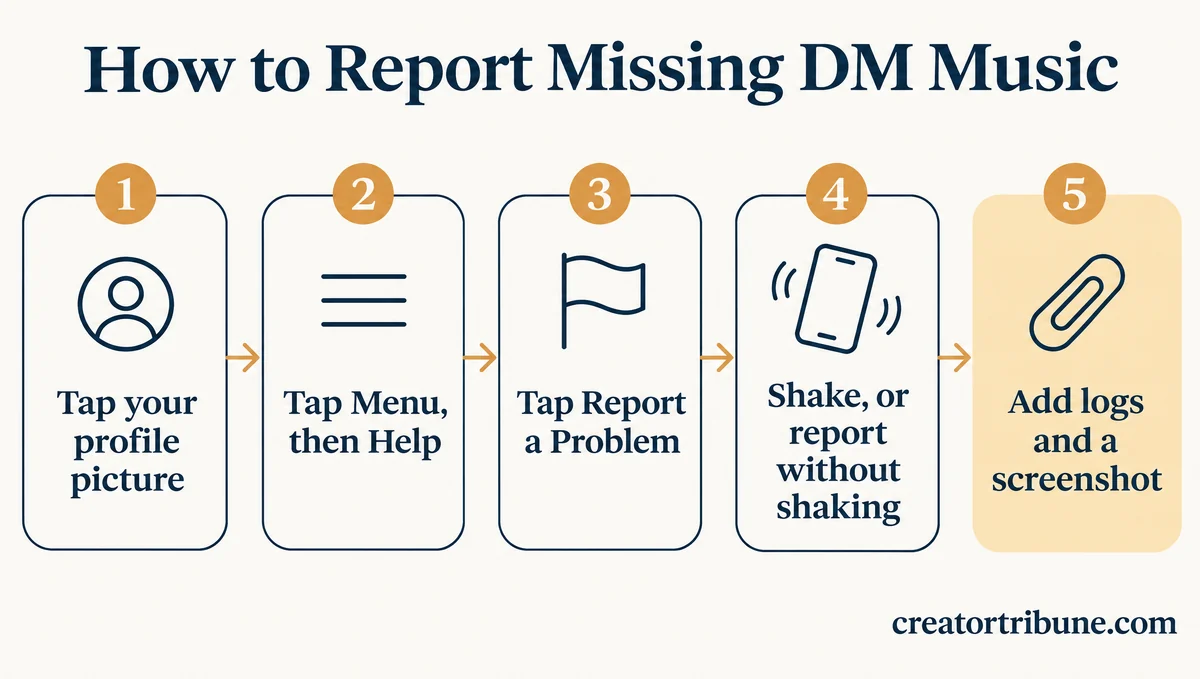
Instagram’s Report a technical problem article gives the path. Tap your profile picture, tap Menu, tap Help below More info and support, then Report a Problem, and either shake your phone or tap Report problem without shaking.
Instagram attaches your device and account details on its own, and you can add more by turning on Include Complete Logs and Diagnostics. Attach a screenshot of the empty Stickers menu.
Before: “music in dms not working pls fix”
After: “The Music option is missing from Stickers in every chat on this account, though it still shows on my second account on the same phone. It has been gone since November 12, and updating and logging out did not bring it back. Screenshot of the empty Stickers menu attached.”
Can Your Account Type or Country Block Music in Instagram DMs?
Your account type or country can block licensed music on Instagram, because Instagram keeps its licensed library for personal, non-commercial use and some business accounts and regions do not get it.
Instagram’s licensed music library article says “certain business accounts and certain types of posts do not have access to the library.” It adds that licensed music “may also not be available in certain countries or regions.”
That rule rarely explains a chat button that vanished overnight. The person who started the r/instagramAsk thread is on a personal account, and a reply there says everyone else in that region still has the option. I don’t buy account type as the cause unless you switched to a business account right before the button disappeared.
Switching a business account to Creator or personal brought the full song list back for several people posting Stories in a long r/Instagram thread. That thread also lists VPN use as a possible cause. The r/InstagramSupport poster switched account types, and the chat button stayed gone.
For music on posts and Reels, our guide to adding music covers the account-type rules in full.
Why Does a Song in an Instagram DM Say Unavailable or Not Play?
A song in an Instagram DM says unavailable or will not play when the chat fails to load the song card, or when the track is not licensed where the listener is.
One r/Instagram post describes a song that showed content unavailable until the chat was closed and reopened, and then had no play button. Instagram’s audio help page adds that a track may not play for someone when it is not available in their region, was taken down, or the artist or label is having technical issues.
That close-and-reopen step is the first thing I try when a song card shows up blank. If the card loads but still will not play, paste a link to the song instead. For a chat that is slow or messages that fail, DMs not loading and message failed to send cover those faults.
How Can You Share a Song in Instagram DMs Without the Music Sticker?
You can share a song in Instagram DMs without the Music sticker by pasting a link from Spotify, Apple Music or YouTube, or by sending a Reel that already uses the song.
- Copy the song’s share link in Spotify, Apple Music or YouTube and paste it into the chat.
- Find a Reel that uses the song, tap the share button and send it to the chat.
- Send the Music sticker from Instagram in a browser, if it shows there for your account.
A pasted Spotify link is my fallback, because it opens the full song for anyone who has the app. The Reel trick keeps the song inside Instagram, which suits friends who never leave the app.
Quick Takeaways
- When the Music sticker is gone on one account but works on another, the problem is the account, so reinstalling is unlikely to fix it.
- Test a second account on the same phone first; it takes two minutes and shows which side the fault is on.
- Send songs from Instagram in a browser, or paste a song link, while you wait.
- Report it from Help with logs on and a screenshot of the empty Stickers menu, even though no November report has brought it back yet.
- Expect a wait, since a main account that lost Instagram Instants the same way was still without it months later, so I check Stickers after every Instagram update.