
How Many TikTok Accounts Can You Have and Why No One Agrees
How Many TikTok Accounts Can You Have and Why No One Agrees
None of TikTok's 218 English help articles caps your accounts. See the rules it does enforce, how to add a second account, and what can ban them all.
- 1How Many TikTok Accounts Can You Have?
- Can You Have More Than 3 TikTok Accounts?
- Which TikTok Account Limits Are Official?
- 2How Do You Add Another Account on TikTok?
- How Do You Switch Accounts on TikTok?
- Why Can’t Your New TikTok Account Follow Anyone?
- 3Can You Make Two TikTok Accounts With the Same Email?
- Can Two TikTok Accounts Share a Phone Number?
- 4Does TikTok Ban You for Having Multiple Accounts?
- Does a Second TikTok Account Hurt Your Reach?
- 5Should You Keep a Separate TikTok Account for Your Business?
- 6Can People Find Your Second TikTok Account?
- 7Quick Takeaways
TL;DR: TikTok does not publish a limit on how many accounts you can have. Its help pages say you can add more accounts and switch between them without naming a number, and one iPhone user already has seven. The rules TikTok does enforce are one email or phone number per account and no extra account to get around a ban.
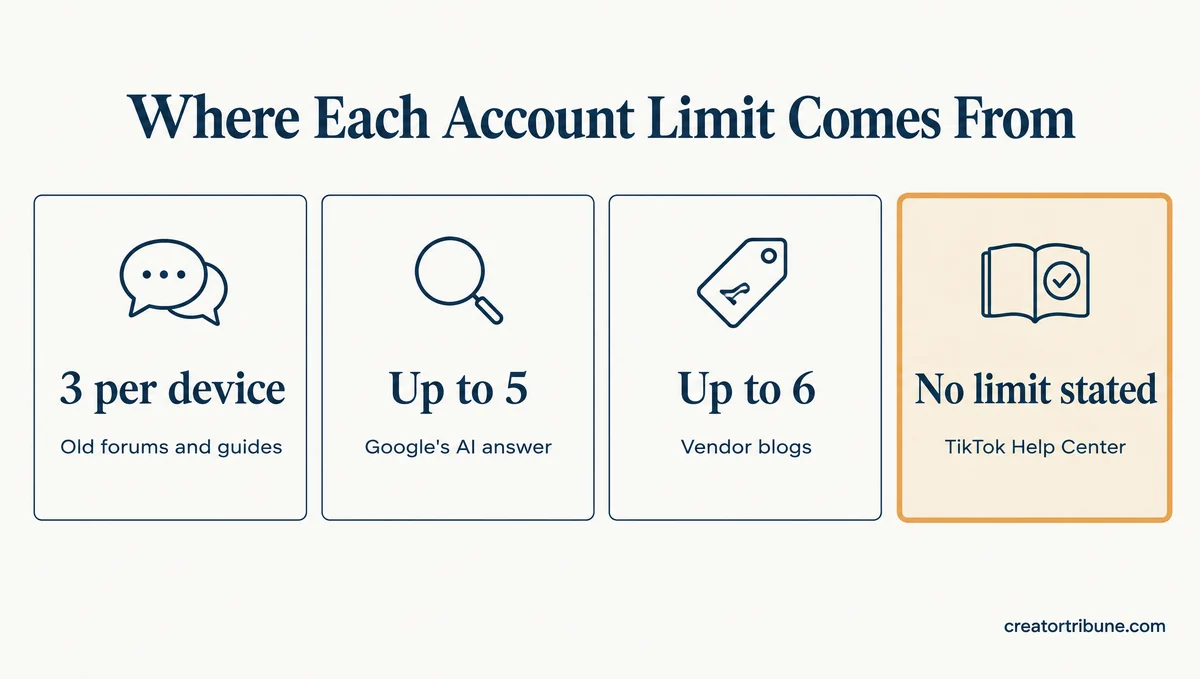
How many TikTok accounts can you have? Google’s AI answer says up to 5, and other top results say 3, 6 or 8. None of those numbers comes from TikTok.
TikTok’s own help page on adding accounts gives no number at all. Neither do the other 217 English articles TikTok lists in its Help Center, as of October 29, 2026.
That gap bothers me, because people delete old accounts or skip a new niche over a limit nobody has shown exists.
The rules TikTok does enforce are narrower than the folklore, and one of them can take down every account you own at once.
How Many TikTok Accounts Can You Have?
TikTok publishes no limit on how many accounts you can have. It gives no number for a person or a phone, and one iPhone user has seven and is thinking of adding more.
TikTok’s Creating an account help page says, “You can add additional accounts to your device and switch between them on TikTok.” No maximum follows it, and TikTok’s bans help page is just as open-ended: “You can create multiple accounts on TikTok.”
That February 2026 post on Reddit’s r/TikTok reads, “I have 7 accounts currently for different niches and thinking of maybe adding more.” I put more weight on one iPhone user with seven accounts than on any round number in a guide.
If adding an account fails for you, check which of two look-alike problems you hit before you assume a cap.
- “Maximum number of attempts reached” while you add an account is a temporary login lock that clears with time. The maximum attempts error guide covers how long it lasts.
- A sign-up that drops you back into your main account means the email or phone number is already in use. The email section below covers the fix.
Can You Have More Than 3 TikTok Accounts?
Yes. No TikTok help article mentions a three-account rule, and in a 2023 Reddit thread one user had five accounts on one device with the Add account button still showing.
That user wrote, “I have 5 tiktok accounts linked to my device and I can still add more.” After a Google search turned up “3 accounts per device,” the same user added that only three of the five were made on that device and the other two on two other devices.
The post they answered asked, “I can only have 3 accounts right?” Its author had read “everywhere that I can only have 3,” yet TikTok was “seemingly allowing me to create a 4th.” Nobody in the thread hit a wall at three, and both users got the number from something they read.
Here is where each number on the first page of Google and Bing comes from, checked on October 29, 2026.
| Number you will read | Where it appears | What TikTok’s help pages say |
|---|---|---|
| 3 per device | A 2022 forum thread, a Medium post and a Facebook group answer | No limit in any of the 218 English articles |
| Up to 5 | Google’s AI answer, which cites a multi-account software maker, a TikTok page of user videos and two YouTube how-tos | No limit, and no TikTok help article is among its sources |
| Up to 6 | Two 2026 blogs from companies that sell tools for running many accounts | No limit |
| 3, 6 or even 8 | A Facebook answer page | No limit |
No one agrees because not one of these numbers traces back to TikTok’s own rules. Three of the sources behind them sell software for running many accounts, which tells me to read their numbers as sales copy.
Which TikTok Account Limits Are Official?
The only account numbers TikTok publishes are for businesses: up to 20 Organization Accounts listed when a team member logs in, and up to 800 TikTok accounts linked to one Business Center for ads.
Organization Accounts are brand profiles that several team members share. TikTok’s Organization Account login page, last updated December 2025, says the app “displays a list of up to 20 Organization Accounts that you are linked to.”
The second number comes from TikTok’s Business Center linking page, last updated April 2026: “Each Business Center can link to up to 800 TikTok accounts for ad delivery.” Business Center is TikTok’s dashboard where companies connect TikTok accounts, hand out tasks and control who has access.
Neither number caps how many personal or creator accounts you can open.
How Do You Add Another Account on TikTok?
To add another account on TikTok, tap Profile, tap your nickname at the top, then tap Add account and sign up or log in. Each new account needs an email or phone number that no other TikTok account uses.
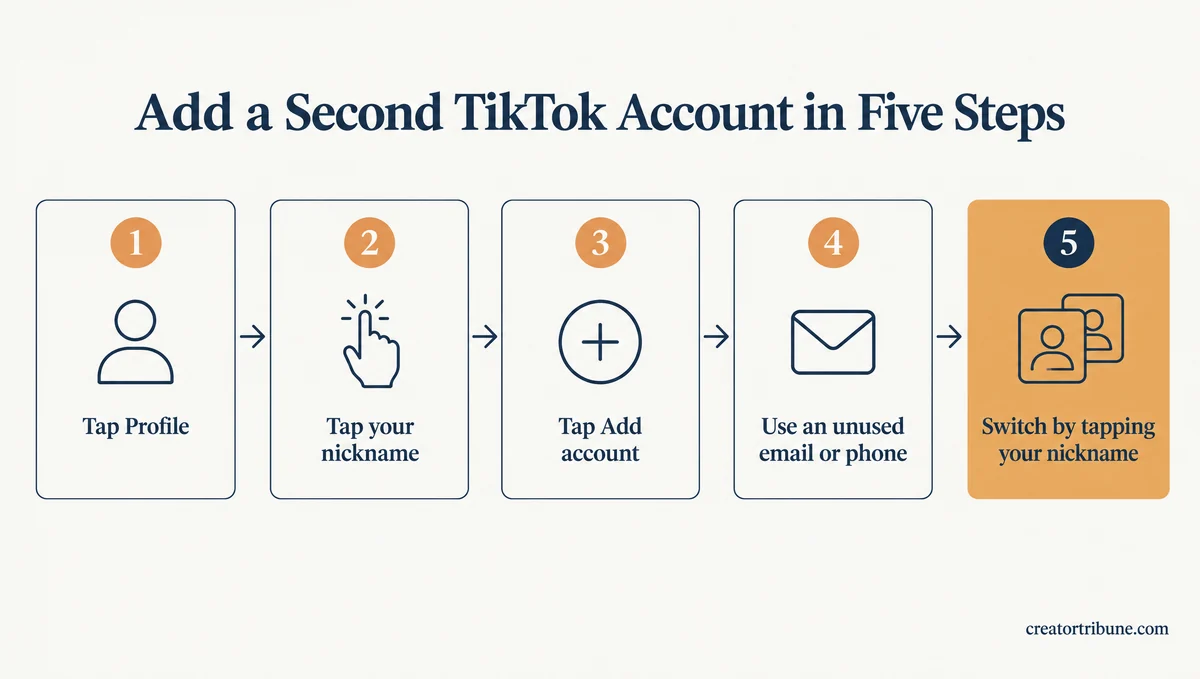
These steps follow TikTok’s Creating an account page and take a few taps on iPhone or Android.
- Open TikTok and tap Profile at the bottom.
- Tap your nickname at the top of the screen.
- Tap Add account.
- Sign up with an email or phone number no other TikTok account uses, or log in to an account you already have.
- Finish the sign-up steps. The new account now shows when you tap your nickname.
TikTok saves each login by default and stores your saved logins, including username, profile picture and login method, in your iCloud or Google account. TikTok’s saved login help page says they appear on any phone signed in to that same iCloud or Google account.
I clear out any saved login I no longer post from, because the list follows me to every phone. Start from the login panel, the screen that lists your saved accounts when you log in.
- On Android, tap Manage accounts, then Delete next to the account, then Remove.
- On iPhone, tap Delete next to the account, then Remove.
TikTok says this deletes the saved login from your iCloud or Google account and from every linked device. It also turns off Save login info if you had it on.
How Do You Switch Accounts on TikTok?
To switch accounts on TikTok, tap Profile, tap your nickname, and pick the account from the list. TikTok’s help page says you can also switch from your settings.
Saved accounts open without a password. If you turned off Save login info, TikTok still shows the account but asks for its password when you log in.
Some settings do not carry over between accounts. TikTok’s Restricted Mode page says that if you have multiple accounts, you must turn Restricted Mode on for each one separately.
If you delete and reinstall the app, TikTok logs you back into the last account you used.
TikTok’s help pages only give switching steps for the app. On the website, check your account menu for a Switch account option, and if you do not see one, log out and log back in with the other account.
Why Can’t Your New TikTok Account Follow Anyone?
A new TikTok account that cannot follow anyone has most likely tripped TikTok’s spam protection. TikTok says following “a lot of accounts too quickly” can get an account temporarily disabled, and it gives no number and no time limit.
That line comes from TikTok’s too fast notice page. Google’s AI answer lists follow caps of 200 a day and 10,000 in total, but TikTok’s Help Center publishes neither number.
Those figures come from creator reports, which the TikTok follow limit guide tracks. Give a new account a few days of watching and posting before it follows people in bulk.
Can You Make Two TikTok Accounts With the Same Email?
No. TikTok links each email address, phone number and social media login to one account only, so a second account needs a different one. A deleted account frees its email or phone number after 30 days.
TikTok’s Creating an account page puts it plainly: “Each phone number, email address, and social media account can only be linked to one TikTok account.” It also lists Instagram and X as unsupported sign-up methods.
Trying the same email again does not make a new account. In a November 2024 thread on r/TikTok, a creator who signed up again with the same phone number and email was verified and logged straight back into the original account.
A different email fixed it. The reply that suggested it came from someone with “four completely separate TikTok accounts, all using a different email.”
Before: Log out, tap Sign up, and enter the email your main account uses. TikTok sends a code and drops you back into your main account.
After: From your main account, tap Profile, your nickname and Add account, then sign up with an email no other TikTok account uses. The new account appears in your list next to the old one.
When a second account will not sign up, I check the login method before anything else. TikTok’s own troubleshooting says to check whether you already used it on an old account, because “you need to create new accounts with a different login method.”
If you want your main email for the new account, change the email on the old account first, under Profile, Menu, Settings and privacy, Account, Account Information, then Email and Change email.
TikTok’s email and phone help page lists that path and notes that both the old and the new email must be active to receive the codes.
Deleting the old account frees the email too, but not right away. TikTok deactivates a deleted account for 30 days, and only then can its email or phone number connect to a new account, as the guide on deleting a TikTok account explains.
Can Two TikTok Accounts Share a Phone Number?
No. A phone number can belong to one personal or business TikTok account at a time. The exception is Organization Accounts, where one team member’s phone number can connect to several.
Your mobile number “can only be associated with a single TikTok account,” according to the same email and phone page.
TikTok’s Organization Account page adds that a phone number “can be connected to various Organization Accounts,” which helps teams that share brand profiles.
Does TikTok Ban You for Having Multiple Accounts?
No. TikTok’s rules allow multiple accounts, for example for fan content or creative expression. The risk comes from using one to deceive people or to get around a ban, and then TikTok may ban all of them.
TikTok’s Integrity and Authenticity guidelines, in force since September 24, 2026, say “You can have multiple accounts” for things like fan content or creative expression, “but not to deceive others or break the rules.”
I don’t buy the idea that a second account puts your first one at risk on its own, and nothing in those rules says it does.
The risk starts with evasion. TikTok’s Accounts and Features guidelines say, “If someone seriously breaks the rules or tries to dodge enforcement, we may ban all of their accounts, including associated accounts.”
TikTok’s bans help page names three moves that count as dodging. They are making a new account after a ban for a severe violation, posting violating content on a new or existing account, and spreading violations across several accounts.
That rule is not new. TechCrunch reported in March 2023 that TikTok’s guideline overhaul banned “the use of multiple accounts to intentionally bypass its rules.”
Every quote in the table below comes from TikTok’s current Community Guidelines on integrity, checked on October 29, 2026.
| What you do with an extra account | Allowed? | TikTok’s wording |
|---|---|---|
| Run a second account for a niche, fan content or a business | Yes | “You can have multiple accounts” |
| Use a new account to get around a restriction or ban | No | You “may not create or use another account to get around it” |
| Use extra accounts to pump up likes, follows or comments | No | TikTok removes “fake likes, followers, or other inflated signals” |
| Run your accounts through bots or scripts built to bypass TikTok’s systems | No | TikTok says it “strictly prohibit[s] automation tools, scripts, or other tricks designed to bypass our systems” |
| Repost the same video on every account | Allowed, but the copies can be ruled ineligible for the For You feed | Content with “unoriginal or reused material without anything new” is ineligible |
The ban on new accounts lasts as long as the trouble on the other account does. TikTok’s bans page says it “applies while any account restriction(s) or permanent account ban remains active on your other account.” Violations expire after 90 days, but a permanent ban stays in force.
If one of your accounts is already banned, appeal the ban rather than starting a fresh account. A new account made to get around an active ban is exactly what the rules above punish.
Does a Second TikTok Account Hurt Your Reach?
No TikTok rule says a second account lowers your reach. Reach can suffer when you post the same video on every account, because TikTok makes reused material without anything new ineligible for the For You feed.
A reply in an October 2026 thread on r/TikTok puts it the same way: “switching between a few accounts on one phone is pretty normal, i haven’t seen it tank reach for anyone.”
The same reply names behaviour as the real risk, like “spamming follows or posting the same clip on every account.”
Give each account its own videos instead of cross-posting one clip. The account not recommended guide covers what else keeps a post off the For You feed.
Should You Keep a Separate TikTok Account for Your Business?
Yes, if you post personal videos and also promote a business. TikTok’s account types page says “we recommend using two separate accounts,” because switching one account back and forth from a Verified Business Account loses the verification.
The full line on TikTok’s account types page reads: “If you’d like to promote your business on TikTok and post personal content, we recommend using two separate accounts.”
Two accounts is the setup I recommend to any creator who also sells something.
Verified Business Accounts cannot use TikTok’s general music library, so a personal account also keeps your sound options open.
A brand run by a team can use an Organization Account instead, which TikTok says can only be created from business platforms such as the TikTok Shop Seller Center.
Can People Find Your Second TikTok Account?
Yes. Other people can search for it, and TikTok may suggest it to your contacts, Facebook friends and people who open your links until you turn off one setting. Even with that setting off, TikTok may still suggest it to people you follow or interact with.
The setting is Suggest your account to others, and TikTok turns it on by default for adults. Here is how to switch it off on the account you want kept quiet:
- Tap Profile, then the Menu button, then Settings and privacy.
- Tap Privacy, then Suggest your account to others.
- Turn off Contacts, Facebook friends, and People who open or send links to you.
TikTok’s suggested accounts page adds a catch: “Even if all these settings are turned off, your account may still be suggested to those you follow, interact with, or share mutual connections with on TikTok.” That sentence worries me most for anyone who wants a secret account.
So a secret account should not follow your main account or your friends, or like and comment on their posts. Setting it to private, covered in the guide to making a TikTok account private, limits who can watch your videos.
It does not hide the profile itself. TikTok’s public and private account page says your name, username and profile photo “will always be visible to anyone on or off TikTok,” and other people can still search for your account.
Quick Takeaways
If you want a second account, add it from your profile with an email no other account uses, and give it videos of its own. The extra account that puts the rest at risk is one used to deceive people or to get around a ban.
- TikTok publishes no limit on accounts, and the 3, 5, 6 and 8 figures online do not come from TikTok.
- Each account needs its own email or phone number, and a deleted account’s email frees up after 30 days.
- Multiple accounts are allowed, but a new account made to dodge a ban can get every account you own banned.
- Post different videos on each account, because TikTok can keep reused clips off the For You feed.
- Turn off all three Suggest your account to others options before you rely on a secret account.