See Who Unfollowed You on Instagram Without Risking a Ban
See Who Unfollowed You on Instagram Without Risking a Ban
Instagram never tells you who unfollowed you. Check one name in a minute or compare two free data exports, and skip apps that want your login.
- 1Can You See Who Unfollowed You on Instagram?
- 2How Do You Check if One Person Unfollowed You on Instagram?
- Did They Unfollow You, Block You or Deactivate Their Instagram?
- 3How Do You See Everyone Who Unfollowed You on Instagram Without an App?
- Why Does One Instagram Export Only Show Who Doesn’t Follow You Back?
- Can ChatGPT Tell You Who Unfollowed You on Instagram?
- 4Are Instagram Unfollower Tracker Apps Safe?
- What Should You Do if You Gave an Unfollower App Your Instagram Login?
- 5Should You Do Anything When Someone Unfollows You on Instagram?
- 6Quick Takeaways
TL;DR: To see who unfollowed you on Instagram, search your Followers list for one name, or export your Followers and following data twice, days apart, and look for names that drop out. One export only shows who doesn’t follow you back. Instagram sends no unfollow alert, and the tracker apps that take your password are the ones tied to locked and flagged accounts.
If you want to see who unfollowed you on Instagram, the app won’t tell you on its own. There is no alert and no list, and Instagram’s unfollow help page says it plainly: “People won’t be notified when you unfollow them.”
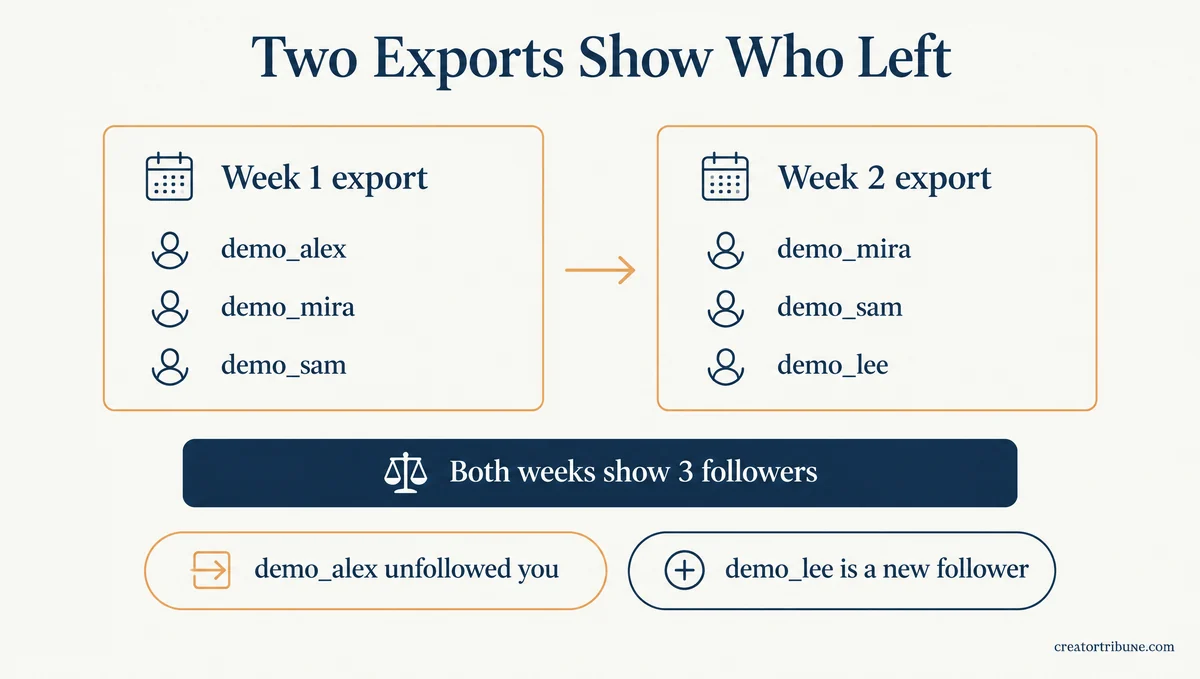
Your follower count is a weak clue, too. Unfollow Checker, a site that reads the follower file Instagram lets you download, publishes two practice exports made a week apart.
Both list three followers, so the count never moves, yet a name-by-name check shows one account left and a new one arrived.
The apps that promise to do this for you have a cost of their own. Reports+, the most-rated unfollower app on the App Store, has reviews titled “Instagram Blocked me for 48h and Limited my Usage the Moment I started Using the App” and “YOU WILL GET HACKED.”
Its 500 newest US reviews in Apple’s public review feed date from August 13 to October 15, 2026. Of those, 65 describe Instagram locking, flagging or disabling the account, or a hack, after the reviewer used the app.
That number is why I start everyone on two free checks: a one-minute search for a single name, and an export comparison that catches everyone who left.

Can You See Who Unfollowed You on Instagram?
Instagram does not show you who unfollowed you.
There is no unfollow notification, no list of people who left and no history of past followers anywhere in the app. Insights only counts how many followers you gained or lost.
Insights is as close as Instagram gets. On any public account with at least 100 followers, Instagram’s insights page says Total followers shows Growth, the “number of followers you’ve gained or lost,” over a window of up to 90 days.
Growth still names nobody, and I look at it before anything else, since it’s the one number Instagram hands over for free.
How Do You Check if One Person Unfollowed You on Instagram?
Search your Followers list for their username.
If the name doesn’t come up, they no longer follow you. To double-check, open their profile, tap Following and search that list for your own name.
This is the check I use when one name is on my mind, and it takes under a minute:
- Open your profile and tap Followers.
- Type their username into the search bar at the top. If they appear, they still follow you.
- If they don’t, open their profile and tap Following.
- Search that list for your username. If you’re missing, they unfollowed you.
Read the button on their profile with care. Follow Back means they still follow you and you don’t follow them. Following only says you follow them and tells you nothing about whether they follow you back.
The second check needs their Following list to be visible. On a private account you don’t follow, Instagram hides it, so check your own Followers list and the button on their profile instead.
Did They Unfollow You, Block You or Deactivate Their Instagram?
A missing name has a few common causes, and their profile tells them apart.
If the profile still loads for you, they unfollowed you. If it loads only when you’re logged out, they blocked you, and if it’s gone for everyone, the account was deactivated, deleted or disabled.
| What you see | Most likely reason | How to confirm |
|---|---|---|
| Their profile loads, but you’re not in their Following list | They unfollowed you | They still show in your Following list if you follow them |
| Their profile won’t load for you, but loads in a logged-out browser | They blocked you | They also drop out of your Following list |
| Their profile is gone logged in and logged out | It was deactivated, deleted or disabled | A deactivated profile comes back when they log in again |
| They vanished right after you tapped Remove all in Flagged for review, Instagram’s suspected-spam list | You removed them as possible spam | The drop lines up with when you cleared that list |
Instagram’s help page on removing followers says you can “block someone to get them to stop following you.” Turned around, a person who blocks you ends your follow of them, so they drop out of your Following list too, and a plain unfollow never does that.
For the logged-out test, open instagram.com/theirusername in a private browser window. When Instagram’s login prompt gets in the way, a public profile viewer such as Inflact loads a public profile by @username without an Instagram login, though it can’t reach private accounts.
The full block check covers the other tells, including what the “Instagram User” name in your DMs means.
How Do You See Everyone Who Unfollowed You on Instagram Without an App?
Export your Followers and following data twice, a few days or weeks apart, and compare the two follower lists.
Any username in the older file that’s missing from the newer one has left. It’s free, and no outside app ever sees your password.
Instagram’s export help page lists the steps, and the menu has a new name on some accounts. Instagram is “gradually updating people to Meta Accounts,” so your Settings will show either Accounts Center or Meta Account.
I keep the first export as a baseline and set a reminder for the second one. Here’s the route:
- Open your profile, tap the menu at the top right and open Meta Account or Accounts Center.
- Tap Your information and permissions, then Export your information, then Create export.
- Pick your Instagram profile, tap Next and choose Export to device.
- Customize the export so only Followers and following is selected, set the date range to All time and pick JSON.
- Tap Start export, then download the file from Available downloads once Instagram tells you it’s ready.
Grab the file quickly, because a finished export stays in Available downloads for only 4 days. Instagram says the email link can take “up to 30 days,” and picking a single type of information keeps the file small.
Inside the ZIP, your followers sit in followers_1.json, with more numbered files on big accounts. The people you follow sit in following.json, and both live in the connections/followers_and_following folder.
Each follower entry carries the date that person started following you. Unfollow Checker’s file guide spells out the gap: “Nothing in the archive records when a relationship ended.” That’s why one file can’t answer the question, and a second export a week or two later can.
Here’s what the comparison looks like with Unfollow Checker’s two practice exports, which use made-up accounts:
| Account | Week 1 export | Week 2 export | What changed |
|---|---|---|---|
| demo_alex | Follows you | Missing | Unfollowed you |
| demo_mira | Follows you | Follows you | Nothing |
| demo_sam | Follows you | Follows you | Nothing |
| demo_lee | Not there | Follows you | New follower |
Both files list three followers, so the count says nothing happened. Loaded into Unfollow Checker in mid-October 2026, the pair shows a net change of 0 next to 1 unfollower and 1 new follower.
In followers_1.json, each username sits in a “value” field next to the profile link. To use a spreadsheet instead, paste the older usernames into column A and the newer ones into column B.
Then fill this formula down column C, and every row marked unfollowed is someone who left:
=IF(COUNTIF(B:B, A2)=0, "unfollowed", "")Two things can fake an unfollow. A follower who changed their username shows up as one loss plus one new name, since the export stores usernames rather than account numbers.
Instagram’s page on follower changes also says “We routinely remove disabled accounts,” so a banned account can leave your list without anyone choosing to go.
If your export also holds Threads lists, make sure your tool keeps them apart. In mid-October 2026, IG Unfollow Tracker, another site that reads export files, named a Threads-only account in Unfollow Checker’s practice export as an Instagram non-follower.
It gave the right answer once the Threads folder was removed.
Why Does One Instagram Export Only Show Who Doesn’t Follow You Back?
One export compares two lists from the same day, so it can only find accounts you follow that don’t follow you back.
That list includes brands and celebrities that never followed you, and it skips anyone who left without you following them first.
Before: One export, following minus followers. The result is demo_shop, an account you follow that never followed you. demo_alex, who left, isn’t on it, because you never followed demo_alex.
After: Two exports, old followers minus new followers. The result is demo_alex, the one account that left between the two dates.
Many guides still present the first method as the way to find unfollowers, though it only finds non-followers.
Older copy-and-paste comparisons broke in late 2025 as well. The maker of FollowBuddy, an unfollower app, said in an October 21, 2025 video that its old “Compare Lists” method “no longer works.” Current exports can also store the username in a different field in following.json than in the followers files.
If you want to trim who you follow rather than find who left, the Least Interacted With list is a faster place to start.
Can ChatGPT Tell You Who Unfollowed You on Instagram?
ChatGPT can’t see your Instagram account, so it can’t find unfollowers by itself. It can compare two follower lists you paste in, which works well enough on smaller accounts.
List A is my Instagram followers from an export dated October 1.
List B is my followers from an export dated October 15.
Give me every username in List A that is not in List B,
then every username in List B that is not in List A.
Paste only the usernames, not the whole file, which adds profile links and follow dates the comparison doesn’t need. On a long list, check the totals it gives back against your own counts before you trust the result.
Are Instagram Unfollower Tracker Apps Safe?
Unfollower apps that log in with your Instagram password are the unsafe kind.
Instagram warns that an app holding your login can “gain complete access to your account,” and tools that only read your own export never get that access.
That warning comes from Instagram’s page on unauthorized activity, and it covers any app holding your login, “whether with an access token or by giving them your username and password.”
Its page on accounts restricted for data scraping lists a likely trigger as well: “You may have provided your username and password to a third-party app or website.”
Reports+ shows 495K ratings and a 4.6 average, yet its newest reviews tell the same story as Instagram’s warnings. Of its latest 500 US reviews, posted from August 13 to October 15, 2026, 65 describe trouble with Instagram after using the app. That’s about one in eight, ranging from locked accounts and forced logouts over suspicious activity to restrictions, disabled accounts and hacks.
The reports don’t stop at one app, though the rate is lower elsewhere. Across six popular unfollower apps on the US App Store, Reports+, FollowMeter and xView among them, 90 of 1,137 written reviews describe the same kind of trouble, 25 of them outside Reports+. That count covers each app’s newest reviews in Apple’s feed, up to 500 per app, posted between mid-April and mid-October 2026.
Ninety reports like that are enough for me to keep my password out of all of them.
Instagram has policed login-sharing apps for years. In November 2018 it began removing follows and likes made through them and sending those accounts “a warning to change their password,” TechCrunch reported.
The same pattern still turns up on r/Instagram. A July 2025 post describes two different unfollower apps and two suspensions, and the top reply in a January 2026 discussion describes warnings, then forced logouts, until the app was deleted and the password changed.
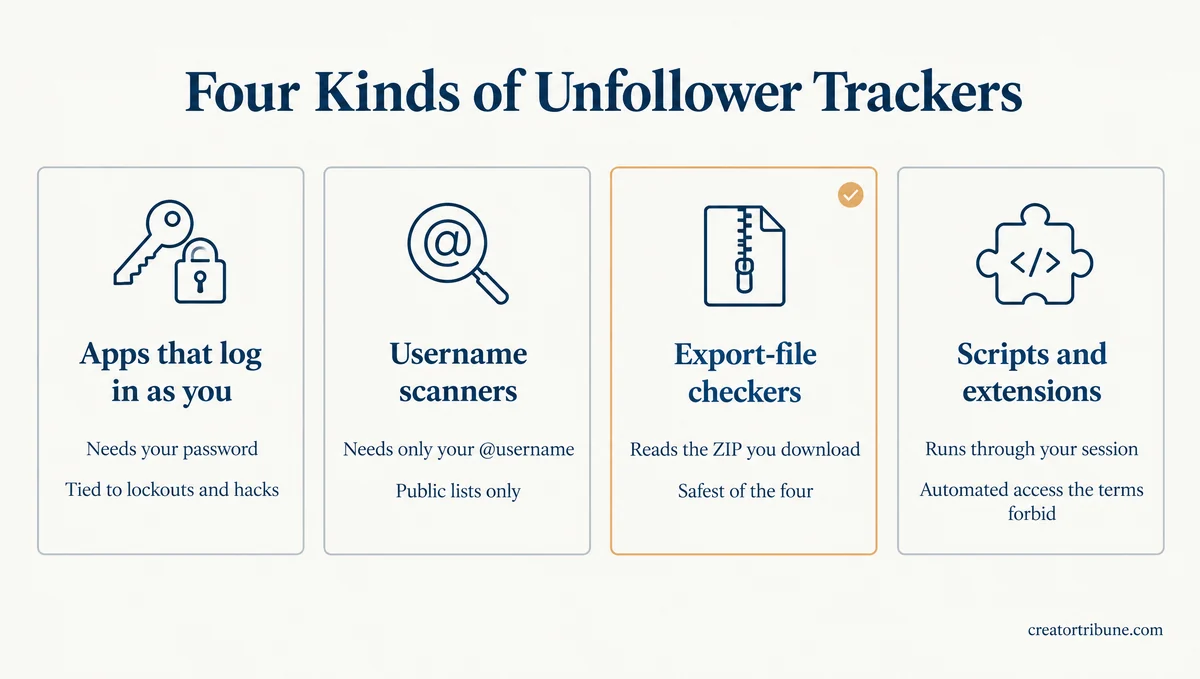
Trackers fall into four types, and what each one needs from you decides the risk:
| Tracker type | What it needs from you | What it can see | The catch |
|---|---|---|---|
| Apps that log in as you (Reports+, FollowMeter) | Your Instagram username and password | Your full lists, public or private | The lockout, flag and hack reports above |
| Username scanners (Unfollowers Track, DolphinRadar) | Your public @username | Public lists only, some only from your first scan | Private lists stay hidden, and full lists cost extra |
| Export-file checkers (Unfollow Checker, IG Unfollow Tracker) | The ZIP you downloaded from Instagram | Exactly what Instagram exported | Some still send usernames to their own servers |
| Browser scripts and extensions | Your logged-in Instagram session | Whatever your session can load | Automated access that Instagram’s terms forbid |
Username scanners never touch your login, and the price is accuracy. Unfollowers Track says your first scan is only a baseline, and that a private profile has to switch to public while a scan runs.
DolphinRadar says private accounts’ lists are invisible to it, so “private accounts will be marked as unfollowers or non-followers.” Its full unfollower report costs $9.9 once, or from $8.9 a month for ongoing tracking.
Export-file checkers are the safest of the four. In a mid-October 2026 run with the browser’s network log open, Unfollow Checker read its sample export inside the browser and never uploaded the file.
It still sent the account’s username to its own server, and it fetched a profile picture for each listed name from its image server, so those names left the browser too.
IG Unfollow Tracker sent nothing at all with the file. Its username search box works differently, passing your handle to Apify, an outside scraping service, and returning only your public counts. I use an export checker for big lists and delete the ZIP when I’m done.
Copy-and-paste console scripts and browser extensions are the riskiest free option, because they run through your logged-in session.
Instagram’s Terms of Use ban collecting information “in an automated way without our express permission, regardless of whether such automated access or collection is undertaken while logged-in to an Instagram account.”
What Should You Do if You Gave an Unfollower App Your Instagram Login?
Change your password first, then clear out logins and apps you don’t recognize, then turn on two-factor authentication.
Instagram’s page on accounts at risk says a new password logs you out of every other device, so anyone signed in as you loses access.
- Change your Instagram password to one you’ve never used anywhere else.
- Check your recent login activity and remove any login you don’t recognize.
- Go to Settings, then Website permissions under Your app and media, then Apps and websites, and remove anything under Active that you don’t use.
- Turn on two-factor authentication.
- If Instagram has already locked you out, work through the locked-account steps instead, and if someone changed your login details, use the hacked-account recovery steps.
Removing an app only stops it from reading more. Instagram’s apps help page warns that it “may have stored information from when you were using it,” so treat anything it already pulled as gone.
Should You Do Anything When Someone Unfollows You on Instagram?
Usually not, because many lost followers never chose to leave.
Instagram removes disabled, spam and fake accounts on its own, and followers you clear from Flagged for review disappear without a notice.
Instagram’s page on follower changes says it routinely removes disabled accounts, so your total “may change, even within a short time.” Followers you clear from Flagged for review drop off the same way, and they “won’t be notified,” per Instagram’s unwanted followers page.
A temporary break can look like a loss, too. Instagram’s deactivation page says a deactivated profile’s photos, comments and likes stay “hidden until you reactivate it by logging back in,” so a profile that’s gone today can be back next week. I wait for a second export before I read anything into one missing name.
When the person who left is someone you know, the only real decision is whether you keep following them. Spread any unfollows over a few days, since fast unfollowing can run into Instagram’s action limits. If your own Following list is the one shrinking, see unfollowing people on its own.
If the count matters more to you than the names, Kicksta, an Instagram-only growth service, follows and likes people who follow niche accounts and hashtags you pick, so follow-backs come from your niche.
It needs your Instagram password, the same risk that keeps my password out of every tracker, and it also automates unfollows, so read the review before you decide.
Start a baseline export today, so your next check has something to compare against.
Quick Takeaways
- Instagram never tells you who unfollowed you, and Insights only counts the followers you gained and lost.
- For one name, search your Followers list, then their Following list, and remember that Follow Back means they still follow you.
- For everyone, export Followers and following twice, days apart, and compare the old follower file with the new one.
- One export only finds accounts that don’t follow you back, and a renamed follower or a removed account can look like an unfollow.
- Skip apps that want your Instagram password, because 65 of the 500 newest reviews of the most-rated one describe lockouts, flags or hacks.