The Grey Tick on Instagram and Whether It Hurts Your Reach
The Grey Tick on Instagram and Whether It Hurts Your Reach
The grey tick on Instagram is a private shortcut to Meta's paid verification. See who can see it, whether it hurts reach, and what to check instead.
- 1What Is the Grey Tick on Instagram?
- Why Did the Grey Tick Show Up on My Account?
- What Happens When You Tap the Grey Tick?
- 2Who Can See the Grey Tick on Your Instagram Profile?
- 3Does the Grey Tick Hurt Your Instagram Reach?
- Why Did My Reach Drop After the Grey Tick Appeared?
- 4How Do You Check Whether Instagram Is Limiting Your Reach?
- 5How Do You Remove the Grey Tick on Instagram?
- 6Quick Takeaways
TL;DR: The grey tick on Instagram is a faint check in a dotted circle that only you can see next to your own name. Tapping it opens the sign-up screen for Meta’s paid verification, and Meta has said nothing that ties the mark to reach. No setting hides it, so if your views fell, check Account Status before you blame the tick.
The grey tick on Instagram started showing up next to people’s own names in June 2026, with no announcement from Meta.
One of the first public questions about it, posted on June 11 in r/instagramAsk, was titled “Google has no info.” Three months on, Meta’s badge and Meta Verified help pages still say nothing about it.
In August the mark picked up a reputation it has not earned. Creator reels spread the claim that it was a warning, as one worried poster put it, that “your account will not get much reach and you should buy the blue tick.”
In September a poster in r/smallbusinessindia asked how to remove the tick because “my reach is going down because of this.”
My read is that the tick is a sales prompt, and nothing Meta has published connects it to your reach. Two checks below settle it for your own account in about a minute each, one for who can see the tick and one for whether Instagram is limiting your reach at all.
What Is the Grey Tick on Instagram?
The grey tick on Instagram is a faint checkmark inside a dotted circle that sits next to your own name and opens Meta’s paid verification sign-up when you tap it.
Meta has not published a help page that describes it, and it does not verify anything.
On screen the mark looks like a washed-out copy of the blue badge. The first posts about it describe a grey dotted circle badge and a transparent grey check in a circle, and one poster described it as a dotted blue checkmark.
The blue badge still means what it always meant. Instagram’s page on verified badges says an account with the badge “is the authentic presence for that person or brand,” whether the badge came from notability or a Meta Verified subscription. That page says nothing about a grey version.
I file the grey tick with the other upsell buttons in the app, like the Boost button under every post. The table sets it next to the two real badges.
| Mark | Who sees it | What it means | Cost to you |
|---|---|---|---|
| Grey tick in a dotted circle | Only you, on your own profile | A shortcut to Meta’s paid verification sign-up | Nothing, it is a prompt |
| Blue badge from a notability check | Everyone | Instagram confirmed a public figure, celebrity or brand | Nothing, but only by request and approval |
| Blue badge from a subscription | Everyone | You paid for Meta Verified or a Meta One plan and passed an ID check | From $11.99 a month on the web or $14.99 in the app in most regions |
Why Did the Grey Tick Show Up on My Account?
Meta has not said who gets the grey tick, and it has appeared on creator and business accounts, including some that already carry the older blue badge.
A big following is not required, since an account with a few hundred followers has one too.
The subscription it points to does have published rules. Meta’s eligibility page asks subscribers to be at least 18 years old, or the age of majority in their country of residence, and to have a government-issued photo ID. The account needs Advanced Protection turned on and must meet “minimum activity requirements” in a country where Meta Verified is sold.
An account that already holds the older blue badge got the grey mark too, and another said the same.
Meta said in June 2023 that it would keep honoring those older badges, so to me the mark reads as a sales prompt shown widely, with no judgment about any one account behind it.
What Happens When You Tap the Grey Tick?
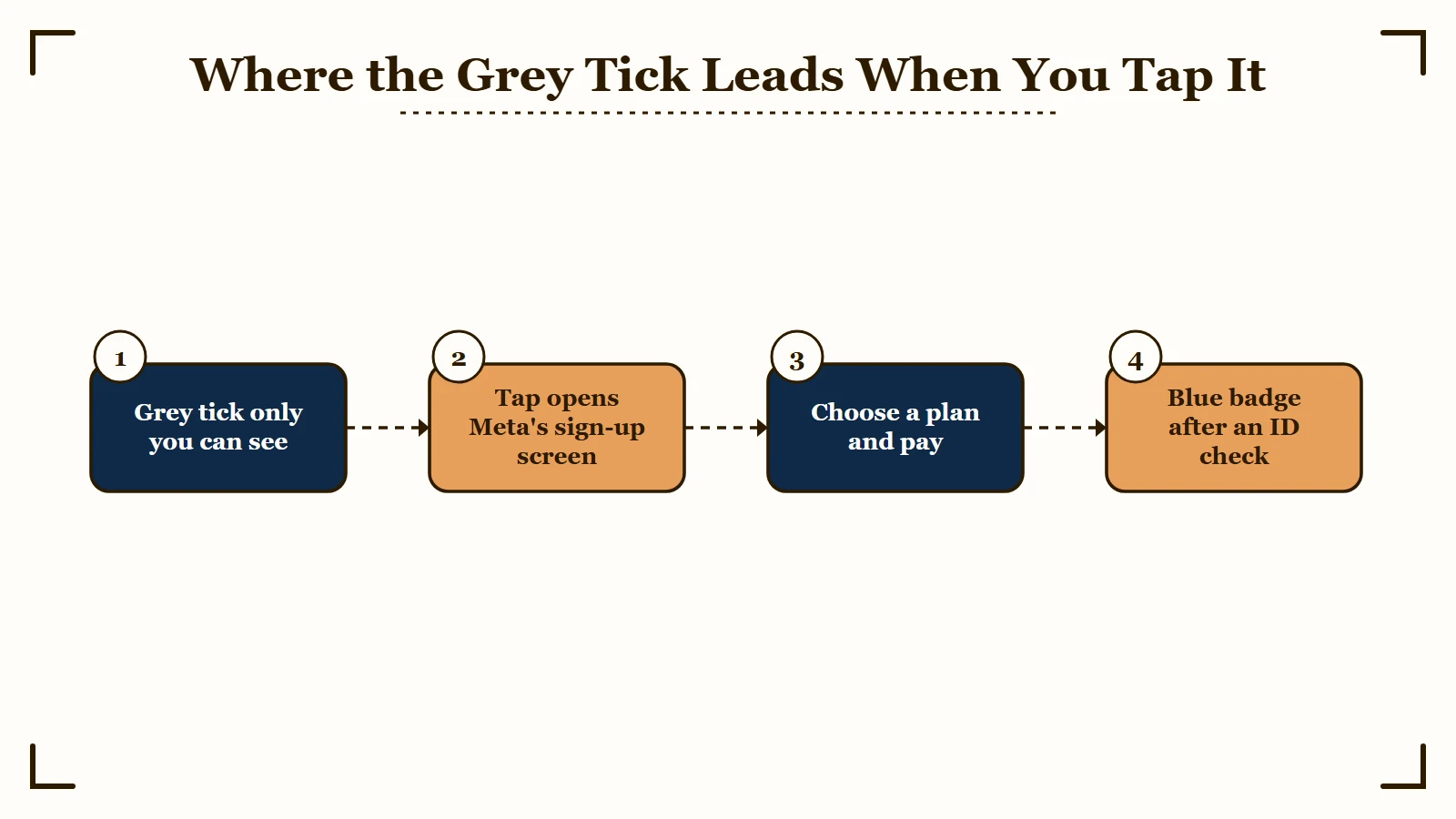
Tapping the grey tick opens the sign-up screen for Meta’s paid verification, and nothing is charged unless you choose a plan and pay.
One business owner who tapped it landed on “the Meta badge purchase page,” and a September 28 post calls it a shortcut for buying a Meta One subscription.
What is Meta One: Meta’s subscription lineup, announced globally on September 15, 2026, with nine plans that run from single-app Plus tiers to creator and business plans that include the verified badge.
Both descriptions fit, because Meta is folding one product into the other. Meta’s Meta Verified page now reads “Meta Verified features are now available in Meta One,” so the offer behind the tick can show Meta One plans rather than the older subscription.
I look at the price first. Meta Verified Standard costs $11.99 a month on the web or $14.99 in the app in most regions, per that same Meta page, and our Instagram Plus guide lays out all nine Meta One plans.
A badge buys an ID check, impersonation protection and support, and Meta’s terms promise nothing firmer on reach than visibility that “may vary.” If growth is the goal, that money does more in your posting routine.
Some creators hand that routine to an automation tool, and SMTasker is one built for Instagram, TikTok and Threads that runs accounts on real Android devices, with a trial before you pay. Automation carries real risk under Instagram’s rules, which the SMTasker review lays out in full.
Who Can See the Grey Tick on Your Instagram Profile?
Only you can see the grey tick on your Instagram profile, and anyone else who opens it sees your name with no mark beside it.
Instagram has not documented this, so a second-account check is the proof that counts.
A photographer and a musician each opened their own profile from a second, personal account, and neither could see the mark. That fits its purpose, since a sales prompt only makes sense on the buyer’s own screen.
Lokshahi reported the same in August, writing that it “is only visible to the user logged into that account.”
I trust this test more than any explainer, this one included, because it takes a minute and settles the question for your own account.
- Sign in to a second Instagram account, or borrow a friend’s phone.
- Search for your username and open your profile from that account.
- Look at the space next to your name. A plain name means your followers see no tick either.
Does the Grey Tick Hurt Your Instagram Reach?
Nothing Meta has published ties the grey tick to lower reach, and every reach effect Meta has documented for its paid badge is an extra for accounts that pay.
Lokshahi, which covered the August scare, found “no official information provided by Instagram or Meta regarding any connection between the grey tick and the decrease in account reach.”
Meta did sell reach once. Its February 19, 2023 launch announcement promised “increased visibility and reach,” and a March 17, 2023 update on that page says “We’re removing increased reach as a subscription feature for now.” TechCrunch reported that day that Meta “heard feedback from users who said this offering was confusing.”
Visibility extras are still written into the paid plan. Meta’s current Standard terms say the subscription “may include” “prioritisation and increased visibility across some surfaces,” and the business terms add that smaller accounts “may see a more noticeable impact to their reach.”
Meta’s product page also lists a search perk among the Meta Verified features.
| Date | Where Meta said it | What it says about reach |
|---|---|---|
| February 19, 2023 | Meta Verified launch post | Promised “increased visibility and reach” in search, comments and recommendations |
| March 17, 2023 | Update on the February 2023 launch post | Removed increased reach “as a subscription feature for now” as the US test began |
| September 2026 | Meta Verified Standard terms | Benefits “may include” “prioritisation and increased visibility across some surfaces” |
| September 2026 | Meta Verified business terms | Smaller business accounts “may see a more noticeable impact to their reach” |
| September 2026 | Meta Verified product page | Lists a search perk for subscribers |
| June to September 2026 | The grey tick rollout | No statement from Meta at all |
I don’t buy the idea that Instagram hides your posts to sell you a badge. Every reach effect Meta has put in writing is an extra for accounts that pay, and Meta has not described a cut for accounts that do not.
Why Did My Reach Drop After the Grey Tick Appeared?
A reach drop that lines up with the grey tick needs a second look, because creators with and without the mark saw views fall over the same months.
The timing looks damning only until you check which change came first.
Many accounts got the mark in mid-July, with several people saying it appeared “last evening” on the same days.
One creator in an August thread said their reach had tanked “since June,” before that wave, and a reply in another thread points to a friend with a blue badge whose views fell too.
The tick also sits on accounts that are doing fine, and one reply reports a reel with the mark reaching 470K views. When my own numbers dip, I put two dates side by side before I blame anything on screen: the day the change appeared and the day the drop began.
How Do You Check Whether Instagram Is Limiting Your Reach?
Account Status is where Instagram tells a professional account whether its content can still be recommended to people who don’t follow it, and checking takes under a minute.
It is free, and it answers the exact question the grey tick rumor raises.
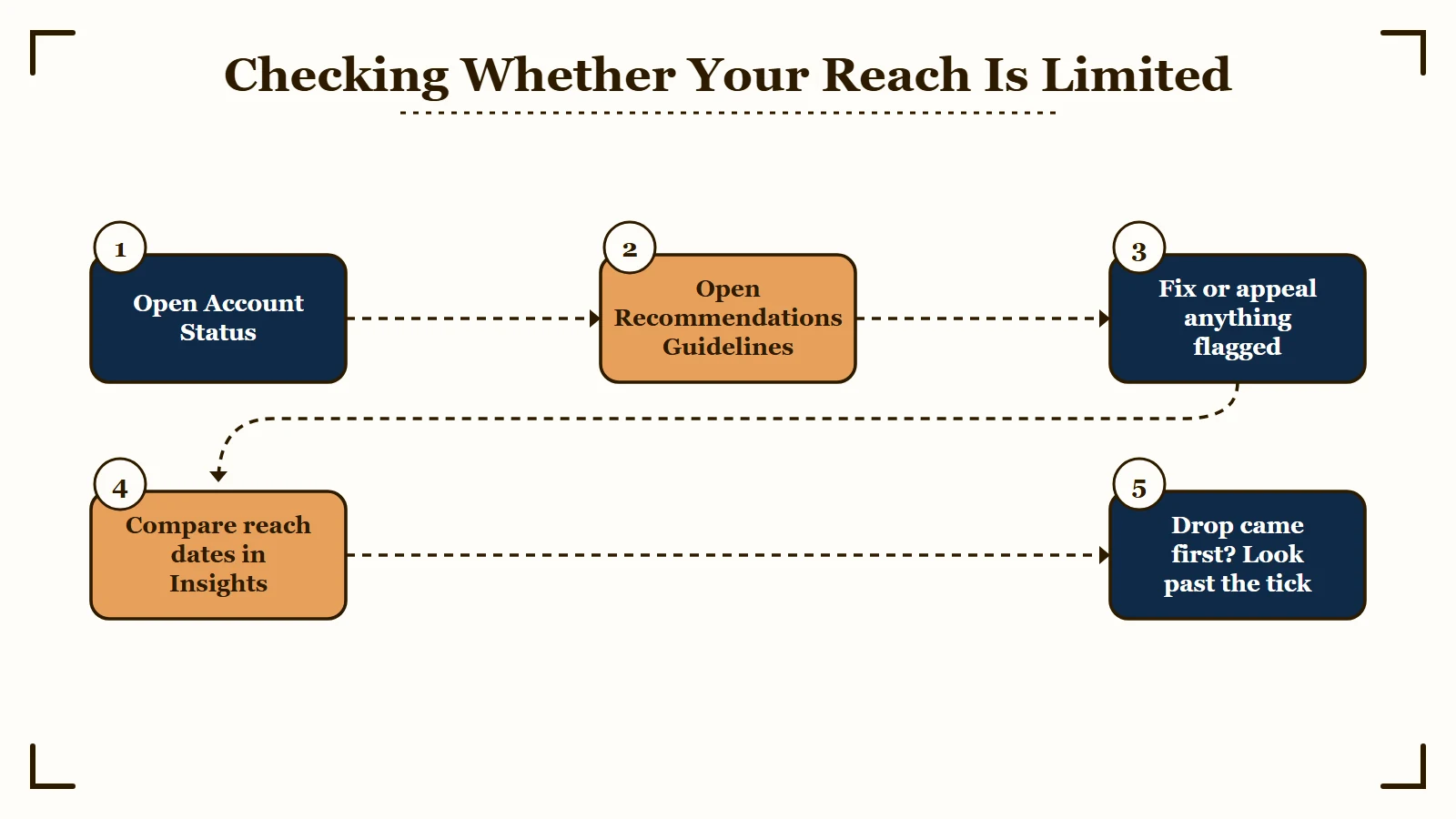
Instagram’s Account Status page says a professional account can see there whether a post or profile item “may be impacting the eligibility of all your content to be recommended” to non-followers. That is the reach limit the rumor describes, and unlike the tick, it comes with an appeal button.
This is the order I check things in:
- Open your profile, tap Menu, then tap Account Status under More info and support.
- On a professional account, open Recommendations Guidelines and look for any flagged post or profile item.
- If something is flagged, tap Edit or remove content to fix it, or tap Disagree with decision to ask for a review.
- Open Insights and compare how much of your reach came from non-followers before and after the day you first saw the tick.
- If nothing is flagged and the drop started first, work through why reach drops overnight instead of the mark.
Before: “My views fell after the grey tick showed up, so the tick is throttling me.”
After: “The tick appeared on July 16. Non-follower reach on my Reels started sliding on July 2. Recommendations Guidelines shows nothing flagged, so the drop began before the tick and my posts can still be recommended.”
I never skip the date comparison, because a drop that starts first cannot have been caused by the tick. For a deeper test that covers every platform, the shadowban test walks through it step by step.
How Do You Remove the Grey Tick on Instagram?
You cannot remove the grey tick with any setting Instagram offers, and since only you can see it, leaving it alone costs nothing.
Meta’s badge help pages never mention the mark, so there is no documented off switch. It can still vanish on its own, since LatestLY notes its appearance depends on “account eligibility, region, app version and Instagram’s ongoing interface testing.”
The usual fixes did not work for the r/smallbusinessindia poster, who wrote that they “tried everything that was being shown on Google” and that “nothing worked.”
Switching between Creator and Business accounts is one trick that circulates, with nothing from Meta to back it. It can also cost you later, because Meta’s eligibility rules cap how many account changes, including account type, you can make “within a certain time period prior to applying for verification.”
Paying for a subscription can earn a blue badge once you pass verification, and Meta’s help page calls that badge “the blue checkmark that appears next to your name on Meta apps.”
Meta has not said the grey mark leaves when the blue one arrives, and accounts holding the older free badge got the grey mark anyway. That is at least $11.99 a month for a change Meta does not promise, on a mark nobody else sees.
Instagram also takes free badge requests from a public figure, celebrity or brand that meets its criteria. It warns that submitting one “doesn’t guarantee that your account will be verified.”
I tell anyone who asks to leave it alone. The badge earns its fee only when impersonators or slow support are real problems for your account, and that is true with or without a grey tick.
Quick Takeaways
- The grey tick is a faint check in a dotted circle that opens Meta’s paid verification sign-up, and it verifies nothing.
- Only you see it, and opening your profile from a second account confirms that in a minute.
- Meta has said nothing that links the tick to reach, and the only reach effects in its terms are possible extras for people who pay.
- If your views fell, check Account Status and compare dates before you blame the tick.
- No setting hides it, and a paid blue badge from $11.99 a month comes with no promise that the grey mark leaves.