Kicksta Review After Its Own Channel Called the Method Dead
Kicksta Review After Its Own Channel Called the Method Dead
Kicksta follows and unfollows people for you, the method its own channel now calls dead. See the prices, the follower ceiling and the account risk.
- 1Why Are Kicksta Reviews So Mixed?
- 2How Does Kicksta Work on Instagram?
- Does Kicksta Need Your Instagram Password?
- Does Kicksta Unfollow People Who Followed You Back?
- 3How Many Followers Can You Get From Kicksta?
- 4How Much Does Kicksta Cost?
- What Does the Kicksta Free Trial Include?
- 5Is Kicksta Safe for Your Instagram Account?
- What Should You Do If Instagram Blocks You While Using Kicksta?
- 6What Are the Pros and Cons of Kicksta?
- 7Who Is Kicksta Best For?
- 8Is Kicksta Worth the Money?
- 9Quick Takeaways
Bottom Line: Kicksta is a real Instagram growth service that logs in with your password, follows people who follow the accounts you pick, and unfollows them 2 to 4 days later. Its own YouTube channel said in July 2026 that follow/unfollow now hurts accounts, and Instagram warns that apps like this can get an account disabled. It costs $39 to $129 a month and fits one established account far better than a new one.
This Kicksta review starts with a line Kicksta published itself.
On July 7, 2026, a video on Kicksta’s YouTube channel said follow/unfollow and engagement pods “now hurt your account more than they help,” and called them “dead.”
Kicksta still runs follow/unfollow as its core method, on your Instagram account, with your password.
The bill runs $39 to $129 a month, depending on the plan and how far ahead you pay. What the pricing page leaves out is the risk to the account, and Instagram spells that risk out in its own help center.
I keep my own channels away from any tool that needs the password, so no Creator Tribune account was connected to Kicksta for this review. The verdict rests on Kicksta’s own pages, its archived pages, its ratings and the rules Instagram publishes.
Creator Tribune earns a commission if you sign up through the Kicksta links on this page. That does not change the verdict, and no ranking on this site is ever sold.
Why Are Kicksta Reviews So Mixed?
Kicksta reviews are mixed because they describe different versions of the product and come from writers with different motives.
Trustpilot rates it 1.9 out of 5 from 628 reviews, G2 rates it 2.8 from 21, and some reviews still ranking describe the likes-only service Kicksta replaced in 2023.
The recent reviews split hard by site. On Trustpilot, 16 of the 18 reviews posted between October 21, 2025 and October 14, 2026 give one star. On G2, the five most recent reviews all score 4.5 or 5, and four of them went up between July 24 and August 3, 2026.
| Rating source | Score | Reviews | Recent reviews |
|---|---|---|---|
| Trustpilot | 1.9 out of 5 | 628 | 16 of 18 from the past year give one star |
| G2 | 2.8 out of 5 | 21 | The 5 most recent all score 4.5 or 5 |
| Kicksta’s pages | “235 five-star reviews” | Not stated | Counts five-star reviews only |
Kicksta’s organic growth page advertises “235 five-star reviews on Trustpilot, G2 and Capterra.” That count leaves out the 41% of Trustpilot reviews that give one star, which outnumber the 35% that give five.
The score sits lower than that split suggests because the TrustScore gives newer reviews more weight. Kicksta’s newer reviews are mostly one star.
The blog reviews split by motive. Kicksta pays affiliates 30% of every monthly payment for as long as a referred customer stays, so plenty of review pages earn money when you sign up, this one included. Many of the pages steering you away from Kicksta are “Kicksta alternative” pages published by rival growth services, such as Owskimedia, Outfame and Plixi.
Reviews with recent dates are the ones I weigh, because a lifetime average mixes the 2019 product with the one sold today. Read the newest reviews on each site before you read any score.
How Does Kicksta Work on Instagram?
Kicksta works by logging in to your Instagram account and running follows, likes and Story views for you from its own phones.
It targets people who follow the accounts and hashtags you choose, and the ones who like your profile follow you back.
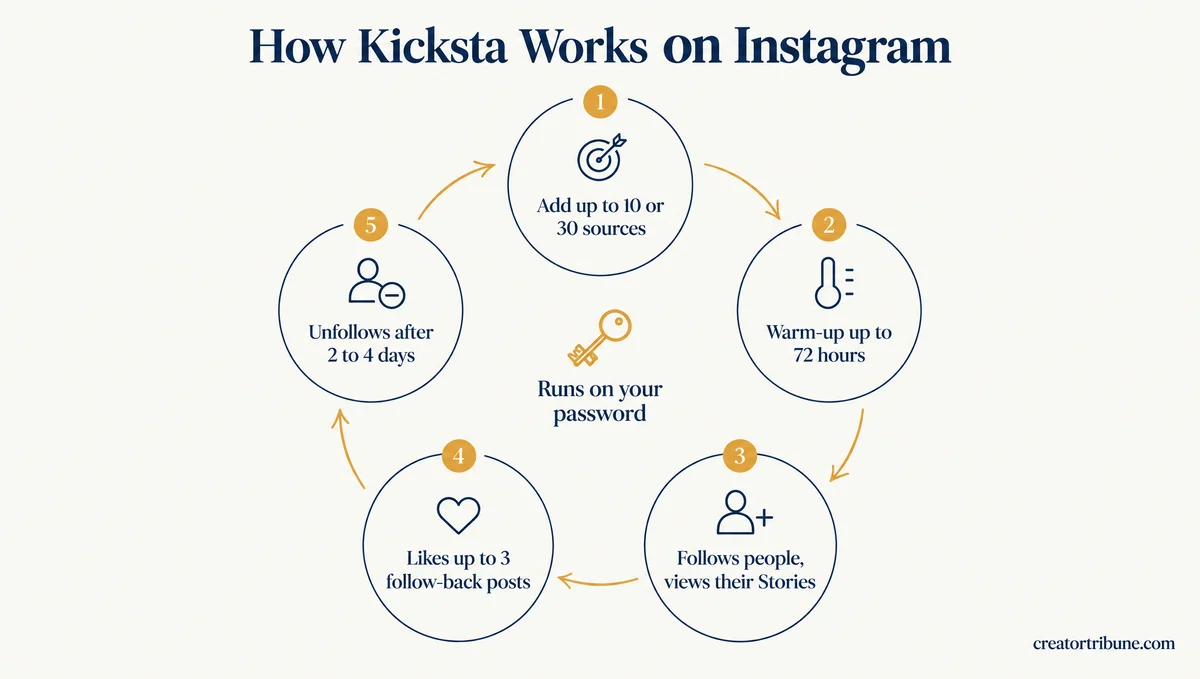
Kicksta’s pricing and organic growth pages lay the cycle out in five steps:
- You add sources, which are the accounts and hashtags your audience already follows. Growth allows 10 and Advanced allows 30.
- Kicksta warms the account up for up to 72 hours, starting slow and building day by day.
- It follows people from those sources and views their Stories so they notice you. The accounts it follows are muted, so your home feed stays yours.
- When someone follows you back, it likes up to 3 of their posts.
- After 2 to 4 days, it unfollows the accounts it followed.
That is not the Kicksta that older reviews describe. From 2019 until at least April 2023, Kicksta’s own FAQ promised “NO follow/unfollow or spammy comments” and said it would like 1 to 2 photos from each person instead. Its pricing page listed “Follow/Unfollow” as a feature by June 5, 2023.
Some reviews ranking today still describe the old product. Single Grain’s review, last updated February 23, 2026, says Kicksta grows accounts “by liking posts from users who follow your selected influencers.” Path Social’s page says it “only likes one to two photos” from each person.
That reversal matters more to me than any feature on the list. Follow/unfollow is the app behavior Instagram began stripping out in November 2018, so it changes the risk you are buying.
Does Kicksta Need Your Instagram Password?
Kicksta needs your Instagram password, according to its own pricing page, FAQ and terms of service.
The pricing page answers the question directly: “Yes. Instagram has no official way for a service to engage on your behalf without it. Kicksta stores it encrypted.”
One Kicksta page says the opposite. Step one on the how-it-works page reads “no passwords stored” and claims “We use Instagram’s official flow, so everything stays safe and compliant.”
Meta’s developer documentation sides with the pricing page. The official Instagram API serves professional accounts for messages, comment moderation, publishing, ads and insights, and its feature list has no way to follow or like other accounts.
I don’t buy the “official flow” line, since Kicksta’s own pricing page explains why no such flow exists for follows and likes. Treat the password as handed over the moment you connect.
Does Kicksta Unfollow People Who Followed You Back?
Kicksta’s own pages disagree on whether it unfollows people who followed you back.
The organic growth page says “it unfollows every account it followed,” while the how-it-works page says it unfollows “accounts that didn’t follow back.”
The difference lands on the people you just won. If the first page is right, a new follower watches you drop them a few days later, which gives them a reason to unfollow you in return.
The first setting I would open is the Allow list, which stops Kicksta from unfollowing anyone on it. Accounts you followed before joining go on it automatically, but new follow-backs do not, and at typical rates that can mean 10 to 40 additions a day.
How Many Followers Can You Get From Kicksta?
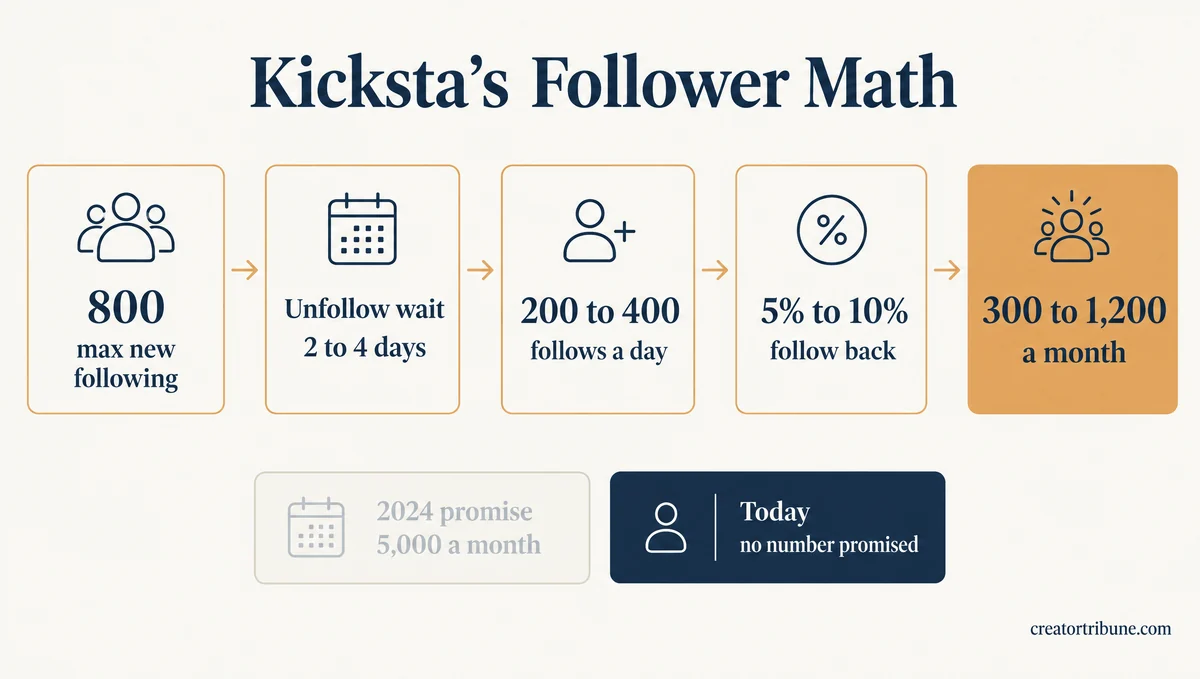
Kicksta no longer promises a follower number, and its own default settings point to roughly 300 to 1,200 follow-backs a month at typical follow-back rates.
That range comes from Kicksta’s published cap on new following, its unfollow wait and the follow-back rates it tells customers to aim for.
The promise has moved a lot over two years. These are the lines Kicksta’s own pricing page and FAQ carried:
| When | What Kicksta promised |
|---|---|
| March 2024 | “2,000 followers/month guaranteed” on the top plan |
| September 2024 | “5,000 followers/month guaranteed” on the top plan |
| February 2025 | “anywhere from 600 to 1,600 new followers” as a typical result |
| June 2026 | Growth 800 to 1,200+ a month, Advanced 1,200 to 1,600+ |
| October 2026 | “Exact follower numbers can’t be promised” |
Kicksta’s own settings make the old guarantees hard to reach. Its organic growth page caps new following at 800 accounts above where you started and unfollows each account after 2 to 4 days.
Divide 800 by those 2 to 4 days and the defaults allow about 200 to 400 follows a day at most.
The same page calls a source with a 10% follow-back rate healthy and tells you to swap any source under 5%.
Those two marks bracket a typical follow-back rate of 5% to 10%. At those rates, 200 to 400 daily follows bring in about 10 to 40 follow-backs a day, or roughly 300 to 1,200 a month. Even a 15% rate on every source would top out near 1,800, far below the 5,000 a month Kicksta once guaranteed on its top plan.
I’d budget around that ceiling and treat Kicksta’s case studies, such as a design account that grew from 1,240 to 6,800 followers in four months on Growth, as best cases. Follow-backs from your sources are only part of the picture, since people who find your posts in the meantime come on top. On the $69 monthly Growth plan, that ceiling works out to about 6 to 23 cents per follow-back.
For scale, 200 to 400 follows a day sits above the 150 to 200 that creators commonly treat as the working range for an account older than six months. Instagram has never published that number, and our follow limit guide explains where the range comes from.
Source choice decides where in that range you land. Kicksta’s advice is that more relevant targets bring more relevant followers.
Vague: sources like @natgeo, @instagram and #travel, which reach millions of people who rarely follow small accounts back.
Specific: three travel creators with 20,000 to 100,000 followers who post every week, plus two hashtags your own audience uses, such as #solotravelafrica.
Keeping the followers you gain is a separate problem. Kicksta’s FAQ says its followers are permanent, “so there are no drops or disappearing accounts,” while a Trustpilot review posted October 14, 2026 reports losing “over 3,000 followers” in one week.
Kicksta’s replies to unhappy reviewers name two features behind poor followers. Its April 2026 reply says Growth Pods promote your account “through external communities,” and that those followers are ones “we don’t directly control or filter.” Its July 2026 reply says the Accelerated Growth option “can sometimes attract followers” who fit your target audience less well than its standard growth.
If you sign up, ask support in writing whether either feature is active on your account, and to keep both off. If junk followers arrive anyway, clearing out bot followers covers removing them without triggering a fresh block.
How Much Does Kicksta Cost?
Kicksta costs $69 a month for the Growth plan or $129 for Advanced, falling to $39 or $79 a month when you pay a year up front.
Monthly and quarterly plans start with a 7-day free trial that needs a card, and yearly plans start paid.
| Plan | Monthly | Quarterly | Yearly |
|---|---|---|---|
| Growth | $69 | $49 a month, billed $147 | $39 a month, billed $468 |
| Advanced | $129 | $99 a month, billed $297 | $79 a month, billed $948 |
Kicksta’s FAQ claims users save 20 to 40 hours a month.
That works out to about 5 to 9 hours a week. At $69 a month, Growth costs roughly $1.73 to $3.45 per hour saved, if those hours hold up.
Growth covers up to 10 sources, niche filters, likes on follow-backs, a weekly audit and growth analytics. Advanced raises that to 30 sources and adds a gender filter, Welcome DM, which messages every new follower, and Close Friends Adder, which puts new followers on your Close Friends list. Welcome DM and Close Friends Adder both add more automated actions to the account.
For one account, I point people to Growth on monthly billing. A prepaid quarter cannot be refunded if the account runs into trouble in week two.
What Does the Kicksta Free Trial Include?
The Kicksta free trial runs for 7 days and includes every Advanced feature, including up to 30 sources.
A buyer planning on the cheaper Growth plan ends up judging it on three times the targeting they will pay for.
Kicksta’s FAQ also says “if you don’t see growth in your first 7 days, we extend your trial.” The card goes on file at sign-up, and the trial turns into a paid plan unless you cancel before it ends.
If you want to test it, start the Kicksta trial with only the 10 sources you would keep on Growth. That way the week shows you what the cheaper plan can do.
Cancel early and get it in writing. The FAQ says cancelling starts from Settings in the dashboard. Kicksta’s terms of service keep a subscription active unless you get “an official confirmation email from the vendor or a direct live chat confirmation from a Support Agent.”
The same terms make prepaid quarterly and yearly plans non-refundable. That is one more reason to start monthly.
Is Kicksta Safe for Your Instagram Account?
Kicksta puts your Instagram account at real risk, and Instagram’s help center says accounts using apps like it may be disabled or terminated.
Kicksta’s FAQ calls a ban “highly unlikely,” but its own YouTube channel says Instagram now suppresses accounts that follow and unfollow.
Instagram’s help page on these apps is blunt. If you shared your login with one, it says, “we may remove any likes or other engagement that they generated.” It adds that “your account may be disabled or terminated” if you use one to gain likes or followers.
The same page warns that accounts which keep using these apps “may notice that certain parts of their Instagram account are limited.” It also tells anyone who shared a password with one of these apps to change it.
Instagram has acted on this for years. TechCrunch reported in November 2018 that Instagram began removing inauthentic follows, likes and comments from apps that “follow then unfollow others,” and told those users to change their passwords.
Kicksta’s July 2026 video puts it in its own words: “Instagram’s algorithm now detects the pattern at scale and suppresses accounts that do it.” The pattern in that sentence is follow/unfollow, the method Kicksta runs on both plans.
Kicksta’s security page answers with “95% Lower Ban Risk” and “101% Encrypted Credentials.” No encryption can be 101%, so read both figures as slogans.
Expect login prompts too. Kicksta’s blog warns that “when your login locations change rapidly, the platform may grow cautious.”
Kicksta’s terms say connecting means you consent to “a login from one of Our hubs, which may be in a different geographical region.” If those prompts turn into repeated logouts, this logout fix walks through them.
A Trustpilot review posted October 5, 2026 describes an account “repeatedly restricted and locked” while Kicksta was running. Kicksta’s terms put that outcome on you: “The Customer uses the Service at their own risk.”
My take is that the risk sits with the account owner, and Kicksta’s own terms say so in writing. Connect only an account you could stand to lose.
What Should You Do If Instagram Blocks You While Using Kicksta?
If Instagram blocks or restricts your account while Kicksta is running, pause Kicksta first and secure your login before anything else.
Instagram’s restriction help page lists giving your password to an app that offers likes or followers as one cause.
- Pause or disconnect Kicksta in its dashboard so no new actions run.
- Change your Instagram password, which is what Instagram tells anyone who shared it with one of these apps.
- Check your login activity, remove sessions you don’t recognize, and turn on two-factor authentication.
- Wait out an action block without retrying the blocked action. Our action block guide covers how long blocks tend to last.
- If Instagram locks the account, follow the locked account steps before reconnecting anything.
I would leave Kicksta disconnected for at least a week after a block lifts. Restarting the same automation right away is the quickest route back into another block.
What Are the Pros and Cons of Kicksta?
Kicksta’s strengths are targeting control and round-the-clock automation, and its weaknesses are the password, the method and the account risk.
Each item below traces to Kicksta’s own pages, Instagram’s rules or the rating sites.
Pros:
- You choose the sources, so follow-backs come from audiences you picked.
- The Allow list and automatic allow list protect accounts you already follow, and the Block list keeps Kicksta away from accounts you name.
- New follows are muted, so your home feed does not fill with strangers.
- The dashboard shows a follow-back rate for every source, which makes weak sources easy to cut.
- It handles following, liking and Story views for you, and Kicksta’s FAQ puts the time saved at 20 to 40 hours a month.
- Kicksta extends the 7-day trial if nothing grows in the first week.
Cons:
- Kicksta needs your Instagram password, whatever its how-it-works page says.
- It runs follow/unfollow, the tactic its own July 2026 video says Instagram now suppresses.
- Instagram says accounts using apps like it may be limited, disabled or terminated.
- Its pages no longer promise a follower number, and its own defaults point to about 300 to 1,200 follow-backs a month at typical rates.
- Sixteen of the 18 Trustpilot reviews from the past year give one star.
- Prepaid quarterly and yearly plans are non-refundable, and it covers Instagram only.
Two of those cons decide it for me: the password and the method. Weigh those two before any feature on the pros list.
Who Is Kicksta Best For?
Kicksta is best for one established Instagram account with a clear niche, a budget for several months and an owner who accepts the account risk.
It is a poor fit for a new account, a recently restricted one, or anyone growing on TikTok or Threads.
People rebuilding after a lost account are the readers I worry about most here. Kicksta’s how-it-works page says that if you are starting from scratch, a few weeks of manual posting before switching it on “helps warm up your account.”
Take that advice further on a replacement account. Run the first weeks by hand inside the new-account limits, and work through hacked account recovery first if the old account may still come back.
Whatever you rebuild with, collect emails from day one. Followers vanish with an account. A creator money page, our free template for collecting emails through your bio link, keeps the people who want your work reachable if it happens again.
Kicksta does not fit TikTok or Threads growth at all, since it sells Instagram plans only. SMTasker covers Instagram, TikTok and Threads from real Android devices, with the same platform-rule questions attached.
Is Kicksta Worth the Money?
Kicksta is worth the money only for an established Instagram account whose owner accepts the risk and values hours back over a guaranteed result.
For most creators, and for every rebuilt account, the price buys the method Kicksta’s own channel now calls dead.
The service does what its pages describe: it finds people in your niche, follows them, likes the posts of those who follow back and shows which sources work. Its recent high scores on G2 back that up, including one small business owner who credits it with “real followers and potential buyers.”
What I cannot get past is the gap between Kicksta’s pages and its product. One page says no passwords are stored, yet the pricing page, the FAQ and the terms all require one. Two pages give different answers on who gets unfollowed, and the company’s own video calls the core method dead.
If you still want to try it, start the Kicksta free trial on a monthly plan with an account you could stand to lose. Decide by day 6, before it bills. If most sources sit under the 5% follow-back mark where Kicksta says to swap one, cancel and get the confirmation in writing.
Quick Takeaways
- Kicksta logs in with your password and runs follow/unfollow, the method its own July 2026 video says Instagram now suppresses.
- Plans cost $69 or $129 a month, or $39 or $79 a month paid yearly, and the 7-day trial runs every Advanced feature.
- Kicksta no longer promises a follower number, and its own default settings point to about 300 to 1,200 follow-backs a month at typical rates.
- Instagram says accounts using apps like this may be limited, disabled or terminated, and Kicksta’s terms put that risk on you.
- If you try it, pick a monthly plan, add keepers to the Allow list, and get any cancellation confirmed in writing.