Blotato Review and the Warm Up Trap That Burns New Creators
Blotato Review and the Warm Up Trap That Burns New Creators
Blotato promises a week of content in 60 seconds, but its own docs warn that automating a new account gets you shadowbanned. My honest review.
- 1Is Blotato Worth It for Creators Who Post Daily
- 2Why Blotato Tells You Not to Automate a New Account
- 3What Blotato Costs Once Your AI Credits Run Out
- 4Where Blotato Breaks and Which Limits You Cannot Beat
- 5Blotato vs Buffer, Metricool, and Postiz
- 6The Verdict on Blotato and Who Should Skip It
- 7Frequently Asked Questions
- Is Blotato free to use?
- Will Blotato get my account shadowbanned?
- Can Blotato post to TikTok and Instagram, or just schedule?
- Is Blotato’s AI video any good?
- How much does Blotato cost?
- What happens to my credits if I cancel Blotato?
- 8Quick Takeaways
Bottom Line: Blotato is worth it if you want an AI writing and multi-platform publishing engine that plugs into n8n or Make, especially for repurposing written content at scale. It is not worth it if you only need basic scheduling or you expect its AI video and carousels to be final-quality. The catch nobody mentions: you cannot point it at a brand new account without risking a shadowban.
Blotato sells a dream every busy creator wants. Drop one idea, pick a template, and walk away with a week of posts fanned out across nine platforms. Before you put that on your card, this Blotato review starts with the one line buried in its own help docs.
Blotato tells you not to automate a brand new account. Connect its software to a fresh TikTok or Instagram profile and you risk tripping bot-detection and getting shadowbanned. The fix is a manual warm-up that runs up to four weeks before the automation you paid for is safe to switch on.
That single detail reframes the whole tool. The instant “post everywhere” fantasy only works once your accounts are established. Blotato is really a publishing and AI-writing engine for creators who already have warmed-up accounts and a content habit.
I dug through Blotato’s billing pages, error logs, terms of service, Trustpilot, and a couple of candid Reddit threads to separate the marketing from the reality. Here is what I found on pricing, the credit trap, where it breaks, and who should skip it.
What is Blotato: An AI social media tool that writes posts, generates images and video, and natively publishes them to nine platforms from one dashboard or through automation tools like n8n and Make.
Is Blotato Worth It for Creators Who Post Daily
Blotato is worth it for creators who already publish across several platforms and want one engine to write, repurpose, and auto-post.
For someone who only needs to queue finished posts, it is overpriced next to a basic scheduler.
The pitch is real. Blotato natively posts to TikTok, Instagram, LinkedIn, X, YouTube, Facebook, Threads, Pinterest, and Bluesky, so you are not logging into nine apps to hit publish. Its AI writer is fine-tuned on more than a million viral posts, which is why the hooks and captions read native instead of generic.
What sold me on its seriousness is the founder. Sabrina Ramonov, a UC Berkeley computer science and physics grad and a 2018 Forbes 30 Under 30 honoree, previously sold her AI startup Qurious to Pegasystems in a cash-and-stock deal valued at over 10 million dollars. That is an operator who can build solid API architecture rather than an influencer slapping a name on white-label software.
The way I see it, the reason to look at Blotato is the automation layer. It ships official n8n and Make nodes plus an MCP server that connects to Claude and ChatGPT, so it slots into a content pipeline instead of being one more dashboard you forget to open.
If you want the bigger picture on where it sits, my scheduling tool comparison maps the category.
Why Blotato Tells You Not to Automate a New Account
Connecting any automation tool to a brand new social account triggers bot-detection and shadowbans, so Blotato makes you warm the account up manually first.
The required wait is long enough to matter to your launch plan.
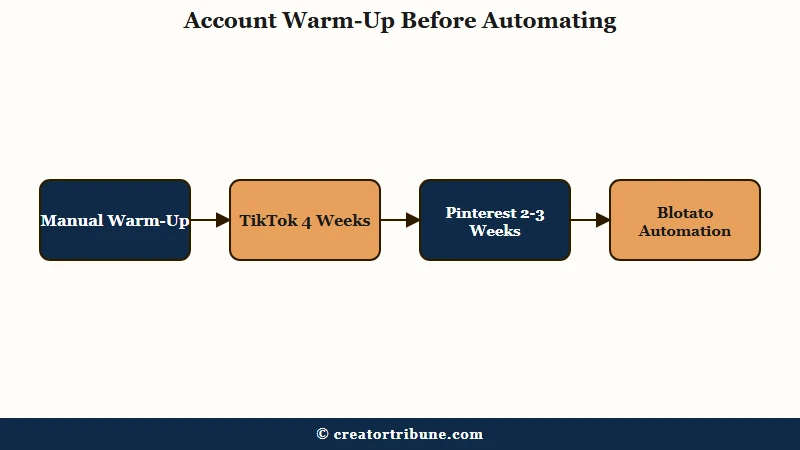
This is the part every surface-level review skips, and it is the most important thing a new creator needs to know. Blotato’s own documentation lays out exact warm-up windows before you connect a fresh profile. Ignoring them is the fastest way to bury an account you just started.
Here is the timeline straight from its help docs. The numbers are not suggestions, they are how long the platforms watch a new account before third-party posting stops looking like a bot.
| Platform | Manual warm-up before connecting | What “warming up” means |
|---|---|---|
| TikTok | About 4 weeks | Post and engage natively, daily, by hand |
| 2 to 3 weeks | Manual pinning and browsing | |
| 1 to 2 weeks | Native posting, scrolling, engaging | |
| YouTube, LinkedIn, Facebook, X, Threads, Bluesky | 1 to 2 weeks | Normal manual activity |
The reason this matters: a creator who buys Blotato to launch five fresh faceless accounts next week is about to learn this the hard way. I would treat the warm-up as non-negotiable, because a shadowban on a new account is far more expensive than a few weeks of manual posting.
There is a second wrinkle that makes the warm-up even more worth respecting. Blotato cannot protect your reach once you are connected, and a platform bug or policy shift can still erase it overnight.
That is the real argument for owning an audience you control, which is exactly what my guide to turning views into subscribers walks through.
What Blotato Costs Once Your AI Credits Run Out
Blotato starts at 29 dollars a month, but the real cost depends on how fast AI video burns your monthly credits.
The sticker price and the working price are two different numbers.
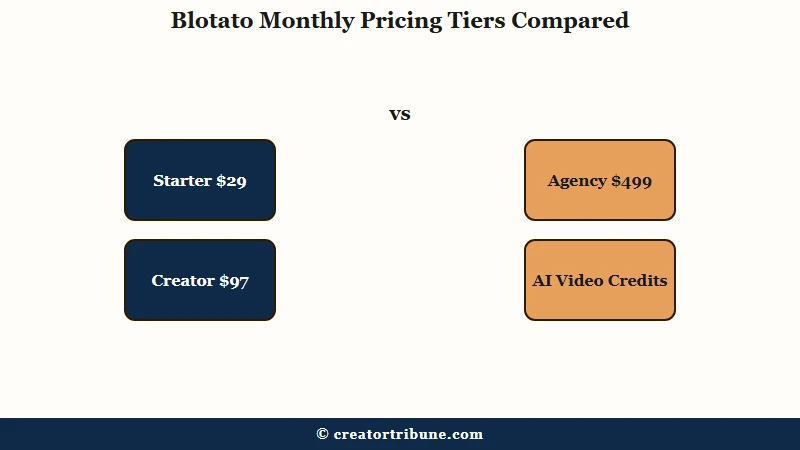
There is no permanent free plan. You get a 7-day trial with 60 AI credits and a 14-day money-back guarantee. One trap to flag: generating an API key instantly ends your trial and starts the paid subscription, no matter how many trial days are left.
Here is how the three tiers break down. I would read the credit column more carefully than the price column, because that is where the surprise lives.
| Plan | Price per month | What you get | Best for |
|---|---|---|---|
| Starter | $29 ($24.08 billed annually) | 20 connected accounts, 1,250 AI credits, 400 MB uploads, 200 queued posts, full API | Solo creators posting mostly text and images |
| Creator | $97 ($80.41 billed annually) | 40 connected accounts, 5,000 AI credits, 1 GB uploads, 1,000 queued posts, full API | Heavy creators leaning on AI video |
| Agency | $499 ($414.08 billed annually) | 100 connected accounts, 28,000 AI credits, 1 GB uploads, 3,000 queued posts, full API | Agencies running many client profiles |
Annual billing saves roughly 17 percent and throws in 5,000 bonus credits plus five free Claude Skills. If you exhaust your monthly credits, top-ups cost 6.99 dollars per 1,000. Text generation is the cheap part, while image-to-video models cost dramatically more per run, and that gap is the whole story.
Before: You assume the Starter plan’s 1,250 monthly credits comfortably cover a daily posting habit.
After: A Trustpilot reviewer reported that a single two-minute vertical AI video ate roughly a full month of his subscription’s credits, because video models are priced far above text and static images.
One more clause worth knowing before you ever hit cancel. The moment you cancel, Blotato deletes all remaining AI credits immediately, including any top-up packs you paid for, and they are not restored if you resubscribe. I would spend down every credit you bought before canceling.
Where Blotato Breaks and Which Limits You Cannot Beat
Most Blotato failures are platform-side API limits and silent errors, not bugs you can fix in the app.
Knowing the difference saves hours of pointless troubleshooting.
Blotato markets unlimited scale, but the social platforms enforce hard ceilings it cannot bypass. On the Starter plan, TikTok posting is capped at three unique TikTok accounts per 24 hours.
Facebook limits you to 35 posts per 24 hours per parent user account, not per page, so connecting three client pages and posting a dozen times each will throttle you.
The error logs are where the honesty lives. These are the failures I would not waste an afternoon debugging, because they are not Blotato’s fault at all.
| Symptom | Likely cause | Fix |
|---|---|---|
| Facebook post fails on a big page | Pages with 5,000+ followers can hit a Meta server memory limit (“reduce the amount of data”) | Retry the post |
| TikTok error “JSON value expected but got” | TikTok returned an HTML error page from server load or rate limiting | Wait and retry, do not debug your setup |
| Instagram post silently does nothing | Instagram returns a “No Error” silent failure | Reconnect the account and repost |
| Automated media will not pull | Google Drive virus scan blocks the file fetch | Host the media elsewhere or wait for the scan |
There are quieter limits too. Free automatic video conversion caps at 120 seconds per clip, and Blotato refuses to support YouTube tags at all, citing YouTube’s own stance that tags play a minimal role in discovery.
One more for agencies with NDAs: Blotato’s terms grant it a worldwide, perpetual, irrevocable, royalty-free license to use and modify the content you submit, which is worth reading before you upload a client’s work.
Blotato vs Buffer, Metricool, and Postiz
Blotato wins on AI creation and automation, but loses to Buffer on price-for-scheduling, Metricool on analytics, and Postiz on platform breadth.
The right pick depends on whether you need a creation engine or a management dashboard.
Blotato is not trying to be a social media manager’s command center. It has no unified inbox, no DM or comment management, and no trackable link-in-bio.
If your day is community management, you want a different tool. Here is how I would frame the choice.
| Tool | Strongest at | Skip it if |
|---|---|---|
| Blotato | AI writing, repurposing, n8n and Make automation | You only need to queue finished posts |
| Buffer | Cheap, clean scheduling with a free tier | You want AI content generation built in |
| Metricool | Deep analytics, competitor and ad tracking | You need content created, not just measured |
| Postiz | 30-plus platforms including niche networks | You want a polished AI writing engine |
For more depth on two of these, my Postiz review covers the open-source angle and my Metricool review digs into the analytics.
If your core need is turning long videos into clips rather than cross-posting, a dedicated clipper like the one in my Opus Clip review does that one job better. My workflow for repurposing long videos into shorts shows where a tool like Blotato fits into the chain.
There is real demand behind all of this. More than 5 billion people use social media worldwide, per Statista, and no creator can keep up across nine of those platforms by hand. That is the problem Blotato is built to solve, just not for someone starting cold.
The Verdict on Blotato and Who Should Skip It
Blotato is a strong buy for established creators and automation builders, and a poor fit for beginners, pure schedulers, and anyone needing final-quality AI video.
It is a content engine, not a starter kit.
I came away genuinely impressed by the writing and the automation, and genuinely wary of the credit math and the warm-up requirement. Here is the honest split.
What Blotato gets right:
- The AI writer, tuned on a million viral posts, produces hooks and scripts that read native rather than robotic.
- It natively publishes to nine platforms, so there is no manual “log in and post” step.
- The official n8n and Make nodes plus the MCP server make it a genuine pipeline component, not just a dashboard.
- Flat pricing with 20 connected accounts on the 29-dollar tier undercuts per-channel schedulers for multi-account creators.
- A founder with a real 10-million-dollar technical exit shows in how solid the API and integrations feel.
Where it falls short:
- You cannot safely connect a brand new account for up to four weeks, which kills the instant-launch fantasy.
- AI video and carousel quality lags, so many users import external visuals and use Blotato only to publish.
- Credits drain fast on video, pushing heavy users into 6.99-dollar top-ups or the 97-dollar tier.
- Canceling instantly deletes every credit you have, including packs you paid for.
- No unified inbox, no link-in-bio, and no posting to WordPress or Webflow.
Buy it if you already run warmed-up accounts, write a lot, and want one engine to generate and distribute at scale, ideally wired into automation. Skip it if you are launching from zero, you only need scheduling, or you expect its AI video to be your final product.
Whatever you choose, the smartest move is owning your audience directly, and my free creator money page template is built for exactly that, plus the ManyChat review covers automating the DMs that turn followers into subscribers.
Frequently Asked Questions
Is Blotato free to use?
Blotato has no permanent free plan. You get a 7-day trial with 60 AI credits and a 14-day money-back guarantee. Generating an API key ends the trial immediately and starts your paid subscription, so wait on that.
Will Blotato get my account shadowbanned?
It can if you connect a brand new account. Blotato’s own docs require a manual warm-up first: about four weeks for TikTok, two to three for Pinterest, and one to two weeks for most other platforms before automated posting is safe.
Can Blotato post to TikTok and Instagram, or just schedule?
Blotato natively publishes to both, so you do not log in to hit publish. Note the limits: the Starter plan caps TikTok at three unique accounts per 24 hours, and platform-side rate limits still apply.
Is Blotato’s AI video any good?
The AI text is its strongest feature, but reviewers consistently rate the AI video and carousels as weaker. Many creators generate visuals elsewhere and use Blotato purely as the writing and publishing layer.
How much does Blotato cost?
Plans run 29 dollars a month for Starter, 97 for Creator, and 499 for Agency, cheaper billed annually. Extra AI credits cost 6.99 dollars per 1,000, and video generation burns them fast.
What happens to my credits if I cancel Blotato?
They vanish. Canceling deletes all remaining AI credits the moment it processes, including top-up packs you purchased, and resubscribing does not bring them back. Spend them down before you cancel.
Quick Takeaways
- Blotato’s own docs require warming up a new account by hand for up to four weeks before automating, so it is not an instant-launch tool.
- The 29-dollar Starter plan is fine for text and images, but a single two-minute AI video can eat a month of credits.
- Canceling instantly deletes every credit you own, including packs you paid for, so spend them first.
- Buy it for AI writing and n8n or Make automation on warmed-up accounts; skip it for basic scheduling or final-quality AI video.
- The durable win is owning your audience, not renting reach you can lose to a shadowban or a bug.