TikTok Search Not Working and How to Tell a Bug From a Block
TikTok Search Not Working and How to Tell a Bug From a Block
TikTok search not working? Before you reinstall, learn to tell a real bug from an intentional block, and the fix order that gets search back.
- 1Why Is TikTok Search Not Working
- 2Is It a Bug or an Intentional Block
- 3How to Fix TikTok Search Not Working
- 4When Search Works for You but Not for Others
- 5The 2026 Changes Breaking TikTok Search
- 6What to Do When Search Is Out of Your Hands
- 7Frequently Asked Questions
- Why did my TikTok search bar disappear?
- Why does TikTok say no internet connection when I search?
- Did TikTok remove the search feature?
- Is my broken TikTok search a shadowban?
- Does clearing the cache fix TikTok search?
- 8Quick Takeaways
TL;DR: TikTok search not working is usually one of four things, and only one is a real bug. It can be an intentional block on a teen or Restricted Mode account, the EU non-personalized search that returns generic results by design, a 2026 server outage tied to the ownership change, or a shadowban that hides your content from other people’s searches. Check those four before you waste an hour clearing cache and reinstalling.
If your TikTok search is not working, your first instinct is probably to clear the cache, reinstall the app, and switch networks until something gives. I get it, but most of the time that is an hour you will never get back. The search problem is often not a bug at all.
Here is the part the generic fix-it videos skip. The phrase “search not working” hides four different problems wearing the same costume, and three of them ignore every cache-clearing trick in the book.
One is an intentional restriction on your account. One is a regional change in how search legally has to work. One is a platform-wide outage, and only the fourth is the local glitch those guides assume you have.
So before you reinstall anything, the smart move is a 60-second diagnostic to figure out which of the four you are dealing with. I will walk you through that diagnostic, then give you the fix order that matches each cause. You will end up knowing whether to flip one setting or whether the problem is TikTok’s to fix, not yours.
Why Is TikTok Search Not Working
TikTok search not working comes down to four causes: an intentional account restriction, the EU non-personalized search mode, a server-side outage, or a shadowban hiding your content from others.
Only the last category of local glitches responds to clearing cache or reinstalling.
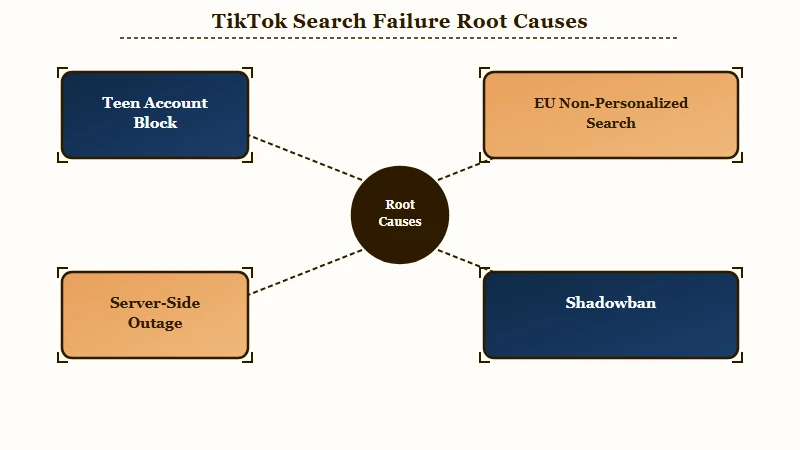
The reason this matters is that each cause has a completely different fix. Throwing reinstall-and-clear-cache at an intentional teen restriction does nothing, because nothing is broken.
I learned to sort the symptom into a category first. The search bar physically missing points one direction, search returning junk results points another, and “no internet connection” on search while everything else loads points a third. Here is how the four causes line up against what you are seeing.
| What you see | Most likely cause | Is it your fix |
|---|---|---|
| Search bar gone entirely | Teen account, Family Pairing, or a device UI bug | Yes, check settings first |
| Generic or irrelevant results | EU non-personalized search or Restricted Mode | Partly, by design in the EU |
| No internet on search only | Cache, app or OS bug, or a server outage | Sometimes, try local fixes |
| You cannot be found by others | Shadowban suppressing your account | Yes, but it takes days |
Is It a Bug or an Intentional Block
Your TikTok search is intentionally blocked if you are on a teen account, a linked Family Pairing account, or have Restricted Mode on, none of which a reinstall will undo.
Rule these out before any technical fix.
What is Family Pairing: TikTok’s parental-control system that links a parent account to a teen account, letting the parent turn off search entirely or filter it by keyword.
This is the single most-missed cause, and I would rule it out before anything else. A parent using Family Pairing on a 13 to 17 account can turn off search completely or restrict it with keyword filtering, and the teen just sees a missing or dead search bar with no explanation. If that is your situation, no amount of cache-clearing will bring it back.
Restricted Mode is the other silent culprit. It filters mature or complex themes and quietly strips a lot of search results, and people forget they ever turned it on. The exact path to check is Profile, then the menu, then Settings and privacy, then Content preferences, then Restricted Mode, then turn it off with the 4-digit passcode.
Here is the difference a diagnostic-first habit makes in practice.
Before: You assume the bug is on TikTok’s end, so you clear the cache, reinstall the app, and switch networks five times across an hour with zero change.
After: You check Family Pairing and Restricted Mode first, find search was toggled off on a linked teen account, flip it back, and search returns in ten seconds.
If both of those are off and you are over 18, then you are likely dealing with a real bug or a platform issue, and the next sections are for you. My guide to running a proper shadowban self-check helps rule out the trickier account-level cause.
How to Fix TikTok Search Not Working
Fix TikTok search not working by working in order from account settings to local device fixes, never the reverse.
Most people start with the nuclear reinstall and skip the 10-second setting that was the real cause.
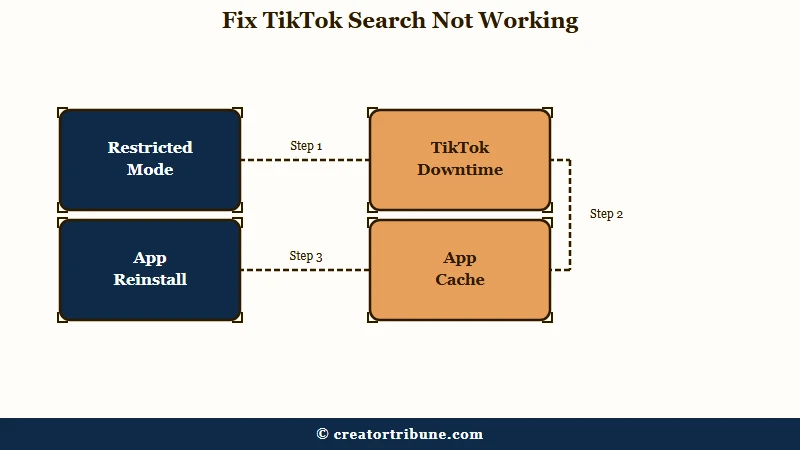
The order you try fixes in matters more than the fixes themselves. I always check the free, instant, setting-level causes before touching storage or reinstalling anything. Here is the sequence I would run.
- Confirm you are not on a teen, Family Pairing, or Restricted Mode account, since those are intentional blocks.
- Check whether TikTok is down for everyone by glancing at its status on another platform before assuming it is your phone.
- Force-close TikTok fully, then reopen it, and toggle airplane mode on and off for a fresh connection.
- Clear the TikTok cache. On Android use device Settings, Apps, TikTok, Storage, Clear cache; on iOS use the in-app Free up space option.
- Update the app and your phone’s OS, since a specific build can break search until patched.
- Only if all of that fails, reinstall the app or reset your phone’s network settings.
The “no internet connection” error that only hits search is its own special case. It usually means a corrupted cache or a server issue, not your wifi, so the cache step above tends to resolve it. One creator with the bug found that toggling the HD video setting off and back on cleared a stuck cache when nothing else did.
If you are traveling or on a VPN, the connection block can be hardware-level. TikTok reads your SIM and eSIM to guess your location, and one user stuck behind a “no internet” wall fixed it by disabling their secondary eSIM. Switching your DNS to 8.8.8.8 or using the browser when TikTok crashes are the next things I would try.
When Search Works for You but Not for Others
A shadowban does not break your search, it hides your content from everyone else’s search, so you can find your video and no one else can.
This is the cause creators most often misread as a personal app bug.
What is a shadowban: An automated visibility penalty where TikTok quietly stops showing your content in search, hashtags, and the For You feed to non-followers, with no notification.
The way I see it, this is the most important distinction in the whole topic. If your own search works fine but your views cratered and your videos do not appear when a non-follower searches your hashtag, the problem is not your search at all. Your account is being suppressed for others.
Shadowbans usually trace to spam-like behavior, banned hashtags, or copyrighted audio. The standard recovery is a 48 to 72 hour posting pause, deleting or privating the flagged clip, then rebuilding with safe content over about two weeks.
I walk through the full process in the TikTok shadowban recovery guide, and if your reach is the real worry, the why FYP views stay low breakdown covers the adjacent symptom.
The 2026 Changes Breaking TikTok Search
Two 2026 changes break TikTok search in ways no reinstall can fix: the January ownership-change outage and the EU non-personalized search rule.
Both are platform-side, so the fix is patience, not troubleshooting.
The bigger one hit on January 25, 2026. Days after control of the new American-owned TikTok USDS entity changed hands, a backend migration triggered more than 36,000 outage reports in a single morning, and the fallout broke search, froze the For You feed into recycled videos, and stuck uploads at zero views. If your search went strange around then and nothing you do helps, this is probably why.
The second change is regional and permanent. To meet the EU’s Digital Services Act, TikTok now lets European users turn off personalized search, and when that is off, results are limited to popular content from your region and language rather than anything tailored to you.
The European Commission has been investigating TikTok under the DSA, and this non-personalized mode is a direct result. If your results suddenly feel generic in the EU, that is the law working as intended, not a glitch.
Here is how the two platform-side changes differ and what each one asks of you.
| 2026 change | Who it hits | What to do |
|---|---|---|
| January ownership-change outage | US users, late January 2026 | Wait it out, the break is server-side |
| EU non-personalized search | EU users who turned personalization off | Turn personalization back on for tailored results |
What to Do When Search Is Out of Your Hands
When a platform bug or outage takes your search down, the only real protection is an audience you can reach without TikTok.
A feature you do not control can vanish overnight, and a server migration proves it.
This is the lesson I would not skip. Three of the four causes above are entirely outside your control, which means your discoverability on TikTok is borrowed, not owned. The day search breaks platform-wide, every creator relying on it to be found goes quiet at once.
So give your audience a way to reach you directly, like an email list or a single link hub, before the next outage. My walkthrough on turning views into subscribers covers the habit, and the free Creator Money Page template is the fastest way to start capturing that audience today. Search will come back; the followers you converted to a list stay yours either way.
Frequently Asked Questions
Why did my TikTok search bar disappear?
Your search bar usually disappears because of a teen or Family Pairing restriction, Restricted Mode, or a device-specific UI bug. One user lost it on a Galaxy Note 10 Plus while the same account worked on an S21 Ultra, so try the account on another phone before assuming a ban.
Why does TikTok say no internet connection when I search?
This error on search alone is normally a corrupted cache or a server issue, not your wifi. Clear the TikTok cache, force-close and reopen the app, and check whether TikTok is down for everyone before troubleshooting your network.
Did TikTok remove the search feature?
No, but the way search works changed in the EU. Under the Digital Services Act, European users who turn off personalization get non-personalized search that shows popular regional content instead of tailored results, which can feel like search is broken.
Is my broken TikTok search a shadowban?
Only if the problem is other people cannot find you. A shadowban hides your content from non-followers in search and hashtags while your own search still works, so if you can search fine but your reach collapsed, it points to suppression.
Does clearing the cache fix TikTok search?
Sometimes. Clearing the cache fixes search problems caused by corrupted local data or a stuck app, but it does nothing for intentional restrictions, EU non-personalized search, or a platform-wide outage. Rule those out first.
Quick Takeaways
- TikTok search not working is four different problems, and only local glitches respond to clearing cache or reinstalling.
- Check teen settings, Family Pairing, and Restricted Mode before any technical fix, since those are intentional blocks.
- A shadowban does not break your search, it hides your content from other people’s searches.
- The January 2026 ownership-change outage and EU non-personalized search are platform-side and not yours to fix.
- Build a direct line to your audience with the free Creator Money Page template so an outage cannot erase your reach.