Pictory Review and the Catch Nobody Mentions
Pictory Review and the Catch Nobody Mentions
Pictory turns scripts and blog posts into video fast, but its AI picks stock footage that misses your meaning. Here is who it fits and who should skip it.
- 1Is Pictory Worth It for Short-Form Creators
- 2How Pictory Turns Text Into Video
- 3Where Pictory Falls Short
- 4Pictory Pricing Plans Explained
- 5Pictory Pros and Cons
- 6The Verdict on Pictory
- 7Frequently Asked Questions
- Is Pictory free to use?
- Is Pictory good for TikTok, Reels, and Shorts?
- Does Pictory generate AI video or just use stock?
- How accurate are Pictory captions?
- Who should skip Pictory?
- 8Quick Takeaways
Bottom Line: Pictory is worth it for faceless YouTubers, bloggers, and marketers who need to turn scripts and articles into stock-footage videos fast. It is the wrong pick if you want AI-generated scenes, cinematic control, or trend-style edits, because it only stitches existing stock clips and its AI often grabs footage that misses your meaning. Paid plans start at $25 a month billed annually, with a 3-project free trial that watermarks everything.
Here is the thing this Pictory review will not bury in the pros and cons. Paste a script that mentions a “river bank” and Pictory’s AI may fill the scene with stock footage of a financial bank, complete with a teller window. That single quirk tells you exactly what kind of tool this is.
Pictory is fast, and it removes the two things that stop most people from making video: no footage and no editing skills. What it does not remove is the need to watch what the AI built before you publish it. The automation gets you a first draft in minutes, not a finished video.
This review covers what Pictory does well, where it falls short, the current pricing, and the one type of creator who should not touch it. I pulled the pricing straight from the current plans so the numbers here match what you will see at checkout.
Is Pictory Worth It for Short-Form Creators
Pictory is worth it for high-volume, faceless, and repurposing-focused creators, and a poor fit for anyone who needs cinematic or trend-driven editing.
It trades creative control for speed, which is the right trade for some creators and a dealbreaker for others.
The way I see it, Pictory sits in a specific lane: you have words, and you want video, and you do not want to learn a timeline editor. Bloggers turning posts into video, faceless YouTube channels, and marketers repurposing webinars are the core audience.
What is Pictory: An AI video tool that turns scripts, articles, or long videos into short videos by auto-matching your text to stock footage, captions, and voiceover.
What I would set straight up front is the expectation. Pictory is not a “type a prompt, get a finished video” machine, and it is not a replacement for a real editor. It is a drafting engine that does 80 percent of the assembly so you can spend your time on the 20 percent that needs a human eye.
If your whole format depends on replicating a specific viral edit or shooting original scenes, this is not your tool, and I would point you to a manual editor instead. For everyone repurposing existing words into watchable video at volume, it earns its keep.
How Pictory Turns Text Into Video
Pictory turns text into video through three input modes: a script, an article URL, or a long video it trims into shorts.
In each case the AI reads your text, breaks it into scenes, and pulls matching clips from a stock library of millions of assets via Storyblocks and Getty.
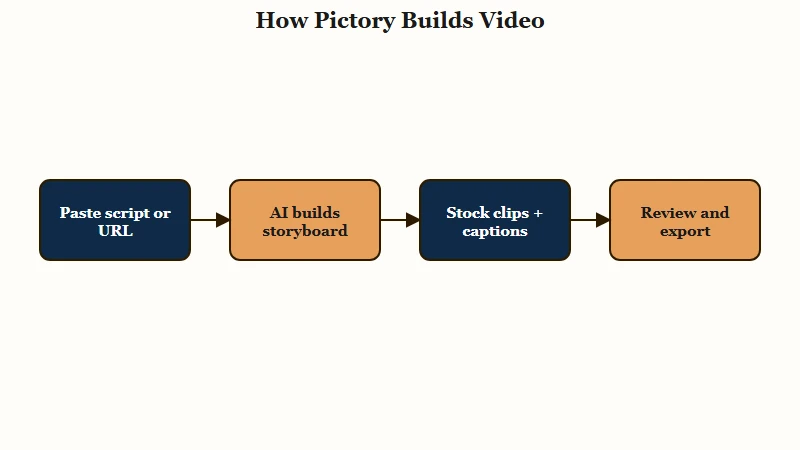
From my testing of tools in this category, the most useful mental model is that you are editing a document, not a timeline. You change the video by changing the text, and Pictory rebuilds the scenes to match. You can even trim the video by deleting words from the transcript.
The three modes cover most repurposing jobs. Script-to-video takes a written script and auto-assembles scenes.
Article-to-video takes a blog URL, summarizes the key points, and storyboards them. Video-to-shorts scans a long recording like a podcast or webinar and packages the highlights into vertical clips for Reels, TikTok, or Shorts.
Captions are where Pictory genuinely shines, and that matters because most social video is watched on mute. The auto-captions are accurate enough that I would trust them with a quick proofread rather than a full rewrite.
If you want the broader workflow context, our guide on repurposing YouTube videos into shorts shows where a tool like this fits in a weekly system.
Where Pictory Falls Short
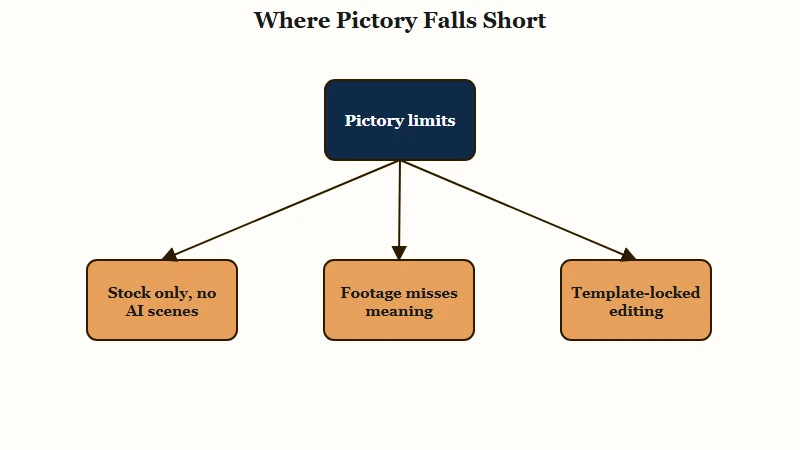
Pictory’s biggest weakness is that its AI matches your script to literal stock footage, so it regularly picks clips that miss your meaning.
The “river bank” becoming a financial bank is the clean example, and it means every video needs a manual review pass before it goes live.
Here is what that looks like in practice and how I handle it.
Before: I paste a script line about hiking along a “river bank” and Pictory auto-fills the scene with stock footage of a corporate bank branch.
After: I open the storyboard, swap that one clip for a riverside shot from the built-in library in about ten seconds, and the scene finally matches the words.
The stock-only constraint is the deeper limitation. Pictory does not generate original AI video scenes and does not do AI image generation, so it can only search and stitch clips that already exist in its library.
For trend-driven creators who need a specific cinematic look or a viral editing style, that is a hidden dealbreaker, and a manual tool like CapCut or DaVinci Resolve will serve you better.
Two more limits worth knowing. There is a real voice-quality jump between tiers, where the basic AI voices can sound robotic while the higher plans unlock ElevenLabs-powered voices that are far more natural for long-form narration.
The editing is also template-based, so you get brand colors and logos but not frame-by-frame timeline control or complex color grading. Creators who have outgrown templates tend to feel boxed in, which is the same ceiling I flagged in our Vizard AI review.
Pictory Pricing Plans Explained
Pictory pricing runs from $25 a month on the annual Starter plan up to $119 a month for the annual Team plan, with monthly billing costing significantly more.
There is no permanent free tier, only a 3-project trial that watermarks your exports.
What I would flag on pricing is how much annual billing saves you. The Starter plan is $29 month-to-month but $25 when billed annually, and the gap widens on higher tiers, so commit annually only once you know the tool fits.
Here is the current plan breakdown.
| Plan | Monthly price | Annual price per month | What you get |
|---|---|---|---|
| Starter | $29 | $25 | 200 video minutes per month, 60 AI voice minutes, 5 GB storage, 1 brand kit |
| Professional | $59 | $35 | 600 video minutes per month, 120 AI voice minutes, 20 GB storage, 5 brand kits |
| Team | $199 | $119 | 1,800 video minutes per month, 240 AI voice minutes, 100 GB storage, 3 plus seats |
| Enterprise | Custom | Custom | Custom minutes, storage, and seats, unlimited brand kits |
The plan I would point most solo creators to is Professional. Starter’s 200 minutes and single brand kit get tight fast once you publish weekly, and the ElevenLabs voice quality on the higher tier is the difference between usable and robotic narration. You can try the tool first through the Pictory site, just remember the trial caps you at three watermarked projects.
Pictory Pros and Cons
Pictory’s pros are speed, captions, and repurposing breadth; its cons are stock-only footage, template limits, and a context-blind AI.
Weigh them against how much hand-holding your content needs.
Here is where I land after weighing both sides.
What works:
- Turns a script, article, or long video into a watchable draft in minutes.
- Caption accuracy is high, which is exactly what muted social feeds need.
- The transcript-based editing makes changes fast for non-editors.
- The stock library is large, so most generic scenes are covered without leaving the app.
What does not:
- The AI frequently mismatches footage to meaning, so manual review is mandatory.
- No AI-generated scenes or images, only existing stock, which limits originality.
- Template-based editing blocks frame-by-frame control and custom looks.
- Basic voices sound robotic, and the good ElevenLabs voices sit behind higher tiers.
The honest summary is that the pros are about speed and the cons are about control. If you have ever used a tool like Opus Clip for clip extraction, Pictory plays in the same speed-over-polish space, just aimed at building videos from text rather than slicing existing ones.
The Verdict on Pictory
Pictory is a buy for creators who value speed and volume over creative control, and a skip for anyone chasing cinematic or trend-style video.
Treat it as a first-draft engine, not a finished-video machine.
Buy it if you are a faceless YouTuber, a blogger turning posts into video, or a marketer repurposing long content at scale, and you are fine doing a quick review pass on every export. For that workflow, the time saved is real and the Professional plan pays for itself.
Skip it if you need original AI-generated scenes, frame-by-frame editing, or the ability to copy a specific viral edit, because the stock-only library and fixed templates will fight you.
A manual editor or a tool like Submagic for caption-led short-form will fit those goals better. Short-form video keeps pulling the majority of social attention and ad spend, and the tools feeding it have multiplied accordingly, per Statista market data, so picking the one that matches your workflow matters more than picking the newest.
Frequently Asked Questions
Is Pictory free to use?
Pictory is not free. It offers a trial of three video projects, each up to ten minutes, but every trial export carries a watermark and cannot be used commercially. To remove the watermark and get commercial rights, you need a paid plan starting at $25 a month billed annually.
Is Pictory good for TikTok, Reels, and Shorts?
Yes. Pictory has a video-to-shorts tool that scans long content and packages the best segments into vertical clips, and it auto-generates captions. It is strong for repurposing, though the stock-only footage limits trend-style edits.
Does Pictory generate AI video or just use stock?
Pictory uses stock footage only. Its AI reads your script and matches it to existing clips from libraries like Storyblocks and Getty, but it does not generate original AI video scenes or AI images the way some newer tools do.
How accurate are Pictory captions?
Pictory captions are highly accurate and generated automatically. A quick proofread is wise, but you will rarely need a full rewrite. You can also edit the video itself by deleting words from the transcript, which doubles as a captioning workflow.
Who should skip Pictory?
Skip Pictory if you need cinematic control, AI-generated scenes, or trend-replicating edits. Filmmakers and creators who have outgrown templates will find the stock-only library and fixed structures too limiting, and a manual editor like CapCut or DaVinci Resolve will serve them better.
Quick Takeaways
- Pictory turns scripts, articles, and long videos into stock-footage drafts fast, but the AI mismatches footage often enough that a manual review pass is mandatory.
- It uses stock clips only, with no AI-generated scenes, so trend-driven and cinematic creators should skip it.
- Paid plans run $25 to $119 a month on annual billing, with no permanent free tier and a 3-project watermarked trial.
- Professional is the plan most weekly creators want, mainly for the ElevenLabs voices and the higher minute cap.
- Treat Pictory as a first-draft engine for faceless and repurposing workflows, not a finished-video machine.