What Is Linktree and How Does It Work
What Is Linktree and How Does It Work
What is Linktree, how it works, what the free plan really costs after the 2026 price hike, the downsides, and what to use instead to own your page.
- 1What Is Linktree
- 2How Do You Set Up a Linktree
- 3Is Linktree Free and What Does It Cost
- 4What Are the Downsides of Linktree
- 5What Should You Use Instead
- 6Frequently Asked Questions
- What is Linktree used for?
- Is Linktree free?
- Is Linktree safe to use?
- How much does Linktree cost in 2026?
- What is a good free alternative to Linktree?
- 7Quick Takeaways
TL;DR: Linktree is a link-in-bio tool that turns one social bio link into a mini page of buttons, so you can send followers to more than one place. The free plan is real but takes a 12 percent cut of sales, stamps its logo on your page, and blocks email capture. After the 2026 price hike, the page worth owning is one you host yourself.
If you have clicked a “link in bio” lately, there is a good chance it opened a Linktree. So what is Linktree in plain terms: it is a tool that builds a single mini page of links, so the one link your Instagram or TikTok bio allows can point to your shop, your latest video, and your newsletter all at once.
It became the default answer to a real problem. Social apps only give you one clickable link in your profile, and Linktree turns that one slot into a tidy menu of buttons.
I will cover what Linktree is and how it works, how you set one up, what the free plan really costs after the 2026 price increase, the downsides most overviews skip, and the stronger options if you want to own your page instead of renting it.

What Is Linktree
Linktree is a link-in-bio tool that hosts a list of your links on one mobile page at a linktr.ee web address, so a single social bio link can lead to many destinations. It is a signpost, not a website.
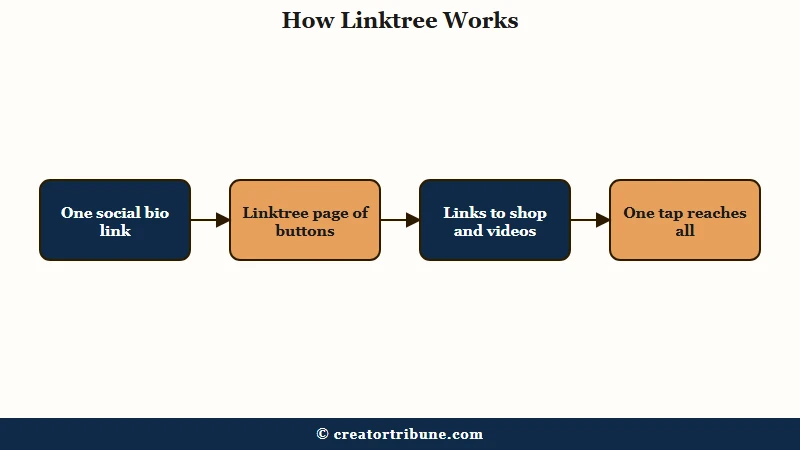
The way it works is simple. You build a page of labeled buttons, each pointing somewhere, then paste that one Linktree URL into your Instagram, TikTok, or YouTube bio so followers reach all of your links from a single tap.
That solved the “one link” limit that creators kept hitting, which is why it spread so fast. With more than 50 million users, a linktr.ee address is one of the most recognized sights on social media.
How Do You Set Up a Linktree
You set up a Linktree by signing up, picking a username that becomes your URL, and adding a button for each link you want to share. The whole thing takes under three minutes.
Here is the sequence from start to live page:
- Sign up at linktree.com with your email and pick a username, which becomes linktr.ee/yourname.
- Choose a category, add a profile photo, and write a short bio of up to 80 characters.
- Click Add New Link, then enter a title and the URL for each destination.
- Open the Appearance tab to pick a theme and colors.
- Copy your link and paste it into your social media bio.
The finished page is a mobile-friendly stack of buttons under your photo and bio. From what I have seen, the speed is the real draw, you can go from nothing to a working link hub before your coffee gets cold.
Is Linktree Free and What Does It Cost
Linktree has a permanent free plan, but it takes a 12 percent cut of any sales, forces its branding, limits analytics to 28 days, and blocks email capture. The monthly fee is zero, the real cost is not.
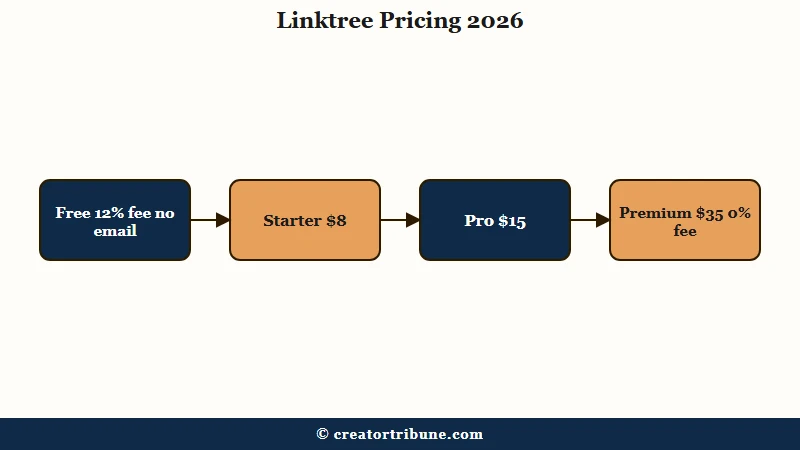
That 12 percent commerce fee is the highest in the category, and free users cannot collect a single email or phone number, so you can drive thousands of clicks and still never own your audience. Paid plans lift those limits, and a November 2025 hike pushed every tier up sharply.
| Plan | Price a month | Cut on sales | What you get |
|---|---|---|---|
| Free | $0 | 12 percent | Unlimited links, forced branding, no email capture |
| Starter | $8, up from $5 | 9 percent | Removes branding, adds email capture |
| Pro | $15, up from $9 | 9 percent | Deeper analytics and scheduling |
| Premium | $35, up from $24 | 0 percent | No sales cut, top tier |
The hike was steep across the board, with Starter up 60 percent, Pro up 67 percent, and Premium up 46 percent. Annual billing trims the cost by roughly 20 to 25 percent if you commit for the year.
What Are the Downsides of Linktree
The main downsides of Linktree are the high sales fees, the lack of email capture on free, weak SEO, and the fact that you do not own the page. None of these show up until you try to grow past a basic link list.
| Linktree pros | Linktree cons |
|---|---|
| Sets up in under three minutes | 12 percent cut on free-plan sales |
| Recognized by 50 million-plus users | No email capture on the free plan |
| Free plan never expires | You do not own the page or its SEO |
The fee math turns strange once you sell. On a $1,000 sales month, the free plan’s 12 percent takes $120, while the $35 Premium plan with a 0 percent fee would have cost less, so the “free” plan is the expensive one for active sellers.
The deeper issue is ownership. Your hub lives at linktr.ee/yourname, not a domain you control, and the pages render with client-side JavaScript that search engines struggle to index, so every visit builds Linktree’s brand and search authority rather than yours.
Before: your hub lives at linktr.ee/yourname, so each visit builds Linktree’s brand and ranking.
After: your hub lives on your own domain, so the same traffic builds your authority and your list.
What Should You Use Instead
If you want to keep your sales and own your audience, use a page you host yourself or a free tool that captures emails at no cut, rather than Linktree’s free plan. The best choice depends on whether you are listing links or building a business.
From what I have seen, most creators leaving Linktree want two things it gates: free email capture and zero fees. A page you control gives you both, plus your own name in the URL instead of a vendor’s.
We built a page you fully own as a free link-in-bio template that captures emails and takes no cut, so you get the ownership without building a site from scratch.
If you want to weigh the hosted options, our roundup of free Linktree alternatives compares them, and our Beacons vs Linktree breakdown covers the closest rival.
Our wider guide to free link in bio tools maps the whole field. With more than two billion people on Instagram every month routing through these single bio links, owning the page is worth more than it looks.
Frequently Asked Questions
What is Linktree used for?
Linktree is used to share several links from the one clickable spot in a social media bio. It hosts a mobile page of buttons that point to your shop, content, or other profiles. Creators use it to get around the one-link limit on Instagram and TikTok.
Is Linktree free?
Yes, Linktree has a permanent free plan with unlimited links. It includes forced Linktree branding, a 12 percent cut on any sales, and no email capture. Paid plans start at $8 a month and remove those limits.
Is Linktree safe to use?
Linktree is a reliable tool used by over 50 million people. The risk is ownership, not security, since your page lives on Linktree’s domain and data. If the platform changes policies or your account is affected, your links can go down.
How much does Linktree cost in 2026?
The tiers are Free at $0, Starter at $8, Pro at $15, and Premium at $35 a month, after a late-2025 price hike. Annual billing saves about 20 to 25 percent. Only the $35 Premium plan removes the sales fee.
What is a good free alternative to Linktree?
A self-hosted template captures emails and takes no cut, which Linktree’s free plan does not. Taplink and Beacons are hosted free options that capture emails. Owning the page keeps your sales and your audience.
Quick Takeaways
- Linktree turns one social bio link into a mobile page of buttons, solving the one-link limit on Instagram and TikTok.
- The free plan is real but takes a 12 percent cut of sales, forces branding, limits analytics to 28 days, and blocks email capture.
- A November 2025 hike raised every paid tier, with Pro up 67 percent to $15 a month.
- You do not own a Linktree page, and its weak SEO builds the platform’s search authority instead of yours.
- To keep your sales and own your list, use a self-hosted page or a free tool that captures emails at no cut.