CapCut Alternatives That Won’t License Your Drafts
CapCut Alternatives That Won’t License Your Drafts
The best CapCut alternatives for creators, compared on price, watermarks, and who owns your footage. Find the right editor to switch to.
- 1Why Creators Are Leaving CapCut
- 2The Best Free CapCut Alternatives With No Watermark
- 3The Best Paid CapCut Alternatives Worth the Money
- 4Which CapCut Alternative Is Safest for Commercial Work
- 5How to Choose the Right CapCut Alternative
- 6Frequently Asked Questions
- Is CapCut still safe and legal to use in the US?
- Does CapCut own my videos and drafts?
- What is the best free CapCut alternative with no watermark?
- What is the cheapest paid CapCut alternative?
- Which alternative is best for AI auto-captions?
- Is there a CapCut alternative made by a US company?
- 7Quick Takeaways
The Verdict: The best CapCut alternatives depend on your setup. VN Video Editor is the closest free, no-watermark swap on mobile, DaVinci Resolve is the most powerful free desktop option, and Clipchamp covers Windows users. If you do client or brand work, the licensing terms matter more than the features, and that is where CapCut quietly lost the room.
Most creators looking for CapCut alternatives think the problem is the price hike. It is bigger than that. Buried in CapCut’s June 2025 terms of service is a line that gives ByteDance a perpetual, irrevocable, royalty-free license to use, modify, and monetize content you create in the app, and that license reaches your private drafts and unfinished projects, not just the videos you publish.
Read that again. The clip you exported and the half-edited draft you never posted are covered by the same broad grant, and several legal breakdowns note the license can outlive your account if you delete it. For a hobbyist that is an annoyance. For anyone editing a client’s footage or a brand’s product shots, it is a genuine problem.
So this is not a “10 apps that also cut video” roundup. I went looking for editors that match what CapCut does day to day, then ranked them by the things that bite you later: watermarks, export caps, real monthly cost, and who ends up holding the rights to your work. By the end you will know exactly which one to move to and why.
Why Creators Are Leaving CapCut
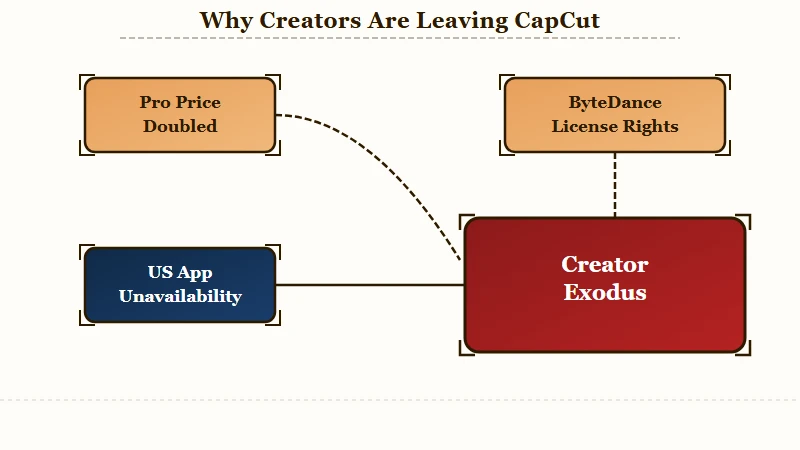
Creators are leaving CapCut because of three stacked problems: a doubled subscription price, a content license that covers private drafts, and US availability that went dark for weeks in early 2025.
Any one of these is survivable. Together they pushed a lot of people to finally switch.
The price is the part everyone feels first. CapCut Pro roughly doubled from about $9.99 to $19.99 a month, and some European users reported rates as high as €29.99.
There is also a quieter sting. Buying Pro through the iOS App Store can run $13.99 to $19.99 a month because the Apple commission gets passed to you, while the same plan bought directly on CapCut’s website often sits closer to $7.99 to $9.99. If you are staying on CapCut, never subscribe through the app.
The licensing terms are the part that should worry working creators more. The draft coverage I flagged up top is the one to sit with, because most people assume unpublished work stays private. It does not under these terms.
If you are cutting a paid client’s assets in CapCut, you are arguably licensing that client’s footage to ByteDance, which is the kind of sentence that ends a brand contract.
There is even a reason behind the squeeze. ByteDance’s 2025 net profit reportedly fell more than 70 percent year over year while it poured an estimated $23 billion into AI infrastructure. Free features moving behind the paywall is what that strategy looks like from the user’s seat.
Availability has been shaky too. CapCut vanished from US app stores in January 2025 under the Protecting Americans from Foreign Adversary Controlled Applications Act, and while it returned, new downloads were blocked for a stretch, as TechCrunch documented when ByteDance apps came back. Once you have had your editor disappear for a billing cycle, a backup plan stops feeling optional.
The Best Free CapCut Alternatives With No Watermark
The best free, no-watermark CapCut alternatives are VN Video Editor on mobile, DaVinci Resolve on desktop, and Clipchamp on Windows.
All three export clean video at no cost, and none of them stamp a logo on your output the way CapCut’s locked assets can.
VN is the one I point most people to first. It runs on mobile and desktop, supports 4K 60fps export with no watermark, and gives you a real multi-track timeline with keyframe animation. There is a detail that matters for anyone leaving over the ownership issue: VN is built by Ubiquiti Labs, a subsidiary of the US networking company Ubiquiti, so the “I am moving off a ByteDance app” box gets ticked.
DaVinci Resolve is the surprise on this list. The free version is more capable than most paid editors, with Hollywood-grade color tools and clean 4K export, and from what I have seen it is the single biggest upgrade in raw power you can make for $0. The catch is the learning curve and the hardware, since it is a desktop workstation rather than a phone app, so budget a weekend to get comfortable.
Clipchamp is the easy Windows answer. It is a Microsoft product built into Windows 11, exports 1080p with no watermark, and includes AI auto-captions across a wide range of languages for free. If you are on a Windows laptop and want something simple today, start there.
| Tool | Best for | Free export | Watermark |
|---|---|---|---|
| VN Video Editor | Mobile creators wanting a 1:1 CapCut swap | 4K 60fps | None |
| DaVinci Resolve | Desktop creators who want pro color and power | Up to 4K | None |
| Clipchamp | Windows users who want simple plus AI captions | 1080p | None |
The Best Paid CapCut Alternatives Worth the Money
The paid alternatives worth paying for are InShot for budget mobile editing, Descript for talking-head and podcast cuts, VEED for a browser-based AI suite, and Submagic or Captions for viral captions.
Each one beats CapCut on a specific job rather than trying to win on everything.
InShot is the value pick. Pro runs about $19.99 a year, which is roughly what a single month of CapCut Pro costs, and for straightforward mobile editing that math is hard to argue with. If your needs are trims, text, music, and clean exports, this is the cheapest exit.
For anyone who talks to camera, Descript is the one I would test. Its Creator plan is around $24 a month billed annually, includes 30 media hours, and exports 4K with no watermark.
The draw is text-based editing, where you edit the transcript and the video follows, which makes cutting filler words and rambling intros far faster than dragging a playhead. Our full Descript review covers where it shines and where the AI overreaches.
VEED is the browser-based all-rounder. The Pro plan sits near $30 a month annually with unlimited project length, 4K export, and a strong AI subtitle and translation suite, and you can read the full VEED breakdown before committing.
If your work is faceless short-form built on auto-captions, the specialist tools are sharper and cheaper. Submagic starts around $9 a month and Captions around $10, and our Submagic versus Captions comparison walks through which caption style fits which niche. For repurposing long videos into clips, Opus Clip versus Vizard covers that lane, with Opus Clip Pro near $19 a month for 300 minutes of source footage.
Which CapCut Alternative Is Safest for Commercial Work
The safest CapCut alternatives for commercial and client work are DaVinci Resolve and VN Video Editor, because their terms do not claim broad rights to monetize or resell your content.
When you are editing someone else’s brand assets, that single difference outweighs any feature comparison.
This is the gap almost every “best alternatives” list skips. They rank editors on AI features and forget that a working creator is handling assets they do not own.
CapCut’s terms are the dealbreaker here precisely because the license is so broad and reaches drafts. Desktop tools like DaVinci Resolve keep your rights with you, and for Apple users iMovie is a safe, hardware-tied option that does not carry the same licensing baggage.
There is also a stability angle worth weighing. A one-time purchase cannot rug-pull you mid-project the way a subscription can, and DaVinci Resolve Studio is a clean example: it is a roughly $295 one-time perpetual license, which works out to less than 1.3 years of CapCut Pro at its annual rate, then never charges you again. Resolve Studio also unlocks specs CapCut cannot touch, up to 32K resolution and 120fps, which is far past what short-form needs but tells you how much headroom you are buying.
| Alternative | Claims broad rights to your content? | Commercial-safe verdict |
|---|---|---|
| DaVinci Resolve | No, creator-first terms | Safest for client and brand work |
| VN Video Editor | No, US-owned, no broad grant | Safe, and free |
| iMovie | No, tied to Apple hardware | Safe for Apple-only workflows |
| CapCut | Yes, perpetual license incl. drafts | Avoid for paid client assets |
Example scenario: Say a brand hires you to cut a product launch reel and the raw footage is theirs. On DaVinci Resolve, those files stay the client’s property with no third-party license attached to your edit. On CapCut, the same project sits under a perpetual license to ByteDance, and the unfinished draft is covered too, so you would be handing a competitor’s platform rights to a client’s unreleased product shots.
How to Choose the Right CapCut Alternative
The right CapCut alternative comes down to your device, your budget, and whether you do paid work. I would not overthink it past those three questions, because the field narrows fast once you answer them honestly.
Here is the decision path I would walk a creator through, in order:
- Editing on a phone and want free with no watermark, go with VN Video Editor.
- On Windows and want simple plus free AI captions, use Clipchamp.
- Want the most power for $0 and have a real computer, learn DaVinci Resolve.
- Doing client or brand work, prioritize DaVinci Resolve or VN for the licensing safety, not the flashiest AI.
- Living in faceless short-form, pair a main editor with Submagic or Captions for the hooks.
The mistake I see most often is creators picking the tool with the longest AI feature list instead of the one that fits how they work. A podcast clipper and a dance-trend editor need almost nothing in common. If you are still rebuilding a clean cross-platform workflow after leaving CapCut, cross-posting without watermarks covers the export settings that keep your reach intact across TikTok, Reels, and Shorts.
One more practical note. If you cancel CapCut Pro, premium assets used in existing projects can revert to watermarked or missing on export, which effectively locks old work unless you keep paying. Export clean masters of anything you care about before you cancel, then rebuild in your new editor.
Frequently Asked Questions
Is CapCut still safe and legal to use in the US?
CapCut is currently legal in the US after the TikTok USDS joint venture finalized in early 2026, which put majority-American owners over US operations. It is usable, but it was pulled from US app stores for a stretch in 2025, and the content licensing terms are the bigger reason creators leave.
Does CapCut own my videos and drafts?
You keep copyright, but CapCut’s June 2025 terms grant ByteDance a royalty-free, perpetual license to use, modify, and monetize your content without payment or credit. That grant covers private drafts and unfinished projects, not only published videos.
What is the best free CapCut alternative with no watermark?
VN Video Editor is the best free no-watermark option on mobile, with 4K 60fps export and a full timeline. On desktop, DaVinci Resolve’s free version is more powerful, and Clipchamp covers Windows users with free 1080p export.
What is the cheapest paid CapCut alternative?
InShot is the cheapest at around $19.99 a year, roughly the price of one month of CapCut Pro. Submagic and Captions start near $9 to $10 a month if you mainly need AI captions for short-form.
Which alternative is best for AI auto-captions?
Clipchamp gives free AI captions in many languages, while VEED offers the most complete paid subtitle and translation suite. For animated viral caption styles, Submagic and Captions are the specialists creators reach for.
Is there a CapCut alternative made by a US company?
Yes. VN Video Editor is built by Ubiquiti Labs, a subsidiary of US-based Ubiquiti, Clipchamp is owned by Microsoft, and DaVinci Resolve is made by Blackmagic Design. All three avoid the ByteDance ownership question entirely.
Quick Takeaways
- CapCut’s real risk is its June 2025 license, which covers private drafts and unfinished projects, not just the price hike to $19.99 a month.
- VN Video Editor is the closest free, no-watermark swap on mobile, and it is US-owned through Ubiquiti.
- DaVinci Resolve is the most powerful free editor, and its $295 one-time Studio license beats 1.3 years of CapCut Pro.
- For client or brand work, choose DaVinci Resolve or VN for the licensing safety before you weigh any AI features.
- Export clean masters before canceling CapCut Pro, or premium assets in old projects can come back watermarked.