Riverside FM Review and Why Most Podcasters Overpay for It
Riverside FM Review and Why Most Podcasters Overpay for It
Riverside FM review covering pricing, recording quality, and the hidden limits most reviews skip. Find out if it is worth your money.
- 1What Is Riverside FM and How Does It Work
- 2How Does Riverside Recording Quality Compare to Zoom
- 3What Does Riverside FM Cost in 2026
- 4Is the Built-In Editor Good Enough to Replace Descript
- 5What Are the Biggest Problems With Riverside FM
- The Media Lock Problem
- Audio and Video Sync Drift
- Pros and Cons
- 6How Does Riverside Compare to Zencastr and SquadCast
- 7Who Should Pay for Riverside and Who Should Skip It
- 8Frequently Asked Questions
- Is Riverside FM free to use?
- Does Riverside FM work if the internet drops mid-recording?
- Can I replace a published podcast episode on Riverside?
- How accurate is Riverside’s AI transcription?
- Is Riverside better than Zoom for podcasting?
- What is the best Riverside FM plan for most podcasters?
- 9Quick Takeaways
Bottom Line: Riverside FM records studio-grade local audio and 4K video that Zoom cannot touch. The Pro plan at $24/month annual is the sweet spot for most podcasters, but the platform locks published files permanently and charges processing time against your quota. Read the full breakdown before committing.
A Riverside FM review that skips the surface-level praise and gets into the numbers most creators never see until after they subscribe. Riverside records each participant locally at up to 4K resolution and 48kHz uncompressed audio, which puts it in a different class from Zoom or Google Meet for remote podcast recording.
That local recording tech is legitimately impressive. Your guest’s choppy Wi-Fi does not ruin the final file because the high-quality version saves on their device first and uploads afterward. The problem is everything wrapped around that core feature: pricing tiers with hidden caps, a built-in editor that most serious creators will outgrow in a month, and a hosting feature that permanently locks your published files.
The pattern across user reviews is consistent: people love the recording quality and hate the billing surprises. This review breaks down where the value lives and where you are paying for features you will never use.
What Is Riverside FM and How Does It Work
What is Riverside FM: A browser-based platform that records separate audio and video tracks locally on each participant’s device, then uploads them to the cloud for editing and export.
Riverside FM is a remote recording platform built for podcasters and video creators who need professional-quality output without an in-person studio. Founded in 2019 by brothers Nadav and Gideon Keyson out of Tel Aviv, the platform now holds a 4.8/5 on G2 (1,722 reviews).
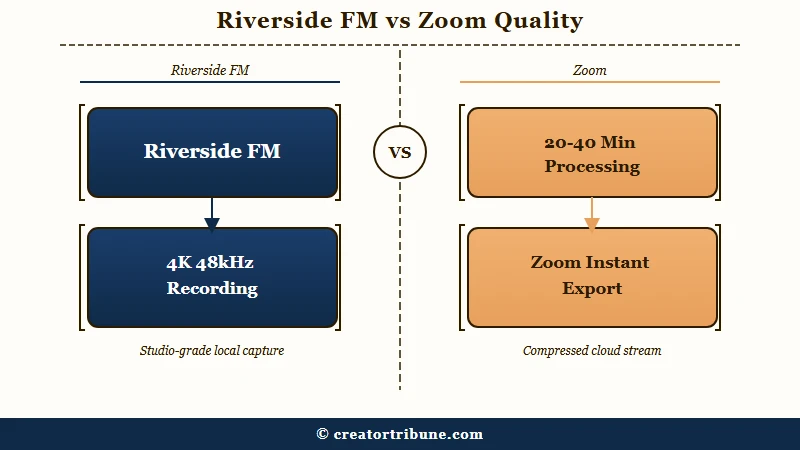
The core selling point is local recording. Unlike Zoom, which captures the compressed internet stream, Riverside records uncompressed 48kHz, 16-bit audio (upgradeable to 32-bit for audio engineers) directly on each person’s computer. Video captures at up to 4K resolution at 30 frames per second.
Guests join through a browser link with zero downloads and no account creation. From my testing, the guest experience is genuinely frictionless on desktop. Mobile guests need the iOS or Android app, and the quality gap between desktop and mobile recording is noticeable.
How Does Riverside Recording Quality Compare to Zoom
Riverside’s local recording eliminates the single biggest problem with Zoom podcasts: internet-dependent audio quality.
When your guest’s bandwidth drops mid-sentence on Zoom, you get a garbled mess. On Riverside, the pristine local file keeps recording and uploads once the connection recovers.
A one-hour recording generates roughly 600MB of audio data and 2 to 5GB of 1080p video per participant. That is a lot of storage, and it matters for your upload speed and hard drive planning. I would recommend having at least 20GB free before a multi-guest session.
The tradeoff is processing time. A two-hour podcast takes between 20 and 40 minutes to process and download on Riverside. Zoom gives you the file instantly because it is already compressed. For weekly shows, that wait adds up.
Sessions support up to 8 participants, which covers most interview and roundtable formats. The platform also partnered with Spotify for Podcasters (formerly Anchor) to streamline video podcast distribution to Spotify’s audience.
What Does Riverside FM Cost in 2026
Riverside offers five tiers, and the gap between what you need and what you pay for is where most creators waste money. Here is the full breakdown:
| Plan | Monthly Price | Annual Price | Key Limits |
|---|---|---|---|
| Free | $0 | $0 | 2 hours recording/month, 720p video, watermark on exports, 44.1kHz audio |
| Standard | $19/mo | $15/mo ($180/yr) | Unlimited recording, 4K video, 5 hours AI transcription, no watermark |
| Pro | $29/mo | $24/mo ($288/yr) | 15 hours AI transcription, separate track downloads, custom branding, live streaming |
| Grow | $39/mo | Varies | Extended features for teams, additional transcription hours |
| Webinar | $99/mo | Varies | Up to 10,000 registrants, custom frame rates (24/25/29.97 FPS), HubSpot CRM sync |
One detail most reviews miss: “recording hours” means the total time the record button is active, not the length of your finished episode. A 45-minute interview where you spent 15 minutes on pre-show small talk and mic checks counts as a full hour against your quota.
The way I see it, the Standard plan is overpriced for what it offers. Five hours of AI transcription per month runs out fast if you record weekly.
The Pro plan at $24/month annual is the real entry point for anyone producing consistent content. Annual billing saves 20 to 35 percent across all tiers.
One warning from the G2 review pool: at least one user reported being charged up to $900 in unauthorized annual fees while believing they were on a free plan. Always screenshot your plan confirmation and set a calendar reminder before any trial converts.
Is the Built-In Editor Good Enough to Replace Descript
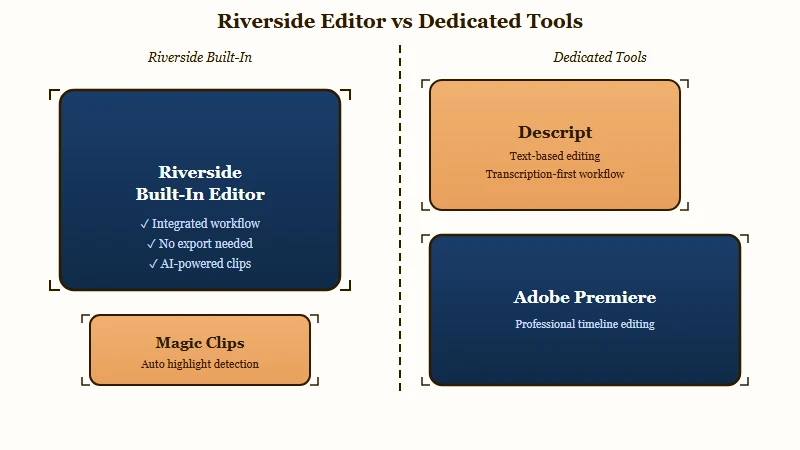
Riverside’s built-in editor handles basic cuts and captions but falls short of a dedicated editing tool for anything beyond quick clips.
The text-based editing lets you trim by deleting words from the transcript, and the Magic Clips feature uses AI to scan for highlights based on keywords, sentiment analysis, and speaker energy levels.
From my testing, Magic Clips works best for pulling 30 to 90 second social snippets from long interviews. It is not a substitute for a real editing workflow. The quality of AI-selected clips is inconsistent, and you will still need to manually scrub through the suggestions to find the ones worth posting.
For creators who need real post-production, I would still recommend exporting separate tracks to Descript or Adobe Premiere. Descript’s text-based editing is deeper, its filler word removal is more aggressive, and its Overdub voice cloning opens workflows Riverside cannot touch.
Vague: “I’ll just use Riverside’s editor for everything since it’s built in.”
Specific: “I record on Riverside for the local 4K quality, export separate WAV and MP4 tracks, then edit in Descript where I can remove filler words, add Overdub corrections, and produce a polished episode in half the time.”
What Are the Biggest Problems With Riverside FM
The recording quality is excellent, but the platform has real pain points that most marketing-focused reviews downplay. Here are the issues I think matter most:
The Media Lock Problem
Once you publish audio files through Riverside’s hosting feature, those files cannot be replaced. If you catch an error, need to swap in a corrected edit, or want to update a sponsorship read, you are locked out.
For professional podcasters who occasionally need to update published episodes, this is a dealbreaker. Most experienced creators still use a dedicated hosting service like Buzzsprout or RSS.com alongside Riverside for this reason.
Audio and Video Sync Drift
Despite being marketed on synchronization, Riverside can suffer from A/V drift where audio and video tracks fall out of alignment. The platform includes a built-in lip-sync tool that lets you shift audio tracks forward or backward by exact millisecond values, which is a practical fix but also an admission that the problem is common enough to warrant a dedicated tool.
Cheap capture cards from Amazon frequently force a 30fps frame rate regardless of your camera settings, which creates additional latency and sync issues. If you use external capture devices, invest in one that lets you lock the frame rate manually.
Pros and Cons
What works well:
- Local 4K video and 48kHz uncompressed audio recording, far superior to any video conferencing tool
- Guest experience requires zero downloads, zero accounts, just a browser link
- SOC 2 Type 2 and ISO27001 certified, which matters for creators in regulated industries like finance or healthcare
- Internet drops do not kill recordings because files save locally and upload when the connection returns
- Over 100 languages supported for AI transcription at 95%+ accuracy on clear audio
What falls short:
- Processing a two-hour podcast takes 20 to 40 minutes, no instant export like Zoom
- Media Lock prevents replacing published audio files, a serious limitation for professional shows
- Recording hours count total button-active time including pre-show chat, inflating quota usage
- Built-in editor is too basic for anything beyond simple trims and social clips
- Mobile recording quality is noticeably inferior to desktop browser recording
How Does Riverside Compare to Zencastr and SquadCast
Riverside, Zencastr, and SquadCast all record locally, but each platform prioritizes different creator needs. Here is how I would rank them across the features that matter most:
| Feature | Riverside | Zencastr | SquadCast |
|---|---|---|---|
| Max video quality | 4K at 30fps | 1080p | 1080p |
| Free plan recording | 2 hours/month | Limited | Limited |
| Paid starting price | $15/mo annual | $13/mo | $20/mo |
| AI transcription | 95%+ accuracy, 100+ languages | Basic | Basic |
| Built-in editor | Text-based + Magic Clips | Minimal | Minimal |
| Max participants | 8 | 9 | 10 |
| Hosting included | Basic (with Media Lock) | No | No |
Riverside wins on video quality and AI features. Zencastr wins on price for audio-only podcasters who do not need 4K video. SquadCast wins on participant count for larger panel shows.
If your show is audio-only and you edit in Descript anyway, Zencastr at $13/month saves you money without sacrificing the local recording advantage. If you produce a video podcast for YouTube, Riverside’s 4K capture is worth the premium.
Who Should Pay for Riverside and Who Should Skip It
Riverside is worth paying for if you produce a video podcast or need 4K remote recording for YouTube content. The Pro plan at $24/month annual is the tier I would recommend, and I would not bother with Standard since the 5-hour transcription cap runs out too fast.
Here is my decision framework:
- Weekly video podcasters recording 1 to 3 hours per week with remote guests: Pro plan, worth every dollar. The 4K local recording and separate track export pays for itself in production quality.
- Audio-only podcasters who edit externally: consider Zencastr first. You are paying for video features you will not use on Riverside.
- Solo creators who record locally on their own machine: you do not need Riverside at all. A USB mic plus OBS or QuickTime gives you the same quality for free.
- Enterprise and B2B teams running webinars with CRM integration: the Webinar plan’s HubSpot sync and 10,000-registrant cap makes Riverside a legitimate alternative to Zoom Webinars.
Skip Riverside entirely if you need to replace published podcast files regularly, if your show is mobile-first (the desktop browser delivers meaningfully better quality), or if you are on a tight budget and your content is audio-only.
If Riverside’s processing times frustrate you, or if you have experienced Spotify for Creators outages, having a backup recording setup (even just a Voice Memos plus Zoom fallback) prevents lost episodes. When you are ready to turn those recordings into short-form content for multiple platforms, the separate audio and video tracks from Riverside make the repurposing workflow much cleaner than working with a single mixed Zoom file.
Keep cross-platform audio licensing in mind if you plan to clip your podcast into Reels or TikToks. Music licensed for your podcast feed may not be cleared for Instagram or TikTok, and Riverside does not flag this for you.
Frequently Asked Questions
Is Riverside FM free to use?
Riverside offers a permanent free plan with up to 2 hours of recording per month at 720p video quality. A watermark appears on all free-tier exports. Paid plans start at $15/month annual and remove the watermark while unlocking 4K video.
Does Riverside FM work if the internet drops mid-recording?
Yes. Riverside records locally on each participant’s device, so the high-quality file continues saving even if the internet connection fails. The file uploads once the connection is restored.
Can I replace a published podcast episode on Riverside?
No. Once an audio file is published through Riverside’s hosting feature, it cannot be replaced or swapped. This Media Lock limitation is why most professional podcasters use a separate hosting service.
How accurate is Riverside’s AI transcription?
Riverside reports over 95% accuracy across more than 100 languages for clear audio. Accuracy drops with heavy accents, overlapping speakers, or significant background noise. Plan to review and correct the output manually for critical transcriptions.
Is Riverside better than Zoom for podcasting?
For recording quality, yes. Riverside captures local 4K video and uncompressed 48kHz audio while Zoom records the compressed internet stream. For ease and speed, Zoom is simpler since it delivers files instantly without the 20 to 40 minute processing wait.
What is the best Riverside FM plan for most podcasters?
The Pro plan at $24/month (annual billing) is the sweet spot. Standard’s 5-hour transcription cap runs out quickly for weekly shows. The Grow and Webinar plans are overkill unless you run large-scale live events or need CRM integrations.
Quick Takeaways
- Riverside FM’s local recording at 4K and 48kHz is genuinely superior to Zoom for podcast and video production quality
- The Pro plan at $24/month annual is the only tier worth paying for; Standard’s 5-hour transcription cap is too restrictive for weekly shows
- Media Lock on Riverside’s hosting means published files cannot be replaced, making a separate podcast host essential for professional shows
- Recording hours count total button-active time including pre-show chat, so budget 20 to 30 percent more quota than your finished episode length
- Audio-only podcasters should evaluate Zencastr at $13/month first since Riverside’s premium is driven by video features