Stop These 5 Mistakes That Kill Viral YouTube Videos
Stop These 5 Mistakes That Kill Viral YouTube Videos
The 5 mistakes that kill viral YouTube videos in 2026, with the official Help-Center rule most creators don't know and the fix for each.
- 1Editing a Live Video in YouTube Studio’s Built-In Editor
- 2Changing the Title or Thumbnail During the First 48 Hours
- 3Deleting and Reuploading the Video to Start Fresh
- 4Toggling Monetization Off and Back On Mid-Flight
- 5Mass-Deleting or Bulk-Hiding Comments During the Spike
- 6Frequently Asked Questions
- Does editing a YouTube video in Studio reindex it?
- Can I change a thumbnail on a viral video safely?
- Why does delete-and-reupload feel like a fresh start but fail in practice?
- Is toggling monetization off and on really risky?
- What should I do if I mass-deleted comments before reading this?
- How long do I have to fix a viral video safely?
TL;DR: The 5 mistakes that kill viral YouTube videos in 2026 are editing the video mid-flight in YouTube Studio, changing the title or thumbnail during the first 48 hours without a real CTR improvement, deleting and reuploading to “start fresh,” toggling monetization off and back on, and mass-deleting comments during the spike. YouTube’s own Help Center documents an unwritten rule: once a video crosses 100,000 views, the Studio Editor locks every edit except blur, which means the safe-edit window is shorter than most creators realize.
The mistakes that kill viral YouTube videos almost always come from the uploader, not the algorithm. The classic version is a creator who built a 19,000-view, 200-views-per-hour winner, opened YouTube Studio, trimmed a 44-second dip, hit save, and watched the velocity drop to 10 views per hour by the next morning. That was the entire pipeline death sentence, and it took one click.
The story is on r/NewTubers right now, posted by a creator who spent £500 making one video. It is not unique. The exact same sequence (live momentum, mid-flight edit, hard stop) shows up across r/PartneredYouTube and r/SmallYoutubers every week.
What you will get below is the 5 specific actions that kill viral momentum on a YouTube long-form video, the official Help Center rule almost nobody knows about, and the safe protocol for fixing a problem on a video that is currently doing well. Read this before you touch a single button on a video that is gaining traction.
Editing a Live Video in YouTube Studio’s Built-In Editor
Editing a live video in YouTube Studio while it is still gaining velocity is the single fastest way to kill its momentum, and YouTube’s own Help Center documents the rule that catches creators by surprise.
The hidden rule is the 100,000-view edit lockdown: once an unedited video crosses 100k views, YouTube disables every Studio Editor save action except for the face-blur tool.
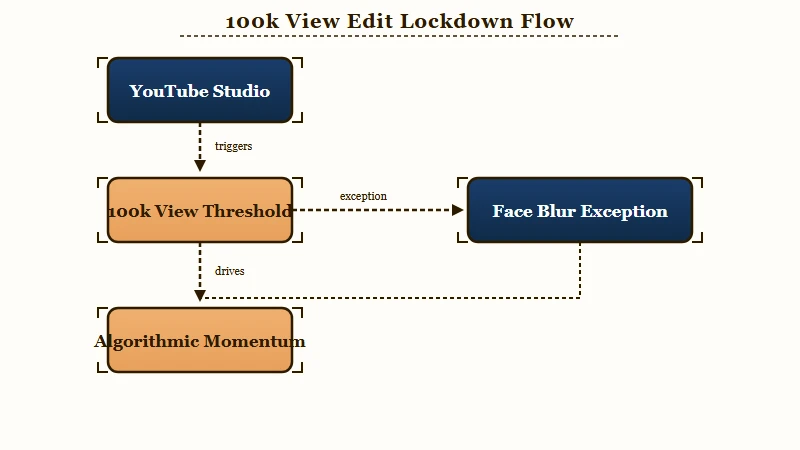
The way I see it, that rule alone tells you everything you need to know about how YouTube treats mid-flight edits. The platform itself does not want you touching the file once it has scaled. The 100k threshold exists because YouTube knows that re-processing a video at scale causes a measurable distribution disruption, and they would rather block the save than reprocess.
What does the disruption look like in practice? The official YouTube Help trim documentation is direct about it. After a trim, the URL, view count, and comments stay intact, but processing can take “several hours” during which viewers continue to see the original, unedited version.
Built-in Studio Editor features (trim, blur, audio replacement) are also strictly unavailable for any video longer than six hours.
The practical reality on the ground is worse than “several hours.” Creator reports across r/PartneredYouTube and r/NewTubers document the same pattern I just described: 200 views per hour to 10 in under 24 hours after a mid-flight Studio edit on a sub-100k video.
What I would recommend, full stop, is the rule below as a worked example:
Before: You notice a 44-second dip in retention on a video pulling 200 vph. You open the YouTube Studio Editor, trim the dip, hit save. The “several hours” of reprocessing breaks the algorithmic momentum graph. Velocity collapses.
After: You notice the dip. You write it down in your next-video notes. You leave the live video alone. The next upload starts strong because you fixed the underlying problem in production, not in post-publish editing.
The same rule applies to blur, end-screen, info-card, and chapter changes. If the video is gaining momentum, do not touch the file. If you have a trust-score reading showing the channel is in a healthy zone, do not risk that trust score on a single video edit.
Changing the Title or Thumbnail During the First 48 Hours
Changing the title or thumbnail on a live video does not directly hurt the algorithm; it only hurts if the change makes click-through worse, in which case the algorithm throttles the video almost immediately.
Title and thumbnail are CTR signals, and YouTube reads them through audience behavior, not as a metadata reset.
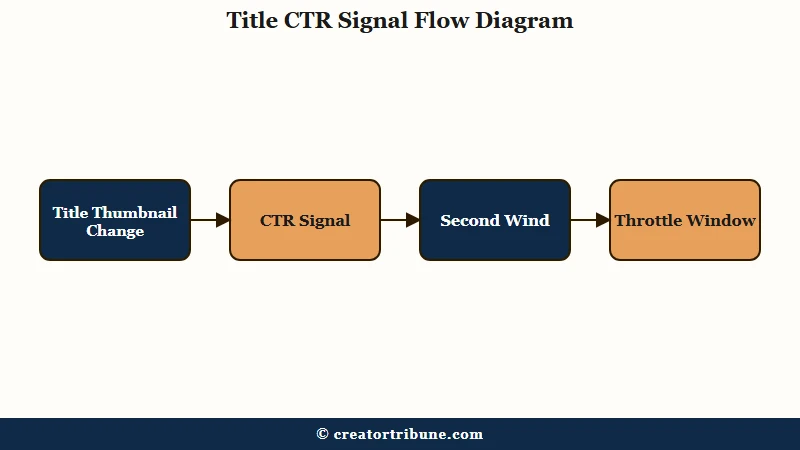
What surprised me when I dug into this is how often creators get the direction backwards. The myth is “changing the thumbnail kills your video.” The reality is “changing to a worse thumbnail kills your video, and changing to a better one gives you a second wind.”
YouTube Senior Director of Growth Todd Beaupré confirmed on the official YouTube blog in August 2024 that title and description are the only metadata that “matters the most” for recommendation. Tags are largely irrelevant.
The practical implication: a thumbnail swap is a high-risk, high-reward play. If you have a tested, proven-better thumbnail, swap. If you are guessing or A/B-testing without data, you are gambling with a video that is already winning.
Here is the 48-hour rule I follow on every video that breaks 100 vph:
- Do not change anything on a video gaining momentum during the first 12 hours. The algorithmic baseline is still establishing.
- Between 12 and 48 hours, change ONE thing at a time and only if you have a specific data-backed reason. Never change title and thumbnail together.
- After 48 hours, the velocity curve has crystallized. Changes here are safer but the upside is smaller.
- If the click-through rate drops by 30% or more within 6 hours of your change, revert immediately. The algorithm will start throttling within the next 12 hours.
Deleting and Reuploading the Video to Start Fresh
Deleting and reuploading the same video is the most damaging mistake on this list because it wipes engagement metrics, breaks every external link, and risks a “repetitious content” flag from YouTube’s duplicate-detection system.
The “fresh start” theory is folk wisdom; the actual outcome is a momentum reset plus a duplicate-content risk.
YouTube’s duplicate-detection system was a major focus of 2025 enforcement. Stricter rules against inauthentic content led to 12.4 million channel terminations across the first nine months of 2025 alone. The algorithm recognises metadata, file fingerprints, and previous performance trajectory; a reupload is not a fresh slate, it is a flagged copy of a video the system already knows.
What I would do instead, in numbered form:
- Switch the video to Unlisted if you need to take it out of public rotation. This preserves the URL, the comments, and the view history, and avoids the duplicate-flag risk.
- If the video has a content problem you can fix without a re-render, use the Studio Editor blur tool. Blur is the one tool that still works above the 100k-view lockdown.
- If the video has a content problem that requires a re-render, leave the original up and post a new, improved version as a separate upload. The new version starts clean without dragging the original’s metadata into a duplicate flag.
- Never re-upload “the same video, just better.” The algorithm reads it as a duplicate. The zero-impressions diagnostic walks through what a duplicate-flag stall looks like in Studio.
Toggling Monetization Off and Back On Mid-Flight
Toggling monetization off and back on, especially during a revenue dip you blame on the platform, can trigger an “Ads limited due to invalid traffic” flag that limits ad serving for days or weeks.
The trigger is the moment revenue posts at $0.00, regardless of whether the traffic itself was clean.
This is the single piece of folk wisdom most likely to wreck a channel. Creators on r/PartneredYouTube circulate the advice “toggle monetization off and on to reset the ads system.” A documented case on YouTube shows the real outcome.
Disabling monetization on the channel forced revenue to $0.00, and the “invalid traffic” flag fired the moment the new $0 number posted, even though the underlying traffic was organic. The flag persisted for weeks.
The 2025 AdSense framework is harsher than most creators realise. The Invalid Traffic system flags any spike in ad revenue without a matching spike in traffic, and the “matching” check happens against historical baselines, not the current 24 hours. A viral video that pulls 10x normal RPM during the spike will get flagged unless YouTube reads the engagement signals as genuine.
The protocol I would use here:
- Never toggle monetization off and on during a viral spike. The risk of an Invalid Traffic flag during the exact window you most need ads serving is not worth any theoretical “reset” benefit.
- If you suspect a real AdSense issue (declining RPM despite stable views), check the Policy Center for warnings before touching the toggle.
- If you are paid through Shorts, remember that Shorts revenue runs on a separate “Engaged Views” metric, not raw views, and the Shorts views-stopping diagnostic covers the engagement-vs-impression split.
Mass-Deleting or Bulk-Hiding Comments During the Spike
Mass-deleting or bulk-hiding comments during a viral push wipes the engagement metrics the algorithm reads as community interest, and the velocity hit lands within the same 24-hour window.
Comments are vital algorithmic ranking signals, and a sudden deletion event reads as a loss of interest rather than as moderation.
The algorithm cannot distinguish between “creator deleted 200 toxic comments to keep the comment section clean” and “the comment section lost 200 comments because viewers left.” The signal it reads is the same: comment-count drop. The mechanical fix is to hide rather than delete, because hidden comments still count toward engagement metrics even though they are not visible to other viewers.
Here is the comment-section protocol for a video gaining traction:
- Hide rather than delete. Use the YouTube Studio comment moderation tool’s “Hide user from channel” or “Hold for review” features instead of bulk delete.
- Never mass-pin. Pinning one good comment is fine; mass-pinning and then unpinning creates a flicker the algorithm reads as instability.
- If you must remove spam, do it gradually across hours, not in a single 100-comment purge.
- Reply-then-delete is the worst pattern, because the algorithm reads both the comment and your reply as engagement, then watches both disappear.
Use the table below to keep the 5 mistakes straight in the moment a viral video lands on your channel.
| Mistake | What it does to momentum | Safe alternative |
|---|---|---|
| Studio Editor trim/blur/end-card | “Several hours” of reprocessing, velocity collapse | Note the fix for the next upload, do not edit the live video |
| Title or thumbnail swap mid-flight | Algorithm throttles if CTR drops 30% in 6 hours | Change one thing at a time after 48 hours, with data |
| Delete and reupload | Wipes engagement, risks duplicate-content flag | Unlist the original, post improved version as new upload |
| Monetization toggle off and on | Triggers Invalid Traffic flag, weeks of limited ads | Never toggle during a viral spike |
| Mass-delete comments | Algorithm reads engagement drop as audience loss | Hide instead of delete, spread moderation across hours |
For the broader context on why these specific mistakes compound, the recent YouTube views glitch playbook covers what a reporting outage looks like versus a real algorithmic suppression event.
The view-to-subscriber conversion guide covers what to do once you survive the viral window and want the audience to stick.
Frequently Asked Questions
Does editing a YouTube video in Studio reindex it?
The official YouTube Help documentation says Studio Editor changes do not change the URL, view count, or comments, but processing can take several hours during which viewers see the unedited version. Multiple creator reports document velocity collapses after mid-flight edits on videos under 100,000 views, where the Studio Editor save is still allowed.
Can I change a thumbnail on a viral video safely?
Yes, if the new thumbnail has tested better than the current one and you change only the thumbnail. The algorithm tracks the CTR change in the 6 to 12 hours after the swap. If CTR drops 30% or more, revert immediately or the throttle window opens.
Why does delete-and-reupload feel like a fresh start but fail in practice?
The duplicate-detection system recognises file fingerprints and previous metadata, so the reupload is not a fresh slate, it is a flagged duplicate. The 12.4 million channel terminations across the first nine months of 2025 came largely from inauthentic and repetitious content flags.
Is toggling monetization off and on really risky?
Yes. Forcing revenue to $0.00 by disabling monetization triggers the Invalid Traffic monitoring layer to fire as soon as the zero posts. The flag persists for days or weeks regardless of the underlying traffic quality.
What should I do if I mass-deleted comments before reading this?
Stop deleting more, switch any further moderation to “Hide user from channel,” and wait the full 48-hour window for the algorithm to re-baseline. Active engagement on the next upload helps the channel-level signal recover faster than trying to recover the single affected video.
How long do I have to fix a viral video safely?
The first 12 hours are the highest-risk window; the algorithm is still establishing the velocity baseline. Between 12 and 48 hours, one targeted change at a time is safe if you have a specific data-backed reason. After 48 hours, the curve is crystallised and changes are lower-impact in both directions.