Why YouTube Shorts Suddenly Stop Getting Views and the Fix
Why YouTube Shorts Suddenly Stop Getting Views and the Fix
YouTube Shorts views stopped after 24 hours? Walk through the five signals YouTube reads and the fixes that restart distribution.
- 1Why Do YouTube Shorts Views Stop After 24 Hours
- Why Your View Count Went Up but Your Earnings Did Not
- 2Did Your Older Shorts Suddenly Drop to Zero? The Late-2025 Algorithm Shift
- 3Has YouTube Ever Confirmed That Older Shorts Get Fewer Views?
- 4How to Read the Viewed vs Swiped Away Metric
- 5What the Retention Curve Tells You About a Stalled Short
- 6How to Fix a Short That Stopped Getting Views
- 7How Many Shorts Should You Post Per Month
- 8When Views Stopping Is a Shadowban and Not an Algorithm Test
- 9Frequently Asked Questions
- Is there a view cap on YouTube Shorts?
- Should I delete and repost a Short that stopped getting views?
- Do hashtags help fix a stalled Short?
- What is the best length for YouTube Shorts?
- How long does it take for Shorts to start getting consistent views?
- Does external traffic from TikTok or Instagram help a Short perform better?
- Are views and engaged views the same thing on Shorts?
- Why did all my YouTube Shorts suddenly stop getting views at once?
TL;DR: YouTube Shorts views stop when the algorithm’s initial test audience doesn’t engage hard enough in the first 30 to 60 minutes. Reposting the same Short does nothing. Find the signal that failed, whether that is the hook, retention or the metadata, and correct it on your next upload.
Your Short hit 500 views in the first hour and then flatlined. The counter hasn’t moved in two days, and nothing looks broken in YouTube Studio.
This pattern is so common that creators call it the “1K wall” or the “200-view stall.” YouTube Shorts views stopped climbing because the algorithm’s testing window is brutally short. The algorithm decides whether to expand distribution within the first 30 to 60 minutes after upload, and if the early numbers don’t pass its threshold, the Short gets shelved.
The good news is that this isn’t random and it isn’t a shadowban. YouTube evaluates every Short against a specific set of engagement signals, and once you know which one failed, you can fix it on the next upload. This guide walks through every signal YouTube reads, how to check each one in Studio, and the exact changes that restart distribution.
Why Do YouTube Shorts Views Stop After 24 Hours
YouTube Shorts views stop because the algorithm’s “explore” phase found weak engagement signals in its initial test batch.
Every Short goes through two phases: explore and exploit. In the explore phase, YouTube shows the Short to a small seed audience, typically a few hundred viewers, within the first 30 to 60 minutes of publishing. If that seed audience watches most of it, replays it, likes it, or shares it, the algorithm shifts into exploit mode and pushes the Short to progressively larger pools.
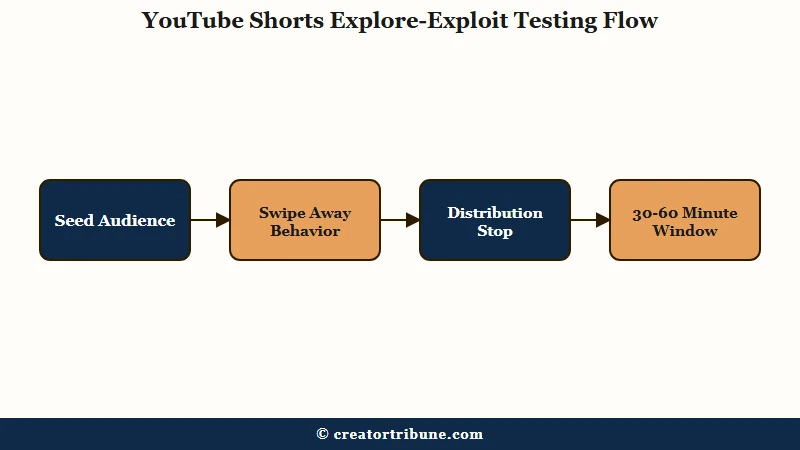
When views stop cold, the explore phase returned a failing grade. The seed audience swiped away too fast, didn’t watch past the first few seconds, or showed no engagement beyond a passive view.
In my experience, the confusing part is that view counts can look healthy during the explore phase. Since March 31 2025, YouTube counts any Short that starts playing or replays as a view, with no minimum watch time at all. Reported view counts stepped up across the platform the day that landed, and not one extra person had chosen to watch anything.
Say a Short sits at 800 public views. The engaged-view count underneath it can be materially lower, and engaged views are the ones tied to what you get paid.
Each Short is evaluated independently. A channel with 50,000 subscribers and a history of viral Shorts can still post one that stalls at 300 views. The algorithm treats every upload as its own test, which is why inconsistent performance across Shorts is normal and not a sign that something is broken at the channel level.
Why Your View Count Went Up but Your Earnings Did Not
On March 31 2025 YouTube changed what counts as a Short view, and the older, stricter metric survived under a different name: engaged views. Your public counter got more generous that day. The number YouTube pays on did not move.
YouTube’s Shorts monetization policies state that revenue goes to monetizing creators “based on their share of total engaged views”. A separate Help page puts the Shorts route into the Partner Program at 1,000 subscribers plus 10 million qualified Shorts views in the last 90 days, and coverage of the recount reported that both counts stayed on the stricter engaged-view basis.
The recount reshaped YouTube’s own headline figure too. CEO Neal Mohan told Cannes Lions on June 18 2025 that Shorts averages 200 billion daily views, against the 70 billion YouTube reported in March 2024, and the counting change contributed to that jump.
So when a Short stalls, open engaged views before you read the headline count. A Short whose public views look survivable can still be well short on the metric your revenue share is calculated from.
Did Your Older Shorts Suddenly Drop to Zero? The Late-2025 Algorithm Shift
If your back catalog of Shorts lost views all at once rather than one upload stalling, you are probably looking at the pattern creators documented in late 2025, where the feed appeared to favor fresh uploads over older ones.
That is a different problem from a single Short failing its engagement test, and it needs a different response.
Starting around mid-September 2025 and sharpening after December 17 2025, creators reported evergreen Shorts that had been earning steady views suddenly falling to near zero. A Google Support thread titled “YouTube Shorts Suddenly Receiving Zero Views Since December 17, 2025” collected hundreds of the same report, and Tubefilter documented the shift toward newer uploads in December 2025.
Mario Joos, a retention strategist who has worked with MrBeast and the Stokes Twins, mapped the drop-off to a threshold around 28 to 30 days and named the effect “the flattening”. Tim Chesney, a creator with two billion lifetime views across his channels, backed him up in public: “2B views on this chart, and in September all of the evergreen videos simply tanked.”
The way I read this is that the evergreen-Shorts era, where one strong video kept feeding a channel for months, is mostly over. If your recent uploads still test and perform while your older library went quiet, no amount of hook surgery on any single Short explains that split.
The practical response is to publish on a steadier cadence instead of leaning on past hits, and to look at the drop across your whole channel before auditing any one video. If your views fell across long-form as well as Shorts, the broader reasons YouTube views suddenly drop to zero guide separates an algorithm cut from a genuine glitch.
Has YouTube Ever Confirmed That Older Shorts Get Fewer Views?
No. YouTube has still not confirmed that it demotes Shorts past a certain age, and the analyst who mapped the 28 to 30 day threshold openly calls his own finding unproven.
Joos described his conclusion as “a carefully constructed working theory and not a confirmed fact”. Both Search Engine Journal and Tubefilter reported the story in December 2025 with the same caveat attached, and nothing has come from YouTube since.
The 28 to 30 day number comes from pattern-matching across a handful of very large channels. YouTube has published nothing on it, so treat it as a working estimate you can plan around and not a documented rule.
For a creator that leaves nothing to appeal and no setting to change. No support form covers it, no toggle puts older Shorts back in the feed, and anyone selling a guaranteed fix is working from the same unconfirmed observation you are.
What you can act on is the part that is measurable on your own channel. Compare impressions on your last five Shorts against five from three months ago; if the older ones flatlined while recent uploads still test normally, you are seeing the pattern, whatever its cause turns out to be.
How to Read the Viewed vs Swiped Away Metric
What is Viewed vs Swiped Away: A YouTube Studio metric that tracks the percentage of viewers who watched your Short versus those who scrolled past it in the feed.
The Viewed vs Swiped Away ratio is the single most important diagnostic for a stalled Short. Views, likes and comments all describe what happened after someone decided to watch. This ratio measures the decision itself, how many people who saw your Short in the feed chose to stop for it, and that is what the algorithm weighs before it expands distribution.
You can find this in YouTube Studio under the Analytics tab for any individual Short. Look for “How viewers find this Short” and check the “Shown in feed” section. It breaks down into two numbers: how many people saw the Short in their feed, and what percentage chose to view it versus swipe away.
Treat the numbers creators trade here as community benchmarks assembled from shared analytics screenshots, not as a line anyone at YouTube has drawn. The working consensus puts healthy above 70 percent, with breakout Shorts landing between 70 and 90 percent, and reads anything under 65 percent as a Short the algorithm is unlikely to carry past its first test batch.
Here’s what a failing ratio looks like in practice:
Before: You open Studio, see 1,200 views, and assume the Short performed okay. You move on and post another one.
After: You check Viewed vs Swiped Away and see 42 percent. That means 58 percent of the people who saw your Short in their feed swiped past it without watching. Your first frame and opening hook failed.
The 1,200 views came almost entirely from the initial test batch, and the algorithm never expanded beyond it.
If the ratio is below 65 percent, the problem is almost always your first frame or the opening second. The content itself might be excellent, but nobody is staying long enough to find out.
What the Retention Curve Tells You About a Stalled Short
The retention curve shows exactly where viewers drop off, and creators consistently find the steepest losses clustered in the first two seconds and again around the 7 to 8 second mark.
YouTube Studio gives you a frame-by-frame retention graph for every Short. The shape of that curve tells you whether the problem is the hook, the middle, or the ending.
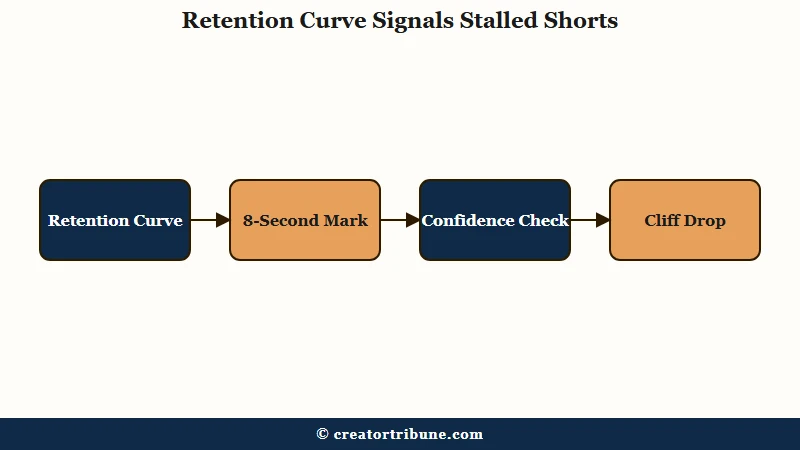
Creators comparing notes generally treat average view duration above 70 percent as healthy, though YouTube publishes no such benchmark. The most common failure pattern I’ve seen is what I’d call the “cliff drop”: retention starts strong at 80 to 90 percent for the first 3 seconds, then collapses to 40 percent by second 8, and flatlines from there.
YouTube has never documented a checkpoint at 8 seconds, so read it as an editing landmark rather than a rule the algorithm enforces. It earns attention because retention graphs cluster their steepest losses in two places: the first second or two, where viewers swipe, and the 7 to 8 second range, where the ones who stayed decide whether the payoff is coming.
A Short that loses half its audience between second 3 and second 8 opened well enough. What follows the hook is what needs tightening.
| Retention Pattern | What It Means | Fix |
|---|---|---|
| Cliff at 1-3 seconds | Hook failed completely | Rebuild first frame and opening line |
| Gradual bleed from 3-8 seconds | Setup too long before payoff | Cut 2-3 seconds of wind-up |
| Drop at the midpoint | Content repeats or drags | Add a visual change or new information beat |
| Flat 70%+ throughout | Healthy, algorithm issue unlikely | Check metadata and posting time instead |
What I’d recommend is comparing your retention curve against other Shorts of similar length on your channel. YouTube Studio shows this as a gray benchmark line. If your Short consistently drops below the benchmark at the same timestamp, that’s the exact second you need to restructure.
How to Fix a Short That Stopped Getting Views
Re-uploading a stalled Short will not restart its distribution, so spend the effort on identifying the signal that failed and fixing it in the next one.
Deleting a low-performing Short and re-uploading it does not improve your channel’s standing with the algorithm. YouTube evaluates each upload independently, so the old Short isn’t dragging anything down. The productive move is diagnosis and iteration.
Here’s the sequence I’d walk through for any Short that stalled:
- Open YouTube Studio and check Viewed vs Swiped Away. If below 65 percent, the problem is your first frame.
- Check the retention curve. If there’s a cliff before second 8, your setup is too slow.
- Check average percentage viewed. Below 50 percent means the content didn’t hold attention long enough.
- Check traffic sources. If “Shorts feed” shows declining distribution over 48 hours with no bump, the algorithm tested and rejected the Short.
- Check the title and description for clear keywords. Shorts without searchable metadata have no secondary distribution path after the feed burst dies.
Once you know which signal failed, apply the corresponding fix to your next Short:
Before: Your Short opens with “Hey guys, today I want to talk about something important…” (generic intro, no visual hook, 3 seconds wasted).
After: Your Short opens with the key visual already on screen, text overlay stating the topic in the first frame, and the payoff previewed within 2 seconds (“This is why your Shorts die after 24 hours”).
The 7-second reset technique works well for mid-Short retention problems. Change the visual angle, switch the audio texture, or introduce a new text overlay every 7 to 8 seconds. From what I’ve seen it flattens the mid-video bleed, which is the part of the curve you have most control over.
For Shorts that stall in the 1,000 to 2,000 view range, the issue is usually topic framing rather than execution. A title like “You need to hear this” tells the algorithm nothing about who should see the Short.
A title like “3 YouTube Shorts Mistakes That Kill Reach” gives the algorithm a clear audience signal. The same content, reframed with specific language, often performs dramatically differently.
How Many Shorts Should You Post Per Month
Posting frequency shapes how fast the algorithm learns who your audience is, and the “right” number per month is something creators worked out among themselves.
Each Short is an independent test, which means every upload gives the algorithm another data point about who your content resonates with. Channels publishing once a week give YouTube seven times fewer chances to find the right audience match compared to daily publishers.
The audience pool is not the constraint at 200 billion daily Shorts views. What the algorithm lacks on a low-volume channel is enough uploads to work out which slice of that pool your content actually matches.
In my experience, the sweet spot for most solo creators is 4 to 5 Shorts per week. That’s enough for the algorithm to identify patterns in what resonates without burning out your production pipeline. Variance between individual uploads also narrows as a channel builds a longer track record, since each Short adds another data point about who to show the next one to.
The trap to avoid is sacrificing quality for volume. What I’d recommend is batching your production: shoot 5 Shorts in one session, edit them across the week, and publish on a consistent schedule.
This keeps your frequency competitive without turning every day into a production day. If you already have long-form YouTube content, repurposing longer videos into Shorts is one of the fastest ways to maintain volume.
The frequency question ties directly into a broader pattern across every major platform right now. Instagram reach dropped for many creators in 2026 for similar algorithmic reasons, and TikTok FYP views stall with comparable mechanics. Across all three platforms, the algorithm rewards consistent volume plus strong early engagement signals.
When Views Stopping Is a Shadowban and Not an Algorithm Test
A genuine YouTube shadowban looks different from a normal view stall, and confusing the two wastes recovery time.
Most Shorts that stop at a few hundred or a few thousand views are not shadowbanned. They’re in the normal range of algorithmic testing where the content didn’t pass the engagement threshold.
A real YouTube shadowban shows specific symptoms: your content stops appearing in search results entirely, the “Browse features” and “Suggested videos” traffic sources drop to near zero in Studio, and this pattern persists across multiple uploads over several weeks, not just one Short.
If you’re unsure whether your stall is a normal algorithm test or something more serious, the cross-platform shadowban test covers how to run a structured diagnostic across YouTube, Instagram, TikTok, and Facebook. The diagnostic matters because many creators panic-react to a normal stall by changing their entire content strategy, which makes the algorithm’s job harder.
In my experience the overwhelming majority of “am I shadowbanned” posts describe standard distribution testing. The Short underperformed on one or two signals and the algorithm moved on. Work out which signal failed before you assume a penalty.
| Symptom | Normal Algorithm Test | Likely Shadowban |
|---|---|---|
| One Short stalls at 200-2K views | Yes | Unlikely |
| Multiple Shorts stall over 2+ weeks | Possible (weak hooks) | Investigate |
| Search results show zero impressions | No | Yes |
| Browse features traffic drops to zero | No | Yes |
| Community post engagement unaffected | Yes | No (also drops) |
Frequently Asked Questions
Is there a view cap on YouTube Shorts?
No. YouTube does not enforce a fixed view cap on Shorts. The “1K wall” or “200-view stall” that creators describe is a performance signal, not an artificial limit.
The algorithm stopped expanding distribution because early engagement metrics fell below its threshold.
Should I delete and repost a Short that stopped getting views?
No. Deleting and re-uploading does not reset the algorithm’s evaluation. Each upload is treated independently, so the old Short isn’t hurting your channel.
Create an improved version instead, using the retention and Viewed vs Swiped Away data from the original to guide what you change.
Do hashtags help fix a stalled Short?
Hashtags have minimal impact on Shorts distribution in 2026. The algorithm relies on title, description, and viewer behavior signals far more than tags. Spending time perfecting hashtags is less productive than rewriting the first 3 seconds of the Short.
What is the best length for YouTube Shorts?
Shorts that run either 13 seconds or the full 60 seconds tend to perform best. The key is matching length to content density. A 13-second Short with a single punchy point outperforms a 45-second version padded with filler.
How long does it take for Shorts to start getting consistent views?
There is no published upload count at which distribution settles down, and wide variance between individual Shorts stays normal for a long time. Most creators describe hitting a more predictable rhythm somewhere after 3 to 6 months of consistent uploading.
Does external traffic from TikTok or Instagram help a Short perform better?
External traffic sends viewers who may not match the algorithm’s target audience profile for the Short. High swipe-away rates from mismatched external viewers can hurt the Viewed vs Swiped Away ratio and reduce algorithmic distribution. Organic YouTube feed discovery remains the primary distribution channel for Shorts performance.
Are views and engaged views the same thing on Shorts?
No. Since March 31 2025 a view is counted the moment a Short starts playing or replays, with no minimum watch time, while engaged views keep the older and stricter definition. Engaged views are what YouTube uses to share Shorts revenue and to measure the 10 million qualified Shorts views that open the Partner Program, so a stalled Short is better judged on engaged views than on the public counter.
Why did all my YouTube Shorts suddenly stop getting views at once?
A channel-wide drop points somewhere other than one video’s hook. Since late 2025 creators have documented a pattern where Shorts past roughly 28 to 30 days stop circulating, with many reporting evergreen Shorts falling to near zero around December 17 2025, though YouTube has never confirmed it. Keep publishing fresh uploads on a steady cadence, because older content is not resurfacing the way it once did.