Instagram Won’t Let Me Like Posts or Keeps Undoing My Likes
Instagram Won’t Let Me Like Posts or Keeps Undoing My Likes
Instagram won't let you like posts? Find out if a glitch, an action block or an account restriction is the cause, and how to clear each one.
- 1Why Won’t Instagram Let Me Like Posts?
- How Do You Check If Instagram Saved Your Like?
- 2Why Do My Instagram Likes Disappear After I Scroll?
- Why Can I Like Posts on My Phone but Not on My Computer?
- Why Are Likes Disappearing From My Own Posts?
- 3Why Does Instagram Say Try Again Later When I Like a Post?
- Does Account Status Show an Instagram Action Block?
- 4What Does “You Can’t Interact With Certain Accounts” Mean on Instagram?
- Does Instagram Use the 1, 3, 7 and 30-Day Strike Ladder?
- 5Can Third-Party Apps Get Your Instagram Likes Blocked or Removed?
- 6Is Instagram Down or Is the Problem Only on My Account?
- 7Quick Takeaways
TL;DR: When Instagram won’t let you like posts, the cause is usually an app glitch that undoes the like, a temporary action block, an Account Status restriction, or a limit tied to a third-party app. Open Your activity, then Interactions, then Likes, because a post that is still up but missing from that list never kept your like. Update the app and report a glitch, stop liking until a block lifts, and read the end date on any restriction in Account Status.
“Instagram won’t let me like posts” covers two different problems: the heart does nothing, or it turns red and empties a moment later. The second one is back in September 2026.
In a September 27 r/Instagram thread, the like vanishes as soon as the poster moves to the next post.
The red heart was never proof that a like saved. Fast Company reported in 2012 that Instagram built its like button to light up “even deep down in a subway,” a trick it called optimistic actions, because “the like can always be uploaded later.” If that later upload fails, your screen and Instagram’s servers can disagree until the post reloads.
That is why I check one list before I touch a single setting. Instagram keeps the 300 most recent posts you’ve liked under Your activity, and a post that is still up but missing from it never kept your like, whatever the heart showed.
This guide sorts the four causes by what you see on screen and gives the fix for each, starting with a two-minute check that tells them apart.
Why Won’t Instagram Let Me Like Posts?
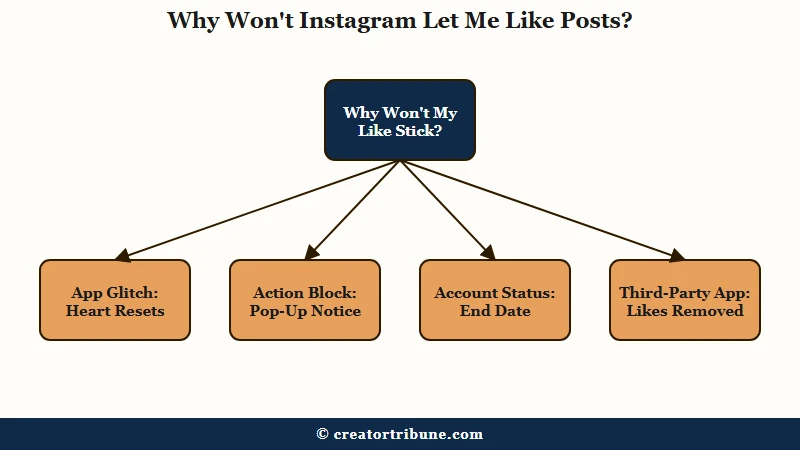
Instagram won’t let you like posts for four common reasons: an app glitch that undoes the like, a temporary action block, an Account Status restriction, or a limit tied to a third-party app that has your login.
Each one leaves a different trace, and the table shows where to look.
| Cause | What you see | Where Instagram tells you | How it ends |
|---|---|---|---|
| App glitch | The heart turns red, then empties after you scroll or reopen the post | Nowhere, since no message appears | An app update or a fix on Instagram’s side |
| Action block | A Try Again Later notice when you tap the heart | The notice itself, while Account Status can look clear | After a wait Instagram does not publish |
| Account Status restriction | “You can’t interact with certain accounts” | Account Status, with an end date and a review option | The end date, or a review that goes your way |
| Third-party app limit | Likes you gave go missing, or parts of the account stop working | Often nowhere, though Meta’s help page warns about it | Removing the app and changing your password |
An outage can look like any of the four while it lasts, so it gets its own section further down. I rule out the glitch first, because that check costs nothing and needs no waiting.
How Do You Check If Instagram Saved Your Like?
Your activity is the check, because a post listed under Your activity, then Interactions, then Likes is a like Instagram recorded.
In the app, open your profile, tap Menu in the top right, tap Your activity under How you use Instagram, then tap Likes under Interactions.
That list holds the 300 most recent posts you’ve liked. If the post you just liked is missing, the like never stuck, and one of the four causes is in play. If the post is there, Instagram kept the like, and the empty heart is a display fault.
The one exception is a post that no longer exists. Meta’s page on removing your likes says that if someone has deleted a post you liked, “you won’t be able to see it,” so a like on a deleted post drops off the list on its own.
Your privacy settings do not hide a like from you either. Instagram’s page on the Likes you’ve made setting says the account that posted “can see that you liked their post or reel” whatever you choose, and “You can always see your own likes on posts, reels and in Your Activity.”
Run the check once, then go to the section that matches what you saw.
Why Do My Instagram Likes Disappear After I Scroll?
Instagram likes that disappear after you scroll are most likely likes the app showed on screen but Instagram never kept, so the heart resets once the post reloads.
The fix is an app update plus a bug report, and repeated tapping only adds failed requests.
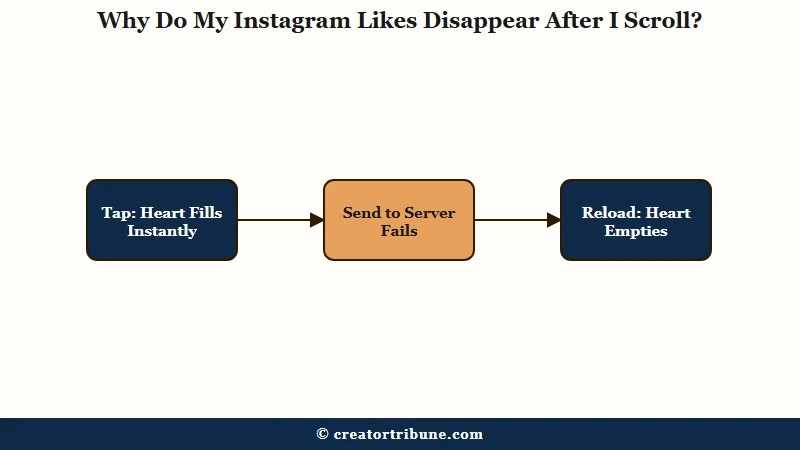
Instagram fills the heart the instant you tap, the design Fast Company described in 2012, and sends the like afterwards, so a failed send can leave a red heart with nothing behind it. In the September 27 thread, one reply links the reset to liking and saving the same post and says it has come back across three app updates. Another reply dates it to about a week earlier and gets around it by scrolling away, scrolling back and liking again.
The same complaint shows up earlier in 2026. A March 2026 thread describes Reels coming back unliked after a scroll, and a July 2026 thread asks why a Story like disappears when the Story is opened again.
Two failed likes on one post are my signal to stop tapping and work through the steps below. An action block usually shows a notice, so a silent reset on a post you can still see points at the app. This order starts with the free steps:
- Stop re-tapping the heart. Each tap sends another like request, and none of them repairs a broken send.
- Update Instagram. When something is not working, Meta recommends “updating your app to the latest version,” and some older versions are no longer supported.
- Restart and switch networks. Meta’s troubleshooting page says to restart the phone and try Instagram on both Wi-Fi and mobile data.
- Clear the app cache. Android has a Clear cache button in the app’s storage settings, and clearing Instagram’s cache covers the iPhone route, where you offload or reinstall instead and can lose unposted drafts.
- Test one like. Like a single post, close the app, and look for that post under Your activity.
- Report it. Tap Menu, then Help, then Report a Problem, and either shake the phone on the screen where the like fails or tap Report problem without shaking, as Instagram’s help explains.
Meta says a reinstall keeps your photos and profile info, but unposted drafts stored on the phone can go with it, so save them first and keep reinstalling as the last step. Tick Include Complete Logs and Diagnostics when you report, since the report then carries your network and crash logs.
A report only helps if someone can reproduce the fault. Here is the difference:
Vague: “likes not working pls fix”
Specific: “iPhone 15, latest iOS, Instagram updated today. In the home feed, when I like a post and then tap save, the like disappears within a second. Happens on Wi-Fi and on mobile data. Started around September 20. Screenshot attached.”
Why Can I Like Posts on My Phone but Not on My Computer?
Likes that fail only on a computer usually point to the browser session when the same account likes normally in the app.
Open instagram.com in a private window with extensions switched off and try one like, then log out and back in on your usual browser if the private window works.
Meta’s app help page notes that you “can always go to Instagram.com on the web” when the app misbehaves, and that makes the reverse test useful too. If likes stick on the web and reset in the app, the app is the problem, and the steps above apply.
Why Are Likes Disappearing From My Own Posts?
Likes can vanish from your own posts when the accounts that left them are deactivated or cleaned out as fake, which is a separate problem from being unable to like.
Instagram’s help says a temporarily deactivated profile has its “photos, comments and likes” hidden until the owner logs back in.
Meta’s help page also says it “may remove any likes or other engagement” that like-selling apps generated, which shrinks a post’s count without any action from you. The guide to why nobody likes your posts covers the engagement side of a falling count.
Why Does Instagram Say Try Again Later When I Like a Post?
Instagram says Try Again Later when it has put a temporary action block on liking, usually after a burst of likes, follows or other repeated actions in a short time.
Instagram publishes no like limit and no block length, so the dependable fix is to stop liking until the block lifts.
The notice reads “Try again later, we restrict certain activity to protect our community,” according to Elfsight’s breakdown, and it offers a way to tell Instagram it made a mistake. That option sends a report, and nothing on the notice promises a reply or an earlier end. Liking alone can set it off, and a reply in one September thread puts a block down to liking too many Reels on one person’s page.
Instagram does not publish how long a block lasts. In an r/Instagram thread about a repost block, the poster’s block lasted roughly a day and came back the next day for a shorter stretch. One reply there says the same block lasted two weeks, and another person cleared theirs by staying off Instagram for 48 hours.
A third reply says these blocks cannot be appealed and have to be waited out. The guide to how long action blocks last goes through the common patterns in more depth.
Every like limit you will find online is a community estimate. Community pacing tables put a mature account’s safe zone at a few hundred likes a day, and since Instagram has never confirmed a figure, I treat any single number as a rough guide.
My rule on a block is one full day with zero likes, then a single test tap on a post from an account I follow. Every extra tap during a block is one more repeated action, which is the behavior the block is there to slow down.
The same fixes get recommended for glitches and blocks, and they do not work equally on both:
| Step | Helps with an app glitch | Helps with an action block |
|---|---|---|
| Update the app | Yes, Meta’s first step for a broken feature | No, the block sits on your account |
| Restart, switch networks or clear the cache | Sometimes | No |
| Turn on a VPN | No | No, the block is tied to your account |
| Keep tapping to test | No | No, it adds more repeated actions |
| Stop liking until it lifts | No | Yes, a block ends with time |
| Remove apps that have your login | No | Yes, when an app caused it |
Does Account Status Show an Instagram Action Block?
Account Status often shows nothing during a Try Again Later block, because Meta describes it as a record of removed content and features you can’t use, and a short pop-up limit may never appear there.
In a September 19 thread where a feed and activity log stopped refreshing, a reply calls action blocks “a separate penalty system” and says that is why Account Status shows “all green check marks.”
So a green Account Status does not mean you are clear to like again. The restriction that does appear there is covered next.
What Does “You Can’t Interact With Certain Accounts” Mean on Instagram?
“You can’t interact with certain accounts” is an Account Status restriction that limits how you engage with some accounts, which can include liking their posts, until a set end date.
It shows in Account Status with that date, and the Features you can’t use section there is where Instagram lets you appeal.
Instagram gives little detail on the trigger. One August restriction of this kind “mentioned something about not following Instagram policies or possibly performing some action multiple times,” lasted about two days, and then came back while the account sat nearly idle.
Meta’s Transparency Center says Account Status shows “some restrictions your account might have and how long they’ll last.” Lengths vary, and the poster of one that began August 21 could still request a review on September 14, with five days left to do it.
Read the date slowly, because the screen is easy to misread. One status screen read “ends on august 21st” when August 21 was the day the restriction started. Another restriction still showed as active on September 17, 16 days after its September 1 end date, while liking, commenting and messaging all worked normally.
I don’t buy the idea that the banner’s color is the final word, and I test with one like the day after the end date passes. Here is the full sequence:
- Open your profile, tap Menu, and tap Account Status under More info and support, per Instagram’s Account Status page.
- Open Features you can’t use and note the restriction and its end date.
- If the restriction is a mistake, request a review from there. Instagram may ask for a video selfie, and selfie verification problems has the fixes if that step fails.
- Stop the activity the restriction names until the end date passes.
- After the end date, test with one like instead of waiting for the banner to change.
Does Instagram Use the 1, 3, 7 and 30-Day Strike Ladder?
No, the 1, 3, 7 and 30-day restriction ladder belongs to Facebook, and Meta says those restrictions apply only to Facebook accounts even though it counts strikes on both apps.
Meta’s restricting-accounts page puts it plainly: “while we count strikes on both Facebook and Instagram, these restrictions only apply to Facebook accounts.”
Guides that quote the ladder for Instagram likes are borrowing Facebook’s rules. On Instagram, the date to trust is the one Account Status shows.
Can Third-Party Apps Get Your Instagram Likes Blocked or Removed?
Yes, apps that trade likes or followers for your Instagram login can get likes removed and parts of your account limited, and Meta says so on its own help page.
Its page on apps that offer likes warns “we may remove any likes or other engagement that they generated.”
The same page says accounts that keep using those apps “may notice that certain parts of their Instagram account are limited,” and tells you to change your password if you shared it. One September restriction came after its owner used a follower-tracking app.
Meta’s page is written about apps that sell likes and followers, but its advice covers any app that asks for your password: “you shouldn’t use these apps or let anyone else access your Instagram account.”
Clearing this takes about ten minutes: change your password, then remove the app. On a computer, Meta’s steps run from More to Settings to Website permissions to Apps and Websites to Active, where each app has a Remove button, per Instagram’s help.
Removing an app only stops it reaching your non-public information from then on, and Meta notes it “may have stored information from when you were using it.” I go through that Active list every few months and remove anything I no longer recognize, which takes me two minutes.
Is Instagram Down or Is the Problem Only on My Account?
A like failure that hits everyone at once is an Instagram outage that clears when Instagram fixes it, while one only you see starts on your own account or app.
Check whether Instagram is down and ask a friend to like a post before you change anything.
Instagram has tried warning people about outages itself. TechCrunch reported in October 2021 that Instagram began testing outage notices in the Activity feed for US users, sent when people “are confused and looking for answers” and not for every outage.
Even where that test reached, a quiet Activity feed does not rule out an outage. I give a suspected outage an hour before touching my phone’s settings, since a fix on Instagram’s side makes every local step wasted time.
Quick Takeaways
- Check Your activity, then Interactions, then Likes first, because a post that is still up but missing from that list never kept your like.
- A heart that turns red and resets after a scroll is usually an app glitch, and an update plus a Report a Problem with logs is the fix.
- A Try Again Later notice is an action block with no published length, and a full day of zero likes is the first thing to try.
- “You can’t interact with certain accounts” shows an end date in Account Status, and one like after that date is the test to trust.
- Apps that sell likes or followers can get likes removed, so change your password and remove them under Website permissions.