Instagram Account Locked and What Really Gets You Back In
Instagram Account Locked and What Really Gets You Back In
Instagram account locked? Here is what each lockout screen really means, the fix that matches it, and the one case Meta says it cannot undo.
- 1What Does It Mean When Your Instagram Account Is Locked?
- 2Why Did Instagram Suddenly Lock My Account?
- 3How Do You Get a Locked Instagram Account Back?
- Why Does Instagram Say Your Email May Not Be Secure?
- What If Instagram Asks You to Choose 2 Friends to Confirm Your Identity?
- 4Why Is Instagram Not Sending My Security Code?
- 5What Happens If You Lost the Email and the Phone Number?
- 6Is That Lockout Warning Even Real?
- 7Which Popular Fixes Should You Avoid?
- 8How Long Does an Instagram Lockout Last?
- 9Quick Takeaways
TL;DR: An Instagram account locked for suspicious activity is usually held at a security checkpoint, which clears once you complete the code or identity step on a device you already use. Two other screens trap people in loops, “Your email may not be secure” and “Choose 2 friends on Instagram who can confirm your identity,” and each has reported workarounds below. One case Meta says in writing that it cannot restore.
Your Instagram account is locked, the app is showing a screen you have never seen before, and the advice you can find splits between “just tap Continue” and “your account is gone forever”.
Neither is much use when you are staring at a code field that keeps rejecting you.
The reason most guides fail here is that they treat “locked” as one problem. It is at least four different states wearing the same word, and each one has a different exit. Send the wrong fix at the wrong screen and you burn attempts, trigger a cooldown, and make the next try harder.
One lock screen in particular has spread fast this year. Reddit’s own search, run on October 3, 2026, returns 49 threads from 48 different accounts in r/Instagram and r/InstagramSupport describing the “Your email may not be secure” screen over the past twelve months. Twenty-three were posted in August and September 2026, and four more arrived in the first three days of October.
A second loop, at the step that asks two friends to vouch for you, kept turning up in the same forums through September. This piece sorts the screens first and then gives the fix that matches each one, because the screen decides everything that follows. It also flags the two popular fixes the sources disagree about, and the one dead end Meta documents plainly.
What Does It Mean When Your Instagram Account Is Locked?
An Instagram account locked by the security system is a temporary checkpoint holding your login until you prove the attempt is yours. It is different from a disabled or suspended account, which is a policy decision about your content and follows a separate appeal path.
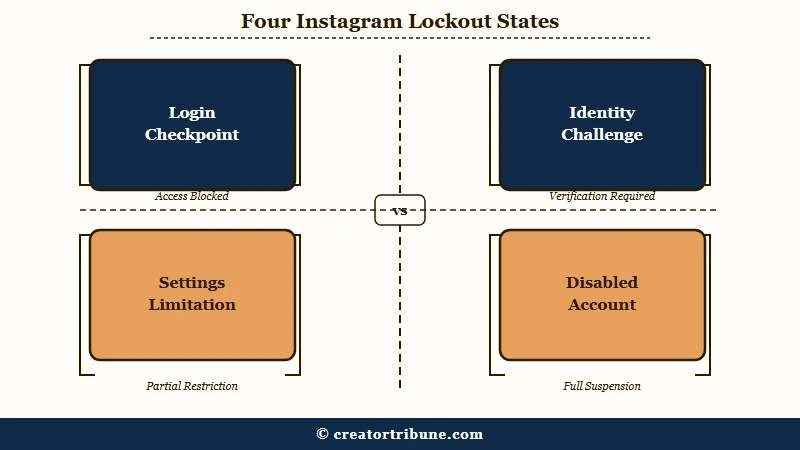
The word “locked” gets applied to at least four states, and the first split to make is checkpoint versus policy. A checkpoint is automated, reversible, and often clears the same day. A policy action is a human or automated judgement about rule-breaking, and no amount of code-entering will move it.
One of the four, the settings limitation, gets mistaken for a full lockout constantly. Instagram documents a mode where you can still use the app normally and only the settings are restricted.
| State | What you see | Is it a ban? | Where it ends |
|---|---|---|---|
| Login checkpoint | “Suspicious login attempt” with a code prompt | No | Enter the code, often minutes |
| Identity challenge | Request for a video selfie or an ID | No | Review, then a password reset email |
| Settings limitation | App works, security settings greyed out | No | A few days, or a recognised device |
| Disabled or suspended | A policy notice with an appeal button | Yes | Appeal only, different process |
If the notice you are looking at names a policy or Community Guidelines, you are in the fourth row and this is the wrong article. The recovery path for a disabled Instagram account runs through appeals, not codes. Readers in India whose appeal is refused have one more step, the India grievance route through Meta’s grievance officer and the Grievance Appellate Committee.
Why Did Instagram Suddenly Lock My Account?
Instagram locks accounts when its automated systems see a login or a behaviour pattern that does not match your history. The most common triggers are a login from an unrecognised device or location, a burst of rapid follows or likes, and a third-party app connected to your account.
Nothing has to go wrong on your side for this to fire. Travel, a new phone, a VPN, or a public network can all register as an unfamiliar login. A lot of people assume a lock means they were hacked when the real cause was moving country.
The state that surprises people most is the mildest one. Instagram’s documentation on limited settings access says that after a login from a device or web browser it does not recognize, it will “limit access to certain security and account settings for a few days.”
That is a restriction on settings, not on the account. Feed, posting and messages keep working, and Meta gives a direct route around it, which is to log in from a device or browser you normally use. Anyone treating that screen as a full lockout is solving a problem they do not have.
Third-party apps deserve their own warning. Meta’s page on why Instagram says an account is at risk names two causes: a password exposed in a data breach elsewhere, and an account “synced with an unauthorized third-party app.” Two people stuck at the email screen in August and September 2026 said it started after they used an unfollower-tracking app.
If the pattern is that you get thrown out over and over rather than held at a checkpoint, that is a separate fault with its own causes, covered in the guide on repeated Instagram logouts.
How Do You Get a Locked Instagram Account Back?
Start at the login screen with the account’s own recovery flow, complete the code step on a device you have used before, and reset the password once you are in. Escalate to identity verification only when the code path is unavailable.
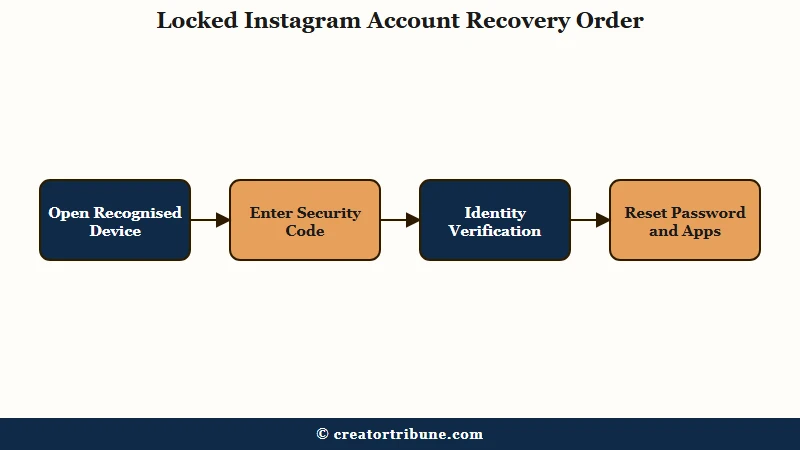
Order matters more than people expect, so work through this sequence rather than tapping whatever is brightest on screen.
- Open the app on a phone that has logged into this account before. A recognised device clears more checkpoints than any other single factor.
- Enter your username and tap the recovery prompt, then choose the code delivery you can definitely receive right now.
- Enter the code once, carefully. Repeated requests are what trigger a cooldown and slow everything down.
- If neither the email nor the phone reaches you, look for Try another way, Need more help? or I can’t access this email or phone number. Instagram’s help pages use all three labels, and each opens more recovery options, ending in a support request and an identity check if nothing else works.
- Once you are back in, reset the password and check which devices and third-party apps still have access.
Step one carries the most weight. Meta’s December 2025 recovery update says its systems now “recognize the device you usually use and familiar locations better than ever.” On that device, a checkpoint can clear in a minute instead of turning into a multi-day identity review.
That is not a guarantee. A November 3, 2026 poster was told “Try another device to continue” on the same Samsung phone they had used hours before the lock.
If the identity route is where you have landed and the selfie keeps failing, the specific failure modes for that step are covered in the walkthrough on Instagram selfie verification.
Why Does Instagram Say Your Email May Not Be Secure?
“Your email may not be secure”, also shown as “Your email address may not be secure”, is a forced security prompt that blocks the app until you add a different email address. People see it right after a hack and on accounts nobody touched, and changing the email does not always clear it.
The full screen reads “The email address associated with your account may be at risk. Add a different email now to secure your account,” according to a September 12, 2026 report from someone hacked ten days earlier. Posters describe a window that cannot be dismissed, so the Update email address button is the only way forward.
That button is where the loop starts. People describe it answering “This content is no longer available,” rejecting a correct code with a temporary error, or sending the code to the old address, as in a September 19 thread. In a September 30 thread, the email change failed with a technical-error message the day the poster was logged out after a hack.
Instagram’s own rules may explain the old-address part. Its help page on email changes says that when the email is changed from the profile page, both addresses get an email, the new one to approve and the old one to reverse.
A search of Instagram’s help center on October 3, 2026 found no article for this exact screen. These are the fixes posters report working, none of them confirmed by Meta:
- Open instagram.com/hacked in a private browser window, take the code by email, set a new password, then log in on the app with it. A commenter in the September 30 thread said this cleared the block, and the page still opened Instagram’s hacked-account form on October 3, 2026. Several other posters, including the one who started that thread, say the same page did nothing for them, one in a private window on October 3.
- Change both the password and the email in Accounts Center on the web, remove the old address, and log out of all devices. That fix comes from an August 12 thread with 72 comments, where several replies say it did not work for them.
- Wait it out. Several posters say the screen lifted by itself after two to four days, including one on August 4, while others say it came back a day later.
What If Instagram Asks You to Choose 2 Friends to Confirm Your Identity?
The two-friends step is an identity check Instagram opened to everyone in December 2022. You pick two Instagram friends, each one gets a request, and if both respond within 24 hours, Instagram lets you reset your password.
Instagram announced it in a December 15, 2022 post: “you will be able to choose two of your Instagram friends to verify your identity and get back into your account.” Engadget reported the same day that friends get 24 hours to respond.
Reports of the step stalling go back to at least June 2026, and a November 3 poster still hit it on a computer, where “Get help from friends” led straight back to the login screen. One poster on September 24 passed two-factor checks by phone and by email, then hit “Choose 2 friends on Instagram who can confirm your identity.” Every tap on Continue sent them back to the login page, for more than 60 hours.
Others got further and still stalled. A September 21 poster picked two friends, then watched the app sit at “Requests for help pending” while neither friend received anything. A September 9 poster had both friends confirm and still could not log in.
If the step loops or stalls, try these in order:
- Tap Try another way. The September 24 poster was offered a backup code or a code by text or email there, and with two-factor authentication on, a saved backup code works even when a code cannot be delivered.
- Open instagram.com/hacked on your phone and choose the hacked option. A commenter under the September 24 post reached the full recovery menu after choosing the hacked-account option on their phone, selfie video included. Neither path got them in, because the friends request never sent after two 48-hour waits and the selfie stuck on a loading screen.
Why Is Instagram Not Sending My Security Code?
When Instagram’s security code does not arrive, check four blockers in order: a filtered email folder, a blocked SMS shortcode on your phone, a code sent to WhatsApp instead of text, and a rate limit from repeated requests.
The shortcode one catches people out because nobody remembers doing it. Android Authority notes the number Instagram sends from “used to be 32665, but apparently, it has changed to 32099”, so check your blocked-numbers list for both rather than assuming one is current.
WhatsApp is the newer route, and it only reaches you if that number runs WhatsApp. Instagram’s two-factor help page lists WhatsApp as a login-code method you can switch on only after text messages. If the code went to WhatsApp, open WhatsApp on the phone with that number, or tap Try another way for a text or email code.
That route can misfire. A September 28, 2026 poster said Meta kept sending security codes to a WhatsApp account on their number, even though they do not have the app.
Requesting the code again and again is the trap to avoid. Each extra request pushes you further into a cooldown, and the fix people reach for is the thing making it worse.
| Symptom | Likely cause | Fix |
|---|---|---|
| No SMS after several tries | Shortcode blocked on the handset | Check blocked numbers for 32665 and 32099 |
| Email code never lands | Spam, promotions or a filter rule | Search all folders for the sender, not the subject |
| Code arrives but is rejected | Expired, or you requested a newer one | Use only the most recent code, then stop requesting |
| Nothing at all, on either channel | Rate-limited after repeat attempts | Wait several hours before the next attempt |
| Code goes to WhatsApp | WhatsApp is on as a login-code method, or linked to that number | Open WhatsApp on that number, or tap Try another way |
What Happens If You Lost the Email and the Phone Number?
Meta’s help page says that if you cannot reach the registration email and never linked the account to Facebook, it is “unable to give you access to the account.” The same page still lists one support request worth filing before you accept that.
The wording is on Meta’s own help page about losing your contact details. “If you can’t access the email account you registered with and didn’t link your Instagram and Facebook accounts, we’re unable to give you access to the account.” Meta adds that “Instagram can’t provide any assistance with helping you get back into your email account.”
The support request sits in that page’s app steps. Tap Forgot password?, enter your username, tap Try another way, then No longer have access to these?, and follow the prompts.
For an account with photos of you, the check that follows is a video selfie of you turning your head, according to Instagram’s hacked-account help page. For an account without photos of you, the same page asks for the email or phone number you signed up with and the type of device you used. Meta says the video “will never be visible on Instagram and will be deleted within 30 days,” and a check that fails can be retried with a new video.
There is a second trap on the contact-details page. The standard advice is to change the email or phone number on your profile, and Meta’s own precondition kills it for locked-out users: “Before you begin, make sure you can already access Instagram… If you can’t access Instagram and reach your Instagram profile settings, you won’t be able to continue.”
That advice is real, and it is preventive rather than curative. Doing it now, while you can still log in, is what keeps you out of the dead end later. Linking the account to Facebook does the same job, because that link is the exact condition Meta names as the difference between recoverable and not.
For anyone building a following, this is the argument for not renting your entire audience from one company. A simple owned landing page for creators with an email list behind it means a lockout costs you a channel, not the relationship.
If you do end up starting over on a new account, many creators hand the posting schedule to an automation tool. SMTasker is one that runs Instagram, TikTok and Threads accounts on real Android devices, with a trial before you pay. A brand-new account still has to clear the same checkpoints, so let it settle before you automate anything, and keep the automation to posting.
Is That Lockout Warning Even Real?
Not always, because scammers now copy the exact language Instagram uses for genuine security alerts, and a 2026 wave uses AI to make the fake version far more convincing than the old generic phishing text.
The old advice that you can spot these by their bad spelling no longer holds. Research from McAfee, reported in The Guardian and PetaPixel in August 2026, found that freely available AI models could work out where a holiday photo was taken from background cues alone. One model reached 87% accuracy and another 91%, without any location data attached.
That gets turned into a message naming the place you genuinely just visited. The example given in the reporting reads “We detected unusual activity while you were traveling in Costa Rica”, followed by a prompt to verify immediately.
The defence is boring and it works. Never action a security alert from the link inside it, and open the app yourself instead. A real checkpoint will be waiting for you in the app; a fake one only exists in the message.
Treat anything posing as the Meta AI support assistant the same way. Meta’s assistant page says its chats “can only be initiated by a user,” so a support chat you did not open yourself is not from Meta.
Check the sender too. Instagram’s help page on its emails says security mail comes only from five domains, including @mail.instagram.com and @support.instagram.com. Once you are back in, Recent emails, under Login and security in your Meta Account settings or in Accounts Center on accounts Meta has not moved yet, lists the security and login emails Instagram sent in the last 14 days.
The same rule kills the paid-recovery scams that circle this problem. Meta has fired staff over misuse of an internal account-restoration tool, as CNET reported in 2022. The market that grew around it is exactly what anyone selling you an “inside contact” is pretending to have.
If your account was genuinely taken over rather than checkpointed, the hacked account recovery route is the real path.
Which Popular Fixes Should You Avoid?
Two of the most-repeated fixes for a locked account are contested by the sources recommending them. Turning on a VPN and using a private browsing window both appear as advice and as warnings, and during an active verification in the app, neither is worth the risk.
The VPN split is the clearest. One set of guides suggests changing your IP to get around a block, while others say to switch any VPN or proxy off before you try again. Meta’s recovery update counts “familiar locations” among the signals its systems recognize, so a VPN that puts you in another city takes one of them away.
The safer rule is to sit on the plainest possible connection until you are back in. Home wifi, no VPN, the usual phone. Every layer you add is another thing the risk system has to forgive.
Private and incognito windows carry the same disagreement. Some guides recommend them to dodge cached-session errors, while others warn that the session cannot persist the way a verification flow expects. The exception is instagram.com/hacked, the separate recovery form, where a commenter in a September 30, 2026 thread used a private window to clear the email loop.
Reinstalling the app is the other one to leave alone mid-checkpoint. It clears the local session without touching the server-side hold, so the checkpoint is still there and you have added a fresh unrecognised install on top of it.
How Long Does an Instagram Lockout Last?
A code-based checkpoint ends the moment you enter a valid code. A settings limitation after an unrecognised login runs a few days by Meta’s own description. An identity review is the slow one, because it depends on a queue rather than on anything you do.
Meta publishes no timing or absolute success rate for identity reviews, so treat any page quoting exact odds with suspicion. The closest official figure is relative. In its December 2025 recovery update, Meta said it had raised the relative success rate of hacked-account recovery by more than 30% in the US and Canada.
What Meta does describe for the selfie review is the shape of the outcome rather than the timing. You lose access while the review runs, and a successful review may come back as an email with a password reset link, not as an instant unlock. Waiting for the app to start working again is how people miss the email that ends the lockout.
The Meta AI support assistant is the newest route, but its help for locked-out accounts is still narrow. Meta’s assistant page, read on November 4, 2026, says it is “available globally for all user support topics” for logged-in users, while help for people who cannot log in covers only “select cases in the U.S. and Canada.”
If you can still open the app, Instagram puts it under Settings and activity, then More info and support, though the same page lists password resets and account recovery as actions live on Facebook and “coming soon to Instagram.” One person stuck at the email screen on September 11 said the assistant returned “This content is no longer available.”
Instagram’s AI recovery route has also been abused. In a breach letter filed with Maine’s attorney general, Meta said attackers took over 20,225 Instagram accounts through High Touch Support, an AI-assisted recovery tool that sent password reset links to email addresses that had never been on the account, as BleepingComputer reported on June 8, 2026. The letter says the reset let an attacker in when the owner had not turned on two-factor authentication, and that Meta disabled the tool and would fix the email check before bringing it back.
A lock holds access rather than deleting anything, so your posts and followers are still there when it lifts. Deleting an account is a separate request with its own confirmation screens.
If you deactivated the account yourself at some point and the confusion is about whether it is coming back at all, that is a different question answered in the guide to reactivating an Instagram account.
Quick Takeaways
- Match the fix to the screen, because a code checkpoint, an identity review and a policy suspension look similar and end in completely different places.
- A recognised device clears more checkpoints than anything else you can do, so wait for your usual phone rather than borrowing one.
- Requesting the code repeatedly can turn a short lockout into a long one, and if two-factor is on, a saved backup code skips delivery entirely.
- Turn on two-factor authentication once you are back in, since Meta says the attackers who abused its AI recovery tool in 2026 got into accounts that did not have it.
- If “Your email may not be secure” or the two-friends step loops, instagram.com/hacked is worth one careful try, though for many posters it changed nothing.
- Link your Instagram to Facebook today, since Meta names that link as the difference between a recoverable account and one it says it cannot restore.
- Treat any security alert that arrives as a message with suspicion, open the app yourself, and check that the sender uses one of Instagram’s five security domains.