TikTok Something Went Wrong and How to Tell Which Fix Works
TikTok Something Went Wrong and How to Tell Which Fix Works
TikTok says Something Went Wrong for several unrelated reasons. Learn the two tests that tell you which one you have before you clear anything.
- 1What Does Something Went Wrong Mean on TikTok?
- 2Is It TikTok’s Servers or Your Device?
- 3Why Does the Error Come Back Every Few Minutes?
- 4How Do You Fix Something Went Wrong on TikTok?
- 5Why Does TikTok Say Something Went Wrong for Everyone at Once?
- 6Which Fixes Do Nothing at All?
- 7Frequently Asked Questions
- Does something went wrong mean I have been banned on TikTok?
- Why does TikTok say something went wrong when I try to log in?
- Why does the error keep coming back every 15 minutes?
- Will clearing my cache fix something went wrong?
- How do I know if TikTok is down rather than broken for me?
- Does using a VPN cause this error?
- 8Quick Takeaways
TL;DR: TikTok shows “Something went wrong” as a single fallback message covering six unrelated failures, from a screen time gate to an Oracle data center fault. Two quick tests, a private window and a second network, tell you which one you have in about thirty seconds.
TikTok something went wrong is the least helpful sentence the app can show you. It appears when you open the app, when you try to log in, when you tap a comment section, and when you upload.
Same message every time, and it tells you nothing about which of those situations you are in.
That vagueness is why the standard advice fails so often. Nearly every guide answers with the same list: clear your cache, update the app, reinstall. Those steps fix one of the causes below and do nothing for the other five.
The first thing I check is whether the error follows me across networks and browsers. That one question splits the causes into two groups and saves a lot of pointless tapping.

What Does Something Went Wrong Mean on TikTok?
“Something went wrong” is a generic fallback message, not a diagnosis. TikTok shows it whenever a request fails without a specific error code to display, which is why the same words cover outages, network blocks, browser conflicts, screen time limits, broken app installs, and account states.
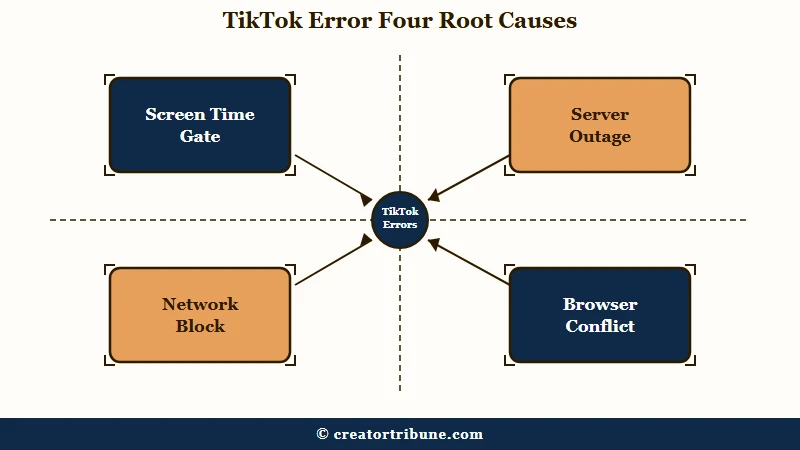
TikTok has never published a help page that names this error. Its support articles render entirely in the browser, so the text never appears in the page source, and the phrase itself is absent from the troubleshooting pages people are pointed to.
That absence is the reason the top search results are a Reddit complaint thread and a set of auto-generated video pages rather than documentation.
This is the vaguest error I deal with on any major app, and the vagueness is doing real damage. When the message gives no code, people fill the gap with the scariest explanation available, which is usually a ban.
Search suggestions around this error include “how do you tell if you’re blocked on TikTok” and “how do you know if TikTok banned you”. Most people asking those questions are looking at a network fault or a timer, not a moderation decision.
| Symptom | Likely cause | Fix |
|---|---|---|
| Fires every few minutes while scrolling, identical on Wi-Fi and mobile data | Daily screen time limit gate | Change screen time settings from the website, not the app |
| Comments will not load, view counts missing, uploads stall, friends affected too | Server-side outage | Wait it out and check TikTok or Oracle status posts |
| Works on mobile data but not your home Wi-Fi | Network filtering, proxy or DNS fault | Restart the router, turn off any VPN, test another network |
| Works in a private window but not a normal tab | Browser cookies, cached site data or an extension | Clear site data, disable ad blockers one at a time |
| Only the desktop app fails while the website is fine | Local app install | Repair, reset or reinstall the app |
| Appears at login or just after an appeal | Account state | Stop retrying and let the lockout expire |
Is It TikTok’s Servers or Your Device?
Two tests answer this. Open TikTok in a private or incognito window, and open it on a different network such as a mobile hotspot. If it works in either one, the fault is local and no amount of waiting will help.
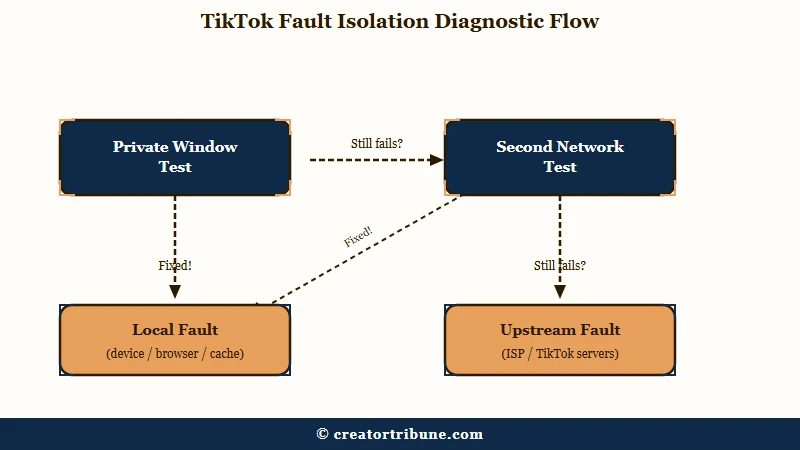
I run both before touching a single setting, because they cost thirty seconds and they split the table above into local faults and everything else.
A private window loads without your stored cookies, cached files, or extensions. If TikTok behaves there, the problem is one of those three things and nothing to do with TikTok itself.
A second network is the other half. If the app works on your phone’s mobile data but fails on home Wi-Fi, your browser is fine and your account is fine, and the block sits in the router, a proxy, a DNS setting, or a network filter.
| Test | What you do | If it works there | What to fix |
|---|---|---|---|
| Private window | Open tiktok.com in incognito or a private tab | Your stored cookies, cache or an extension is the cause | Clear site data, then disable extensions one at a time |
| Second network | Switch to a mobile hotspot or different Wi-Fi | Your original network is filtering or misrouting traffic | Restart the router, disable VPN, check proxy settings |
| Both fail everywhere | Try a second device on a third network | Nothing local is wrong, the fault is upstream | Nothing on your end, wait for the platform |
Before: clear the cache, reinstall the app, change your password, then repeat all three when the error returns an hour later.
After: open a private window and a hotspot first, then fix only the layer those two tests point at.
Whichever layer the tests point to, the repair belongs there. If it is the browser or the desktop client, the walkthrough for TikTok not working on PC covers the sequence in more detail.
Why Does the Error Come Back Every Few Minutes?
A repeating error that fires every ten to fifteen minutes of scrolling, behaves identically on Wi-Fi and mobile data, and clears when you close the app is usually a screen time limit surfacing as a generic failure rather than as the time prompt it should be.
This is the cause that surprised me most, because it looks nothing like a settings problem. There is no countdown, no “you have reached your limit” screen, just the same generic message on a timer.
TikTok applies a default 60-minute daily screen time limit to every account held by someone under 18, and when that limit is reached the user is prompted to enter a passcode and make an “active decision” to keep watching, according to PBS NewsHour.
For accounts under 13, a parent or guardian has to enter a passcode to grant 30 minutes more.
What is a screen time gate: A time-based interruption that pauses the feed and asks for a passcode before you can continue scrolling.
The trap is what happens when that passcode prompt fails to draw. The gate still fires on schedule, the app still stops you, and the fallback message is what you see instead. Users hitting this report the same loop: opening screen time settings to switch it off throws the identical error, so the control you need sits behind the thing that is broken.
The way out is to leave the app entirely. Sign in to your account on tiktok.com in a browser and change the screen time settings there, where the gate is not intercepting you.
Some people find the setting already off and the interruption still running, which points at a stale limit on the account rather than on the device.
How Do You Fix Something Went Wrong on TikTok?
Work outward from the cheapest test to the most disruptive fix. Run the private window and second network tests first, then repair only the layer they implicate, and leave reinstalling until last because it signs you out of a session you may need.
Here is the order I use, and the ordering matters more than any individual step:
- Force close the app and reopen it once. Confirm the error repeats before doing anything else.
- Open tiktok.com in a private window. If it loads, stop and fix your browser data or extensions.
- Switch to a mobile hotspot. If it loads, stop and fix your network, router or VPN.
- Check whether the error arrives on a timer while scrolling. If it does, change screen time settings from the website.
- Ask one other person whether the app is behaving. Widespread comment and upload failures mean a platform fault.
- Only now clear the app cache, and only if steps two through five all came back clean.
- Reinstall last, and only if the app fails while the website works normally.
Step six is deliberately late. Clearing the cache is the single most recommended fix for this error and the least likely to be the right one, though it does have its place, and clearing the TikTok cache without losing drafts is worth doing properly when you get there.
If the app is closing itself rather than showing an error, that is a different fault with its own causes, and TikTok keeps crashing is the closer match.
Why Does TikTok Say Something Went Wrong for Everyone at Once?
When the whole platform is struggling, the error arrives alongside missing view counts, comments that will not load, and uploads that stall. Those symptoms together are server-side and no local fix touches them.
TikTok’s US operations moved to a new owner on 22 January 2026, when the joint venture with Oracle, Silver Lake and MGX closed, with Oracle hosting US user data for the platform’s 170 million US users. ByteDance retained 19.9 per cent.
That transition came with visible instability. A winter storm knocked out power at US data centers days after the handover, leaving people unable to upload videos or see view counts.
On 3 March 2026 a technical error in Oracle’s Ashburn environment caused connection timeouts and increased latency, confirmed by both companies, with creators warned they might see lags in posting.
I do not buy the assumption that a platform-wide wobble means your account has been touched. When search results thinned out during the January outage, plenty of people read it as suppression, and the data center losing power was the duller and more accurate explanation.
Scope is the tell. An account problem leaves your friends scrolling normally while you stare at the message, and an infrastructure problem takes down everyone on the platform at the same moment, which is what checking if TikTok is down is for.
Which Fixes Do Nothing at All?
Four widely shared fixes for this error have no mechanism behind them: clearing a desktop app’s cache to fix a browser problem, running Windows TokenBroker commands, chasing minimum browser versions, and treating a Singapore seller guide as global policy.
My rule here is that a fix needs a mechanism I can name, and these four do not have one.
Clearing the Windows app cache cannot repair tiktok.com in a browser. The website stores its cookies and cached files in the browser, so emptying an unrelated app’s storage leaves every one of them untouched.
The net stop TokenBroker command circulating in PC fix guides resets a Windows authentication service used by Microsoft Edge profiles. It does not touch TikTok credentials or TikTok’s servers.
Chasing a minimum supported browser version is a dead end too, because no current minimum is published for Chrome, Edge, Firefox or Windows. The related claim that TikTok requires Chrome traces back to a TikTok Shop Academy seller login guide written for Singapore and dated August 2023, which was never a global requirement.
The same pattern shows up on other platforms, and the same error on Instagram collects an almost identical pile of fixes that cannot work.
Frequently Asked Questions
Does something went wrong mean I have been banned on TikTok?
Rarely. A ban or restriction normally names itself, and this message is a generic fallback. If friends see the same failures at the same time, it is a platform fault, not your account.
Why does TikTok say something went wrong when I try to log in?
Login failures usually come from stored browser data, a network block, or a lockout after repeated attempts. Try a private window first, then a different network before changing your password.
Why does the error keep coming back every 15 minutes?
That timing pattern points at a daily screen time limit firing without its passcode prompt. Change the screen time setting from tiktok.com in a browser rather than inside the app.
Will clearing my cache fix something went wrong?
Sometimes, but it is the wrong first move. Cache only explains a narrow set of failures, and it does nothing for outages, network blocks, or screen time gates.
How do I know if TikTok is down rather than broken for me?
Missing view counts, comments that will not load, and stalled uploads happening together are server-side. Confirm by asking someone on a different network and device.
Does using a VPN cause this error?
It can. VPNs and proxy settings reroute traffic in ways TikTok sometimes rejects, so turn any VPN off and retest before assuming the fault is with the app.
Quick Takeaways
- “Something went wrong” covers six unrelated failures, so treat it as a starting point rather than a diagnosis.
- Run the private window and second network tests first. Thirty seconds of testing rules out most of the causes.
- An error that repeats on a timer while scrolling is a screen time gate, and the setting is reachable from the website when the app blocks it.
- Missing view counts and stalled uploads across your whole feed mean a platform fault, not your account.
- Save cache clearing and reinstalling for last, because they are the most disruptive steps and the least likely to be the cause.