How to Know if Someone Blocked You on Instagram or Deactivated
How to Know if Someone Blocked You on Instagram or Deactivated
Blocked, or did they just deactivate? Here are the exact signals that tell you someone blocked you on Instagram, and how to be sure.
- 1How to Know if Someone Blocked You on Instagram
- 2What the Incognito Test Really Proves
- 3Blocked vs Deactivated vs Deleted vs Restricted
- What Does “Instagram User” Mean on Instagram?
- How to Tell a Deleted Account From a Deactivated One
- 4What Happens to Your Old Likes, Comments, and DMs
- 5Does Instagram Tell Someone When You Block Them
- Can You Block Someone Who Already Blocked You?
- 6Frequently Asked Questions
- How do you know if someone blocked you on Instagram or deactivated?
- Does Instagram notify you when someone blocks you?
- What does a blocked person see on your profile?
- Do your messages disappear when you block someone on Instagram?
- Why does a profile say “User not found” if I was not blocked?
- 7Quick Takeaways
The Short Answer: If someone blocked you on Instagram, their profile throws a “User not found” error or a blank “No Posts Yet” page while you are logged in, yet it still loads in an incognito browser. If the account is gone for everyone, they deactivated or deleted it instead. Your old DM thread is worth a look too, though the “Instagram User” label it shows covers a block, a deactivation and a pending deletion alike.
Learning how to know if someone blocked you on Instagram sounds simple until you realize the app gives you the same blank error for four completely different situations. A block, a deactivation, a permanent deletion, and a temporary suspension can all show you “User not found,” so the error itself proves nothing.
Instagram passed 3 billion monthly active users in September 2025, so accounts drop out of your view constantly for reasons that have nothing to do with you.
That overlap is why people spiral. You see an empty profile, assume the worst about one specific person, and start refreshing like it will change.
The good news is that the four states leave different fingerprints once you know where to look. One test settles it on its own. The rest are supporting clues, and they need careful reading.
I write about creator platforms daily, and this is one of the most-searched Instagram questions there is. Below I walk through the exact block signals, the one test that settles it for good, and how to tell a block apart from a deactivated, deleted, or restricted account.
How to Know if Someone Blocked You on Instagram
You know someone blocked you on Instagram when their profile shows “User not found” or a blank “No Posts Yet” page with zero posts and zero followers, you cannot find them in search, and you can no longer tag or mention their username.
Any one of these is a hint. Together they are close to proof.
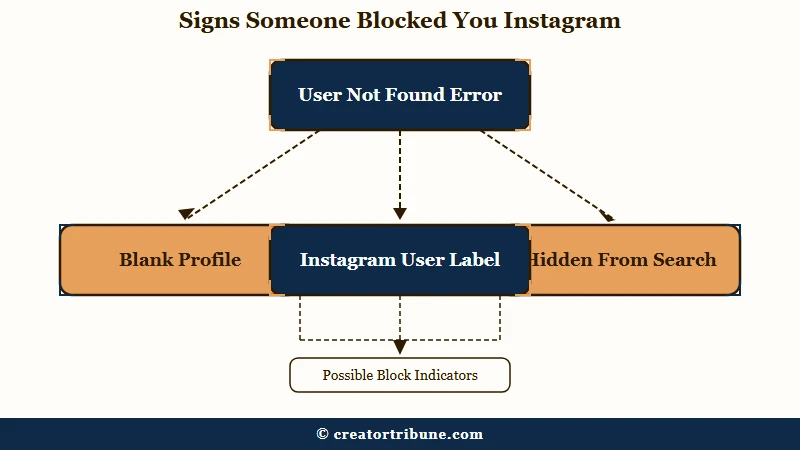
One in-app signal lives in your direct messages. If you had a chat with the person, open it and look at the name at the top. When a block is active, their name switches to the generic “Instagram User” and their profile photo vanishes, though the old messages stay put.
Read that label as a hint rather than a verdict. Instagram shows the same two words for a deactivation and for an account inside its deletion window, so it narrows the field without naming the cause.
The tagging test is my favorite quick check because it is hard to fake. Try to @mention the person in a comment or caption. If you are blocked, their username will not resolve into a working tag, and older tags of them may go grey.
What is a block on Instagram: A privacy action that hides your account from a specific person, removing their access to your profile, posts, stories, and the ability to message or tag you.
None of these signals is loud, and that is deliberate. Instagram never announces a block, so you are always reading indirect clues rather than getting a straight answer.
A single post that will not load is a weaker clue than it looks. A block takes the whole account out of view at once, so a lone “Post unavailable” message on a profile that still opens points to a deleted, archived or audience-limited post instead.
Here is a fast way to read the most common signals at a glance.
| Signal you see | Most likely meaning |
|---|---|
| Profile loads logged out but not for you | You are blocked |
| Profile is gone for everyone | Deactivated or deleted |
| DM name reads “Instagram User” | Blocked, deactivated, or mid deletion |
| DM name reads “deleted” plus random letters | Account deleted for good |
| Normal profile, but your comments show only to you | You may be restricted |
What the Incognito Test Really Proves
The incognito test proves whether an account still exists at all, which is the one thing that separates a block from a deactivation or deletion.
Open a private or incognito browser window, stay logged out, and go to instagram.com/theirusername.
Here is the logic I rely on. A block only hides the account from you, so a blocked person’s profile still loads normally for the logged-out public. A deactivated or deleted account, by contrast, is gone for everyone and returns “Sorry, this page isn’t available” no matter who looks.
Before: You see “User not found” on your phone and conclude that a specific person blocked you.
After: You open the same profile in a logged-out incognito tab, it loads fine, and now you know it is a block and not a deleted account.
If you would rather not fiddle with browsers, the friend method does the same job. Ask someone the person does not follow to search for the profile from their own account. If your friend sees a normal page and you see nothing, you have your answer.
Blocked vs Deactivated vs Deleted vs Restricted
Blocked hides an account from you only, deactivated and deleted hide it from everyone, and restricted quietly limits someone without hiding anything.
Telling them apart comes down to one test that works and several signals that only narrow the field.
The DM label narrows the field without settling it. A blocked or deactivated account usually shows as “Instagram User” in your inbox, while an account that has finished deleting often shows the word “deleted” followed by a string of random letters.
That random-letter version is the closest thing to a permanent answer. It only appears once the deletion has actually gone through, which can be weeks after the person tapped the button.
Do not read the Follow button as the divider between a block and a restriction. Restrict changes nothing about how a profile renders for you, because the restricted person keeps following the account and keeps seeing its posts and Stories.
What changes is your own side of the relationship. Your comments on their posts stop showing to anyone else until they approve them, your messages land in their message requests, and their activity status and read receipts disappear. I go through those signals in what Restrict means on Instagram.
| Account state | What their profile shows you | DM thread label | Visible to others? |
|---|---|---|---|
| Blocked | User not found or blank profile | Instagram User | Yes, visible to everyone else |
| Deactivated | Page isn’t available | Instagram User | No, hidden from everyone |
| Deleted | Page isn’t available | Instagram User first, then deleted plus random letters | No, and permanent once the cancellation window closes |
| Restricted | Normal profile, but your comments stay hidden | Normal name | Yes, they can still see you |
Some people also get a shortcut for one specific case. If you were mutual followers, open your own followers list and check whether a “Deactivated accounts” grouping appears there. Seeing the person in it points to a deactivation rather than a block, because a block leaves their account live for everyone else.
Treat a missing grouping as nothing at all, though. Instagram documents only a “Potential spam” filtered list in that tab, so treat the deactivated grouping as luck when it shows up, and skip it otherwise.
Here is the order I would run the checks in when the answer really matters.
- Open your old DM thread and read the name at the top, remembering that “Instagram User” covers a block, a deactivation and a pending deletion.
- Load their profile in a logged-out incognito browser to see if the account exists for the public.
- Ask a mutual-free friend to search for them as a second opinion.
- Check your Followers list for a “Deactivated accounts” grouping if you followed each other, which only some accounts see.
What Does “Instagram User” Mean on Instagram?
“Instagram User” is the placeholder Instagram shows when it cannot render a real username in a thread or a list, and it appears when the account is blocked, deactivated, or inside its deletion window. It describes what the app could not load, so it says nothing about why. That is why so many people read it as proof of a block.
Instagram does not explain the label anywhere I can find in its own documentation. Three Help Centre searches on 18 September 2026, for “Instagram User”, “why does it say Instagram User in my messages” and “profile name shows Instagram User”, returned no article covering the DM or profile label at all.
That gap shows in how inconsistently the label behaves. In a September 2026 r/Instagram thread asking this exact question, at more than 200 upvotes and 23 comments, one person described two of their own deactivated accounts: “I will log in on one day and it will Instagram User sometimes the next day it will show the account username.” They added that they could verify no block was involved, since both accounts were theirs.
Another reported the same flicker across three deactivated friends in a close friends list, where scrolling a name off screen and back again changed what it said. A third had been blocked, watched the thread switch to “Instagram User”, and confirmed the account was still live through an incognito window.
So the label is worth reading, just not as an answer on its own. When you need to know for certain, go back to the logged-out check above.
How to Tell a Deleted Account From a Deactivated One
From outside you usually cannot, because Instagram hides a deleting account from everyone for as long as 30 days before the deletion becomes permanent. A deactivated account looks identical from where you are standing.
Instagram’s deletion page says that after 30 days “your profile and all your information will be permanently deleted”, and that during those 30 days the content “is not accessible to other people using Instagram”. Two details on the same page undercut any firm countdown, though.
The first is that “the number of days that you can cancel an account deletion varies by region”, so 30 is not a universal figure. The second is that deletion “may take up to 90 days to complete” once it begins, which is why an account can sit in limbo far longer than a month.
The one hard number you can use is on the other side. Instagram allows deactivation only once a week, so an account that keeps vanishing and returning every couple of days is not being deactivated each time, and you are probably watching the label glitch.
What Happens to Your Old Likes, Comments, and DMs
When you block someone, Instagram removes their past likes and comments from your posts and freezes your DM thread, and unblocking does not bring the likes and comments back. Shared group chats are the exception, because both of you keep seeing each other’s messages there.
The engagement erasure is the part I see trip people up most often.
Your direct message history does not vanish, which is a common myth. The old thread stays visible in both inboxes, but neither side can send anything new once the block is live.
There is a real gap between the official rule and what users report. Instagram’s own guidance says blocking scrubs a person’s likes and comments from your content instantly, yet plenty of people find that a blocked user’s old likes still linger on their photos, likely a caching quirk. If you see leftover likes from someone you are sure is blocked, do not treat it as proof the block failed.
There is a separate case that is documented, and it is not a glitch. Instagram’s block page is written for the person doing the blocking, and it states that “people that you block can still see your likes and comments on posts that were shared by public accounts or accounts they follow”. Read from your side, that is why someone who blocked you can keep appearing in the likes on a public account’s post months later.
Group chats follow their own logic. Blocking someone does not remove either of you from a shared group, so Instagram asks whether you want to stay. Its own wording is that if you choose to stay, “you and the blocked person will be able to see each other’s messages in the group”, so the block does not follow you in there.
Does Instagram Tell Someone When You Block Them
No, Instagram never sends a notification when you block someone, so the person only finds out by noticing your profile has vanished or that their messages no longer land.
The action is silent by design, the same restraint that means you can never see who views your profile either. Instagram states it plainly on its blocking pages: “People aren’t notified when you block them”.
The block can reach further than one account, though. Instagram lets you block a person’s current account plus any other accounts they have or later create, and its blocking guide adds that the option skips any of their accounts you already follow.
That linked-account system operates at a scale most people never see. When Meta expanded blocking to cover a person’s existing accounts, not just new ones, it estimated the change would spare users from manually blocking around four million accounts every week. For anyone dealing with a persistent harasser, that is the feature quietly doing the heavy lifting.
It is not airtight. Neither Meta’s announcement nor Instagram’s help pages say how it decides which accounts belong to the same person. A September 2026 r/Instagram poster who picked the block-all option every time still got message requests from new accounts their harasser kept creating, then turned message requests off.
The block’s reach also changes how you should test. Because a block can extend to accounts the same person creates later, checking from your own second account can show you the same empty page, which is why the logged-out tab and the friend method are the versions that hold up.
A block you placed that keeps lifting on its own, or a name that drops off your blocked list, is a separate problem with its own causes, set out in why a block keeps lifting.
For creators, a block or a sudden deactivation is a reminder of how fragile a platform relationship is. If a following you spent years building can disappear behind one “User not found” screen, a simple creator money page that captures emails is the insurance, because a block cannot erase a contact you already own.
Can You Block Someone Who Already Blocked You?
Yes, but usually only through an old chat. Open the conversation, tap their name at the top, tap Options, then Block, which is one of the routes in Instagram’s blocking guide.
The guide’s other routes start from their profile or a search result, and a block on you usually hides both. Reports in r/Instagram from April to October 2026 match that:
- An old chat: works, according to replies posted on April 20, September 22 and October 2.
- Tagging them in a comment or post, then tapping the name: failed for posters on June 8 and October 2.
- Their profile, in the app or a browser: an April 20 poster got only “something went wrong”, and on August 11 another wrote that “all the browser-based methods don’t work”.
- A second account: failed for the October 2 poster, since a block can extend to your other accounts.
- Add, at the top of your Blocked list: an October 2 reply says it works if you know the username, while a June 15 poster tried it and it did not work.
- Their profile, if it reappears: once they lift their block, their profile shows for you again, and its Options menu has Block like any other profile.
Blocking back mostly matters for later. Someone who blocked you can lift the block, look at your profile and block you again, as a June 15 poster described. Your own block keeps them out of your profile in the app if they do, though a public profile still loads for anyone in a logged-out browser.
The old-chat route also works in reverse, so someone you blocked can still block you back. One test from a September 22 thread: open your Blocked list and tap their name, and an empty page in place of their bio suggests they have blocked you too. A deactivated account may leave the same empty page, so confirm it with the logged-out check above before you read it as a block.
Frequently Asked Questions
How do you know if someone blocked you on Instagram or deactivated?
Load their profile in a logged-out incognito browser. If it appears there but not on your logged-in app, you are blocked. If the profile is missing for everyone and returns “Sorry, this page isn’t available,” the person deactivated or deleted their account instead.
Does Instagram notify you when someone blocks you?
No. Instagram never sends a notification or any alert when someone blocks you. You can only infer it from indirect signs, such as their profile showing “User not found,” your DM thread relabeling them as “Instagram User,” and being unable to tag them.
What does a blocked person see on your profile?
A blocked person usually cannot find your account in search at all. If they reach it through an old link, they see “User not found” or a blank profile showing zero posts and zero followers, even though your account is perfectly normal for everyone else.
Do your messages disappear when you block someone on Instagram?
No. Blocking does not delete your existing DM thread, which stays visible in both inboxes. Neither of you can send new messages in that chat, and the blocked person’s name may change to “Instagram User” with their profile photo removed.
Why does a profile say “User not found” if I was not blocked?
“User not found” is a blanket error. Besides blocking, it appears when someone deactivates or deletes their account, changes their username, gets suspended by Instagram, or when Instagram is down and the app glitches. Instagram publishes no guaranteed timeline, though a temporary action block usually clears on its own within 24 to 72 hours.
Quick Takeaways
- A block shows “User not found” or a blank profile only to you, while a deactivated or deleted account is missing for everyone.
- Your DM thread only narrows it, because “Instagram User” covers a block, a deactivation and a pending deletion, and users report the label flipping between visits.
- The incognito test settles it, if the profile loads while you are logged out but not logged in, you have been blocked.
- Blocking is silent, wipes the person’s past likes and comments, freezes your chat, and can extend to their other accounts.
- To block someone who blocked you first, use an old chat thread, because their profile and search result usually stay hidden from you.
- Since one screen can erase a follower relationship, move your most important audience to a channel you genuinely own.