Why Your Reels Reach Dropped and the Distribution Cap
Why Your Reels Reach Dropped and the Distribution Cap
Reels reach low? Walk through the five algorithm signals Instagram tests and the fixes that restart distribution in 2026.
- 1Why Do Reels Get Low Reach in 2026
- 2What the Algorithm Measures on Every Reel
- 3How to Check If Your Reels Have an Originality Problem
- 4Why the 3-Second Hook Decides Everything
- 5How to Fix Reels That Stopped Getting Reach
- 6What Changed About Hashtags and Audio for Reels Reach
- 7When Low Reach Is a Shadowban and Not an Algorithm Test
- 8Frequently Asked Questions
- Is there a view cap on Instagram Reels?
- Should I delete and repost a Reel that got low reach?
- Do hashtags still help Reels reach in 2026?
- What is the best length for Instagram Reels?
- How long does it take for Reels reach to recover?
- Does posting from a business account hurt Reels reach?
TL;DR: Low Reels reach usually means Instagram tested a Reel on a small audience and the early signals came back weak: viewers skipped in the first seconds, few people sent it to a friend, or the account was posting reposts Instagram treats as unoriginal. Adam Mosseri names watch time, likes and sends as the top ranking signals, so find the one that fell short and change it on your next upload.
Your last ten Reels averaged 300 views each, and three months ago the same account was hitting 5,000. The content, the hashtags and the posting schedule all look the same.
Reels reach low across the board is one of the most common complaints in creator forums, and a shadowban is rarely the cause. More often the Reels are being judged on signals the creator is not tracking, starting with how many viewers skip in the first three seconds. Three rule changes also moved the goalposts: Instagram capped posts at five hashtags in December 2025, extended its repost penalty to photos and carousels on April 30, 2026, and now lets Reels run to 20 minutes while saying those over 3 minutes are not recommended to new audiences.
Instagram head Adam Mosseri has said the top three ranking signals are watch time, likes and sends, with sends counting slightly more for reaching people who do not follow you, as Emplifi quoted him. This guide walks through each signal, how to check it in your Insights, and the specific changes that restart distribution.
Why Do Reels Get Low Reach in 2026
Reels get low reach because Instagram’s algorithm tests every upload with a small audience and stops distributing when early engagement signals fail.
Every Reel goes through a test phase, and Instagram’s creators page on recommendations says eligible content is first shown to a small audience, whether or not those people follow the account. If that test group skips it in the first few seconds, does not send it to anyone, and does not like or save it, Instagram stops widening the audience.
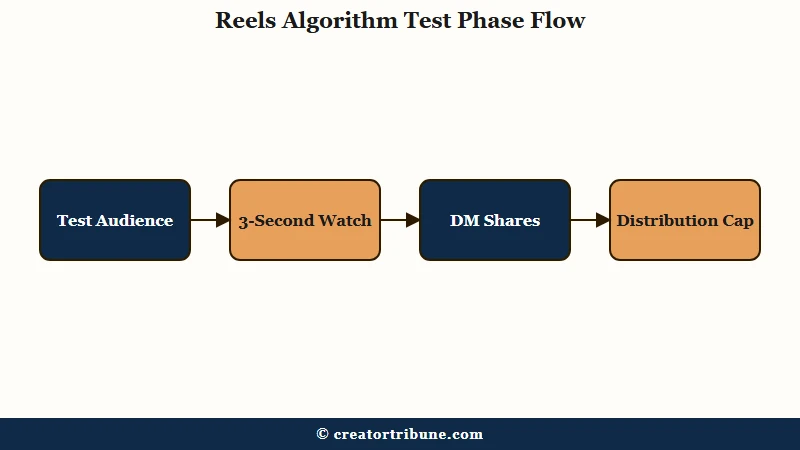
What is the distribution cap: An informal name for the point where a Reel’s view count stops climbing because its test audience did not engage strongly enough to trigger the next round of distribution. Instagram publishes no such cap.
In my experience, the confusing part is that you can still see a decent view count during the test phase. Instagram’s reel insights page counts a view every time a Reel “starts to play or replay,” with no minimum watch time.
That means passive scrolling inflates your numbers. The Viewers figure on the same page counts unique accounts that saw the Reel on screen, and the gap between views versus viewers is worth reading before you judge a Reel.
The signals behind that decision are watch time, likes and sends, by Mosseri’s own account. Likes still matter, slightly more for reaching your followers, while sends carry slightly more weight for reaching people who have never seen you.
If your Instagram reach dropped overnight across every post type, that guide covers the account-level causes this page does not.
Keeping Reels coming on a steady schedule gets harder once you run more than one account. Some creators hand posting to an automation tool such as SMTasker, which runs Instagram, TikTok and Threads accounts on real Android devices and offers a trial before you pay. It covers the posting side only, so a weak opening or a repost problem is still yours to fix.
What the Algorithm Measures on Every Reel
Instagram ranks Reels mainly on watch time, likes and sends, the three signals Adam Mosseri has named, and Meta’s public Reels ranking explainer adds a prediction of how likely you are to watch less than three seconds.
Knowing which signal fell short matters, because optimizing for the wrong one wastes effort. For discovery, a Reel people send to friends tends to travel further than one they only like.
Here is what Instagram has said about each signal:
| Signal | What Instagram has said | What It Tells Instagram |
|---|---|---|
| Watch time | One of Mosseri’s top three signals; insights report average watch time per Reel | Viewer committed beyond the scroll impulse |
| Sends (DM shares) | Top three; slightly more important for reaching non-followers | Content worth forwarding to a specific person |
| Likes | Top three; slightly more important for reaching your followers | Approval from people who already know you |
| Early skips | Meta’s Reels explainer predicts how likely you are to watch less than three seconds | Viewer left before the Reel got going |
| Saves and profile visits | No published weight | Reference value, or curiosity about the creator |
Sends carry extra weight with strangers because a DM share puts the Reel in front of someone through a person they already trust, which a like never does. That is my read of why Instagram leans on them for discovery, since Meta publishes no weights.
Track the three as rates in your Insights, meaning average watch time, likes per reach and sends per reach, because raw totals mostly reflect how many people saw the Reel. Most creators watch total likes, while the send rate matters more for discovery.
How to Check If Your Reels Have an Originality Problem
Instagram stops recommending accounts that repeatedly post content from other users without changing it in a material way, and its originality rules set the line at 10 or more such posts in the last 30 days, which you can check in Account Status.
Since April 30, 2026, that penalty covers photos and carousels as well as Reels, so a mostly-repost account loses recommendations on every format.
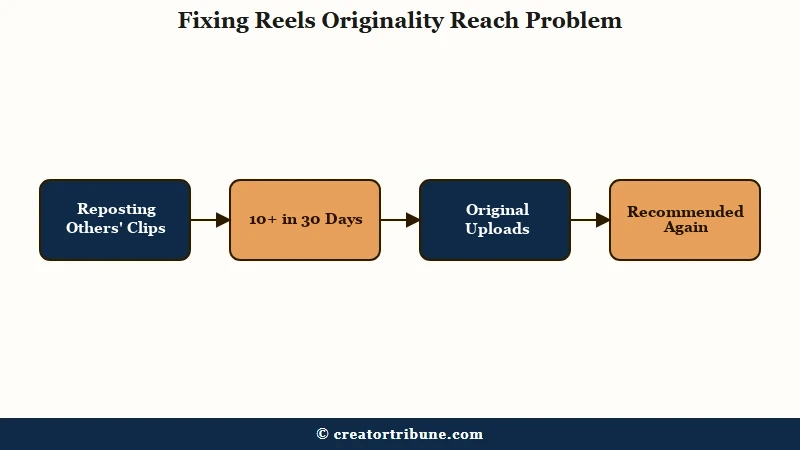
Instagram has not published how it spots a repost, so treat claims about audio fingerprints and frame matching as guesses. Mosseri’s advice to accounts that share other people’s work, quoted by PetaPixel, is to use the Repost button, “which gives them credit where it’s due,” or a collab post, rather than re-uploading the file.
What I’d recommend checking first is your recent upload pattern. If most of your Reels in the last 30 days were re-uploads, whether other people’s clips or your own TikToks with the watermark still on, start there before you touch anything else.
Here is how to run the diagnostic:
- Open Account Status from the menu on your profile. It shows whether your content can be recommended to people who do not follow you, and it is where the repost threshold is checked.
- Check your last 20 Reels in Insights and compare the ones you recorded for Instagram with the cross-posts. If the native Reels reach far more people every time, the cross-posting is the drag.
- Post your next test as a trial reel, which Instagram shows to non-followers first and reports on within 24 hours, so you can compare openers without your followers seeing every attempt.
- Switch to an Instagram-first workflow for the next two weeks. Record for Instagram first, then export and modify for TikTok second.
Before: You record in TikTok, post it there, then save the exported file with TikTok’s watermark and upload that same file to Reels.
After: You keep the clean original from your camera roll, upload it to Instagram first with Instagram’s own text and audio, then post a separate edit to TikTok.
For an account over the repost threshold, Instagram says recommendations come back only once it drops below the line, and because the count rolls over 30 days, that can take up to a month without new reposts. Cross-posts that simply lose to native uploads recover faster, since each new Reel is judged on its own.
Why the 3-Second Hook Decides Everything
The first three seconds decide whether Instagram keeps showing a Reel, because Meta’s Reels ranking system predicts how likely each viewer is to watch less than three seconds, and quick skips count against the Reel.
Check your Instagram skip rate, the share of a Reel’s initial views that swiped away in the first 3 seconds. Meta publishes no target for it, and the hold-rate benchmarks repeated in creator guides cite no source.
Socialinsider’s study of 140,000 business Reels from January to June 2026 put the average skip rate between 60.5 percent for accounts with 100,000 to 1 million followers and 65.5 percent for accounts with 1,000 to 5,000. On an average Reel, then, most initial views end inside three seconds, so judging yours against your own median is fairer than any fixed benchmark.
The most common hook failure I see is what I’d call the “warm-up” opener. The creator spends the first 2 to 3 seconds on a title card, a logo animation, or a vague statement like “you need to hear this.” None of those create what the algorithm needs: a reason for the viewer to stop scrolling.
Strong hooks create an open loop, a specific question or curiosity that can only be resolved by watching the rest. Here is the difference:
Before: “Hey guys, today I want to share some tips about Instagram reach…” (generic, no open loop, nothing on screen worth stopping for)
After: “Your Reels are getting 200 views because of one setting you’ve never checked.” (specific, creates curiosity, viewer needs to watch to learn which setting)
What I’d suggest testing is opening on a person mid-action or on the payoff itself, so the first frame already shows something happening. Meta’s Reels ranking explainer lists plays with the sound on among its signals, so keep a spoken hook for people listening too.
Pair that with a text overlay stating the specific payoff (“The one Reels setting killing your reach”) and you have covered both the visual and text hooks simultaneously.
How to Fix Reels That Stopped Getting Reach
Fix low Reels reach by finding the signal that failed, whether that is early skips, few sends or a repost problem, and changing that one thing on your next upload.
Posting more rarely fixes it on its own, because each new Reel is tested on its own signals. Three well-built Reels a week with strong openers will usually teach you more than seven rushed ones.
From what I’ve seen, the recovery sequence matters. Here is the order I’d walk through for any account seeing a reach collapse:
- Check Account Status for any recommendation warning. If a flag is present, that is your primary problem and no content fix will override it. The cross-platform shadowban test covers how to diagnose whether the issue is account-level or content-level.
- Review your last 10 Reels in Insights. Compare reach on native recordings versus cross-posted content. If cross-posts consistently underperform, switch to Instagram-first uploads immediately.
- Check the skip rate on your worst-performing Reels against your own median. If one sits well above it, that Reel’s opener is the bottleneck.
- Look at sends per reach on your recent Reels and compare them with your best performers, since Mosseri says sends count slightly more than likes when Instagram shows a Reel to non-followers.
- Audit your posting over the last 60 days. Instagram publishes no rule that rewards a fixed schedule, so look for gaps that line up with your drops before you blame the algorithm.
The recovery timeline depends on the root cause. An account over Instagram’s repost threshold regains recommendations once its reposts in the last 30 days fall under 10, while a hook problem can improve with the very next upload, because each Reel is evaluated on its own.
| Root Cause | Diagnostic Signal | Fix | Recovery Time |
|---|---|---|---|
| Repost problem | Account Status shows a recommendations warning, or most recent uploads are other people’s clips or watermarked cross-posts | Post your own footage, and use the Repost button or a collab for other people’s Reels | Up to 30 days, until reposts in the last 30 days fall under 10 |
| Weak hook | Skip rate well above your own median | Rebuild the first frame with a person or the payoff on screen | Judged per upload |
| Low shareability | Sends per reach well below your best Reels | Structure content to answer: would someone DM this to a friend? | Judged per upload |
| Inconsistent posting | Long gaps that line up with your reach drops | Pick a schedule you can actually keep | No published timeline |
| Account-level restriction | Account Status shows flags, all content suppressed equally | Resolve the flagged issue first before any content changes | Depends on violation |
What Changed About Hashtags and Audio for Reels Reach
Hashtags now work as labels rather than reach levers, and since December 2025 Instagram caps every post and Reel at five of them.
Instagram’s explanation, quoted by Social Media Today, was that “using fewer (up to 5) more targeted hashtags, rather than many generic ones, can improve both your content’s performance and people’s experience on Instagram.” If you still research and rotate 30 hashtags per Reel, the app will no longer let you post them.
Up to five relevant hashtags is now the whole allowance, so choose them for categorization. Think of them as filing labels that tell Instagram what your content is about.
Discovery runs on watch time, likes and sends, with hashtags mostly feeding search.
Instagram has not published an audio weighting, though its originality page lists “no visible watermarks” among the traits of content eligible for recommendation. That is one more reason I skip watermarked TikTok exports and lean on my own voiceover or sounds from Instagram’s library.
A simple voiceover counts as original audio and doubles as a spoken hook. Trending sounds from Instagram’s own library are still fine when they suit the clip.
The same reach pattern plays out across other platforms with similar mechanics. TikTok FYP views stall for comparable reasons, and YouTube Shorts stop getting views through the same algorithmic testing window. Across all three platforms, the algorithm rewards original content with strong early engagement signals over recycled content with vanity metrics.
When Low Reach Is a Shadowban and Not an Algorithm Test
A genuine Instagram shadowban looks different from normal low reach, and confusing the two wastes recovery time.
Most Reels that stall at a few hundred views are not shadowbanned. They are in the normal range of algorithmic testing where the content did not pass the engagement threshold.
A real Instagram shadowban shows specific symptoms: your content stops appearing in hashtag results entirely, your non-follower reach drops to near zero across every Reel (not just one), and Account Status shows a flag or warning. If only some Reels underperform while others do fine, the problem sits with those Reels, since an account restriction would hit every one of them.
Most “I think I’m shadowbanned” posts I read in creator forums turn out to be ordinary distribution testing. The Reel underperformed on the hook or did not generate sends, and the algorithm moved on.
| Symptom | Normal Low Reach | Likely Shadowban |
|---|---|---|
| One Reel stalls at 200 views | Yes | Unlikely |
| All Reels stall for 2+ weeks | Possible (weak signals) | Investigate |
| Non-follower reach drops to zero | No | Yes |
| Account Status shows flags | No | Yes |
The correct response to low reach is the 5-step diagnostic under “How to Fix Reels That Stopped Getting Reach.” If reach stays flat across several weeks of uploads and Account Status is clean, the cross-platform shadowban diagnostic is the right next step.
Frequently Asked Questions
Is there a view cap on Instagram Reels?
No official cap exists. The “distribution cap” creators describe is what happens when early engagement is not strong enough to earn the next, wider round of testing, so the algorithm stops expanding distribution.
Should I delete and repost a Reel that got low reach?
Usually not. Deleting throws away whatever reach the Reel still had, and an identical re-upload gets judged on the same opening. Make an improved version instead, using the skip rate and sends from the original to guide what you change.
Do hashtags still help Reels reach in 2026?
Only a little. Instagram has capped posts at five hashtags since December 2025 and says fewer, targeted tags perform better, while ranking leans on watch time, likes and sends. Use up to five relevant hashtags for categorization.
What is the best length for Instagram Reels?
Instagram names no best length. Reels can now run up to 20 minutes, but its Reels help page says Reels over 3 minutes won’t be recommended to new audiences. In Socialinsider’s 2026 data, Reels of 30 to 60 seconds had the highest average reach rate, 5.6 percent, falling to 3.5 percent past two minutes, so keep the Reel as short as the idea allows.
How long does it take for Reels reach to recover?
Recovery depends on the root cause. An account over Instagram’s repost threshold gets recommendations back once its reposts in the last 30 days fall under 10, which can take up to a month without new reposts. Hook and content fixes can show on the next upload, because each Reel is evaluated on its own.
Does posting from a business account hurt Reels reach?
Instagram has never said account type changes ranking, and the top signals Mosseri names apply to every account. If your business account has lower reach, check its content signals before you switch account types.