Filmora Review and the AI Credit Burn Nobody Mentions
Filmora Review and the AI Credit Burn Nobody Mentions
A Filmora review for short-form creators in plain numbers. The AI credit burn, the perpetual-license trap, and who should pay.
- 1Why This Filmora Review Starts With AI Credits
- 2How Much Does Filmora Cost in 2026
- 3Is the Perpetual License or Subscription the Real Trap
- 4Does Filmora Work for Short Form Creators
- 5How Filmora Compares to CapCut DaVinci and VN
- 6The Verdict on Filmora
- 7Frequently Asked Questions
- Is Filmora free to use?
- Is Filmora worth it for short-form creators?
- How do Filmora AI credits work?
- Should I buy the perpetual license or the subscription?
- How does Filmora compare to CapCut?
- 8Quick Takeaways
Bottom Line: Filmora is a fast, friendly desktop editor that is worth paying for if you want AI-assisted editing without CapCut’s terms of service. The catch most reviews skip is the AI credit system, which can run dry mid-month on a paid plan. Daily short-form creators leaning on AI background removal will feel the squeeze first.
The thing nobody tells you in a Filmora review is that the AI features you are paying for run on a meter. Filmora’s Advanced annual plan hands you 1,000 AI credits a month, which sounds generous until you learn that one AI background removal on a 10-minute video can eat 200 to 300 of them.
Do that math for a creator who posts daily. Three or four background-removal jobs and the headline AI tools you bought for the year stop working until the credits refill or you buy a top-up. The features have a hidden expiry date, and it lands weeks before your subscription does.
That single detail reframes the whole “is it worth it” question for short-form creators. So this review leads with the credit economy, then walks through the real 2026 pricing, the perpetual-license trap, what the AI clip tools really produce, and who should pick something else.
If you are weighing Filmora against the obvious free option, the CapCut alternatives breakdown pairs well with this.
Why This Filmora Review Starts With AI Credits
Filmora’s AI features run on a monthly credit allowance, so the tools you pay for can stop working mid-month even on a paid annual plan. That is the part the feature lists bury.
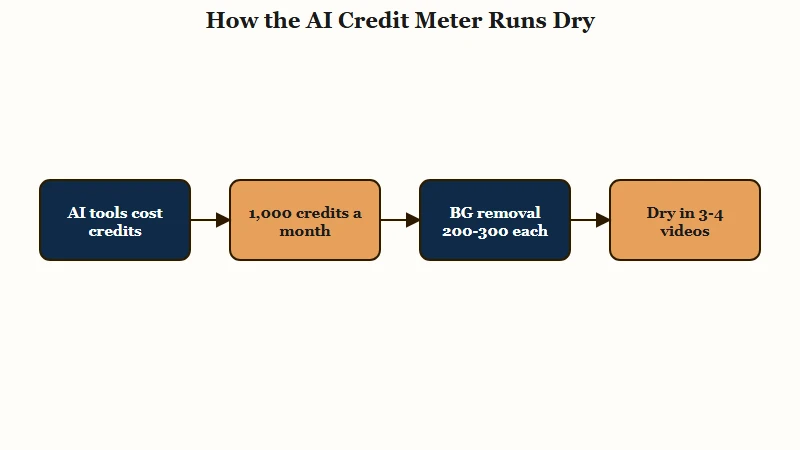
Credits power the marketed stuff: background removal, smart cutout, text-to-image, speech-to-text, and the generative effects. The Advanced subscription includes 1,000 credits a month, and the one-time perpetual license includes a single bundle of 1,000 credits total, not monthly. Once they are gone, you wait for the refill or pay for a top-up that can run $30 to $60 a year for an active creator.
Here is the trap in plain numbers, because the marketing never frames it this way.
Before: “The Advanced plan gives me 1,000 AI credits a month, that is plenty for my edits.”
After: “Background removal costs 200 to 300 credits per 10-minute clip, so I am out after three or four videos and posting daily means I run dry in the first week.”
What I would take from this is simple. If your editing leans hard on AI cutouts and generative tools, treat Filmora’s credits as a metered utility, not an all-you-can-eat plan, and budget for top-ups from day one.
How Much Does Filmora Cost in 2026
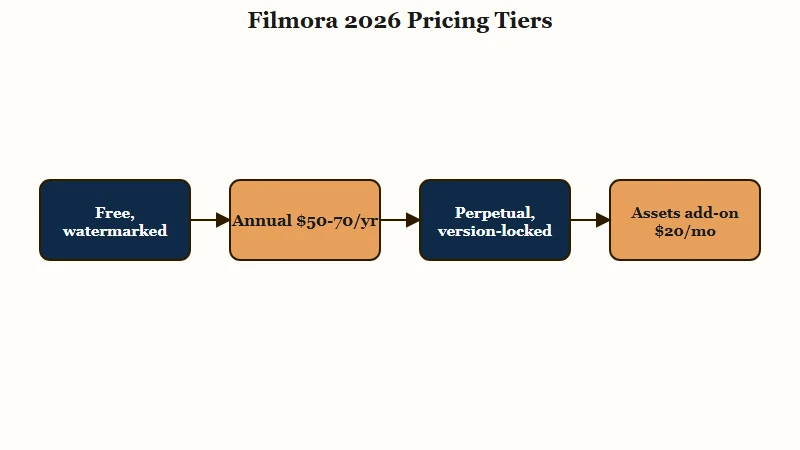
Filmora in 2026 runs a free watermarked tier, annual plans from roughly $50 to $70, and a one-time perpetual license near $80 to $100 that is locked to one version. The sticker price is only half the real cost.
The free version has no time limit, which is unusual, but it stamps a large watermark on every export, so it works for learning the tool and nothing you publish. To remove the watermark you have to log in with a paid license. Avoid the cracked “free” builds floating around, since those are a malware risk, not a discount.
The detail that catches people is the second subscription. Premium transitions, motion graphics, and the Boris FX and NewBlue FX plugins sit behind a separate Filmora Creative Assets plan at about $19.99 a month or $79.99 a year. Paying for the editor does not unlock the full effects library.
Here is how the tiers shake out for an individual creator in 2026.
| Plan | Rough 2026 price | What you get |
|---|---|---|
| Free | $0, no time limit | Full basic editor with a large export watermark and very limited AI |
| Annual subscription | About $49.99 to $69.99 per year | Watermark-free exports, all major upgrades, multi-platform, Advanced adds 1,000 monthly AI credits and 10GB cloud |
| Perpetual license | About $79.99 to $99.99 one time | Locked to one major version, one-time 1,000 credits, desktop only with no mobile apps |
| Creative Assets add-on | About $19.99 per month or $79.99 per year | Premium transitions, motion graphics, Boris FX and NewBlue FX plugins |
One more thing I would flag at checkout. A class action filed in early 2024 accused Wondershare of trapping users in auto-renewals without clear disclosure, so turn off auto-renew in your account settings the moment you buy.
Is the Perpetual License or Subscription the Real Trap
The perpetual license is the trap for most creators, because it is locked to the version you bought and excludes the mobile apps entirely.
People hear “perpetual” and assume lifetime access to everything. That is not what it means here.
Your one-time purchase covers the major version you bought, say version 14, and stops there. When version 15 lands with new features, you pay again. The subscription, for all its credit limits, at least rolls you into every major upgrade.
The bigger miss for short-form work is that the perpetual plan does not include Filmora’s phone apps. If your workflow is film on the phone, rough-cut on mobile, finish on desktop, a perpetual license breaks that chain. According to PCMag’s testing, the mobile-to-desktop sync that short creators rely on is not part of the one-time deal.
There is history here too. In 2022 Wondershare retired the original “lifetime, unlimited updates” licenses and pushed those owners to pay for major versions, offering refunds only to customers who replied inside a one-month window. The way I see it, that pattern is a reason to treat any “perpetual” promise from this company with caution.
Does Filmora Work for Short Form Creators
Filmora works well for short-form creators who want speed and AI assistance, but its automated clip tools do less than the name suggests. The editor is genuinely fast and beginner-friendly, which is its real strength.
The headline short-form feature is Smart Short Clips, pitched as a way to turn one long video into a stack of vertical clips for TikTok, Reels, and Shorts. In practice it is not the hands-off viral generator people expect. In PCMag’s hands the tool detected topics and spat out ten clips, but each one consisted only of a text title over background music, without the original footage or any B-roll filled in.
That means you still do the real work of dropping in the visuals. For a true long-to-short workflow you will lean on Auto Reframe and manual editing, and our guide to repurposing long videos into shorts maps out the steps Filmora does not automate for you.
Where Filmora earns its keep is AI Mate, the conversational copilot. You type natural commands like “delete the silent segments” or “make this brighter” and it executes, which trims a lot of timeline fiddling. There is even an Inspiration to Video Agent mode aimed at comic-style clips and short dramas, and the avatar voiceover tool supports 42 languages, so I would call it a strong fit for faceless and narrative creators specifically.
How Filmora Compares to CapCut DaVinci and VN
Filmora sits between CapCut’s mobile simplicity and DaVinci Resolve’s professional depth, trading raw power for AI-driven speed. Which one wins depends entirely on what you are optimizing for.
CapCut is mobile-first and its free tier exports without a watermark, which Filmora’s free tier cannot match. The trade is CapCut’s terms of service, the reason a lot of creators are shopping for an exit.
DaVinci Resolve gives you free, professional color grading and precision editing, but its learning curve is steep and it is overkill for quick vertical clips. VN is the free no-watermark mobile pick, lighter than all of them.
For a closer look at each option, the CapCut review and the VN Video Editor review cover those tools in depth.
| Editor | Best for | Free tier catch | Standout |
|---|---|---|---|
| Filmora | AI-assisted desktop editing | Large export watermark | AI Mate copilot and fast render |
| CapCut | Mobile-first quick edits | Terms of service concerns | No watermark on free exports |
| DaVinci Resolve | Pro color and precision | Steep learning curve | Industry-grade grading, free |
| VN | Lightweight mobile editing | Fewer AI tools | Free with no watermark |
One pleasant surprise from the testing notes: Filmora’s render engine can beat Adobe Premiere Pro on 1080p export speed, even though it lacks pro timeline moves like slip, slide, and roll. For 1080p vertical clips, that speed is the part short-form creators will feel.
The Verdict on Filmora
Filmora is worth it for creators who want fast, AI-assisted desktop editing and will stay inside the credit budget, and a poor fit for heavy daily AI users or true one-time buyers.
It is a polished tool with an honest set of limits once you know where they hide.
Here is what I like about it.
- AI Mate’s conversational editing genuinely speeds up routine cuts and cleanups.
- The render engine is fast, beating some pricier editors on 1080p export.
- It is beginner-friendly, with a gentle learning curve compared to DaVinci.
- The annual plan includes every major upgrade and multi-platform access.
Here is what I would skip it for.
- Daily AI editing, since 1,000 monthly credits can vanish in three or four background-removal jobs.
- A true one-time buy, because the perpetual license is version-locked and has no mobile apps.
- A full effects library on a budget, since the best plugins need a second subscription.
- Trustpilot tells the support story, with a 3.2 out of 5 rating built on billing and refund complaints, against a friendlier 4.5 on G2.
My recommendation is the Advanced annual plan for a creator who edits a few times a week and wants the AI copilot, and a hard pass on the perpetual license for anyone who touches mobile. Whatever you choose, disable auto-renew on day one. For the broader menu of editors built to dodge CapCut’s terms, the CapCut alternatives guide is the companion piece to this review.
Frequently Asked Questions
Is Filmora free to use?
Filmora has a free version with no time limit, but every export carries a large watermark and AI access is very limited. It is fine for learning the editor. To publish clean videos you need a paid license, which starts around $49.99 a year.
Is Filmora worth it for short-form creators?
Filmora is worth it if you want fast AI-assisted desktop editing and edit a few times a week. Heavy daily creators who lean on AI background removal will burn through the monthly credits quickly, so it is a weaker pick for high-volume automated editing.
How do Filmora AI credits work?
AI credits power features like background removal and text-to-image. The Advanced plan includes 1,000 credits a month, but a single background removal on a 10-minute video can use 200 to 300, so heavy users run out fast and must buy top-ups.
Should I buy the perpetual license or the subscription?
For most creators the subscription is safer. The perpetual license is locked to one major version, excludes the mobile apps, and forces a repurchase for major upgrades. The subscription includes every upgrade and multi-platform access.
How does Filmora compare to CapCut?
CapCut is mobile-first and exports watermark-free on its free tier, which Filmora cannot match. Filmora wins on desktop AI tools and render speed. Many creators choose Filmora specifically to avoid CapCut’s terms of service.
Quick Takeaways
- Filmora’s AI features run on credits, and 1,000 monthly credits can disappear in three or four background-removal videos, so budget for top-ups if you edit daily.
- The perpetual license is the trap for short-form creators, since it is version-locked and has no mobile apps for the phone-to-desktop workflow.
- Premium effects and the best plugins sit behind a separate Creative Assets subscription, so the editor price is not the full cost.
- Pick the Advanced annual plan if you edit a few times a week, and turn off auto-renew the moment you buy to avoid the billing complaints that drag its Trustpilot score to 3.2.