How to Add a Collaborator on TikTok and Fix It When Missing
How to Add a Collaborator on TikTok and Fix It When Missing
TikTok's collaborator feature is still invite-gated. See who has access, the real limits, and the safe way to run a collab while you wait.
- 1Why Don’t You Have the TikTok Collaborator Feature Yet
- Is there a setting to turn on the collaborator option?
- What is the difference between Tag people and Invite collaborators?
- 2How Does the TikTok Collaborator Feature Work
- 3How Do You Send a Collab Invite on TikTok
- 4What If the Invite Collaborators Option Is Missing
- 5Should You Post the Same Video on Two Accounts Instead
- 6Frequently Asked Questions
- How many followers do you need for the TikTok collaborator feature?
- Can I add a collaborator to a TikTok video after posting it?
- How many people can be on one TikTok collab post?
- How is engagement counted on a collab post?
- Why did the collaborator option disappear from my TikTok?
- 7Quick Takeaways
TL;DR: There is no form, setting, or follower count that unlocks the TikTok collaborator feature. TikTok is rolling it out in stages, support agents confirm it is still in testing, and accounts with 7,000+ followers are still waiting. While you wait, do not post the same video on two accounts, that shortcut gets flagged within hours.
The TikTok collaborator feature is the most requested button that most creators still cannot find. It lets one video live on up to 6 profiles at once, the originator plus 5 collaborators, with every view, like, and comment pooled across all of them.
The catch is access. Creators keep digging through settings, toggling account types, and reinstalling the app, convinced they missed a switch somewhere.
I went through the same hunt, and the frustrating answer is that there is no switch. This guide covers who has the feature, exactly how invites work once you do, and the one workaround you should never use in the meantime.

Why Don’t You Have the TikTok Collaborator Feature Yet
The TikTok collaborator feature is missing from your account because it is still in a staged test, not because of anything you did. TikTok support agents have said in live chat that the tool is “undergoing testing” and that they are unsure if it is available for everyone yet.
That support response matters because it kills the most common theories. A documented report from May 2026 describes an account with over 7,000 followers that still had no access, so this is not a follower-milestone unlock.
What is a collab post: A single TikTok video that appears on the profiles of every creator who accepts the invite, with all engagement counted together.
Switching between a Creator account and a Business account does not trigger it either; users have toggled both ways with no change. TikTok’s own artist documentation calls the feature “not broadly available” and tells users to watch their System Notifications for invites rather than hunt through settings.
The strangest wrinkle I have come across is the asymmetry. Some accounts can receive and accept collab invites while having no option to send one, which means your collab partner may be able to start the post even when you cannot.
Is there a setting to turn on the collaborator option?
No. There is no on/off toggle for the collaborator option anywhere in TikTok settings. On accounts that have it, the “Invite collaborators” control simply appears on the posting screen, and on accounts that do not, no menu switch will make it show.
The confusion is fair, because most TikTok features live under Settings and privacy. This one does not.
To check whether your account has it, skip settings entirely: start a post, tap Next, then look under “Tag people” and the advanced options on the posting screen. If it is not there, your account cannot start one yet.
As of August 2026 TikTok has announced no general release for the feature, so an account that lacks it today has done nothing wrong and has no form to fill in. Watch your System Notifications, which is where TikTok delivers both the rollout and individual collab invites.
This has been going on longer than most creators realize. Social Media Today reported the collab post in testing on May 13, 2024, calling it “late-stage testing” that would arrive “sometime soon”. More than two years later it still has not shipped broadly.
What is the difference between Tag people and Invite collaborators?
Tagging credits another account inside your post. A collab invite puts the video on that account’s profile as well as yours with the engagement pooled, and on accounts that have it the control sits beside Tag people on the posting screen.
Tag people is open to every account and has been for years. It links the person you tag, and the video still lives on your profile alone, so their followers only see it if it reaches them the usual way.
A collab invite goes further. Once a collaborator accepts, the same video appears on their profile too, and the engagement counts once across both.
The two get mixed up because the collab control is easy to miss when it sits tucked inside Tag people rather than beside it. If you only ever see Tag people, your account cannot start a collab post, though it may still be able to accept an invite from someone who can.
How Does the TikTok Collaborator Feature Work
A TikTok collab post is one video shared across up to 6 profiles, you plus 5 collaborators, where views, likes, and comments pool together instead of splitting. The original creator keeps sole editing rights, and any collaborator can remove themselves after the post goes live.
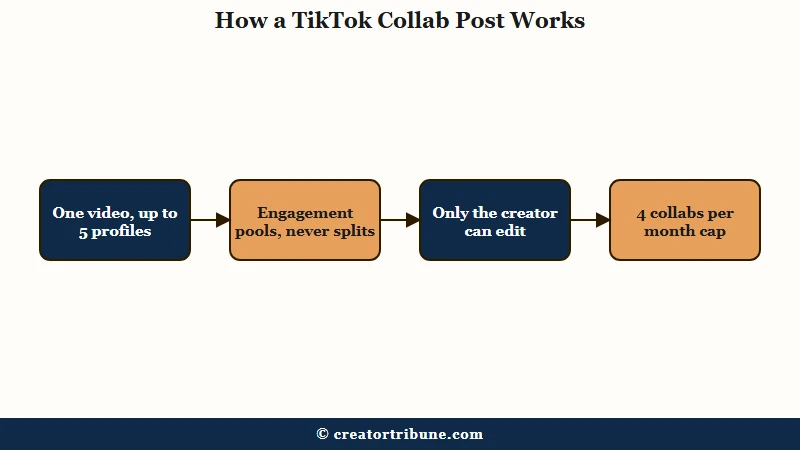
The hard numbers trace back to that same May 2024 report, which was built on The SpAndroid’s back-end code analysis and not on a TikTok announcement, and they are stricter than most creators expect. The reported cap is four collaboration posts per month for the account that starts them.
Here is how the feature compares to the Instagram version most creators already know:
| Rule | TikTok collab post | Instagram Collab |
|---|---|---|
| Max collaborators | 5 per post | 5 per post |
| Monthly cap | 4 initiated posts per month (per backend code) | No published cap |
| Who can edit | Original creator only | Original creator only |
| Availability | Staged testing, no general release | Fully rolled out |
Treat the monthly cap as provisional, since it rests on a single 2024 code teardown that nothing since has re-tested. What I would plan around is the five-collaborator ceiling and the one-way editing, because both show up consistently across sources.
The engagement pooling is the part worth getting excited about. A collab post surfaces to each collaborator’s audience separately, which is why creators chasing reach want it so badly.
How Do You Send a Collab Invite on TikTok
Sending a TikTok collab invite happens on the posting screen before you publish, through the Invite collaborators option, and cannot be added to a video that is already live. If you have the feature, the flow takes under a minute.
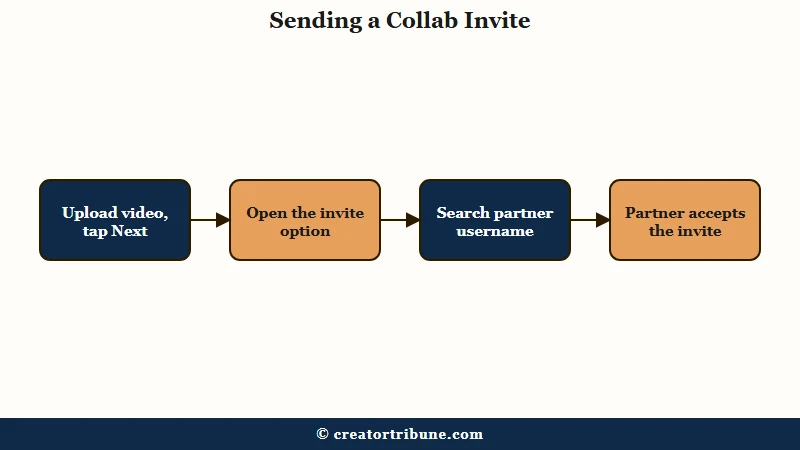
Creators report that the menu placement moves between app versions, so check both spots in step 3. Here is the sequence:
- Record or upload your video the way you normally would.
- Tap Next to reach the posting screen.
- Find Invite collaborators. Depending on your app version it sits as its own option or inside Tag people under the advanced settings.
- Search the creator by username and select them.
- Tap Done and publish. The video goes up on your profile with a pending collaboration status.
- Your collaborator accepts or declines. The invite lands in their System Notifications and appears on the video itself.
- On acceptance, the post appears on their profile automatically, with shared engagement from that point on.
One detail that surprises people: if your collab is sponsored or promotes any brand, the Disclose commercial content toggle has to go on before publishing. Under TikTok’s 2026 disclosure rules, a flagged post gets a 24-hour window to add labels before it is suppressed from the For You feed for good.
What If the Invite Collaborators Option Is Missing
If the Invite collaborators option is missing, there is no manual request path; access arrives through the staged rollout or through an invite from an account that already has it. The way I see it, your energy is better spent on the things that still work than on chasing the button.
Here is how I would read each situation:
| What you see | What it means | What to do |
|---|---|---|
| No invite option anywhere | Your account cannot start collab posts yet | Update the app, then wait; no request form exists |
| You received an invite but cannot send one | Asymmetric access, common in this rollout | Let partners with access initiate the posts |
| The option appeared, then vanished | TikTok adjusting the test group | Nothing; users report it returning on its own |
| Option present but invite fails | Recipient may be excluded or restricted | Have the other account try initiating instead |
Keep the app updated, since the feature ships inside recent versions. Past that, the honest answer is patience, and TikTok’s own advice amounts to watching System Notifications.
What you should not do is force a workaround that puts the account at risk. A flagged account loses reach across everything it posts, and recovering from that is a slower road than waiting for a feature, as the account flag recovery guide lays out in detail.
Should You Post the Same Video on Two Accounts Instead
Posting the same video on two accounts is the workaround to avoid, because TikTok’s duplicate detection flags the second upload for unoriginal content, often within a day. One documented creator test makes the risk concrete.
In that report, the creator posted a shared video to a second account with manual edits, adjusted zoom, and moved text placement. The duplicate still got hit with a “low quality or unoriginal content” flag within 18 hours.
Before: Two creators export the same final cut, each posts it to their own account, and they tag each other in captions. The second upload gets flagged for unoriginal content within 18 hours, and its reach flatlines.
After: One creator posts the video and credits the partner with an @mention while they wait for collab access, and the partner runs a Duet or Stitch that adds a reaction or commentary layer. Both videos count as original, and neither account collects a flag.
The Duet and Stitch route is what I would run today, because it gives both accounts native, original posts that the algorithm treats as new content. Pair it with a healthy posting cadence and cross-promotion in captions, and you capture most of what a collab post offers.
There is one more reason to keep everything clean and disclosed. Flags and suppressed posts compound quietly, and they are a common hidden cause when creators wonder why FYP views drop across a whole account.
Frequently Asked Questions
How many followers do you need for the TikTok collaborator feature?
No follower threshold has been documented for collab posts, and accounts with over 7,000 followers still lack access. The 1,000-follower rule people cite applies to hosting LIVE streams, which is a separate feature.
Can I add a collaborator to a TikTok video after posting it?
No. The Invite collaborators option only appears on the posting screen before you publish. To collaborate on existing content, your partner can Duet or Stitch the live video instead.
How many people can be on one TikTok collab post?
Up to 5 collaborators can join a single post, and backend code points to a limit of four initiated collab posts per month. Only the original creator can edit the video once it is live.
How is engagement counted on a collab post?
Engagement pools across every profile on the post. All collaborators see the same combined views, likes, and comments rather than a split share, which is the feature’s main draw for smaller accounts.
Why did the collaborator option disappear from my TikTok?
TikTok is still adjusting the test group, and creators report the option appearing and vanishing between sessions. There is no fix on your end; users who lost it report it returning on its own.
Quick Takeaways
- The TikTok collaborator feature is invite-gated and in staged testing, with no follower count, account type, or setting that unlocks it.
- Plan around the documented limits, 5 collaborators per post, original-creator-only editing, and a probable 4-collab monthly cap from backend code.
- Never duplicate-post the same video across two accounts; a documented test got flagged for unoriginal content within 18 hours despite manual edits.
- Use Duet, Stitch, and @mention crediting as the safe collab substitute until the rollout reaches your account.