Why TikTok Drafts Disappear and How to Get Them Back
Why TikTok Drafts Disappear and How to Get Them Back
TikTok drafts disappeared after an update or reinstall? Where drafts really live, what is recoverable, and the habit that stops the next loss.
- 1Why Did My TikTok Drafts Disappear?
- 2Will You Lose Your Drafts If You Update TikTok?
- 3Does TikTok Officially Say Where Drafts Are Stored?
- 4How Do You Recover TikTok Drafts That Disappeared?
- 5How Do You Stop TikTok Drafts From Vanishing Again?
- 6Frequently Asked Questions
- Does deleting the TikTok app delete my drafts?
- Do TikTok drafts transfer to a new phone?
- Is there a Recently Deleted folder for TikTok drafts?
- Why did my drafts disappear when I never deleted the app?
- Can TikTok support recover my drafts?
- Is there any way to get TikTok drafts back?
- My TikTok draft disappeared while editing. What happened?
- 7Quick Takeaways
TL;DR: TikTok drafts live only on your phone, never on your account, so reinstalls, logouts, cache cleanups, and cleaner apps can erase them for good. Recovery is possible only through your camera roll, a device backup, or scanning software, and each step up that ladder gets riskier. The 30-second fix going forward is posting important edits as Only Me with Save to Device turned on.
Your TikTok drafts are gone, and all you did was update the app or free up some storage. The edits were hours of work: trimmed clips, timed captions, effects layered just right, all sitting safely in the drafts folder. Then the folder is empty.
The painful part is that almost nobody registers how fragile that folder is until it empties. Drafts look like account data, sitting right there on your profile next to your posted videos, so everyone assumes they sync somewhere. They do not.
This guide covers why drafts vanish, an honest recovery ladder from free checks to last-resort software (with one safety warning you should not skip), and the one habit that makes the next loss impossible. The bad news comes first, but the prevention section is the part I’d bookmark.
Updated the app and the folder is empty? Do not panic-reinstall. A plain TikTok update rarely deletes drafts on its own, because they sit in local storage that survives updates. The empty folder is usually a display glitch, so restart your phone first, since the drafts often reappear once the app re-indexes local storage. Reinstalling is the one move that makes a fixable problem permanent.
Why Did My TikTok Drafts Disappear?
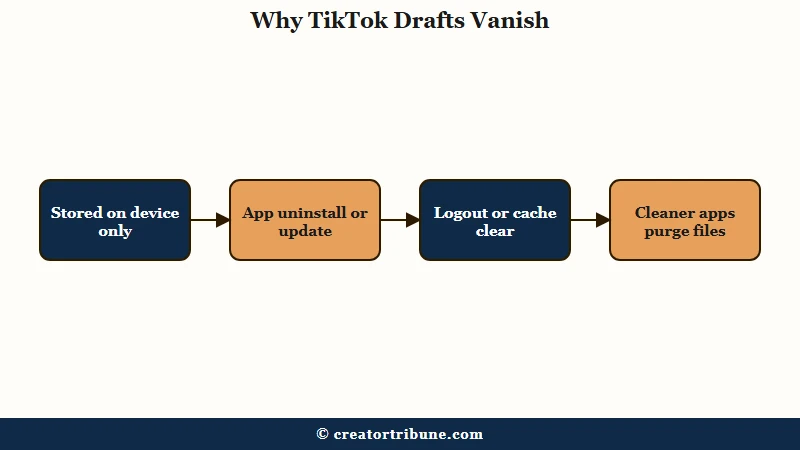
TikTok drafts disappear because they are stored only on your device, never on TikTok’s servers. Anything that clears the app’s local data, like uninstalling, logging out, clearing the cache, or a cleaner app sweeping the folder, deletes every draft with it. A routine app update does not, which is why an empty folder after updating is usually a glitch rather than a deletion.
What is a TikTok draft: An unfinished video saved inside the app’s local storage on your phone. It is visible only to you, only on that device, and never uploaded to your account.
The design surprises almost everyone. Your posted videos live on TikTok’s servers and follow your account anywhere, while drafts are closer to files in a folder that the app owns on your phone. Whatever the reasoning behind that split, and TikTok has not explained it publicly, the effect is that unfinished content never touches their platform.
The practical consequence is that ordinary phone maintenance doubles as draft deletion. Here is what wipes them:
| What you did | What happened to your drafts |
|---|---|
| Uninstalled or reinstalled TikTok | Deleted with the app’s data |
| Logged out or switched accounts | Often wiped or hidden |
| Cleared the app cache or data | Deleted if app data was cleared |
| Ran a phone cleaner app | Cleaners flag drafts as temp files and purge them |
| Switched to a new phone | Drafts stay on the old device, they never transfer |
| App update or crash | Occasional losses from interrupted storage |
The cleaner-app row deserves special attention, because it catches people who never touched TikTok at all. Storage cleanup tools see large video files inside an app’s data folder and treat them as junk. In my view that is the most common “I did nothing and they vanished” explanation.
One more quirk: drafts are device-specific and account-specific at the same time. Logging into your account on a new phone shows your posted videos and an empty drafts folder, and the drafts stay marooned on the old device.
This is also why drafts not showing on your profile does not always mean they were deleted. Check the profile grid before anything else.
If the drafts tile still shows a count, the files are there and you are looking at a display problem. If the tile is gone entirely, you have a real loss to work through, and the recovery ladder below is the next step.
Will You Lose Your Drafts If You Update TikTok?
Usually not. Updating the TikTok app does not by itself lose or delete your drafts, because an update replaces program files and leaves the app’s local data in place. That local data is where drafts live, so an empty folder straight after updating is far more often a display glitch than a real deletion.
Restart the phone before you do anything else. Reopen TikTok afterward and check the profile grid rather than the create screen. This is the single most common happy ending to a “my drafts are gone” scare.
What genuinely deletes them is anything that clears app data rather than replacing app code: uninstalling, clearing cache or data in system settings, logging out, or a cleaner app sweeping the folder. The dangerous move after an update is reinstalling the app to “fix” the empty folder, because that is the step that turns a recoverable glitch into a permanent loss.
Does TikTok Officially Say Where Drafts Are Stored?
No. TikTok’s Help Center has no article dedicated to drafts. As of August 2026, its support sitemap lists 4,695 pages across every language the company publishes in, and not one of those URLs mentions drafts, so the single most consequential fact about them, that they exist only on one device, reaches creators through third-party guides and hard experience instead of documentation.
I checked in August 2026. The Creating videos section runs to 26 articles, covering Making a post, Camera tools, Effects, Sounds, Duets, Stitch, Stories, Playlists and TikTok Studio among others, and drafts is not one of them.
Drafts may well get a passing mention inside some other article. There is still no page anyone can be pointed to when they ask where their drafts went.
Searches for official guidance return the same thing: creator blogs, recovery-software vendors, and TikTok topic hubs that collect user videos. None of those is TikTok telling you your work is not backed up.
Treat the guides claiming TikTok quietly added a drafts sync setting with the same caution. I went looking and could not stand one up, and several of the pages making the claim sell recovery software.
Knowing that saves you the hour of hunting for a support answer that was never written. If you searched the Help Center and came up empty, that was not you missing it.
How Do You Recover TikTok Drafts That Disappeared?
To get them back, work a ladder of four options in order. Confirm it is not a display glitch, check your camera roll and Recently Deleted, restore or extract from a device backup, and only then consider scanning software. TikTok support cannot help, because drafts never reach their servers.
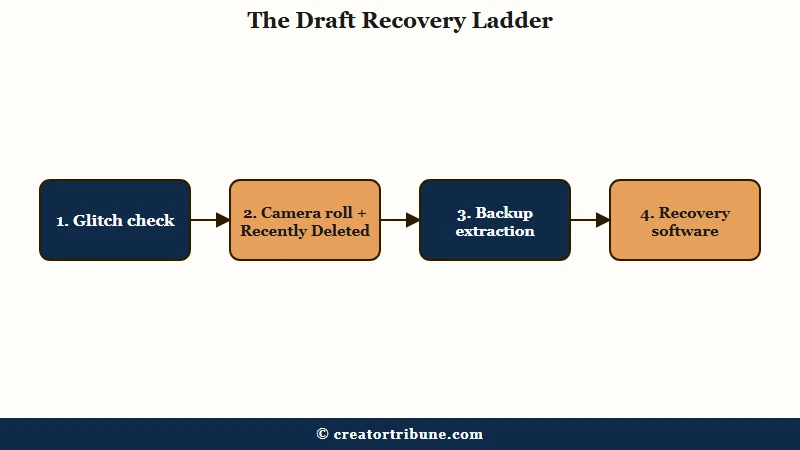
There is no recycle bin for drafts inside TikTok, so every way to get them back runs through your phone. Here is the order I’d work through, cheapest and safest first:
- Rule out a glitch. Check your profile grid for the drafts tile, which shows a count like “3 Drafts” in the first slot. If the count is there but the folder looks empty, update TikTok, force-close it, and restart your phone before assuming the worst.
- Check your camera roll. If Save to Device was ever on, finished versions of your edits are in your gallery. On iPhone, also open Photos and look in Recently Deleted, which holds removed files for about 30 days.
- Restore from a device backup, carefully. An iCloud, iTunes, or Google Drive backup from before the loss can bring drafts back, but a full restore reverts your ENTIRE phone to that date and erases everything created since. Treat it as the nuclear option, and prefer tools that can extract specific files from a backup without wiping the phone.
- Try recovery software as a last resort. Scanners like Tenorshare UltData, iMyFone D-Back, or Gbyte iOS Recovery search device memory for deleted file fragments. Success is not guaranteed, the useful features sit behind paid licenses, and you should be picky about which one you trust.
That fourth rung needs a real warning. This category of software asks for deep device access, and a scanner that can read deleted file fragments can read everything else on the phone too. Read recent independent reviews before connecting your phone to any of them, and never hand one your Apple ID password.
The honest odds depend on one question: did a copy ever exist outside TikTok’s data folder? If the answer is no, recovery software is a long shot, and I’d rather you spend that hour rebuilding the edit from raw clips in your gallery.
Here is how the four recovery options compare at a glance:
| Method | Works when | Risk | Cost |
|---|---|---|---|
| Glitch check | Drafts are hidden, not deleted | None | Free |
| Camera roll / Recently Deleted | Save to Device was on; within 30 days for deleted files | None | Free |
| Backup restore or extraction | A backup predates the loss | Full restore erases newer data; extraction is safer | Free to ~$50 |
| Recovery scanner software | No backup exists, loss is recent | Unvetted tools can harm the device or account | Paid license, success not guaranteed |
How Do You Stop TikTok Drafts From Vanishing Again?
Prevention means keeping a copy outside TikTok’s data folder. Turn on Save to Device, post important work-in-progress as Only Me, and keep raw clips in a cloud-synced gallery so any edit can be rebuilt.
The fail-safe habit takes about 30 seconds per video, and the trick is using TikTok’s private posting against its fragile drafts system. A video posted as Only Me uploads to your account like any other post, visible to nobody but you, and with Save to Device on it also drops a finished copy into your camera roll.
Before: You save the edit as a draft and move on. The draft lives in app data only, and the next logout, reinstall, or cleaner-app sweep deletes it silently.
After: You set the video’s privacy to Only Me, enable Save to Device, and post it. A copy now exists on TikTok’s servers under your account and another sits in your gallery syncing to iCloud or Google Photos. When you are ready, you change the visibility to public or re-edit from the saved file.
Three more habits round out the protection. First, keep your raw clips: a master copy in the gallery turns any lost edit into an hour of rebuilding instead of a funeral, the same logic behind keeping a clean master file for cross-posting.
Second, do heavy edits in an external editor when the project matters, because a dedicated editing app keeps project files outside TikTok entirely and out of reach of an app update. Third, never let your phone run critically low on storage, because the operating system starts harvesting app data exactly where drafts live.
What I’d also flag for daily posters is that batching makes this painless. Filming and editing in blocks, then exporting everything to the gallery before scheduling, is already the rhythm that posting at the right times rewards. One export step at the end of each batch session protects the whole batch.
Every TikTok account gets the same fragile local drafts folder, and its rules stay invisible until the day something wipes it, which is why this loss keeps catching careful people. If your saved copies ever look soft after exporting, the upload quality guide covers the export settings worth locking in.
Frequently Asked Questions
Does deleting the TikTok app delete my drafts?
Yes. Drafts are stored in the app’s local data folder, so uninstalling TikTok wipes every draft with it. Reinstalling brings back your account and posted videos, but the drafts folder comes back empty.
Do TikTok drafts transfer to a new phone?
No. Drafts are tied to the device where they were created, even on the same account. Before switching phones, post important drafts as Only Me with Save to Device on, or export them to your gallery.
Is there a Recently Deleted folder for TikTok drafts?
Not inside TikTok. The app has no recycle bin for drafts. Your phone’s gallery has one, though, and on iPhone the Photos Recently Deleted folder keeps removed videos for about 30 days if copies were ever saved there.
Why did my drafts disappear when I never deleted the app?
The usual culprits are logging out, switching accounts, an app update glitch, or a storage cleaner app purging TikTok’s data folder. Low device storage can also push the operating system to clear app data on its own.
If your drafts keep disappearing rather than vanishing once, a cleaner app with automatic sweeps turned on is the first thing to rule out.
Can TikTok support recover my drafts?
No. Drafts never reach TikTok’s servers, so support has nothing to restore. There is no drafts troubleshooting article in the Help Center to fall back on either, so any real recovery has to happen on your device.
Is there any way to get TikTok drafts back?
Sometimes, and it depends entirely on whether a copy ever existed outside TikTok’s data folder. Work the ladder above in order: rule out a display glitch, check your camera roll and Recently Deleted, then look at a device backup, with recovery software as the last resort.
If no copy was ever saved outside the app, rebuilding from your raw clips is usually the faster route.
My TikTok draft disappeared while editing. What happened?
A draft can fail to save if the app crashes or gets force-closed before it finishes writing the file to local storage. That half-saved edit is usually unrecoverable, so the fix is preventive: post edits that matter as Only Me with Save to Device on rather than trusting the draft to hold.
Quick Takeaways
- TikTok drafts are device files, not account data, so reinstalls, logouts, cache clears, and cleaner apps can erase them permanently.
- Run the recovery ladder in order: glitch check, camera roll and Recently Deleted (30-day window on iPhone), backup extraction, and recovery software last.
- A full backup restore is the nuclear option that erases everything created after the backup date. Prefer extracting specific files.
- Vet recovery software hard before connecting your phone, and never give one your Apple ID password.
- Adopt the 30-second fail-safe today: post important edits as Only Me with Save to Device on, so a copy always exists outside the drafts folder.