How To Check If a YouTube Channel Is Monetized
How To Check If a YouTube Channel Is Monetized
How to check if a YouTube channel is monetized in 2026. The public signals that actually prove it, why ads do not, and how to read your own status.
- 1Why Ads No Longer Prove a Channel Is Monetized
- 2How Do You Check If Someone Else’s Channel Is Monetized
- 3How To Check Your Own Channel’s Monetization Status
- 4What Are the Requirements To Get Monetized
- 5Why Are Social Blade Earnings Estimates Often Wrong
- 6Frequently Asked Questions
- Can you see if someone else’s YouTube channel is monetized?
- Do ads mean a YouTube channel is monetized?
- How many subscribers do you need to be monetized?
- Why do old source-code tricks for checking monetization not work?
- Are Social Blade earnings accurate?
- 7Quick Takeaways
TL;DR: You cannot officially see whether someone else’s YouTube channel is monetized, because that status lives only in their private Studio dashboard. What you can do is read the public fan-funding signals: a Join button, a Super Thanks button, or live gifts all mean the channel is in the Partner Program. Seeing ads on a video proves nothing, since YouTube places ads on plenty of channels that earn zero.
Here is the part that quietly breaks the most popular method people still use. Since 2020, YouTube has reserved the right to run ads on any video, including channels that are not in the Partner Program and earn nothing from those ads.
So the old trick of “if I see ads, the channel must be monetized” is dead. Ads can also appear because a copyright owner claimed the video and is collecting the revenue themselves, not the creator. If you want to know how to check if a YouTube channel is monetized, ads are the one signal you should ignore.
What actually works is a short list of public features only a Partner Program creator can switch on, plus knowing the difference between the two monetization tiers. I will walk through how to read another channel, how to check your own status in Studio, and why third-party earnings estimates are mostly guesswork.
Why Ads No Longer Prove a Channel Is Monetized
Ads do not prove monetization because YouTube can serve ads on any video, including non-Partner-Program channels that earn nothing.
A 2020 policy change gave YouTube that right, so an ad on a video tells you nothing about who gets paid.
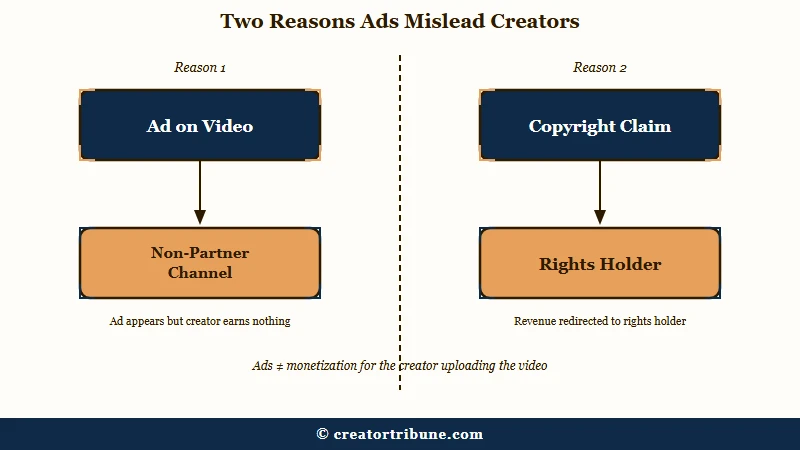
The way I see it, this is the single most common mistake creators make when sizing up a competitor. They see a pre-roll ad, assume the channel is cashing checks, and model their own expectations on a number that may be zero.
There is a second reason ads mislead you. If a video uses music or clips owned by someone else, a copyright claim can route all the ad revenue to the rights holder while the creator earns nothing. The ad is real, the creator’s paycheck is not.
How Do You Check If Someone Else’s Channel Is Monetized
You check another channel by looking for public fan-funding features, since the official status is private. A Join button, a Super Thanks button, or gifts enabled on a livestream all confirm the channel is in the Partner Program.
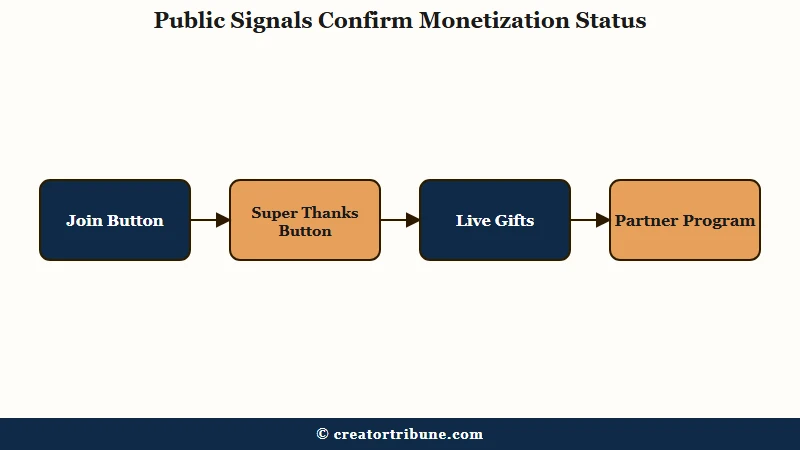
What is the expanded YouTube Partner Program: A lower tier creators can join at 500 subscribers that unlocks fan funding like memberships and Super Thanks, but not ad revenue sharing.
In my experience these signals are reliable in one direction only. Their presence confirms Partner Program membership. Their absence proves nothing, because a creator can earn ad revenue without ever turning on memberships or Super Thanks.
Here is what each visible signal actually tells you, and what it does not.
| Public signal | What it proves | What it does not prove |
|---|---|---|
| Ads on the video | Nothing reliable | That the creator earns anything |
| Join button present | Channel is in the Partner Program | That it earns ad revenue specifically |
| Super Thanks button | Fan funding is enabled | The size of the earnings |
| Live gifts or Jewels | Fan funding is active | Long-form ad eligibility |
| No fan-funding buttons | Nothing | That the channel is unmonetized |
When I want a quick read on a channel, this is the order I check things in.
- Skip the ads entirely, they are noise.
- Open the channel’s video page and look for a Join button next to Subscribe.
- Check under a video for the Super Thanks heart icon.
- Watch a livestream replay for gifts or Jewels.
- If none appear, accept that you simply cannot confirm it from the outside.
Before: “This channel runs ads on every video, so they must be making good money.”
After: “This channel has no Join or Super Thanks button and the ads tell me nothing, so I cannot confirm they earn anything and I will not benchmark against a guess.”
How To Check Your Own Channel’s Monetization Status
You check your own status in the Content tab of YouTube Studio, where each video shows a colored dollar-sign icon.
Green means monetization is on, yellow means limited ads, and red means the video is not eligible.
From what I would recommend, the Earn tab is the only source of truth for your own channel. It shows whether your application is approved, in review, or still short of the threshold. Everything else is secondary.
The per-video icons matter because demonetization is often video-level, not channel-level. A single yellow icon usually means the content tripped an advertiser-friendly rule, and you can request a human review or trim the flagged moment. If your whole channel got hit, the path is different, and recovering from a monetization denial has its own playbook.
One trigger worth knowing: strong profanity in the first 7 seconds of a video is a common cause of the yellow icon, even when the same word later in the video would pass. That opening window is the riskiest stretch for your ad eligibility.
What Are the Requirements To Get Monetized
Monetization now comes in two tiers, and only the higher one pays ad revenue. The expanded program starts at 500 subscribers for fan funding, while ad and Premium revenue requires 1,000 subscribers.
This split is the part I see most guides blur together, and it changes how you read another channel. A creator at the 500-subscriber tier can have a Join button and still earn no ad revenue at all.
| Requirement | Expanded YPP (fan funding) | Full YPP (ad revenue) |
|---|---|---|
| Subscribers | 500 | 1,000 |
| Watch hours (12 months) | 3,000 or 3M Shorts views in 90 days | 4,000 or 10M Shorts views in 90 days |
| Uploads | 3 public uploads in 90 days | Same baseline plus AdSense link |
| What you earn | Memberships, Super Thanks, Super Chat | All of the above plus ad and Premium revenue |
Worth noting the Shorts and watch-hour goals are separate paths, not a combined total. Shorts views do not count toward the 4,000 long-form watch hours, and the Shorts monetization route works on its own pool. One more trap: YouTube can switch off monetization for any channel inactive for 6 months or longer.
Why Are Social Blade Earnings Estimates Often Wrong
Social Blade estimates are wrong because they guess from public view counts and a generic ad rate. They cannot see a creator’s real ad rate, sponsorships, memberships, or audience geography, so the numbers swing wildly.
What is RPM: Revenue per mille, a creator’s actual earnings per 1,000 views across all sources, as opposed to CPM, which is what advertisers pay per 1,000 ad impressions.
What surprised me is just how wide the gap gets. One analysis of more than 10,000 creator accounts found that public estimators miss private revenue entirely, and that audience geography alone can swing a channel’s effective ad rate by as much as 5x. A US-heavy audience earns far more per view than the same view count from low-rate regions.
That is why I treat any third-party earnings number as a loose ceiling, never a real figure. If you are trying to understand the real cost and payback of running a channel, the actual monthly numbers are worth modeling properly rather than trusting a public estimate. According to Statista, the Partner Program already spans millions of channels, and almost none of their real earnings are visible from the outside. How aggressively the algorithm trusts and surfaces a channel also ties back to its overall channel trust signals.
Frequently Asked Questions
Can you see if someone else’s YouTube channel is monetized?
Not officially. Monetization status is private to the channel owner in YouTube Studio. You can only infer it from public fan-funding features like a Join button, Super Thanks, or live gifts.
Do ads mean a YouTube channel is monetized?
No. Since 2020 YouTube can run ads on any video, including channels that earn nothing. Ads can also come from a copyright claim, where the rights holder collects the money instead of the creator.
How many subscribers do you need to be monetized?
You need 500 subscribers for the expanded program, which unlocks fan funding only. Ad revenue requires 1,000 subscribers plus 4,000 watch hours in a year or 10 million Shorts views in 90 days.
Why do old source-code tricks for checking monetization not work?
Older methods relied on searching a page’s source code for a monetization flag. YouTube changed how that data is served, so those tricks now return false results and are unreliable.
Are Social Blade earnings accurate?
Rarely. They estimate from public views and a generic ad rate, missing sponsorships, memberships, and geography effects that move real earnings by several times in either direction.
Quick Takeaways
- Ignore ads when checking monetization, since YouTube serves them on plenty of channels that earn nothing.
- The only outside-visible proof is a Join button, Super Thanks, or live gifts, all of which confirm Partner Program membership.
- Another channel’s official status is private, so accept you cannot fully confirm it from outside.
- The 500-subscriber tier unlocks fan funding only, while ad revenue still needs 1,000 subscribers and the watch-hour or Shorts threshold.
- Treat Social Blade and similar estimates as loose ceilings, never real earnings.