Fix YouTube 0 View Loop on New Shorts Channels
Fix YouTube 0 View Loop on New Shorts Channels
YouTube Shorts stuck at 0 views on every new channel? It is the 2026 ban evasion detector, not bad content. Here is the cleanroom recovery sequence.
- 1What The 0 View Loop Really Means in The 2026 YouTube System
- 2Why The 0 View Loop Is Not A Normal New Channel Slow Start
- 3The Cleanroom Diagnostic Before You Try Any Recovery
- 4The 30 Day Cleanroom Recovery When Device Or Network Carries The Flag
- 5When To Abandon The Flagged Identity Entirely
- 6How To Launch A New Channel Without Triggering The Flag
- 7Frequently Asked Questions
- Is the 0 view loop the same as a YouTube Shorts shadowban?
- Will using a VPN fix the 0 view loop?
- Can I just delete my flagged channel and try again on the same account?
- How long do I have to wait before YouTube forgets the old account?
- Does YouTube tell me my new channel is flagged for ban evasion?
- If my cleanroom test Short gets 0 views, is the recovery impossible?
TL;DR: The 0 view loop on a new YouTube Shorts channel almost always means YouTube’s ban evasion detector has linked the new account to a previously terminated channel through shared device, IP, phone number, AdSense, or browser fingerprint. Reuploading the same content from a fresh account is not enough. The 30 day cleanroom recovery requires real signal separation on every identity layer the algorithm tracks. Without that, every new channel inherits the suppression of the old one.
If every new YouTube Shorts channel you create gets 0 views, regardless of content, the issue is almost never the videos. It is YouTube’s ban evasion detection treating your new account as a continuation of a channel that was previously terminated or restricted.
This pattern shows up most often after a creator’s main channel gets nuked, taken down for community guidelines, or hit with a copyright termination. They make a fresh account on the same laptop, sometimes with a new email but the same phone number, upload a new Short, and watch it sit at 0 views forever. The algorithm has already decided this account is the previous account in disguise.
This guide walks through what the 2026 detection system really checks, the cleanroom diagnostic to confirm ban evasion versus normal new channel growth, and the 30 day recovery sequence that gives a flagged identity a real path back.
I will also flag when the recovery is worth attempting versus when the better move is a full identity rebuild from scratch.

What The 0 View Loop Really Means in The 2026 YouTube System
The 0 view loop is YouTube’s algorithm treating a new channel as a continuation of a previously flagged identity, based on shared signals across device, network, payment, and biometric layers.
This is distinct from a normal slow start, which produces 10 to 100 views per upload, not literal zero.
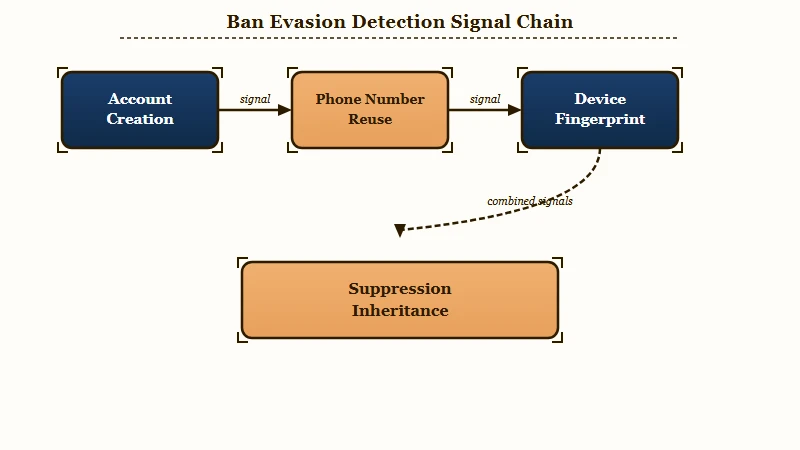
YouTube’s 2026 detection system runs ban evasion checks at the moment a new account is created and again every time a video is uploaded. The system looks for shared ownership indicators across these layers:
What is ban evasion detection: YouTube’s automated layer that links new accounts to previously terminated ones by matching device, IP, payment, and browser signals. Once linked, the new account inherits the old account’s suppression status.
- Phone number reuse. A phone number ever associated with a terminated channel flags any new account using the same number. Recycled or shared phone numbers from family members trigger the same flag.
- IP address history. Home and mobile IPs that ever served a terminated channel are scored. Even after the IP changes (DHCP rotation, ISP change), the historical association persists if YouTube saw enough activity from that IP.
- Device fingerprint. Browser version, screen resolution, installed fonts, GPU model, and OS version combine into a fingerprint hash. Same laptop equals same fingerprint, equals same identity in the detector.
- AdSense account history. A terminated AdSense account flags any YouTube account linked to its owner, even on different devices, because the AdSense layer is identity verified.
- Cookie and session continuity. If the new account is signed up while the old account’s cookies are still in the browser, the link is direct. Many creators do this without realizing it because browsers retain Google session state across logouts.
- Login pattern overlap. Same time of day, same router, same default browser language, same mouse movement entropy. The detector aggregates these as soft signals.
Once any combination of these triggers the link, the new account inherits the suppression posture of the old account. Uploads serve 0 impressions, the For You feed does not see the content, and search visibility is removed for non subscribers.
Why The 0 View Loop Is Not A Normal New Channel Slow Start
A normal new channel produces 10 to 100 views per Short within the first 24 hours from the test pool that YouTube uses to evaluate any new account.
A 0 view ceiling that persists across multiple uploads is a different signal entirely.
YouTube assigns every new channel a starter test pool of roughly 200 to 500 impressions across the first 1 to 3 Shorts. Even a terrible video gets some of this pool. The pool exists because the algorithm needs engagement data to calibrate distribution, and zero impressions produces zero data.
When that test pool gets withheld, the most common explanation in 2026 is not content quality. It is account suppression carried over from a flagged identity. The system has decided not to allocate any impressions until the identity question is resolved.
| Signal | Normal slow start | 0 view ban evasion loop |
|---|---|---|
| First 24h views per Short | 10 to 100 | Literally 0 |
| Drift after 7 days | Climbs to 50 to 300 | Stays at 0 |
| Search visibility for non subscribers | Visible at low rank | Removed entirely |
| Account Status warnings | Clean, eligible | Sometimes clean, sometimes flagged |
| Impact of changing niche or content style | Some lift | No lift at all |
The way I see it, the giveaway is the cross upload uniformity. A genuine slow start has variance, one Short hits 80 views, another hits 12. A ban evasion loop produces the same number on every upload, and that number is 0.
The Cleanroom Diagnostic Before You Try Any Recovery
The cleanroom diagnostic uses a fresh device, fresh network, and fresh identity to determine whether the suppression follows you or follows the original account.
Run this before any recovery attempt, because the answer changes the entire recovery path.
The test costs you a few hours and requires access to a second device. The result tells you whether to invest 30 days in cleanroom recovery or move directly to a separate identity rebuild.
- Borrow a device that has never logged into your YouTube account. A friend’s laptop, a work computer, or a public library terminal works. Do not use your phone or any device that has ever served your account.
- Use a network you have never used for the flagged account. A coffee shop wifi, a friend’s home network, or a mobile hotspot from a different carrier. Not your home network and not your mobile data.
- Create a brand new Google account from scratch on this device and network. Use an email address that has never been linked to YouTube. Skip phone verification if possible, use the verification skip path. If verification is required, use a phone number not associated with any prior YouTube account.
- Upload one Short from the new account, with content unrelated to your prior channels. Wait 24 hours.
The result tells you which scenario you are in:
- If the test Short gets 10 to 100 views in 24 hours, the suppression is tied to your original device, network, or identity. A cleanroom recovery is worth attempting.
- If the test Short also gets 0 views, the suppression follows your real identity (phone, AdSense, government ID linked accounts). A cleanroom recovery will not work and the better path is to assess whether the flagged identity is worth recovering at all.
Diagnostic question: Does a freshly created account on a brand new device and network also get 0 views? If yes, the suppression is identity level, not device level. If no, the device or network is the carrier and a cleanroom rebuild can work.
This diagnostic is the step most creators skip and the reason they spend months in the 0 view loop. Without confirming which layer is flagged, every recovery attempt fights the wrong variable.
The 30 Day Cleanroom Recovery When Device Or Network Carries The Flag
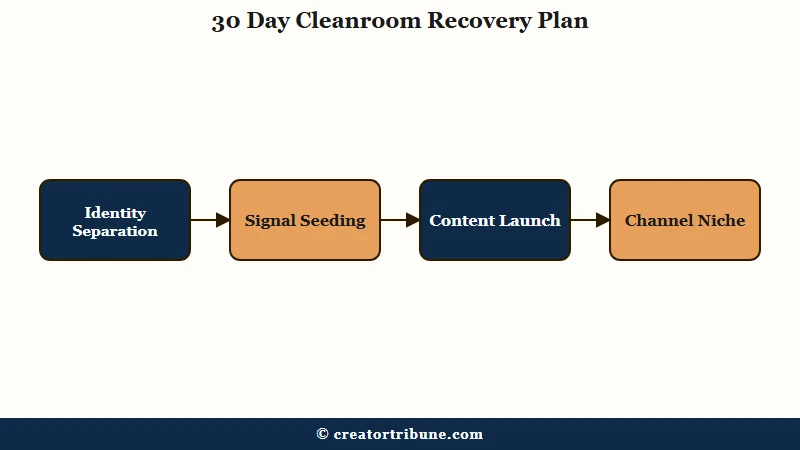
The 30 day cleanroom recovery rebuilds a YouTube identity on a completely fresh device, network, and account stack, then waits long enough for YouTube to score the new identity on its own merits.
Less than 30 days is too short for the detection layer to stop cross referencing.
This sequence assumes the diagnostic confirmed device or network carriage. It will not work if your underlying identity (phone number, AdSense, payment profile) is the carrier.
Days 1 to 3, identity separation:
- Acquire a fresh phone number not previously linked to any YouTube account. A prepaid SIM, a Google Voice number with a clean history, or a number from a different carrier all work. Do not use a number ever used for verification on the flagged account.
- Use a device that has never logged into the flagged channel. New laptop, freshly factory reset device, or a clean browser profile that has never carried your YouTube cookies.
- Use a network the flagged account never used. Different ISP, mobile data from a different carrier, or a VPN with a stable residential IP from a region matching your real location.
- Create the Google account, then YouTube channel, on this stack and only this stack.
Days 4 to 14, signal seeding:
- Use the new YouTube account passively for one week before uploading anything. Watch content in the niche you plan to publish in. Subscribe to 3 to 5 channels in that niche. Engage with comments on 2 to 3 videos per day.
- The point of this phase is to establish a viewer profile on the account before YouTube has any creator signals to score. A creator account that emerges from a populated viewer account looks more legitimate than one that emerges from zero history.
- Do not upload anything yet. The detector is most sensitive in the first week after account creation.
Days 15 to 30, content launch:
- Day 15, upload your first Short. Pick content that is recognizably different from the flagged account’s niche to avoid pattern matching on subject. If the old channel was NBA edits, do not start with NBA edits.
- Days 15 to 22, post 1 Short per day. Each post must be original, not reuploaded from the flagged account. Reuploaded content is one of the easiest signals YouTube cross references through audio and video hashing.
- Days 23 to 30, increase to 1 to 2 Shorts per day, with content that demonstrates niche consistency. By day 30, expect the test pool to start allocating 50 to 500 impressions per upload if the cleanroom held.
- If by day 30 the account is still stuck at 0 views, the diagnostic was incomplete and there is still an identity layer carrying the flag.
Before vs After of the cleanroom phase 1 setup:
Before: Create a new Gmail on the same Chrome profile, log into YouTube, upload a reupload of the old channel’s most viewed video, wait for the algorithm to notice.
After: Day 1, factory reset laptop, install fresh Chrome with no extensions, sign up with a prepaid SIM that has no Google history, use a friend’s residential IP for the first 72 hours, create the Google account, do not log into YouTube for 5 days. Day 6, log into YouTube, watch content in target niche only. Day 15, upload an original Short on a content angle different from the flagged channel.
When To Abandon The Flagged Identity Entirely
If the cleanroom diagnostic shows 0 views even from a fresh device and network, the suppression is anchored to your real identity and a cleanroom recovery will not resolve it.
The honest move at that point is to evaluate whether the flagged identity is worth recovering or whether starting fresh under a separate creator persona is more efficient.
This is the conversation most creators avoid because the flagged identity often holds 6 to 24 months of brand building. The math is rarely as bad as it feels.
A separate creator persona built on clean identity layers, with a clean phone number and a clean AdSense, reaches the same monetization milestone in 6 to 9 months on Shorts in 2026. Fighting an identity level flag often takes longer than that and frequently fails.
The cases where fighting the flagged identity is worth it are narrow. The first is when the original channel termination was a clean false positive and a successful YouTube channel termination appeal is realistic, which would restore the original identity rather than route around it.
The second is when the flagged identity has external assets that depend on the YouTube name, like a brand partnership pipeline that already references the old channel.
Outside those two cases, the math favors starting clean. Separate phone, separate AdSense, separate persona, separate naming convention. Treat it as a new business, not a workaround.
How To Launch A New Channel Without Triggering The Flag
Launching a clean new channel in 2026 requires fresh signal on every layer the detector reads, separate browser session, separate phone number, separate AdSense, and zero cookie continuity with any prior YouTube identity.
For creators planning a new channel where there is no flagged history yet, the prevention sequence is simple and worth doing right the first time.
The biggest single decision is to never mix YouTube identities on the same browser session. If you have any historical association with a flagged account, use a separate browser entirely for the new channel. Firefox for personal Google, Chrome for the new YouTube identity, with no shared cookies, history, or autofill data.
Phone numbers carry more weight in 2026 than most creators realize. The number used for verification becomes a permanent identity anchor.
A number that was ever used for a terminated channel is poisoned for any new YouTube identity tied to it, even years later. Use a fresh number for any new channel from a different carrier than the flagged one.
AdSense linkage is the highest weight signal. Do not link a new YouTube channel to an AdSense account that has ever been associated with a terminated YouTube account. The way the AdSense Invalid Click Activity flag carries across associations maps directly to this YouTube layer.
For broader context on what gets a YouTube channel terminated in the first place, the YouTube channel terminated recovery guide covers the five termination types and which ones produce permanent identity flags versus recoverable ones. The YouTube Shorts views stopped after 24 hours diagnostic covers the mid life Shorts stall, which is a different problem from the 0 view loop.
Statista reports YouTube now has around 2.5 billion monthly active users and 3 million Partner Program channels globally. The ban evasion detection layer exists because the platform’s economic model depends on advertiser trust, and ban evasion is one of the lowest cost behaviors for bad actors to attempt.
Honest creators caught in the crossfire need the cleanroom recovery sequence above precisely because the detector cannot tell the difference at scan time.
Frequently Asked Questions
Is the 0 view loop the same as a YouTube Shorts shadowban?
No. A Shorts shadowban produces low but non zero views (typically 5 to 50 per upload) with limited distribution. The 0 view loop produces literal zero impressions on every upload. The 0 view loop is caused by ban evasion detection linking your new account to a flagged identity, not by content level suppression.
Will using a VPN fix the 0 view loop?
A VPN alone is not sufficient. YouTube’s detection cross references IP with device fingerprint, phone number, browser cookies, and AdSense identity. A clean IP combined with a flagged device or phone number still produces a link. The cleanroom recovery requires separation across every layer simultaneously.
Can I just delete my flagged channel and try again on the same account?
No. Deleting the flagged channel does not remove the identity link in YouTube’s records. The account, phone number, and device history all retain the association. The cleanroom recovery requires a genuinely fresh identity stack, not just a deleted channel.
How long do I have to wait before YouTube forgets the old account?
There is no documented expiration on identity flags. Anecdotal evidence from creators who recovered suggests 12 to 24 months of inactivity on the flagged identity may reduce the weight of the link, but it does not erase it. The cleanroom path is faster than waiting.
Does YouTube tell me my new channel is flagged for ban evasion?
Almost never. The Account Status panel typically reads “Eligible for the For You feed” even when the account is in a 0 view loop, because the technical eligibility status is clean. The suppression is applied at the distribution layer, not the policy layer, so it does not surface as a notice.
If my cleanroom test Short gets 0 views, is the recovery impossible?
Recovery from an identity level flag through the same legal name and government identifiers is impractical in most cases. The realistic path is to launch under a separate creator persona on clean identity layers, treating the flagged identity as closed.