Fix YouTube AdSense Disabled for Invalid Click Activity
Fix YouTube AdSense Disabled for Invalid Click Activity
AdSense Invalid Click Activity locks your Step 2 monetization the moment you change association. Here is the actual fix path, not the support loop.
- 1What Invalid Click Activity Means When You Have Never Even Been Monetized
- 2Why Changing Your AdSense Association Sets Off the Flag
- 3Suspension Versus Disablement, And Why The Difference Decides Your Next Move
- 4The Appeal Form That Really Works When You Are Not At Fault
- 5Managing The Second AdSense Account Without Making Things Worse
- 6Why Step 2 Stays Stuck Even After Reinstatement, And What To Do About It
- 7How To Avoid This The Next Time You Change Anything On AdSense
- 8Frequently Asked Questions
- How do I fix a YouTube AdSense account disabled for Invalid Click Activity?
- Can I appeal a 30 day Invalid Click Activity suspension?
- Why did the flag fire on a channel that has never served ads?
- Should I create a new AdSense account if my old one is stuck?
- What happens to my earned but unpaid revenue if the account is disabled?
- Why does YouTube support keep telling me my case is escalated?
- Will appealing through YouTube Studio reach the AdSense team?
TL;DR: Step 2 monetization locks for Invalid Click Activity most often because Google’s automated system flagged your account during an association change, not because of real bad traffic. A 30 day suspension cannot be appealed, only waited out. A disablement can be appealed, but only through the AdSense Policy Center, never through YouTube Studio support chat. The fastest path forward is to identify which state you are in, file the right form with the right evidence, and stop trying to fix it from the wrong door.
If you have been stuck at YouTube Step 2 monetization for weeks because your AdSense account is flagged for Invalid Click Activity, you are looking at one of the worst documented failure modes in the creator economy. The exact script repeats over and over: a creator tries to change AdSense association during a residency move, the old account locks for “invalid click activity,” and YouTube support sends them in circles for four months without ever saying “no.”
The frustrating part is that almost none of the public guides talk about the association change as the trigger. Most describe Invalid Click Activity as if it always means click farms or self clicks.
The way I see it, that framing is wrong. The flag fires automatically during association attempts even on channels that have never served a single ad.
This guide walks through what is really happening, why the support chat will never solve it, and the appeal pathway that has a real chance of unlocking your channel. I will also flag two procedural mistakes that make the situation worse, including the one that turns a recoverable suspension into a permanent ban.
What Invalid Click Activity Means When You Have Never Even Been Monetized
Invalid Click Activity is Google’s automated label for any traffic pattern its filters consider artificial, including patterns triggered by account changes rather than ad clicks.
Google’s published description of the system is that its real-time filters assess impressions and clicks as they occur, and that traffic judged invalid generates no revenue and costs advertisers nothing. Nothing in that mechanism requires an ad to have served for your account to be flagged.
What is Invalid Click Activity: Google’s blanket term for clicks, impressions, or account behaviors that its automated systems judge to be artificially generated, accidental, or otherwise non genuine.
The official definition covers clicks and impressions that “may artificially inflate an advertiser’s costs or a publisher’s earnings.” In practice that includes automated bot traffic, self clicks, click farms, but also relationship signals between accounts.
The most common real world trigger fires the moment a creator presses “change association” to switch their YouTube channel from an old AdSense account to a new one. The channel had never been monetized, and no clicks were ever served on it.
The flag fired anyway.
This is the part most public guides miss. Google’s filters do not look only at click data. They look at account relationships, IP overlap, address overlap, prior account history, and recent administrative actions.
An association change is itself a signal that the system reads and reacts to.
Why Changing Your AdSense Association Sets Off the Flag
Changing your AdSense association links two accounts in Google’s system, and the link itself is a signal its automated filters treat as a risk event, even when neither account has any real click violation.
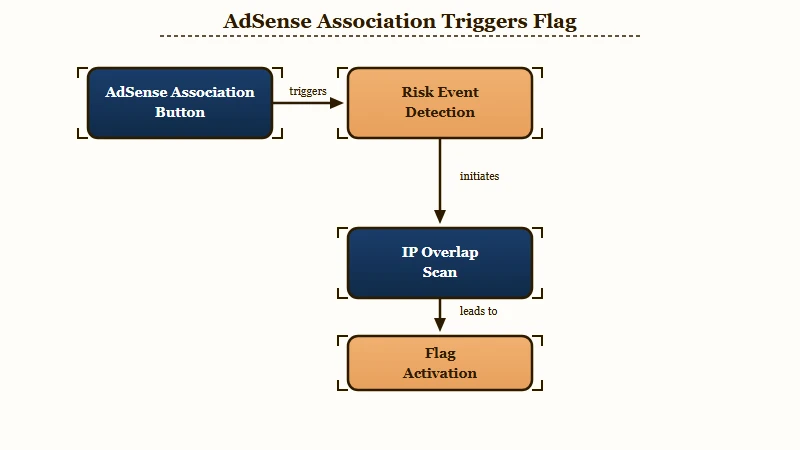
The “guilt by association” rule is the part of Google’s policy that explains what just happened to you. From the AdSense help docs, an account can be disabled just on the basis of being related to another previously disabled account. The relationship can be IP overlap, shared address, or the act of logging into a channel owned by someone with a flagged account.
When you press “change association” in YouTube Studio, you are telling Google’s system that two AdSense accounts share a YouTube channel as a common point. From the system’s perspective, that is a relationship signal.
If anything in the old account’s history was borderline, the new linking attempt can re activate scrutiny on both sides. The flag often hits the older account first because it is the one with usage history Google can scan.
Country and residency migrations make this worse. AdSense ties payment profiles to country of creation, so creators who relocate often end up with two AdSense accounts, the old one tied to the original country and a new one created to match current residency.
Trying to merge or switch between them is exactly the kind of administrative move Google’s filters watch for, because circumvention attempts also look like that.
| Trigger | What Google sees | What happens |
|---|---|---|
| Pressing “change association” | Two AdSense accounts share one YouTube channel | Filters re evaluate both accounts |
| New AdSense account during ongoing review | Possible circumvention pattern | New account flagged in parallel |
| Logging into someone else’s flagged channel from your device | IP and account overlap | Risk score increases |
| Residency change with payment profile mismatch | Geo signal inconsistency | Manual review triggered |
In my view, this is the most underserved angle in every public article on this topic. Most of them frame Invalid Click Activity as something you did with clicks. For creators caught in the association change loop, the actual cause is administrative, and the fix has to be administrative too.
Suspension Versus Disablement, And Why The Difference Decides Your Next Move
Account suspension is a temporary state, typically 30 days, that resolves automatically. Disablement is permanent and is the only state that can be appealed. Confusing these two costs creators months of wasted appeals.
From what I have seen in the Google docs, here is how the two states differ in practical terms. Read this carefully because the appeal form you have probably already filled out only matters in one of these scenarios.
- Suspension turns off ad serving for a fixed period, usually 30 days. The account is not closed. If no further issues appear during that window, ad serving resumes automatically. Suspensions cannot be appealed. There is no form, no support call, and no escalation that will shorten this window. Google explicitly tells publishers not to fill out the invalid traffic appeal form during a suspension. Its own AdSense blog spells out the consequence: “that form is reserved for disabled accounts, and you will receive an email that says we can’t process this appeal”. If you have already filed during a suspension and got a bounce like that, nothing has gone wrong with your case. You filed the right form at the wrong time.
- Disablement is permanent. The account is closed. The creator is barred from any further participation in AdSense, Google Ad Manager, and other Google ad programs. New AdSense accounts cannot be opened. A 30 day payment hold is applied during which Google calculates the final balance, and any revenue identified as invalid is refunded to the original advertisers.
The pattern that gives this away is a multi month limbo with “escalations” that never close. If the account were on a 30 day suspension, the loop would have ended automatically by day 31. If it were disabled, the user would have received a clear disabled notice.
The state of “perpetual internal review” is what you get when an automated filter has flagged something the manual queue is not really working on.
Diagnostic question: Has the account state changed at all in the last 30 days, or does it read identically to day one? If identical, you are not in a recoverable suspension and the appeal route is your only path.
The way I read this is that the appeal route is the only meaningful action you can take if the state has not resolved on its own in 30 days. Support chat will not move the needle. It is the AdSense Policy Center, or nothing.
The Appeal Form That Really Works When You Are Not At Fault
The appeal form that matters is Google’s invalid activity appeal form, a standalone page Google links directly from its own help documentation, and it only applies once your account has moved from suspended to disabled.
Most creators file the version YouTube support hands them, which is the generic creator help form, and that form does not route to the team that can lift the flag. The one that does is Google’s invalid activity appeal form at support.google.com/adsense/contact/appeal_form_adsense_admob, the same form Google links from both its AdSense account closure page and its dedicated AdSense for YouTube invalid traffic page.
The phrasing of the appeal matters more than the form fields. Here is the difference between an appeal that gets a generic auto reply and one that lands on the right desk:
Before: “My account was suspended for Invalid Click Activity. I did not click my own ads. Please review my account and reinstate it.”
After: “My AdSense account was flagged for Invalid Click Activity on 2026-03-14 at 14:22 UTC, exactly 9 minutes after I attempted a YouTube channel association change from this account to a new AdSense account I created during a residency move from Country A to Country B. The flagged channel has never served a billed impression and earned 0 dollars in ad revenue. I am attaching screenshots of the association change confirmation and the policy notice timestamps. I am proactively disclosing the second AdSense account, which exists only because my new country of residence does not match the original payment profile. I have not used the second account for any monetization activity.”
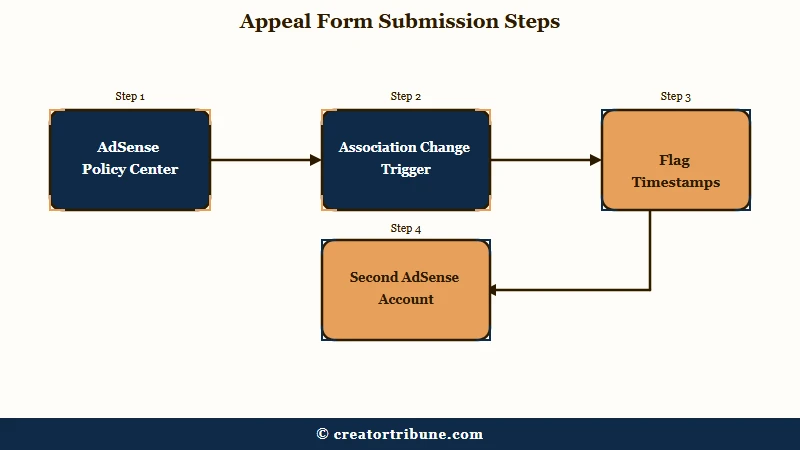
Here is the sequence I would walk through if I were filing this appeal cold today, with the association change as the trigger:
- Sign into the disabled or flagged AdSense account directly at adsense.google.com. Do not start from YouTube Studio, and file from the flagged account itself rather than any second account you hold. Google matches the appeal to the account by the email address you submit.
- Check your state in the Policy Center from the left sidebar before you file anything. If it reads “your account is under review” with no disablement notice, you are still in suspension and there is nothing to file yet. If the account is disabled, go to the invalid activity appeal form directly rather than hunting for a link in the interface.
- State the trigger explicitly in the first sentence of your appeal. Example phrasing that beats the generic version: “My account was flagged for Invalid Click Activity at the exact moment I attempted to change AdSense association on my YouTube channel during a residency move. The channel has never served ads and no impressions have been billed.”
- Provide timestamps. Include the date and approximate time of the association change attempt, and the date the flag appeared in your account. If they match within minutes or hours, that is your evidence that the trigger was administrative, not behavioral.
- Address the multi account question proactively. If you created a second AdSense to handle the country mismatch, state it openly. Explain why you needed the second account (payment profile geography), and confirm the second account is not being used to circumvent any restriction. Hiding it makes the appeal weaker, because Google’s system already knows it exists.
- Describe the changes you have made. This is required by the form. Even when you did nothing wrong, Google wants to see that you have audited your traffic sources, removed third party widgets if any, and committed to a specific monitoring approach going forward. Generic answers fail. Specific answers about your traffic stack pass.
- File once, then wait. Repeated appeals on the same case actively hurt you. The form notes that further appeals may not be considered after a decision is reached.
The cap on appeals is the part of this that surprises most creators. Conventional creator wisdom says “keep appealing, eventually a human will look at it.” That is wrong for Invalid Click Activity cases. One well documented appeal beats five generic ones.
Managing The Second AdSense Account Without Making Things Worse
A second AdSense account opened during a country migration must be disclosed in the appeal, never hidden, and never used to attempt a workaround on the first account’s flag.
Creators in country migration scenarios almost always end up with two AdSense accounts. The textbook example looks like this: the original account is 10 years old in a different country, the new account is created to match current residency, and the moment the creator tries to bridge the two with an association change, the system locks the old one.
If this is your situation, the choices are narrow but specific. Do not delete the second account before resolving the first, because if the first account holds more than 10 dollars in earnings, full verification on the first account is required before closure can complete. Deleting the second prematurely can leave you stranded.
| Your situation | Right move | Wrong move |
|---|---|---|
| Old account flagged, new account active but unused | Reference both openly in the appeal, keep new one inactive | Hide the second account, hope Google does not see |
| Both accounts active, neither flagged yet | Stop using “change association,” route via AdSense support | Press change association again to “try once more” |
| Old account disabled, new account still pending | Appeal old account first, then activate new | Try to use new account to circumvent the disabled one |
| Both flagged simultaneously | File appeals on both with matched timestamps | Open a third account |
In my reading, the worst thing a creator can do in this situation is open a third account. That moves the file from “Invalid Click Activity” into the much harder “circumvention” category, which has lower success rates and triggers cross account bans.
Why Step 2 Stays Stuck Even After Reinstatement, And What To Do About It
Step 2 can stay locked for up to 48 hours after a successful reinstatement because Google’s servers and the YouTube to AdSense binding both need a manual nudge before the UI catches up.
Even when an appeal succeeds, the YouTube Studio Step 2 screen does not always update automatically. Two things slow it down.
The first is server propagation. Google’s documentation acknowledges that ad serving can take up to 48 hours to resume globally after an account is reinstated. The second is the YouTube to AdSense binding itself, which sometimes requires a manual reassociation pass even after the AdSense side has cleared.
Here is the sequence to follow once your appeal is accepted:
- Wait the full 48 hours after the reinstatement email arrives. Do not press any buttons during this window. Server propagation is slow and impatience can re trigger filters.
- Check the AdSense dashboard at adsense.google.com. If your status reads “active,” the account side has cleared.
- Go to YouTube Studio, then Earn, then the AdSense card. If Step 2 is still locked, choose “Change or Accept Association” and sign into the now reinstated AdSense account using the email it was created under.
- If the association attempt errors out, clear browser cache, switch to an incognito window, and try again. Sign in only with the original AdSense email, not any alternate account.
- If Step 2 still does not unlock after a clean association attempt, file a follow up note through the same Policy Center thread, citing the reinstatement date and the residual UI block.
Most creators do not know about step 5. The Policy Center thread stays open after an appeal is processed, and a short follow up about the residual UI lock is the right channel for it. Reaching out via YouTube support chat at this stage starts a new ticket that does not route to anyone who can help.
How To Avoid This The Next Time You Change Anything On AdSense
Avoiding a repeat of this loop comes down to controlling identity signals, staging country moves carefully, and never pressing “change association” during an active payment profile change.
Once the original account is unlocked, a few habits keep the same loop from happening again on the next country move or account change.
The biggest one is logging in with the correct identity every time. Cross account sign ins are the most common origin point for “guilt by association” flags.
If you have ever logged into a friend’s channel from your laptop while their AdSense was under review, your IP is now associated with theirs in Google’s records. Use separate browsers or browser profiles for separate Google identities.
Avoid pressing “change association” during any active country or address change. Wait until the payment profile is fully stable on the new account before linking your YouTube channel to it. If you need to change association mid migration, use the AdSense Policy Center support channel first, ask the question, and proceed only after they confirm the safe sequence.
For YouTube creators specifically, skip ads when watching your own videos. The platform’s own documentation calls this out explicitly, and the rule applies even when you are testing thumbnails or watching previews. Each impression on your own content is counted, and a small pattern of self watches accumulates over months.
A useful background reference here is the broader YouTube monetization denied diagnostic flow, which covers the four major rejection categories AdSense uses across the Partner Program. The YouTube channel terminated recovery walkthrough is the next step if the appeal closes against you, because at that point you are dealing with channel termination, not just monetization lock.
Cross platform, the TikTok Creator Rewards rejection guide covers how a different platform handles a similar “you cannot earn here” state, and the YouTube Shorts monetization mechanics explains the ad revenue share model that this whole appeal exists to unlock.
For perspective on scale, Statista reports that the YouTube Partner Program now spans around 3 million channels worldwide. Google publishes no breakdown of how many of those sit in a Step 2 lock at any moment.
That silence is most of why the loop feels isolating, and it is worth knowing the shape of it before you file. Creators who get out of it are the ones who identify their account state correctly, then send a single well evidenced appeal.
Frequently Asked Questions
How do I fix a YouTube AdSense account disabled for Invalid Click Activity?
File Google’s invalid activity appeal form once, from the disabled account itself, with the timestamp of whatever administrative action preceded the flag. Disablement is the only state with an appeal path, so confirm you are disabled rather than suspended first. A suspension has no form and no escalation, it simply runs its roughly 30 day course.
Can I appeal a 30 day Invalid Click Activity suspension?
No. Suspensions are explicitly not appealable. Google’s documentation tells publishers not to file the invalid traffic appeal form during a suspension period. The 30 days has to run out on its own, and if no further issues are detected, ad serving resumes automatically.
Why did the flag fire on a channel that has never served ads?
Because Invalid Click Activity is not only about clicks. The filter also evaluates account relationships, IP overlap, and recent administrative actions like association changes. A channel with no monetization history can still trigger the flag if Google’s system reads the surrounding signals as suspicious.
Should I create a new AdSense account if my old one is stuck?
No. Creating a second AdSense account while the first is under review can move your case from “Invalid Click Activity” into the harder “circumvention” category. If a second account already exists from a residency migration, disclose it openly in the appeal rather than hiding it.
What happens to my earned but unpaid revenue if the account is disabled?
A 30 day payment hold is applied. Google uses that window to calculate the final balance, and any revenue identified as invalid is refunded to the original advertisers rather than retained. Earnings classified as valid may be released as a final payment.
Why does YouTube support keep telling me my case is escalated?
Because the support agents on YouTube chat cannot override an AdSense filter. They can re queue the case internally, which is what “escalation” means in their tooling, but the actual review happens on the AdSense side. Your account’s Policy Center is where that side reports its verdict, which is why it is the page worth watching rather than the chat transcript.
Will appealing through YouTube Studio reach the AdSense team?
Not reliably. The form YouTube Studio hands creators routes through general YouTube creator support, which does not have access to the AdSense Invalid Click Activity queue. The correct one is Google’s standalone invalid activity appeal form, submitted with the email address on the flagged AdSense account.