How to Protect Your YouTube Channel From Phishing Attacks That Bypass 2FA
How to Protect Your YouTube Channel From Phishing Attacks That Bypass 2FA
Learn how phishing attacks bypass 2FA to hijack YouTube channels. Protect yourself with Chrome DBSC, hardware security keys, and a proven recovery plan.
- 1Why Do Phishing Attacks Still Work After Enabling 2FA?
- 2What Does a YouTube Phishing Email Actually Look Like?
- Before (Phishing Email)
- After (Legitimate YouTube Email)
- 3Which Attack Vectors Target YouTube Creators Right Now?
- 4What the 2026 Fake Copyright Notice Looks Like
- 5How Do Hackers Steal Your Session Cookies Specifically?
- 6What Concrete Steps Protect Your Channel From These Attacks?
- 7How Do Protection Methods Compare Against Each Attack?
- 8What Should You Do in the First 60 Minutes After Getting Hacked?
- 9How Can You Spot Fake Brand Deal Emails Before Clicking?
- 10FAQ
- Can a YubiKey prevent all YouTube phishing attacks?
- Is [email protected] a real YouTube address?
- Does YouTube officially support passkeys for login?
- What is the “DMCA Abuse” phishing lure?
- How long does YouTube channel recovery take after a hack?
- Are channels with more subscribers more likely to be targeted?
- What is Chrome DBSC and do I need a special computer for it?
- 11Quick Takeaways
TL;DR: Phishing kits now steal session cookies after you log in, making traditional 2FA useless. Chrome 146+ on Windows enables Device Bound Session Credentials, macOS has no equivalent yet, so pair it with a FIDO2 hardware key and bookmark youtube.com/hacked. Google supports hacking cases only from the past 9 months.
You turned on two-factor authentication years ago and assumed your channel was safe. So did every creator who woke up to find their uploads replaced with crypto scams. The attackers never needed your password or your 2FA code because they stole something more valuable: your session cookie.
Google’s Threat Analysis Group has tracked this technique against YouTube creators since late 2019, and security researchers were still pulling apart working kits in April 2026. The defences worth having changed this year.
Chrome shipped a countermeasure aimed squarely at stolen cookies this year, and it only covers one operating system so far. Most creator security checklists still have not caught up to either half of that.
Why Do Phishing Attacks Still Work After Enabling 2FA?
Session cookie theft (Pass-the-Cookie attacks) lets hackers clone your logged-in browser session without ever triggering a 2FA prompt.
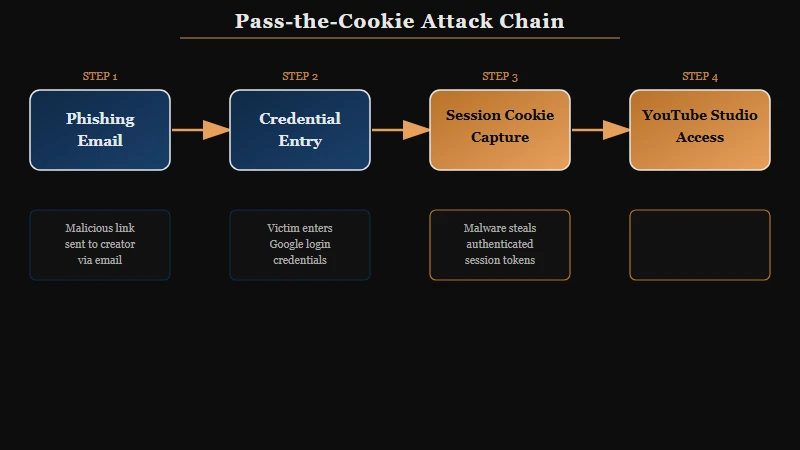
Here is how the attack chain works. A scammer sends you a “brand deal” or “copyright strike” email with a PDF attachment or a link to a fake login page. You open the link, enter your credentials, complete your 2FA challenge, and land on what looks like a normal dashboard.
Behind the scenes, the page captured your session cookie the moment authentication completed. The attacker imports that cookie into their own browser and instantly gains full access to your YouTube Studio, AdSense, and linked Google services. Your 2FA never fires again because the cookie tells Google this is an already-authenticated session.
Google’s Threat Analysis Group has been disrupting this exact campaign since late 2019 and attributes it to financially motivated hack for hire actors recruited through job ads on Russian-speaking forums, not to a state intelligence service. They impersonate partnership managers, send polished collaboration proposals, and extract session cookies through malware disguised as antivirus trials, VPN installers or “contract” documents.
Google identified roughly 15,000 actor accounts and at least 1,011 domains built for this single campaign, and it has cut the related phishing volume reaching Gmail by 99.6% since May 2021. That figure covers Gmail specifically, so it measures one channel being closed rather than the campaign ending.
What Does a YouTube Phishing Email Actually Look Like?
Phishing emails mimic official YouTube notifications so closely that even experienced creators click before thinking.
The difference between a real email and a fake one comes down to small details that are easy to miss at 2 AM when you are worried about a copyright strike. Here is a side-by-side breakdown.
Before (Phishing Email)
From:
[email protected]Subject: DMCA Abuse Notice, Immediate Action Required
Body: “Your channel has received a DMCA Abuse complaint. You must review the attached documentation within 48 hours or your channel will be permanently terminated. Download the review form: [copyright-review-form.pdf]”
After (Legitimate YouTube Email)
From:
[email protected]Subject: Copyright claim on your video “[Video Title]”
Body: “A copyright owner has claimed content in your video. You can review the details in YouTube Studio. No attachments, no urgency threats, just a link to studio.youtube.com.”
Notice the differences. The phishing version uses a spoofed domain (y0utube-support.com with a zero instead of an “o”), attaches a PDF (YouTube never does this), and creates artificial urgency with termination threats. The legitimate email names your specific video, links to YouTube Studio directly, and never asks you to download anything.
Which Attack Vectors Target YouTube Creators Right Now?
Five primary attack types dominate the current threat landscape, each exploiting a different psychological trigger.
| Attack Type | Trigger Exploited | Delivery Method | Success Rate Signal |
|---|---|---|---|
| Fake Copyright Strike | Fear of losing channel | Email with PDF attachment | Very High |
| Fake Brand Deal | Greed for sponsorship | Email with “contract” link | High |
| AdSense Suspension Lure | Fear of losing revenue | Email with fake dashboard | High |
| Browser-in-Browser (BitB) | Trust in login popups | Fake OAuth popup window | Medium |
| ClickFix Attack | Helpfulness instinct | “Paste this command to fix” | Growing fast |
The 7-Day AdSense Forfeiture Lure deserves special attention. Scammers send a notice claiming your AdSense account has been suspended and you have seven days to resolve it or forfeit your five-figure earnings balance. Creators who have real money sitting in AdSense panic and click without thinking.
ESET recorded a 517% rise in ClickFix attacks across the first half of 2025, which made it the second most common attack vector after phishing itself, at close to 8% of everything the company blocked. These trick you into opening a terminal and pasting a command that supposedly “fixes” a display issue or “verifies” your account.
That command downloads and executes malware in seconds. The technique works on Windows, macOS and Linux, so the operating system you use is not the protection here.
Malwarebytes analysts who took apart a live kit found it checks your subscriber count first and skips the attack entirely on channels above 3 million, showing them a reassuring “good standing” message instead.
Large channels have security staff, direct lines into YouTube trust and safety, and enough visibility to turn one compromise into a news story. Mid-tier creators between roughly 10,000 and 500,000 subscribers earn enough to be worth stealing and attract none of that response.
What the 2026 Fake Copyright Notice Looks Like
The current campaign assembles a copyright strike page from your real channel data, then opens a counterfeit browser window to capture the login.
Malwarebytes documented a working version of this kit on April 15, 2026, served from the lure domain dmca-notification[.]info. The page pulls your actual avatar, subscriber count, video count and latest upload thumbnail straight from YouTube, then stamps a freshly generated timestamp on the notice so it reads as individually issued.
The notice states that “Deleting the video will not remove the strike”, which heads off the first instinct most creators have, then threatens channel enforcement if you fail to respond within three days.
Clicking the sign-in button triggers a Browser-in-the-Browser attack. What looks like a Chrome sign-in popup is HTML and CSS drawn inside the page, so the address bar you are inspecting is a picture of an address bar.
Two checks defeat it. Drag the popup toward the edge of your screen, because a real browser window will travel outside the page and a drawn one cannot.
The second check is the one worth committing to memory: copyright strikes only ever appear in YouTube Studio. No genuine strike asks you to sign in from a link in an email, so open studio.youtube.com yourself and look.
How Do Hackers Steal Your Session Cookies Specifically?
Attackers use malware-laced PDFs, fake browser extensions, and AI-powered document exploits to extract cookies from your browser storage.
The most common path starts with a PDF. You download a “sponsorship brief” or “copyright review form,” and opening it triggers a script that reads Chrome cookie database from your local file system. The malware targets Cookies and Login Data files in your Chrome profile directory.
Crypto wallet extensions like MetaMask and Phantom are specifically targeted alongside YouTube cookies. If you review crypto products on your channel and have wallet extensions installed, a single successful phish can drain both your channel and your crypto holdings simultaneously.
A newer vector called XPIA (Cross-Prompt Injection Attacks) targets creators who use AI assistants. Hidden text embedded in PDFs instructs AI agents to exfiltrate session data when the creator asks their assistant to “summarize this sponsorship brief.” The malicious instructions are invisible to human readers but get processed by the AI.
A quieter variant routes the whole thing through a service you already trust. The fake YouTube copyright notice sent through Grammarly arrives from [email protected], a genuine Grammarly sending domain, so it passes every authentication check and survives the sender inspection most creators rely on.
What Concrete Steps Protect Your Channel From These Attacks?
Layer three defenses: upgrade your browser, replace SMS/TOTP 2FA with phishing-resistant keys, and lock down your Google account with Advanced Protection.
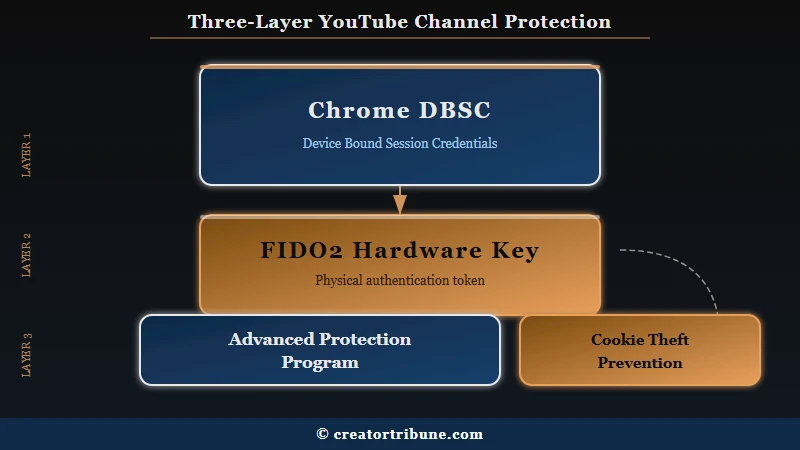
Here is your protection checklist, ranked by impact.
- Confirm you are running Chrome 146 or later on Windows. Device Bound Session Credentials binds your session cookies to your device TPM chip, so a stolen cookie is useless on the attacker’s machine. It reached general availability on Windows in April 2026, Google began the gradual rollout on May 25, 2026, and it is on by default for personal Google accounts and Workspace users with no switch to turn it off. Support for macOS through the Secure Enclave has not shipped yet, so Mac creators get no protection from this layer and need to lean on the two below.
- Buy a FIDO2 hardware security key. A YubiKey 5 NFC costs around $50 and makes phishing login pages completely useless. The key only responds to the real google.com domain. Fake domains get nothing.
- Enable passkeys on your Google account. Passkeys use the same cryptographic challenge as hardware keys but store the credential on your phone or laptop secure enclave. They are phishing-resistant and free.
- Enroll in Google Advanced Protection Program. This restricts your account to only FIDO2 keys or passkeys for login, blocks most third-party app access, and adds extra verification for file downloads. It is the highest security tier Google offers.
- Never download PDFs or executables from email senders you have not independently verified. If a brand wants to work with you, look up their website separately and contact them through official channels.
- Check the sender domain on every email. The difference between
[email protected]and[email protected]is one character. Zoom in.
How Do Protection Methods Compare Against Each Attack?
Hardware security keys and DBSC together block every current attack vector. SMS 2FA blocks none of the cookie-based attacks.
| Protection Method | Blocks Fake Login | Blocks Cookie Theft | Blocks Malware | Cost |
|---|---|---|---|---|
| SMS 2FA | Partial | No | No | Free |
| TOTP App (Google Authenticator) | Partial | No | No | Free |
| Passkeys | Yes | No | No | Free |
| FIDO2 Hardware Key | Yes | No | No | ~$50 |
| Chrome DBSC (146+, Windows only) | No | Yes | No | Free |
| FIDO2 Key + DBSC + Advanced Protection | Yes | Yes | Partial | ~$50 |
No single layer stops everything. DBSC neutralizes cookie theft but does not prevent you from entering credentials on a fake page. Hardware keys prevent fake-page logins but do not stop malware that is already running on your machine. You need both, plus careful behavior around email attachments.
What Should You Do in the First 60 Minutes After Getting Hacked?
Go to youtube.com/hacked immediately, change your Google password from a clean device, and contact @TeamYouTube on X for human escalation.
Speed matters more than anything else here. The moment you notice unauthorized changes to your channel, follow this exact sequence.
- Open
youtube.com/hackedon a device you trust (your phone, a family member laptop). This is Google dedicated recovery page for compromised YouTube accounts. - Change your Google password immediately. This invalidates all existing sessions across every device.
- Revoke all third-party app access at
myaccount.google.com/permissions. Attackers often install OAuth apps that persist even after a password change. - Post to @TeamYouTube on X (formerly Twitter) describing the situation. This is the fastest path to reaching a human at YouTube support. Include your channel URL and a brief description of what happened.
- When YouTube responds with the hijacking form, treat it as urgent. Creators who have been through the process consistently report a 72 hour window to complete it, though Google does not publish that figure, so do not gamble on an extension existing. Have your AdSense Publisher ID and the original channel creation date ready because the form requires both.
- Do not let the case go cold. Google only supports hacking cases from the past 9 months because of its data retention policy, and that is the one deadline in this process with no appeal behind it.
If your channel was terminated during the attack, the recovery process involves additional steps specific to reinstatement appeals. Creators who have dealt with copyright strike removal will recognize the escalation pattern, but hijacking cases typically receive faster attention.
How Can You Spot Fake Brand Deal Emails Before Clicking?
Legitimate brands send from corporate domains, never ask you to download software, and are happy to schedule a video call before any contract is signed.
I use a 10-point checklist every time a “sponsorship” email lands in my inbox. Here are the red flags that matter most.
The email comes from a free email provider (Gmail, Outlook, ProtonMail) instead of a company domain. The “brand” has no verifiable website, or the website was registered within the last 30 days (check via WHOIS). The email asks you to install software, download a “media kit” as an executable, or click through to a Google Docs link that requests editing permissions.
The compensation is suspiciously high for your subscriber count. They want to pay upfront before you have even agreed to terms. There is no mention of FTC disclosure requirements. The email contains grammatical errors that a professional marketing team would catch.
Any single red flag warrants caution. Three or more flags mean you should delete the email and block the sender. When in doubt, search the brand name plus “scam” or “phishing” on Reddit. Chances are another creator has already flagged it.
For creators who have experienced an account compromise on other platforms, the patterns are strikingly similar. The same social engineering playbook works across YouTube, Instagram, and TikTok.
FAQ
Can a YubiKey prevent all YouTube phishing attacks?
A YubiKey prevents credential phishing completely because it only authenticates with the real google.com domain. It does not prevent post-authentication cookie theft from malware already running on your machine. Pair it with Chrome DBSC for the most complete protection available today.
Is [email protected] a real YouTube address?
Yes, [email protected] is a genuine YouTube sending address, which is exactly why checking the sender alone is not enough. Scammers register lookalikes such as y0utube-support.com, and the Grammarly variant of this scam sends from a real third-party domain that passes authentication outright. Verify the claim inside YouTube Studio rather than verifying the sender.
Does YouTube officially support passkeys for login?
Yes. Google rolled out passkey support across all Google accounts, including YouTube. You can set up passkeys at myaccount.google.com/signinoptions/passkeys. They work on Android, iOS, Windows, and macOS devices with biometric or PIN authentication.
What is the “DMCA Abuse” phishing lure?
Scammers place “DMCA Abuse” in the email subject line to trigger a fear response. The term sounds like official regulatory language, making creators believe they face legal consequences. Real DMCA notices from YouTube arrive through YouTube Studio notifications, not email attachments with that specific phrasing.
How long does YouTube channel recovery take after a hack?
Most creators report recovery within 3 to 14 days after submitting the hijacking form through youtube.com/hacked, and complex cases involving terminated channels or deleted content can take 30 days or more. The widely reported 72 hour figure is a deadline for you to return the form, not a promise about YouTube’s response time.
The limit Google does publish is different and much longer. It supports hacking cases only from the past 9 months, after which its data retention policy makes recovery unlikely regardless of how strong your evidence is.
Are channels with more subscribers more likely to be targeted?
Counterintuitively, no. Malwarebytes found that the kit it analysed in April 2026 checks subscriber count and skips channels above 3 million entirely. Attackers concentrate on mid-tier creators between roughly 10,000 and 500,000 subscribers, who earn enough to be worth stealing without commanding the rapid platform response a large channel gets.
What is Chrome DBSC and do I need a special computer for it?
Device Bound Session Credentials (DBSC) binds your browser cookies to your device TPM (Trusted Platform Module) chip, and most computers built after 2016 include one. You need Chrome 146 or later on Windows, which you can check at chrome://version, and no extra hardware purchase is involved.
There is no macOS version yet. Google has said Secure Enclave support is the next step, so until it ships a Mac running Chrome 148 has no DBSC protection despite the higher version number.
Quick Takeaways
- Traditional 2FA (SMS, authenticator apps) does not protect against session cookie theft, which is the primary attack method used against YouTube creators today.
- Phishing kits deliberately target mid-tier creators (10K to 500K subscribers) and auto-exempt channels above 3 million to avoid detection.
- Chrome DBSC (version 146+) binds cookies to your hardware, making stolen cookies worthless on other devices.
- FIDO2 hardware keys ($50) and free passkeys are the only login methods that are fully phishing-resistant.
- Creators report a 72 hour window to return the hijacking form, and Google separately supports hacking cases only from the past 9 months. Have your AdSense Publisher ID and channel creation date ready before you need them.
- Every “brand deal” email deserves the same scrutiny as a suspicious bank notification. Legitimate sponsors are happy to verify their identity through a video call.