Recover a YouTube Channel Banned for Unlisted Videos
Recover a YouTube Channel Banned for Unlisted Videos
YouTube terminated a channel that only uploaded unlisted videos. Here is why Community Guidelines apply to private content and how to appeal it.
- 1Why YouTube Terminates Channels for Unlisted-Only Content
- 2Can a Channel With No Uploads Get Terminated?
- 3What the Termination Email Means in 2026
- 4The Recovery Sequence That Works
- 5Frequently Asked Questions
- Why was my YouTube channel terminated if my videos were unlisted?
- Does YouTube actively scan unlisted videos for violations?
- Do unlisted videos still get copyright strikes?
- My YouTube termination appeal was rejected, can I still recover?
- Can I just make a new YouTube channel after termination?
- How do I apply for the YouTube Second Chance program?
- Does the Second Chance program restore my old subscribers and videos?
- Can I download my videos from a terminated YouTube channel?
TL;DR: YouTube’s Community Guidelines apply to unlisted and private videos just as fully as to public uploads, and YouTube’s own privacy help marks all three settings as open to review for copyright and abuse prevention. If your channel was terminated despite only hosting unlisted content, the recovery path is an appeal within one year, then a new channel through the Second Chance pilot once 12 months have passed. Do not delete the terminated channel before reading this.
The assumption that an unlisted YouTube upload is invisible to moderation is one of the more expensive misconceptions a creator can hold in 2026. Content ID scans every video when it is uploaded, and YouTube’s review for copyright and abuse covers unlisted videos just as it covers public ones.
This piece walks through why a channel that only hosted unlisted videos can still get terminated, what specifically triggers it when unlisted is used as a privacy mode, and the staged recovery sequence that works in 2026. The hard deadline is the 12-month appeal window, and the worst move you can make in the first 24 hours after the termination email arrives is deleting the channel out of frustration. Deleting it hides the Second Chance option YouTube launched in October 2025, which is a way back if your appeal fails.
What I would tell anyone reading this with a still-fresh termination notification: do not panic-click the delete button, do not start a new channel on any device, and do not file the appeal in the first draft you write.
Write the first appeal as if it is the only one you get, because YouTube limits how many times you can appeal a single channel termination. The form asks only for a contact email and your reason for appeal, so your written reason is your whole case, and venting wastes it.
Why YouTube Terminates Channels for Unlisted-Only Content
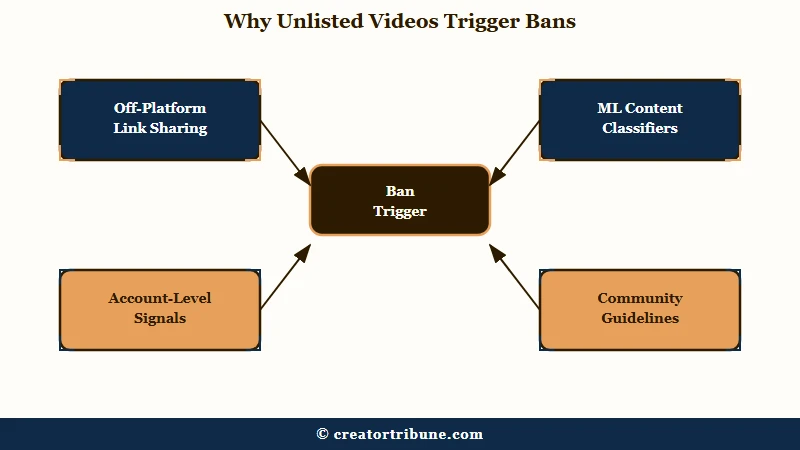
Unlisted videos remain inside YouTube’s moderation pipeline. Community Guidelines apply equally to unlisted and private content, and a single severe-abuse violation can trigger immediate termination without prior strikes regardless of how the privacy setting is configured.
YouTube’s Community Guidelines strike basics page states that the policies apply to all types of content on the platform, including unlisted and private content, comments, links, posts, and thumbnails.
The comparison table in YouTube’s own privacy settings help marks public, unlisted and private videos alike as reviewable by YouTube “for ad suitability, copyright, and other abuse prevention mechanisms”, and Content ID adds its own layer, since YouTube says every video is automatically scanned by Content ID when it is uploaded.
What is unlisted on YouTube: A privacy setting that keeps a video off your channel’s Videos tab and out of search results and recommendations, while anyone with the link can watch it and reshare it. YouTube notes one exception: an unlisted video that someone adds to a public playlist can show up in search. The video remains subject to every moderation policy.
Three specific patterns trigger termination on unlisted-only channels. The first is off-platform link sharing: an unlisted URL gets posted in a Discord, Telegram, or forum, someone in that audience reports it, and the report routes back into the YouTube moderation queue.
The second is automated detection flagging the file itself, regardless of privacy setting, and YouTube says a single case of severe abuse can end a channel without a warning. The third is behavior across the whole account, because YouTube’s termination policy covers repeated violations across any form of content, comments included, and channels it judges to be dedicated to a policy violation.
The damage can also cross products. Google’s disabled account help lists breaking a product’s own rules, with the YouTube Community Guidelines and the Google Workspace Acceptable Use Policy among them, as a reason Google might stop someone signing in to any Google service, not just the one where the violation happened.
YouTube publishes its enforcement numbers every quarter, and the latest quarter shows the scale. From April to June 2026 YouTube removed 2,732,395 channels, up 25% from 2,183,919 in the first three months of the year, and those terminations took 86,686,063 videos down with them, according to Google’s Transparency Report. Spam, deceptive practices and scams accounted for 2,310,181 of the channel removals, or 84.5%.
Automated systems do nearly all of the finding. Of the 11,159,676 videos YouTube reported removing from April to June 2026, automated flagging made the first detection on 11,005,420, about 98.6%. That is why “nobody ever watched it” carries no weight in an appeal, and why an unlisted video faces the same review as a public one.
Can a Channel With No Uploads Get Terminated?
Yes. Community Guidelines strikes attach to comments, links, posts and thumbnails as well as to videos, so a channel that has never uploaded a video can still collect enough strikes to be removed.
YouTube states that 3 strikes in the same 90-day period may result in a channel being permanently removed, and that each strike does not expire until 90 days from the time it was issued.
A viewer-only account that leaves a run of comments YouTube reads as harassment or spam sits inside that same counter, and spam can also end a channel outright as a single case of severe abuse. Nothing in the rule requires an upload to exist first, which is why terminations land on accounts whose owners never thought of themselves as creators.
An empty channel that sat unused is a separate case. Google’s inactive account policy defines an inactive account as one that has not been used within a 2-year period, and it counts watching a YouTube video, running a search or reading an email as use. An account you still sign into is not exposed to that rule, though Google adds that a single product can delete its own data after two years without use in that product.
Separate the channel from the Google Account behind it, because creators collapse the two at the worst possible moment. A channel termination takes the channel, but YouTube’s termination page says you can still sign in to YouTube Studio to review it, so the account behind it keeps working.
That surviving account is what your appeal and your Second Chance request both run through. If Google has disabled the whole account instead, sign-in fails across every Google service, and the route back is Google’s own account appeal, where some violations get up to two reviewed appeals.
Deleting the terminated channel or its Google account is the move to avoid. YouTube says creators who did either cannot currently see the “request a new channel” option, which closes the Second Chance path before it opens.
What the Termination Email Means in 2026
The termination email sets your appeal path, and not every terminated creator gets a working appeal button. When the in-Studio appeal will not submit, YouTube publishes a separate appeal form for exactly that situation, and that form is the route to use.
The standard termination flow gives you a one-year appeal window. YouTube’s channel termination page states that creators have up to 1 year from the date their channel was terminated to submit an appeal.
The appeal goes through YouTube Studio’s built-in form if the button is enabled on your account, or through a separate public appeal form for cases where the Studio form is locked.
Google’s Transparency Report publishes appeal outcomes for removed videos rather than for terminated channels, and the video numbers set expectations. From April to June 2026 YouTube received 1,269,277 video appeals and reinstated 87,953 videos, roughly 7 reinstatements for every 100 appeals counted in the same quarter, so yours has to carry specific evidence rather than a general protest.
Broken appeal flows are a recurring complaint in r/PartneredYoutube and r/NewTubers threads, where creators describe a submit button that grays out or a form that never loads. YouTube’s own termination help page accounts for this and directs anyone who cannot appeal through the standard steps to an alternative appeal form.
Some creators also work their case through a certified Product Expert, an unpaid community volunteer with access to a YouTube escalation channel. YouTube does not document that route as part of the appeals process, so treat the official alternative form as the primary path and the Product Expert route as a long shot.
The Second Chance pilot program, which YouTube launched in October 2025, is the parallel path for cases where the original appeal will not succeed and the termination is not in an excluded category.
Terminations for copyright infringement are excluded, and YouTube’s termination page sends those cases down a separate legal route: a counter notification, which terminated creators can still file by email, fax or postal mail because the webform is closed to them. Terminations under YouTube’s Creator Responsibility policies are excluded too.
The Creator Responsibility policy covers on-platform and off-platform behavior YouTube reads as harming its users, community, employees or ecosystem, and it names using YouTube’s own tools to create spam as one of its examples.
Terminations under retired guidelines sit at the other end. In September 2025 Alphabet told House Judiciary Chair Jim Jordan that channels removed for Covid-19 or election misinformation would be able to apply for reinstatement, and YouTube announced the Second Chance pilot on October 9. Approved creators get a new channel that starts from scratch.
Here is the decision tree I would walk through within 48 hours of receiving the termination email:
| Termination reason in the email | Appeal path |
|---|---|
| Reused content, repetitive content, misleading metadata | Standard appeal within 1 year; Second Chance once 12 months have passed if the appeal fails |
| Spam, deceptive practices, severe abuse | Standard appeal; Second Chance is not ruled out by category unless the email cites Creator Responsibility, and YouTube weighs severe or persistent violations |
| Copyright (Content ID escalation or DMCA) | Counter notification, or ask the claimant for a retraction; Second Chance excluded |
| Creator Responsibility (on- or off-platform harm) | Standard appeal only; Second Chance excluded |
| Retired guidelines (older COVID/election policy) | Second Chance after 12 months; a standard appeal only if still inside the 1-year window |
| Whole Google Account disabled | Google’s own account appeal at sign-in; some violations get up to 2 reviewed appeals |
The YouTube channel terminated recovery breakdown covers the general appeal mechanics in more depth for non-unlisted cases. The unlisted-only angle adds the wrinkle that the appeal form needs to explicitly address what the unlisted videos contained, because the reviewer will not have the same context they get for a public-channel termination.
The Recovery Sequence That Works
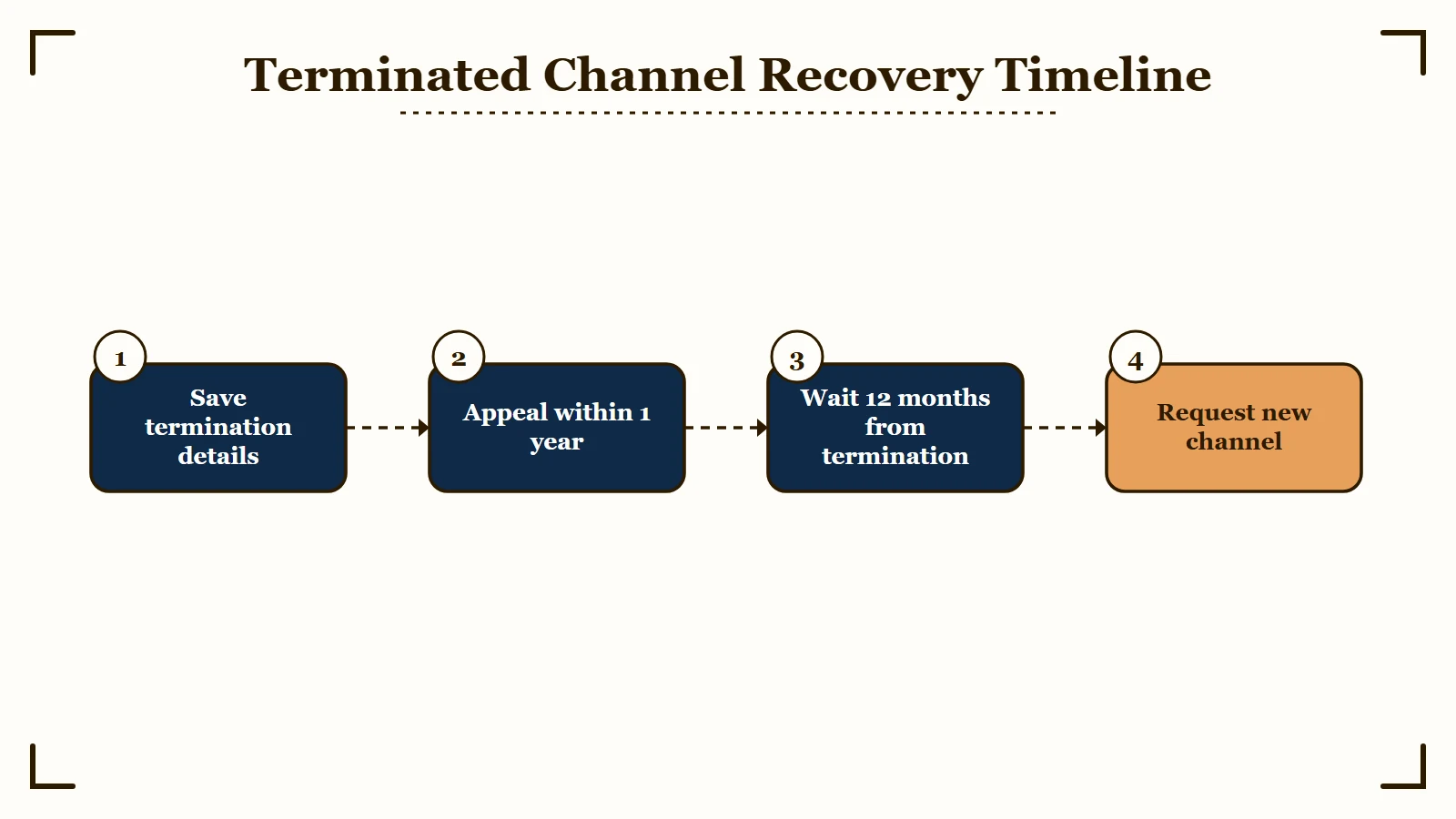
The recovery sequence for an unlisted-only channel termination is a strict 12-month timeline: save the termination details and your own copies of your videos; file the standard appeal with specific evidence within the first 30 days, well inside YouTube’s one-year window; wait for the decision; then apply for the Second Chance program once 12 months have passed since the termination date.
The first 24 hours after the termination email are the most consequential, and the temptation to make irreversible moves is highest then. The two moves I would tell anyone to avoid are deleting the terminated channel from the Google Account dashboard, and creating a new channel on any device.
Both moves can cost you the Second Chance pathway. Deleting hides the “request new channel” option, and a new channel breaks YouTube’s circumvention rule, which bars a terminated creator from using, possessing or creating any other channel and can take down channels you are repeatedly or prominently featured in.
YouTube’s termination page also bars anyone from letting a terminated creator use their channel. A partner who lets you post from theirs, or keeps putting you on camera, puts that channel at risk too.
Here is the four-step recovery protocol I would walk through:
- Save what you still can within 48 hours. YouTube’s termination page says you can still sign in to YouTube Studio to review the termination, so screenshot that and keep the email. It also says you can no longer download your YouTube content after a termination, although your wider Google data stays downloadable, so round up your own original video files now.
- File the standard appeal within 30 days. The appeal form asks for a contact email and your reason for appeal, and YouTube limits how many times you can appeal one termination, so treat it like a legal filing. Lead with the specific Community Guidelines section the termination cited, explain in plain terms why your unlisted content did not violate it, cite the relevant video timestamps, and end with a one-sentence ask for review under the current policy version.
- Wait for the decision without panicking. If the standard appeal is denied, do not delete the channel and do not fire off a second appeal in frustration. The Second Chance clock runs from your termination date rather than from the denial, so a rejection in month eight does not push your application out to month twenty.
- Apply for Second Chance 12 months after the termination date by logging into YouTube Studio on a computer with the terminated channel’s credentials, not a new account. YouTube states that some eligible creators see a “request a new channel” option there, that anyone who deleted the terminated channel or its Google account cannot currently see it, and that the rollout is gradual, so eligibility does not guarantee the option appears the day you qualify. On the decision itself YouTube says it weighs whether the violations were particularly severe or persistent, and whether your on-platform or off-platform activity harmed the YouTube community or may continue to.
Before: “My channel just got terminated and only unlisted videos were ever uploaded. I am going to delete this account and start a new channel today so I can keep working.”
After: “My channel just got terminated despite only hosting unlisted videos. I am saving the termination details and my own video files in the next 48 hours, filing the standard appeal within 30 days, and waiting the full 12 months before applying for Second Chance. I am not creating any new channel until that window closes.”
The YouTube channel trust score breakdown covers the broader signal hierarchy YouTube uses to evaluate channel health, and the terminated-for-spam recovery walkthrough is the parallel piece for terminations that cite spam or scams specifically. The delete-before-appeal trap covers the related mistake that costs creators their monetization appeal window, and the same logic applies to a termination appeal.
Frequently Asked Questions
Why was my YouTube channel terminated if my videos were unlisted?
YouTube’s Community Guidelines apply to unlisted and private content as well as public uploads, and Content ID scans every video when it is uploaded. An unlisted link passed around a Discord or forum can be reported like any public video, and a single case of severe abuse can end a channel without a warning.
Does YouTube actively scan unlisted videos for violations?
Yes. YouTube’s privacy settings help marks unlisted videos, like public and private ones, as reviewable for ad suitability, copyright and other abuse prevention, and Content ID scans every video when it is uploaded. Unlisted only changes who can find the video in search and recommendations.
Do unlisted videos still get copyright strikes?
Yes, and a Content ID claim is not the same thing as a strike. YouTube says a video is automatically scanned by Content ID when it is uploaded, and a match produces a claim that blocks, monetizes or tracks the video. A copyright strike instead follows a legal removal request, three inside 90 days make a channel subject to termination, and YouTube states that deleting the video afterwards does not resolve one unless the removal request was scheduled, which gives you 7 days to take the video down first.
My YouTube termination appeal was rejected, can I still recover?
Possibly, though not as the same channel: the Second Chance pilot may let you start a new one, and its clock runs from your termination date rather than from the rejection. YouTube says terminated creators are not eligible to apply for a new channel until one year after their channel was terminated, and that terminations for copyright infringement or under the Creator Responsibility policies are excluded. Do not delete the terminated channel or its Google account, because YouTube says creators who did that cannot currently see the request option.
Can I just make a new YouTube channel after termination?
No. YouTube’s termination policy bars a terminated creator from using, possessing or creating any other YouTube channel, and that covers new channels you create or acquire. The Second Chance program is a way back once the 12-month wait is over.
How do I apply for the YouTube Second Chance program?
Wait 12 months from the termination date, then log into YouTube Studio on a computer using the credentials of the terminated channel. Some eligible creators see a “Request new channel” option there. YouTube is rolling the option out gradually, so being eligible does not mean it shows up the day you qualify.
Does the Second Chance program restore my old subscribers and videos?
No. The program is a fresh start at zero subscribers and zero videos, the original channel is not restored, and you have to requalify for the YouTube Partner Program on the new one. YouTube does say you can re-upload any of your prior videos that fall within its Community Guidelines, so keep your original files.
Can I download my videos from a terminated YouTube channel?
Not from YouTube itself. YouTube’s termination page says you can no longer download your YouTube content once a channel is terminated, although you keep the ability to download your wider Google data. Anything you want to re-upload later has to come from your own original files.